

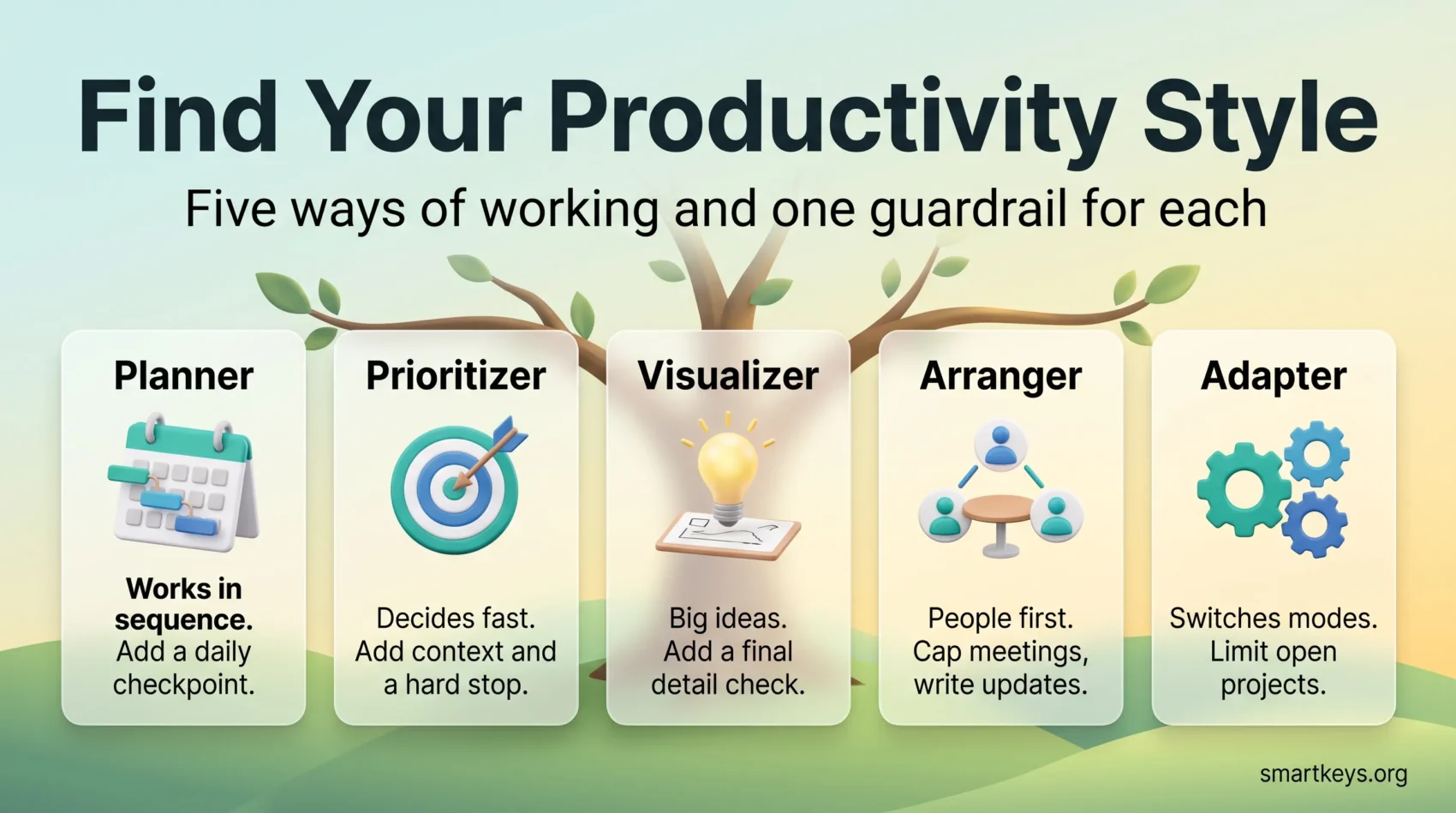
A productivity style is the way you naturally plan, decide and finish work. Some people need a written sequence before they start. Others decide fast and move on. Others think in pictures, and others work best by talking it through with someone.
Knowing which describes you is useful for one reason: it tells you which advice to ignore. If you have ever tried a famous method, kept it four days and quietly dropped it, the method was probably fine. It just did not match how you think.
This guide covers the five styles, what each is good at, where each goes wrong, and which tools fit. It also covers the part most articles skip: running a team where all five sit in the same meeting.
Key Takeaways
- Five common working styles: Planner, Prioritizer, Visualizer, Arranger and Adapter.
- Each style has a predictable blind spot, so pair it with one guardrail.
- Match tools to how you process information instead of copying someone else’s setup.
- Mixed teams need written norms for meetings, notes and reply times.
- Treat the label as a starting point for experiments, not a personality verdict.
Where the Idea Comes From
The best known version comes from Carson Tate, a workplace consultant whose 2015 book Work Simply set out four productivity styles: Prioritizer, Planner, Arranger and Visualizer. Tate also sells a self-assessment based on them. Later write-ups add a fifth, flexible profile, usually called the Adapter.
Two caveats. These are self-assessment labels, not validated psychological tests: nobody has shown that a Planner outperforms a Visualizer. The framework gives you vocabulary, a quick way to say why a method feels like friction.
And the label describes a tendency, not a cage. Most people lean one way on solo work and another way in a group. That is normal, and it is the point of the Adapter profile.
The Five Productivity Styles
Each profile below lists what the style does well, the failure mode it slides into under pressure, and one cheap guardrail.
The Planner
Strengths: works in sequence, builds accurate timelines, finishes on the date promised. Planners are why projects with many dependencies do not collapse.
Blind spot: rigidity. When the plan changes at 4pm on a Thursday, a Planner often rebuilds the whole schedule instead of adjusting the next two steps.
Guardrail: a five-minute end-of-day checkpoint, asking one question: what moved today that changes tomorrow? Planners also underestimate their own tasks, so read up on the planning fallacy and why estimates run short.
The Prioritizer
Strengths: decisive and data-led. A Prioritizer looks at nine possible tasks, picks the two that move a number, and drops the rest without agonizing.
Blind spot: burnout and blunt messages. A three-word reply reads as efficient to the sender and as annoyance to everyone else.
Guardrail: add one sentence of context to short messages, and put a hard stop in the calendar. If picking the two tasks is the hard part, see these task prioritization frameworks compared.
The Visualizer
Strengths: big-picture thinking and fast idea generation. Visualizers spot the connection between two unrelated projects that nobody else noticed.
Blind spot: missed details and constant switching. The idea gets built, but the invoice never gets sent.
Guardrail: a short checkpoint before anything ships, run by someone else if possible. It also helps to understand why switching tasks costs more than it feels like.
The Arranger
Strengths: people first. Arrangers get buy-in, unblock stalled work with one phone call, and notice when a quiet colleague has stopped contributing.
Blind spot: meeting inflation. Because talking works so well for them, the default answer to any problem becomes another call.
Guardrail: cap recurring meetings and convert the status updates to writing. A meeting audit is the fastest way to see how much calendar time is actually in play.
The Adapter
Strengths: switches approach to suit the work. Useful where the shape of a project keeps changing, and in small companies where one person covers several roles.
Blind spot: overcommitment. Being able to do any kind of work tends to mean being handed all of it.
Guardrail: a written limit on concurrent projects, plus a clear handoff note whenever you pass work on.
How to Identify Your Own Style
You do not need a questionnaire. Three checks settle it in under ten minutes.
1. Look at your calendar and notes
Open last week. Do you see dated lists and timelines (Planner), a short priority list with gaps around it (Prioritizer), sketches and half-formed documents (Visualizer), or a page of short calls and check-ins (Arranger)? If the honest answer is “all four, depending on the week”, you are probably an Adapter.
2. Notice what you do when work arrives unplanned
A new request lands at 11am. Do you schedule it, decide immediately whether it matters, start sketching how it connects to existing work, or forward it to whoever should own it? That reflex is the clearest signal you have.
3. Check how you write
Short, blunt messages usually come from goal-led people. Long, context-rich notes come from big-picture thinkers. Frequent check-ins point to a people-first style. This matters more than it sounds: most friction between colleagues is a style mismatch being read as an attitude problem.
Then pick one thing to test this week. Not five. One.
Tools and Techniques That Fit Each Style
Aim for a small, repeatable setup. Every extra app is one more thing to maintain, and tool sprawl quietly eats the time the tools were meant to save.
Planner picks
Block time in a shared calendar so colleagues can see where the work sits, and keep milestones in one document rather than scattered across chat. Time blocking does most of the work here. Convert actionable emails into dated tasks with an owner, so nothing lives only in an inbox.
Prioritizer picks
Protect long stretches for the tasks that matter and cut the rest ruthlessly. Read up on deep work and set inbox rules so low-value mail files itself. Email batching suits this style particularly well, because it removes the constant pull to check.
Visualizer picks
Use a space where ideas can stay messy: a whiteboard, a mind map, or a notes app with good search. Digital note-taking and a second brain system both help, because the problem is rarely generating ideas but finding them again. Short sprints with a visible timer keep energy up while a checklist catches details.
Arranger picks
Swap half the status calls for written updates and keep a simple “waiting for” list so handoffs do not fall through. Asynchronous work is the main lever here. When a call really is the right format, run it with an agenda and a named decision, as covered in efficient meetings.
Adapter picks
Keep one list that holds everything, whatever the source. General task management habits matter more than any specialized tool here, since the risk is losing track rather than working the wrong way. A weekly review closes the loops that switching leaves open.
Make It Work Across a Team
A team does not have one style. That is a feature, but only if you write down how you work together. Three rules cover most of it.
Put decisions first, context last
Open with what has to be decided and who decides it. Close with the wider picture. Prioritizers get their answer early and Visualizers get the framing they need, without either group sitting through 20 minutes for the other. If part of the group joins remotely, see hybrid meeting etiquette for giving both sides an equal voice.
Agree response times, not availability
Microsoft’s 2025 Work Trend Index report “Breaking down the infinite workday” found employees are interrupted roughly every two minutes during core hours, and that the median Teams user handles 153 chat messages a day. No style survives that. Write down which channel means “today”, which means “this hour” and which means “call me”, then stop apologizing for the rest. Instant messaging boundaries and a shared focus time policy make this stick better than good intentions.
Write things down once
Shared notes with owners and next steps solve the biggest mixed-style problem: everyone remembers a different version of the same conversation. One document per project, updated after each decision, is enough.
Where Style Thinking Stops Working
Two warnings, because this idea is easy to over-apply.
A style is not an excuse. “I am a Visualizer, so I do not do deadlines” is not a working style, it is a missed deadline. The guardrails above exist so the blind spot does not become the team’s problem.
And style is not the only variable. If you cannot concentrate, the cause may be workload, sleep, or a calendar with no gaps in it. A week-long time audit will tell you which it is, and the maker versus manager schedule often explains more than any personality label. Whatever your style, general time management techniques remain the foundation.
Conclusion
Name your main style, then pick one experiment for this week: a single 90-minute focus block, an inbox rule, or a status meeting turned into a written update.
Log two lines each day: which task drained you, and which felt easy. After two weeks you will have better evidence about your working style than any assessment can give you. Keep what worked, drop what did not, and review in 30 days.
A simple daily to-do list is enough to track it, and single-tasking on one item at a time will do more for your output than any new app.
Found this useful?
Make SmartKeys a preferred source on Google, and our articles will surface more often in your Top Stories, AI Overviews, and AI Mode.
Add as Preferred Source




