Tools
Tools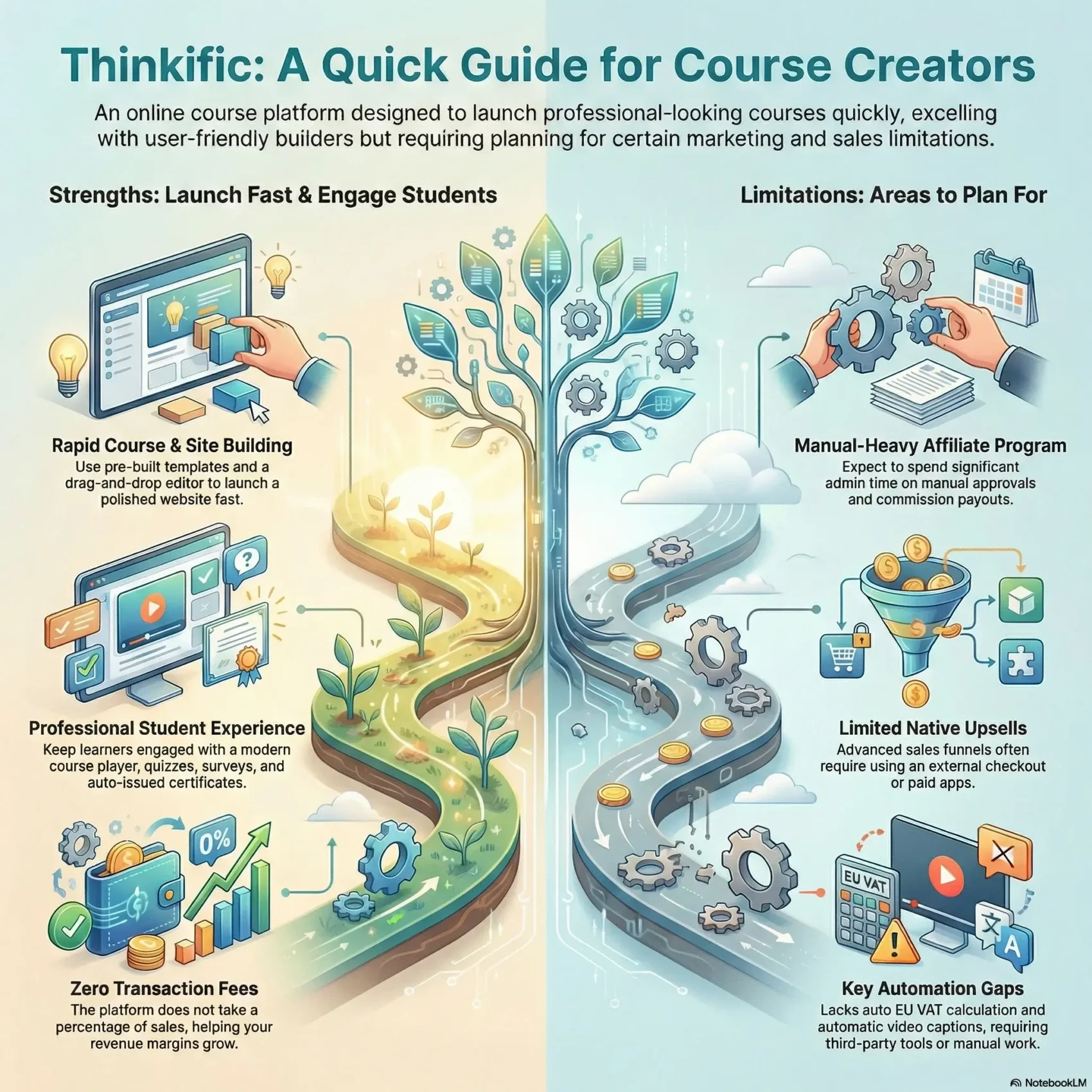
Last Updated on January 24, 2026
You want a clear, practical look at a popular course platform so you can pick the right path for your online course business. This introduction gives a short, honest overview of what the platform does well and where it still needs work.
You’ll read about the course builder, site builder, and course player and see how templates, lesson types, and a drag-and-drop page editor save you time. The platform supports video, audio, text, PDFs, slides, and live Zoom lessons to help structure content quickly.
Expect details on built-in marketing, sales tools, and payment options, plus reporting for revenue, enrollments, and engagement. You’ll also get real-world examples of friction points—bulk enrollments, affiliate management, and automation gaps—so you know what to plan for.
Key Takeaways
- You’ll learn which features speed up course creation and which need add-ons.
- The builder and site pages make launching an online course faster.
- Native sales tools cover basics, but some marketing tasks need integrations.
- Reporting helps track students, revenue, and engagement without extra tools.
- Real examples highlight common pain points to watch for when scaling.
- Compare plans and costs so your plan matches your growth goals and timeline.
Quick Take: Is Thinkific the right course platform for you?
If you need a quick, no-fuss way to launch your first course, this platform gets you live fast. The builder and onboarding are designed for new creators, with a Fast Track course and a large Help Center to guide setup.
What it does best: you can publish polished pages and course content quickly, with templates and pre-built sections that cut time on creation.
- If you want to validate an idea without cost, the free plan lets you start with one course and basic marketing features.
- If your business needs flexible payment options, one-time payments, installments, and memberships are supported out of the box.
- If affiliates, bulk enrollments, or complex upsells matter, expect to use integrations or an external checkout to fill the gaps.
Pricing and plans include Free, Start, and Grow tiers, with annual discounts and no transaction fees. Pay attention to reporting limits and app allowances as you scale courses and students.
Start your free course todayHands-on with the Course Builder: lessons, templates, and content types
Dive into the builder to see how lessons, templates, and media shape real course creation.
Supported lesson types
You can add lessons as video, audio, text, PDFs, slides, or live Zoom. Mixing formats helps keep students engaged across learning styles.
The bulk importer and centralized video library let you reuse assets and copy lessons between courses to speed up creation.
Try the course builder for freeQuizzes, assignments, and certificates
Insert quizzes and assignments to validate learning and boost completion rates. Surveys collect feedback so you can improve your next cohort.
Certificates auto-issue at completion using templates that populate student names and course details.
Course player and UI improvements
The updated player supports branding — colors, fonts, and logos — and previews how each lesson appears to a student.
“Plan your captioning workflow early: captions require manual SRT uploads.”
- Set prerequisites and completion rules to guide progression.
- Note: automatic captions are not available; allocate time for SRTs.
- The modern UI makes navigation feel more premium to learners.
Site Builder and Pages: themes, templates, and landing pages that convert
Your website is the storefront for your courses — it must convert visitors into students. The site builder gives you three theme families, 10 style variations, and a library of 23 pre-formatted sections to speed creation.
The drag-and-drop editor lets you assemble home, course landing, sign-up, sign-in, dashboard, checkout, and coming soon pages without code.
Quick wins: drop in CTAs, FAQs, testimonials, instructor bios, pricing blocks, and smart product/category blocks to boost conversions.
Sales pages, checkout flow, and upsell limitations
You can manage pricing and order forms on the same page to cut friction between reading benefits and completing checkout.
Note: upsell placement is limited and bump offers are small by default. If you need advanced post-purchase upsells, A/B testing, or large bump buttons, plan to use an external checkout or a paid page-builder app.
- Launch a clean website fast with ready templates and simple customization.
- Embed video on pages to showcase lessons and increase trust.
- Switch themes after launch if you want a fresh look without rebuilding content.
Marketing and Sales Features: email, coupons, affiliates, and promotions
Selling courses needs both practical marketing tools and a checkout that converts. The platform bundles basic promotional features so you can start campaigns without patching together a dozen apps.
Built-in options vs. email integrations and sales widgets
You can run coupons, limited-time offers, and price tests directly on your course pages to speed enrollments. Sales widgets let you embed buy links on your website or blog so you sell where your audience already is.
Transactional email—welcome messages, receipts, and discussion replies—runs automatically. For nurture sequences and lead magnets, connect MailChimp, ConvertKit, AWeber, Constant Contact, or ActiveCampaign.
Affiliate management realities: tracking, approvals, and workload
Spinning up an affiliate program is fast, but expect manual registration and commission approvals. The dashboard UX can frustrate partners, so plan monthly admin time and a clear payment workflow to keep top affiliates happy.
- Segment offers by course or bundle and use coupons to reactivate past students.
- Upgrade checkout to unlock bump offers, 1-click upsells, and richer affiliate reporting.
- Add countdown timers and ad pixels via apps to track marketing performance.
Payments, pricing options, and taxes: Stripe, PayPal, subscriptions, and VAT
Choose payment flows that match your buyers — simple one-offs, flexible installments, or membership access.
One-time fees, installments, memberships, and bundles
You can accept card payments via Stripe and one-off purchases via PayPal. If you need a fuller eCommerce layer, connect Shopify to sell through another storefront.
Package your offers as one-time pricing, multi-pay installments, memberships, or bundles to fit buyer habits. Bundles work well to raise average order value and cross-sell multiple courses.
- Sell corporate access with group seats and invoicing while tracking fulfillment in the platform.
- Handle refunds and coupon rules per product for clean accounting and promotions.
- Test checkout flows on desktop and mobile to cut friction and clarify receipts for students.
EU VAT MOSS considerations and third‑party tax tools
The platform does not auto-calculate EU VAT MOSS. Use a third-party tool like Quaderno if you hit collection thresholds.
“Plan for subscription tag automation—cancellations may need a Zapier flow to remove tags.”
Note migration caveats: moving Stripe subscriptions off the platform can take assertive coordination. Review payout timing, subscription handling, and affiliate tag behavior before you scale.
Student experience and community: discussions, live lessons, and engagement
How students move through your course matters as much as the content itself. Good engagement keeps learners active and helps you spot where to improve.
Discussions, Zoom webinars, and branded communities
You can host comment-style discussions under each lesson so students ask questions and you coach in public threads.
Live Zoom sessions (available from the Start plan) let you run onboarding, weekly Q&A, or capstone workshops and publish replays directly in the course.
Branded community spaces give students a place to post, like, and comment without leaving your site. You control access so the right member sees the right group.
Progress tracking, surveys, and auto‑issued certificates
Track each student’s progress to spot drop-offs and send targeted emails or bonus content to re-engage them.
Certificates auto-issue on completion using templates, and short surveys at module end help you refine content fast.
- You can embed short video explainers in modules to simplify complex ideas.
- Use small quizzes and micro-wins to keep momentum high.
- For platform choices, compare features in the Kajabi vs Thinkific comparison.
Analytics and reporting: revenue, orders, enrollments, and engagement
A focused analytics view makes it simple to find revenue trends and engagement gaps.
The platform’s reporting (Start + Growth) groups revenue, orders, enrollments, and student engagement in one place. Visual charts clarify trends so you can spot seasonality and high-performing launches fast.
You can filter reports by date range, course or product type, and customer type. These filters help when you evaluate specific plans or an evergreen funnel.
Engagement reports compare enrollments to completion rates and show which lesson formats get the most views. Use that data to rework weak modules and prioritize the content formats that drive results.
“Use monthly KPI reviews to turn raw numbers into course updates that boost completion and revenue.”
- Monitor revenue, orders, and enrollments together to spot catalog trends.
- Export data or connect reporting tools to tie marketing channels to course outcomes.
- Give reporting access to the right team members for better management and faster iteration.

Integrations and the Thinkific App Store: extending your platform
A smart integration strategy helps your course business run smoother and scale faster.
The App Store includes 45+ apps, from Shopify and Salesforce to Segment, Intercom, Google Analytics, and Poptin. These apps connect core marketing and support tools so you can run launches, track conversions, and help students without custom code.
Popular apps and use cases to enhance marketing and management
Common use cases focus on email, analytics, chat, and on‑site conversion tools.
- Connect email and ESPs to automate lifecycle and onboarding campaigns.
- Sync student and order data to CRMs or Segment for cleaner sales funnels.
- Add Intercom or helpdesk widgets to answer questions and reduce churn.
- Use Shopify if you prefer a traditional store checkout while still granting course access.
Automations, API access, and when to layer additional tools
API access appears on higher tiers and unlocks automations like enrollment syncing, tagging, and custom dashboards.
“Map your tech stack early to avoid fragmented data and wasted work.”
- Start lean: add an app when it clearly saves time or lifts revenue.
- Use the API when off‑the‑shelf tools miss a needed automation.
- Standardize sales reporting by feeding order data into your finance tools.
- Evaluate app ratings and docs to pick stable, well‑supported integrations.
Thinkific pricing and plans: Free, Start, Grow, and discounts
Understanding each pricing tier helps you forecast costs and prioritize features for launch.
Free plan gives you one course, unlimited students, and access to training resources so you can validate product-market fit without upfront costs.
Get the Free Plan nowWhat you get on each plan
The Start plan unlocks unlimited courses, live lessons, app access, and custom domains so your website and pages feel professional.
The Grow plan adds bulk emails, bulk enrollments, API access, and removes platform branding. It also includes phone and priority email support for teams that need faster responses.
Free trial value and annual savings
A 1-month Start + Growth free trial sometimes appears in promotions and helps you test marketing tools, reporting, and payment flows before you commit.
Annual billing gives about 25% savings. Because the platform does not take transaction fees, your revenue margins stay cleaner as sales grow.
- Start on the free plan to test demand, then move to Start for unlimited courses and live lessons.
- Choose Grow for bulk operations, API access, and branding control when your catalog scales.
- Map needed features (API, bulk enrollments, support SLAs) to the right plan to avoid mid‑launch surprises.
Support, training, and resources: Help Center, Academy, and experts
Access to fast help, guided training, and vetted experts saves you time and keeps creators focused on building great courses.
The Help Center houses 500+ articles, videos, and FAQs and includes an in-app Help button that surfaces relevant pages quickly.
Self-serve resources, live chat availability, and response expectations
You can self-serve answers fast with searchable docs and step-by-step guides. Free plans use email ticketing, while paid plans unlock live chat for quicker support.
“Set response expectations by plan so your team knows when to escalate issues.”
Fast Track training, pro courses, and accredited experts
Fast Track helps you build and launch a course in about an hour with short videos and checklists. Advanced Academy courses expand skills, and the Grow plan includes select paid classes at no extra cost.
- You can hire accredited experts for design, migrations, and marketing.
- Use the community to swap tactics, get unstuck, and reduce repetitive tickets.
- Document internal processes using Academy course examples to standardize onboarding for creators and students.
Thinkific vs. Teachable (and others) in 2025: where Thinkific wins and loses
A side‑by‑side look shows which platform speeds creation and which eases ongoing management.
Course player, builder, and templates
You get faster course creation with a modern player, reusable video library, and more templates.
Surveys and native quizzes let you collect feedback and improve lessons quickly. The template set reduces design time and keeps your pages consistent.
Email integrations, sales pages, and tax handling
Thinkific natively connects more email providers (MailChimp, ConvertKit, AWeber, ActiveCampaign, Constant Contact), which simplifies email marketing and onboarding flows.
Teachable wins on EU VAT MOSS by offering BackOffice (2% fee) while other platforms often require third‑party tax tools. If tax automation matters, factor that into pricing and payout timing.
When other platforms might fit better
- Teachable: deeper analytics and blog features if you need reporting-heavy workflows.
- Podia: cheaper plans for digital products and simpler VAT support.
- LearnWorlds: strong learner features and premium support for scalable course businesses.
- Kajabi: if mobile apps and 24/7 chat are must-haves.
“Compare example pages and test sales flows to judge which platform matches your brand and revenue goals.”
Thinkific Review — pros, cons, and who should choose it
Decide quickly if this platform suits your launch and growth needs.
Standout strengths for first‑time creators and growing course businesses
The builder and templates get you live fast, so you can ship a polished course without hiring a designer.
The updated course player, reusable video library, quizzes, and surveys make lessons feel professional and keep students engaged.
Integrations for email, a growing App Store, and no transaction fees help your marketing and business scale without surprise costs.
Key limitations for affiliates, bulk enrollments, site design, and speed
Affiliate workflows are manual-heavy; approvals and payouts can consume a lot of admin time as you grow.
Bulk enrollments require per-course CSV uploads and can take 10–20 minutes each. Plan days for migrations.
Upsell UI is limited; many creators use an external checkout to raise average order value and smooth affiliate ops.
“Map subscription automations with Zapier and build a captioning process early if accessibility matters.”
- Best if you want to launch fast and iterate.
- Expect extra work for affiliate scale, big imports, and advanced page design.
- Use targeted tools and apps to fill gaps as your course catalog grows.
Conclusion
Launch confidently and iterate quickly.
You can publish an online course on the free plan, validate demand, then upgrade to access reporting, apps, and better support as you scale.
Build momentum with clean pages, clear course navigation, and simple marketing to start driving sales and revenue.
Connect email marketing, analytics, and conversion tools to run campaigns that move prospects into students.
Use bundles, memberships, or an external checkout for stronger upsells, and plan for VAT if you sell in the EU.
Rely on training, the app store, and community features to keep learners engaged and growing your business.
Launch your course for free