Tools
Tools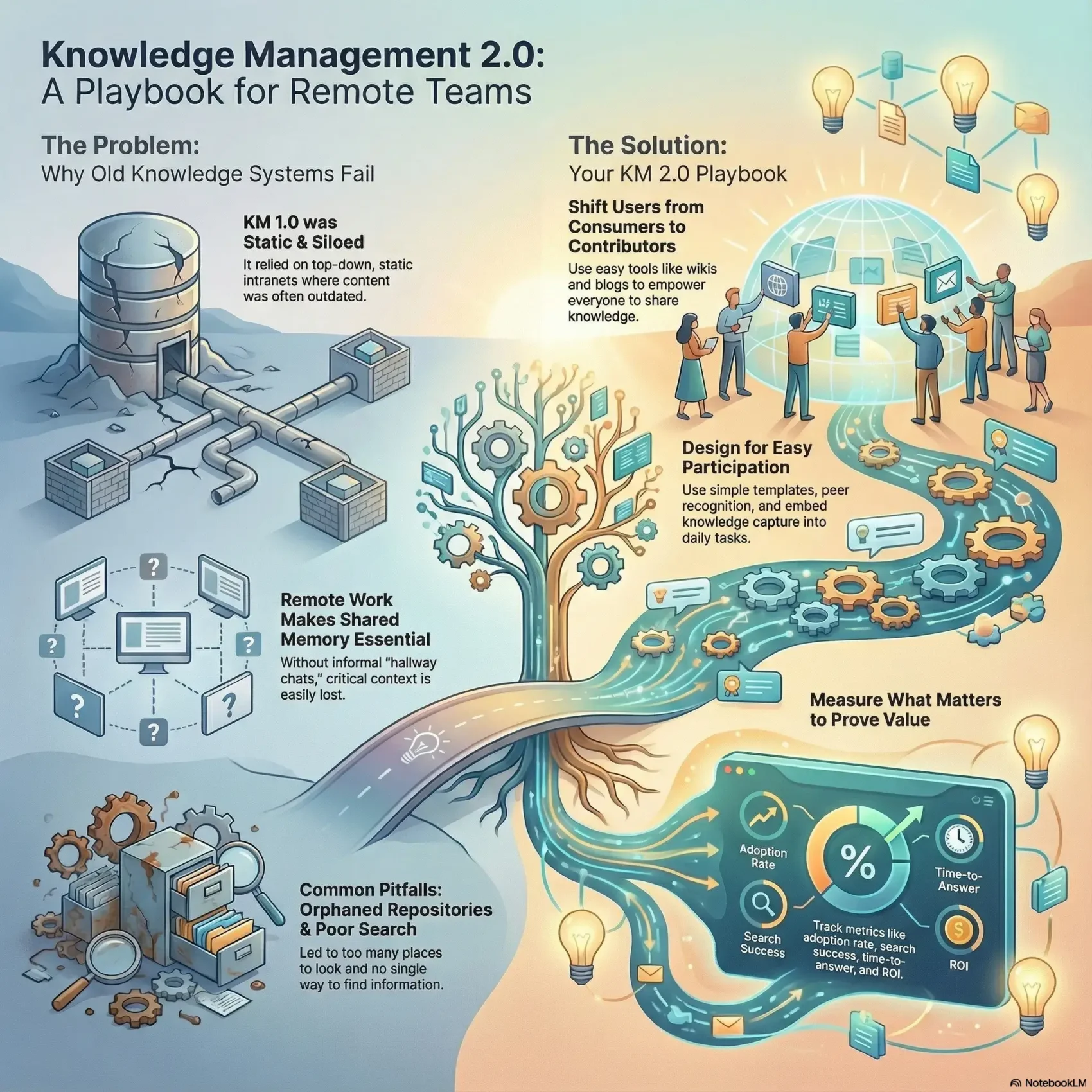
Last Updated on January 3, 2026
This guide shows how modern systems help your remote team capture, connect, and keep institutional memory. You’ll learn practical moves that turn scattered inputs from the web and social feeds into usable, shareable assets.
Start by picturing an environment where teammates add value, not just consume it. Web 2.0-style tools—think wikis, social feeds, and shared maps—make contribution easy and visible.
Researchers at MIT Sloan framed the Big Data challenge: raw inputs must become reliable memory for your business. KM 2.0 builds on that idea and favors carrots over sticks to boost adoption.
Key Takeaways
- KM 2.0 helps remote teams capture and reuse what your company already knows.
- Social, participatory tools shift users from passive readers to active contributors.
- Design for ease and recognition to encourage steady participation.
- Turn high-volume information into reliable memory with simple workflows.
- You can start small and still see faster onboarding and fewer repeated questions.
From KM 1.0 to Knowledge Management 2.0: How You Got Here and What’s Changed
Back when intranets were new, firms tried to turn human experience into searchable corporate assets. Davenport’s classic line — capturing, distributing, and using what people know — set the early aim for those efforts.
Defining the shift
KM 1.0 relied on static intranets and top-down curation. Content sat in silos and updates lagged behind daily work.
Web 1.0 → web 2.0 leap
Web 2.0 brought blogs, wikis, micro-blogs, video, and mapping tools that made every user a contributor. Wikipedia and social platforms proved people will create and improve content when the tools are easy.
Why remote teams make this urgent
Without hallway chats, your teams lose the quick fixes that used to live in people’s heads. Remote work raises the cost of lost context and makes shared memory essential.
Pitfalls to leave behind
- Orphaned repositories and mismatched taxonomies.
- Too many places to search, no single findability model.
- Relying on storage alone instead of shared methods and emergent models.
KM 2.0 Building Blocks: Web 2.0, Enterprise 2.0, and People-Centric Collaboration
Modern teams win when social tools make everyday work visible and reusable. KM 2.0 blends familiar social apps with enterprise-grade systems so your people contribute without friction.
Social tools inside companies include blogs, wikis, RSS, folksonomies, micro-blogs, podcasting, and multimedia. Use them for quick updates, how-to posts, and short video notes that preserve context before it’s lost.
From raw information to usable assets
Combine unstructured posts and chat with structured records and lists so content becomes actionable. Tagging, templates, and simple metadata link conversations to formal data.
Governance, taxonomy, and consolidation
Consolidate where it matters: pick one primary platform for roughly 80% of needs and reserve niche tools for special cases.
- Map essential tools and clear roles so employees know where to post.
- Use lightweight taxonomy and templates to improve search and reduce duplicates.
- Apply community rules and periodic audits to keep content findable.
For a practical playbook on workflows and team SOPs, see SOPs and team productivity. This keeps your models simple and your community active.
Your Remote-Ready Playbook for Knowledge Management 2.0
Start your rollout with a practical playbook that ties tools to tasks, not tech for tech’s sake. Pick a primary collaboration backbone that covers roughly 80% of daily needs and reserve niche tools for special cases.
Selecting your collaboration backbone
When to use suites like SharePoint: broad coverage, strong permission controls, and integrated search make them a fit for enterprise environments with lots of documents and compliance needs.
When to skip them: if your team needs fast, lightweight interaction or specialized workflows, choose a targeted tool instead.
Designing for participation
Create simple contribution paths: short templates, quick edit buttons, and clear labels. Set community norms so employees know what to post and where.
Make small, linked content the default—wiki stubs, ticket comments, and short how‑tos that live next to the work.
Carrot over stick: incentives that work
Use peer recognition: forum shout-outs, leaderboards, and visibility in performance check-ins. Reward helpful shares with real incentives.
Embed in day-to-day work
Auto-tag decisions in meeting notes, link wiki stubs from tasks, and capture brief lessons in ticket threads so capture is natural.
Measurement that matters
- Adoption: active contributors per month.
- Findability: search success rate.
- Time-to-knowledge: average time to locate an answer.
- ROI: hours saved per workflow.
Security and continuity
Apply least-privilege access, set standardized retention schedules, and name clear owners for each space. Combine simple lifecycle rules with periodic reviews so your system stays useful as teams change.
Conclusion
A clear, simple model helps teams move from scattered files to living systems that serve day-to-day work.
You’re equipped to evolve static repositories into spaces where knowledge is created, refined, and reused in the flow of work. Small, steady practices—clear ownership, simple taxonomy, and frequent updates—beat complex designs that stall adoption.
Focus your effort on consolidating core systems, improving search, and linking short content to tasks and meetings. Track adoption, findability, time-to-answer, and ROI so you adjust based on real use.
Take one step this week: define core spaces, set lightweight governance, and pilot a short playbook with a single team. Do this and you’ll make organizational memory easier to find, faster to use, and more resilient over time.