You can get your calendar back without losing touch with your team. Asynchronous work, usually shortened to async, simply means people contribute when it suits them instead of all being online at the same moment. A written update, a shared document or a short recorded video replaces most status calls.
The pressure to try it is real. Microsoft’s Work Trend Index special report Breaking down the infinite workday (June 2025) found that employees are interrupted roughly every two minutes during core working hours by meetings, emails and chat messages. Atlassian’s State of Teams research, based on a survey of 5,000 knowledge workers, found that 72% of meetings fail at their stated purpose and that 78% of respondents struggle to finish their work because of how many meetings they are expected to attend.
This guide shows what async looks like in practice, where live conversation still wins, and how to switch without leaving people confused or isolated.
Key Takeaways
- Async means progress does not wait for everyone’s calendar to line up.
- Replacing routine status meetings with written updates protects long blocks of focused time.
- Clear communication norms, especially reply-time rules, are what keep async from feeling like silence.
- Async widens your hiring pool across time zones and removes most late-night calls.
- Keep live sessions for urgent, complex or sensitive topics: fewer meetings, better ones.
Why asynchronous work matters right now
Calendar blocks are quietly eating the hours when you think best. Microsoft’s 2025 analysis of anonymised Microsoft 365 data found that 57% of meetings are ad hoc, with no calendar invite at all. They simply appear. It also found that nearly a third of meetings now span multiple time zones, up 35% since 2021, and that meetings starting after 8pm have grown 16% year over year.
Those findings describe one problem from three angles: work is spread across more locations and hours than the meeting habit was built for. When a team in Berlin, Austin and Singapore solves everything live, someone always takes the call at a bad hour.
Async changes the default. A decision that does not need instant back and forth gets written down instead of scheduled, and everyone responds in their own working hours.
- Reclaim time: move recurring status updates into a document or a recorded walkthrough.
- Protect focus: fewer interruptions means longer stretches for work that needs concentration.
- Include more people: written threads let careful thinkers and non-native speakers contribute properly, instead of losing the floor to whoever talks fastest.
Async does not abolish meetings. It clears out the ones that repeat what could have been read, so the rest are worth attending. Our guide to running effective meetings covers the sessions you keep.
What asynchronous work is and how it differs from remote work
When you pick the right medium, progress stops depending on calendars lining up.
Asynchronous work means moving a project forward without real-time interaction. Think email, shared documents, recorded video and clear handoffs. Your team advances a task, then someone else picks it up hours later with enough context to continue.
Synchronous communication is the opposite: meetings, live chat, phone calls. It is best when a topic is genuinely complex, emotionally sensitive or urgent enough that waiting costs real money. Use it sparingly and it stays valuable.
Async or live: how to choose in ten seconds
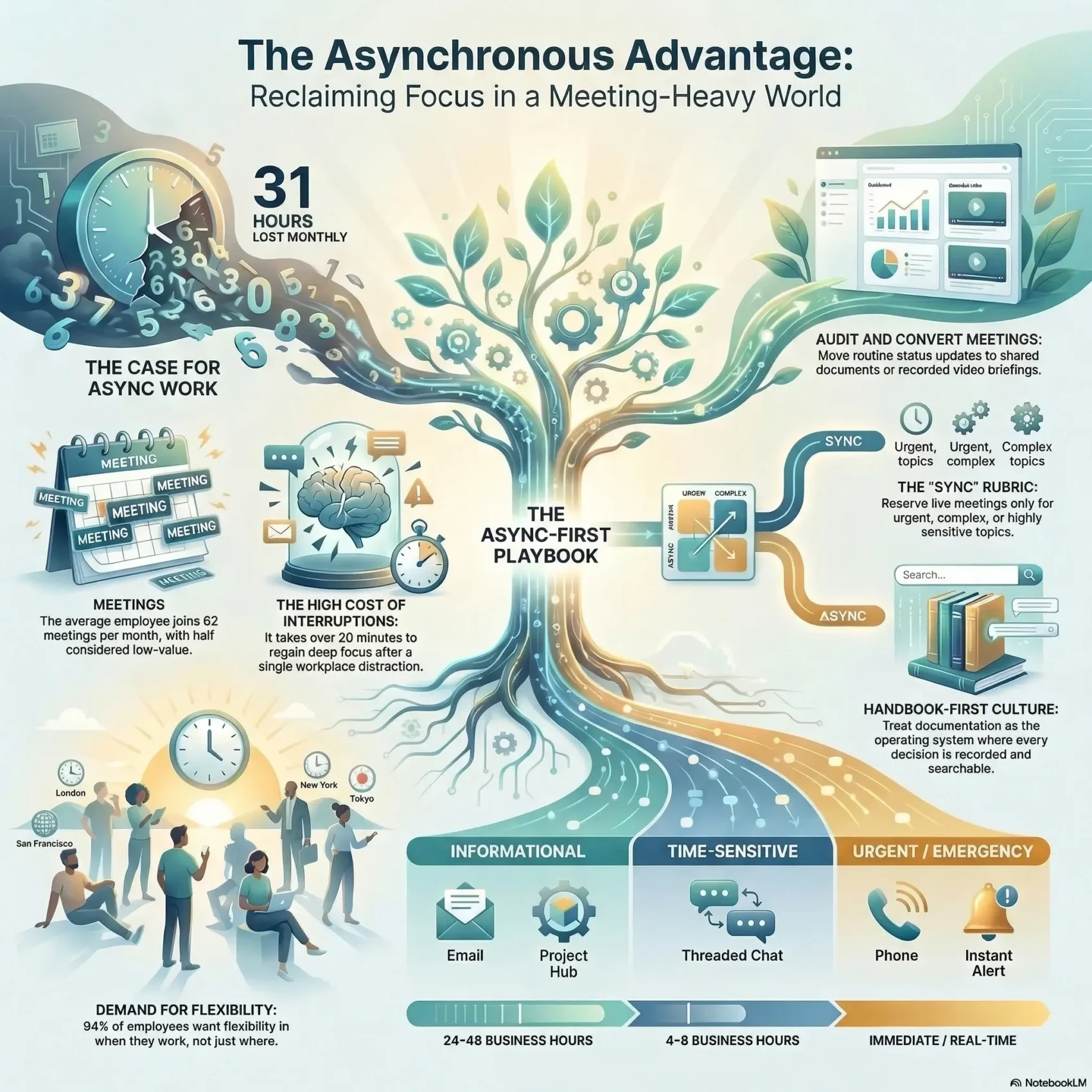
Ask three questions. Is it urgent? Is it complex enough that people will talk past each other in writing? Is it sensitive, meaning someone might be upset or defensive? If all three answers are no, write it down.
That means documents and email for structured updates, threaded chat for quick clarifications, and a live call for the rest. If you are choosing a chat platform, our Slack vs Microsoft Teams comparison covers how each handles threads.
Where you work versus how work gets done
Remote describes location. Async describes timing. They are often confused, but they are separate choices.
A team can sit in one office and still work asynchronously, writing decisions down instead of tapping each other on the shoulder. A fully distributed team can be painfully synchronous, with everyone expected online from 9 to 5 in one time zone. Async is the discipline that makes remote work sustainable rather than just possible.
- Quick test: urgent, complex or sensitive? If not, default to async.
- Measure what ships: track finished work, not how long someone’s status dot stays green.
Core benefits of async work for your team
Freeing up calendar space starts with deciding, deliberately, how your team communicates. Move routine updates off the calendar and the gains show up in both output and mood.
Flexibility across time zones and schedules
Flexibility lets people contribute without 11pm calls. You can hire wherever the skills are, and employees can work during the hours when they concentrate best.
Gallup’s May 2025 data shows why this matters. Among remote-capable US employees, 52% work hybrid, 28% are fully remote and 21% are fully on site. Who sets the hybrid schedule is contested too: the employee in 34% of cases, the manager or team in 35%, the employer in 31%. Async removes much of that friction, because the schedule stops being the thing to negotiate.
Focus and deep work with fewer interruptions
Interruptions are the tax async is designed to cut. A workday broken every two minutes leaves fragments too short for demanding work.
Replacing a quick sync with a written update gives that time back. Protecting it deliberately works even better: see our guides to deep work and to setting a team-wide focus time policy.
Built-in documentation and knowledge retention
Async communication leaves a trail by default. Decisions, the reasoning behind them and the examples that were discussed all end up written down, in a place people can search.
That record does two jobs. New hires answer their own questions, and nobody has to reconstruct why a choice was made eighteen months ago. Doing this deliberately is the heart of modern knowledge management.
Inclusivity, autonomy, and less pressure
Written contributions level the floor. The colleague who needs a minute to think, or who works in a second language, gets the same standing as the fastest talker in the room.
Clear norms also lower the pressure to reply instantly. Teams gain autonomy: people own their handoffs instead of waiting for a slot in someone’s diary. For patterns that support this, see our guide to decentralized teams.
- Hire and keep people in more places.
- Protect the concentration that good decisions need.
- Build a record that helps every future colleague.
“Async gives people space to think and a record that shows the progress.”
Common pitfalls to watch for in async environments
When most communication moves to writing, new problems appear quietly. They show up in how connected people feel, how clearly messages land, and how fast genuine emergencies get handled.
Disconnection and loneliness
This risk is measurable. Gallup’s 2024 State of the Global Workplace report found that one in five employees worldwide felt lonely a lot of the previous day. Broken down by arrangement, 25% of fully remote employees reported it, against 21% of hybrid and 16% of fully on-site workers.
Async does not cause that gap on its own, but it can widen it if the only contact people have is a task board. Counter it on purpose: a regular optional social call, a buddy system for new joiners, an occasional in-person gathering. Our guide to remote work and mental health goes deeper.
Miscommunication without tone of voice
Text strips out tone, facial expression and hesitation. A short reply meant as efficiency reads as annoyance.
Two habits fix most of it. Write in low-context style, meaning you say the thing explicitly instead of relying on shared background. And record a short video when the message carries nuance or difficult news. Our guide to clear communication has the specifics.
Speed and expectations for urgent issues
Async channels are not instant, by design. That is fine until something actually breaks, so decide in advance what counts as urgent and how it gets escalated.
- Set reply norms, for example one business day for routine items.
- Cut the number of channels so people are not switching between five apps to find an answer. Our overview of asynchronous communication tools helps you consolidate.
- Discourage off-hours pings and use scheduled send. Several countries now back this with a legal right to disconnect.
Designing your async-first communication norms
Mapping your channels stops people hunting for answers. Decide where questions belong, where status lives, and what goes in a project space rather than general chat. Write the map down in one page and link it everywhere.
Choosing channels for questions, updates, and project messages
Pick one source of truth for project files and decisions. Keep status in the project hub, keep reference material in the knowledge base, keep quick clarifications in threaded chat, and keep formal notices in email. The goal is that anyone can guess where something lives on the first try.
Threads matter more than they sound. In a threaded tool, a question and its answers stay attached to each other, which is what keeps chat searchable months later.
Response-time expectations and what counts as urgent
Publish simple service levels: one business day for routine questions, a few hours during overlap time for anything time-sensitive, and a phone call or paging alert for real emergencies. Three rules do the rest:
- Every live meeting needs an agenda, a pre-read and written notes, ideally from a shared template.
- Every message states the context, the decision you want and the date you need it by.
- Leaders go first. If managers keep calling ad hoc meetings, nobody believes the policy.
“Clear norms let people act with confidence and keep the project history searchable.”
Audit your meetings to reclaim time
A short audit separates the meetings that move work forward from the ones that survive out of habit. List every recurring invite, name its purpose in one sentence, and ask whether a document would do the same job. Our meeting audit guide walks through it.
Convert status updates to async documents
Start with the readouts: the weekly where five people each describe what they did. Move those into a living document with a named owner and a due date.
Use the same template every time so people can scan and compare. Record a two-minute summary if the update needs tone or a screen share, then store it with the action items.
Keep only high-impact synchronous collaboration
Reserve live time for decisions, genuine brainstorming and removing blockers. One monthly cross-team session is usually enough, with deep dives booked as needed.
Run a checklist for the ones you keep: goal, attendees, agenda, pre-read, facilitator, notetaker, decisions. Make it normal to decline an invite with no stated purpose and propose a written alternative instead.
Sample agendas, pre-reads, and recorded updates
A pre-read shifts information out of the meeting so the live time is spent deciding. Send it a day ahead and expect people to have read it.
Some teams go further and run silent meetings, where the first fifteen minutes are spent reading the document together before anyone speaks.
- Keep artifacts in one place so they do not vanish into inboxes.
- Record updates, add a written summary, and tag the owner of each action.
- Show a before and after calendar so people can see the hours they got back.
Documentation as your operating system
A living handbook turns scattered decisions into guidance your team can actually find. Policies, playbooks and meeting outcomes become the default answer, so people stop interrupting each other to ask.

Handbook-first culture and searchable information
Handbook-first means the written page comes before the conversation. GitLab, which runs an all-remote company of well over a thousand people, publishes its entire handbook openly and treats it as the single source of truth. If a question comes up twice, the answer belongs in the handbook rather than in a reply.
Record the reasoning, not just the outcome. Knowing why a choice was made is what lets a new colleague adapt it later instead of blindly repeating it.
Templates for requests, updates, and decisions
Templates make messages consistent and quick to scan. A good update opens with a one-line summary, then context, then action items with an owner and a date.
- Centralise: keep links, recordings and examples in one searchable hub.
- Keep pages light: short, versioned pages get edited. Long ones get abandoned.
- Manage the lifecycle: create, review, update and archive, so nobody follows a page that stopped being true a year ago.
“If it is not in the system of record, it effectively does not exist.”
Point out the documents that saved the team from redoing work. That turns documentation from a chore into a habit, and it is a large part of a healthy remote company culture.
Tools that make async collaboration work
No tool creates async habits, but the wrong mix makes them almost impossible. Aim for three layers and resist adding a fourth.
Start with a project hub and a knowledge base. The hub holds plans, tasks and status: Asana, Jira, Trello or Monday.com. The knowledge base holds durable reference material: Notion, Confluence or Google Docs.
Threaded messaging and async video
Choose a chat tool where replies stay attached to the original message, so a thread from last month is still readable. Slack and Microsoft Teams both support this.
For anything that needs tone or a screen, record a short video instead of writing five paragraphs. Loom is the best known option; our Loom comparison covers the alternatives after Soapbox was retired. Keep recordings under five minutes and add a written summary, because video is not searchable the way text is.
Automation to replace nudges and check-ins
Automation removes the job of chasing people. Tools like Zapier, or the automation built into your project hub, can post a status rollup every Friday, move a task to the next owner when a stage completes, and remind an owner before a due date. For the meetings you do keep, an AI meeting notes workflow can turn the call into a summary and action items that land in the hub by themselves.
- Standardise naming, tags and archiving so search actually works.
- Store the highlights of live sessions in the hub, not in someone’s inbox.
- Give managers a dashboard that shows progress without requiring a meeting to explain it.
Working across different time zones without friction
Coordinating across many hours needs clean handoffs, not more calls. Write updates so a colleague seven hours away can pick up the work and finish a step without asking a question first.
Done well, this gives close to continuous progress: one team hands off at the end of its day and another picks up at the start of theirs. Our guide to follow-the-sun scheduling explains how to structure the handoff so the next team is not left guessing.
- Handoff-ready updates: a template, a short recording and a checklist of what is done and what is next.
- Limited overlap hours: agree a small shared window and spend it only on decisions.
- Response windows in business hours: “one business day” means something different in Sydney than in Chicago, so say which.
- On-call rotations: define them so emergencies never depend on someone being awake by luck.
Keep a shared calendar of regional holidays and daylight-saving changes. Ask people to publish their preferred hours, and rotate any unavoidable live session so the same region never takes the late slot twice.
Culture, trust, and leadership in async teams
Trust is what lets a team swap instant replies for clearer results. When leaders stop treating a green status dot as evidence of effort, everyone else can too.
Measure impact, not hours. Set goals, define what “done” looks like, and assess the finished work. This is the core idea behind outcome-based work, and it gives people autonomy without losing accountability.
Measuring impact, not hours
Pick two or three measures of real progress: cycle time from start to shipped, on-time delivery, quality or customer outcomes. Review them on a regular cadence and write the review down.
Watch for proximity bias, the tendency to rate people you see more highly than people you do not. Async raises that risk, because visibility now depends on what someone writes rather than who walks past your desk.
Mental health, boundaries, and a sustainable pace
Make delayed replies normal. If a manager answers at 11pm, the team learns that 11pm is expected, whatever the policy says.
Ask about workload in regular written check-ins, so problems surface before burnout does. Our guide to remote leadership skills covers how to run those conversations well.
- Hire for reliability and self-direction.
- Model fewer ad hoc meetings and more written proposals.
- Make decisions transparent, so nobody has to guess in a side channel.
How to implement asynchronous work step by step
Start with a filter, not a tool. Your team needs one simple rule for deciding when something can proceed without a meeting. Everything else follows from that.
Decide what should be asynchronous and what should be live
Use the three-question test: urgent, complex, sensitive. Label each item write it up, read and act, or meet, and put the rule on one page.
Roll out processes, iteration, and parallel work
Introduce templates, checklists and clear ownership so async is genuinely the easier path. If writing the update is harder than calling a meeting, people will call the meeting.
Break projects into small, shippable steps, so several strands move at once and nobody waits idle on a single approval.
Train for writing clarity and low-context communication
This is a skill, not a personality trait. Coach people to lead with a one-line summary, state the decision they want, name the owner and give a date.
Run a short workshop on real examples from your own team: one update that worked, one that caused three follow-up questions. The contrast teaches more than any style guide.
Real-world examples and role-based exceptions
Some roles cannot go async, and pretending otherwise damages trust. Incident response, live sales calls and the first conversation about a performance problem all need real-time contact. Customer-facing teams also need faster reply windows than internal ones. Set those exceptions explicitly by role instead of leaving people to guess.
- Measure outcomes: cycle time, meeting hours saved, on-time delivery.
- Set service levels: reply windows and a named escalation path.
- Share the wins: point to the decision that got made in a document in two days instead of waiting a week for a slot.
Conclusion
The gain comes from clarity and trust, not from deleting meetings for their own sake.
Async buys flexibility across time zones, longer blocks of focus, a searchable record of decisions and a fairer hearing for people who think before they speak. The cost is writing things down and being deliberate about connection.
Start small. Convert one recurring meeting into a written update for a month, then compare what you lost against the hours you got back. Keep a single source of truth, publish your reply-time rules, and judge people by what they finish.
Found this useful?
Make SmartKeys a preferred source on Google, and our articles will surface more often in your Top Stories, AI Overviews, and AI Mode.
Add as Preferred Source