A not-to-do list is a short, written list of things you have decided to stop doing. Not tasks you postpone, but habits and requests you remove from your week on purpose: the meeting with no agenda, the inbox check before breakfast, the call from a number you do not recognize.
The idea was popularized by author Tim Ferriss in his 2007 post “The Not-To-Do List: 9 Habits to Stop Now”: what you refuse shapes your output more than what you add.
Most productivity advice adds something: an app, a system, another list. This one subtracts. A workday holds a fixed number of hours, and every low-value habit you keep is paid for out of the same budget as your best work.
Key Takeaways
- Name the habits you will stop, so your best hours go to work that matters.
- Build the list from evidence: your last few weeks of calendar entries and interruptions.
- Give every item one decision: delete, delegate, outsource or decline.
- Batch email, refuse meetings without an agenda and end time, protect one task a day.
- Pair every refusal with an alternative, so colleagues know how to reach you.
Why a Not-To-Do List Matters Right Now
If your day feels like a chain of interruptions, a short set of refusals can restore direction.
The problem is not a missing system. It is that small, reasonable-sounding commitments accumulate: a recurring status call, a half-open inbox, a client who sends five messages for every billable hour. Each looks harmless alone. Together they leave you busy all day with nothing finished.
There is a hidden cost too. Every switch between tasks leaves part of your attention on the previous one, so ten minutes on a message costs more than ten minutes of output. Cutting the switch beats getting faster at it, which is why fewer commitments often do more than a better approach to prioritization.
A written refusal list does three things:
- It turns a repeated judgment call into a rule, so you stop re-deciding the same question weekly.
- It gives you language for the moment itself, which is when most people say yes by accident.
- It frees whole blocks of time rather than scattered minutes, and blocks are what demanding work needs.
If saying no is the hard part, this guide to declining without damaging the relationship covers the wording.
What a Not-To-Do List Is and How It Improves Your Time, Energy, and Focus
The list is an inventory of recurring drains, each with a decision attached. You write down the activities that keep reappearing and add little value, then mark each one: delete, delegate, outsource or decline.
That last step turns it into a list rather than a complaint. “Too many meetings” changes nothing. “I do not accept meetings without an agenda, and I reply with a template asking for one” changes next week’s calendar.

Key benefits
- Fewer interruptions. You protect blocks of focused time instead of single minutes.
- Clearer priorities. When low-value work disappears, what remains is easier to rank.
- Less decision fatigue. A rule set once in a calm moment beats a judgment made under pressure.
How it differs from an anti-to-do list
An anti-to-do list is a “done” column: you record what you finished, which helps morale on days that felt unproductive. It looks backwards. A not-to-do list looks forwards, removing the commitment before it reaches your calendar. Both are useful, but only one gives you time back.
- Scan recent weeks for drains that repeat.
- Decide for each one: delete, delegate, outsource, decline.
- Write the sentence you will actually say, then keep the list short and visible.
Your High-Impact Not-To-Do List: Habits and Tasks to Drop for More Productivity
These refusals free the most time for the least friction. Start with one or two rather than all at once.
Do not check email first thing in the morning or last thing at night
Open the day on your priority, not someone else’s. An inbox opened before you have decided what matters hands your first hour to whoever wrote overnight. Do your first important task, then open email.
The evening version protects sleep. A message you read at 23:00 and cannot answer until morning buys nothing but a worse night. A firm cut-off, built into an evening routine, beats willpower.
Do not attend meetings without a clear agenda and end time
Make both a condition of accepting. A short reply works: “Happy to join. What are we deciding, and when does it end?” Organizers either send an agenda or realize they do not need you. If your calendar is already full of standing calls, a meeting audit is the faster fix, and this guide to running meetings that decide something covers the replacement.
Do not answer calls from numbers you do not recognize
Let them go to voicemail and return only what matters. Anyone with a genuine reason to reach you leaves a message or emails. You keep the block intact, and you choose when the conversation happens.
Do not keep checking email between tasks
Two or three scheduled slots a day are enough for most roles. Set an autoresponder saying when you reply, so nobody is left guessing. This is email batching, and it is the change most people notice within a week. If your inbox is already unmanageable, clear it once with an inbox processing method first.
Do not stay reachable in chat all day
Constant messaging is the interruption people underestimate, because each ping is small. Turn on Do Not Disturb for focus blocks and set reply windows. The detail is in this guide to managing instant messaging and to cutting notifications down to what needs you today.
Do not over-serve your least profitable clients
Apply the 80/20 pattern, the common observation that a small share of customers produces most of the results. Work out who takes the most hand-holding relative to what they bring in, then set response rules for that group. The 80/20 rule explained shows how to run the check.
Do not mix personal errands into deep work blocks
Errands feel productive and cost you the block. Cluster them into one slot rather than letting them break a morning apart. Finding where the day currently leaks is the point of a time audit.
How to Create Your Own Not-To-Do List
Set aside 30 to 60 minutes and work from evidence, not memory. Your calendar remembers the week more accurately than you do.
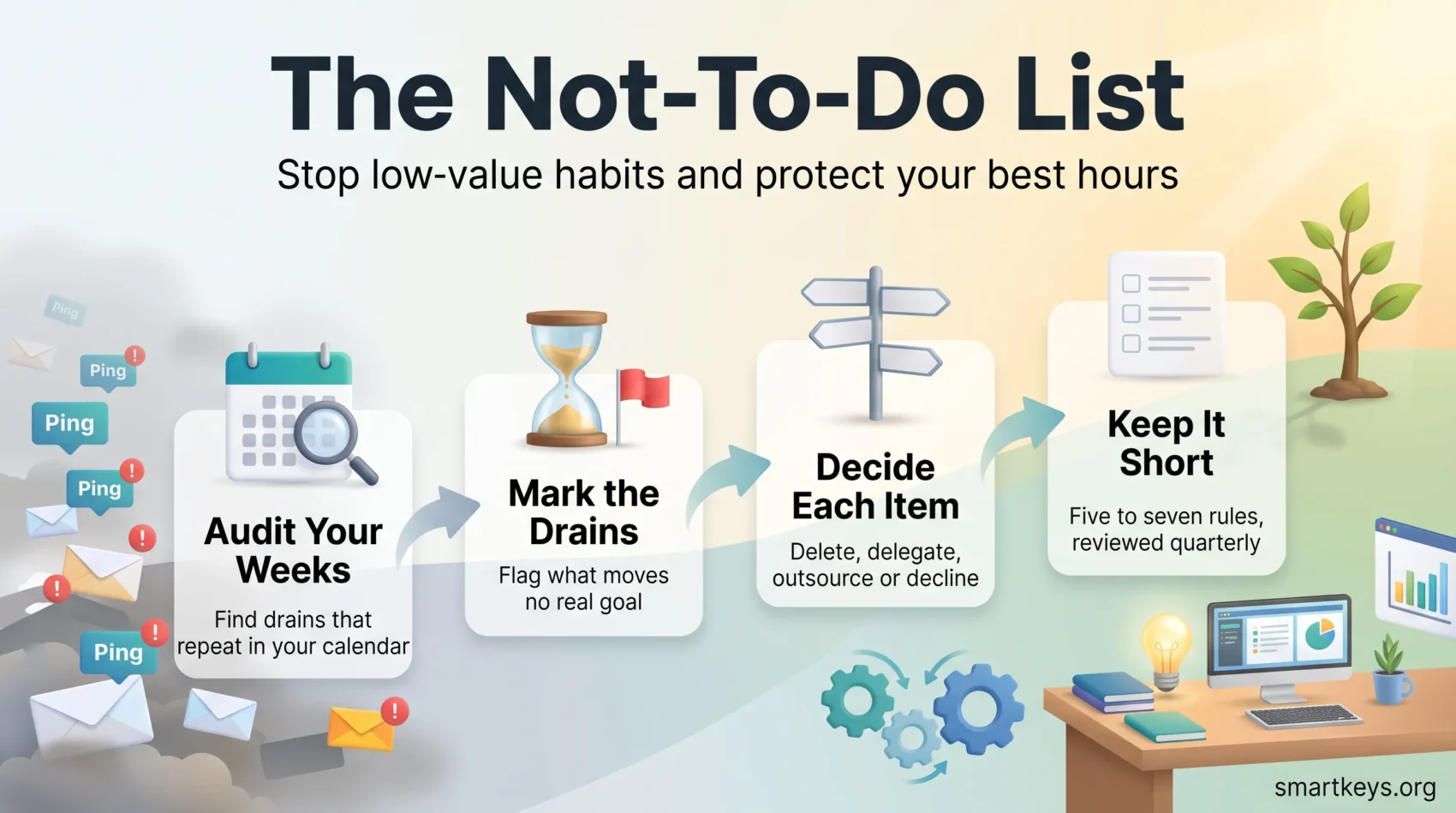
Step 1: Audit your last few weeks
Open the last three or four weeks of your calendar, task list and sent messages. Write down anything appearing more than twice: recurring meetings, the same request, the same interruption. Add a rough time cost to each. A 30-minute weekly call is 26 hours a year, and the annual figure is usually what makes the decision easy.
Step 2: Mark what drains without paying
Ask two questions of each item. Does it move a goal you actually care about? Could someone else do it at acceptable quality? Flag anything failing the first question: those are your candidates. Be honest about the ones you keep because they are comfortable rather than useful.
Step 3: Give every item one decision
Each entry gets exactly one path:
- Delete. Nobody misses it. Stop and see whether anyone asks.
- Delegate. Hand over the decision as well as the task, or it comes straight back. The mechanics are in this guide to delegating properly.
- Outsource. A service or freelancer does it faster or cheaper. Check which tasks are worth outsourcing first.
- Decline. It keeps arriving from outside. Write the sentence now, while you are calm, and reuse it.
Step 4: Keep it short and review it quarterly
Five to seven items is plenty; a long refusal list is just another thing to manage. Put it where you will see it and revisit it quarterly, because the drains change as your role does.
If a big project keeps getting crowded out, pair the list with the Swiss cheese method: punch small holes in the work daily instead of waiting for a clear afternoon that never comes.
Tools, Templates, and Boundaries That Make Your List Stick
A refusal only holds if something takes its place. Every rule below pairs a “no” with an alternative, which is what stops the list reading as unavailability.
Email. Set a signature line or autoresponder stating when you read messages. Save three canned replies: one that declines, one that hands the request on, one that defers with a date. The awkwardness sits in the wording, not the decision.
Meetings. Require a written purpose, the decision to be made and a fixed end time. Invite only those who decide or act. A shared document circulated in advance replaces a surprising number of status calls.
Availability. Replace “always open” with published office hours: a fixed window when anyone can reach you without booking. People accept a closed door once they know when it opens. Recurring no-meeting hours as protected focus time make the same point at team level.
After hours. Agree a message cut-off and keep to it visibly, since a manager who replies at midnight quietly sets the standard for everyone. The background is in this piece on the right to disconnect.
Write the boundaries down and tell people once. Unspoken rules get broken, and you end up enforcing them in the moment, which is what the list was meant to avoid. This guide to setting boundaries at work goes further on the conversation.
Examples to Jump-Start Your List at Work and in Life
Concrete beats abstract. Borrow whichever fit and ignore the rest.

Work examples
- I do not accept meetings without an agenda and an end time.
- I do not attend meetings where I am neither deciding nor doing. I read the notes.
- I do not reply to chat during my two daily focus blocks.
- I do not answer unknown numbers during working hours.
Life examples
- I do not open social apps before the first task of the day, and I keep them to two short windows. A structured break from social media helps if the habit is entrenched.
- I do not read interesting links when I find them. They go into a read-later queue.
- I do not bring my phone into the bedroom.
- I do not leave family time, exercise or hobbies off the calendar, because unscheduled means unprotected.
Notice the shape. Each is specific enough that you can tell at the end of a day whether you kept it. “Be less distracted” fails that test. “No chat before 11:00” passes.
Conclusion
Pick one habit to stop this week. One is enough to notice the difference, and far more likely to survive than a list of nine. Write it as a sentence you could say out loud, decide what goes in its place, and tell the people it affects. Then leave it alone for a month before adding the next.
Review quarterly, and watch for Parkinson’s Law, the observation that work expands to fill the time available. Tasks you left generous slots for quietly grow into them; trim the slot and the task usually shrinks with it.
The measure of a good not-to-do list is not how much you removed. It is whether the work you care about now happens in daylight hours, on purpose, instead of in the gaps.
Found this useful?
Make SmartKeys a preferred source on Google, and our articles will surface more often in your Top Stories, AI Overviews, and AI Mode.
Add as Preferred Source