You have probably had a day that felt full but produced almost nothing. You rewrote your task list, moved cards between columns, tried a new app, and color-coded the calendar. By evening, the one piece of work that mattered had not moved.
That is the core productivity pitfall: organizing starts to replace doing. Planning is useful, but only up to the point where it tells you what to do next. Everything after that point is maintenance that feels like progress. This guide shows how to spot the pattern, which habits feed it, and the simple fixes that get you back to real work.
Key Takeaways
- Planning pays off only until you know your next concrete action. After that, extra organizing is usually avoidance.
- Knowledge workers spend a large share of their day on coordination rather than skilled work, so the problem is common and measurable.
- Switching between tasks and apps has a real cost. Single-tasking in protected blocks gives better quality in less time.
- Perfectionism, open inboxes and automatic meeting acceptance are the three habits that most often stall output.
- Keep your system small: one capture list, one calendar, a short daily plan, and tool changes only during a weekly review.
What “organizing more than doing” looks like
Picture a Monday morning. You open your task app, notice the labels are messy, and spend 40 minutes rebuilding them. Then you read an article about a better system and start migrating. At 11:30 you finally open the report that is due Wednesday. Nothing about your week has improved, but you feel busy and slightly virtuous.
Researchers have a name for the wider category this belongs to. Asana calls it “work about work”: time spent coordinating work instead of doing it, such as chasing status updates, searching for files and switching between tools. In its 2023 Anatomy of Work Index, based on a survey of 9,615 knowledge workers in six countries, respondents said they spent 58% of their day this way.
Some coordination is necessary. You cannot ship a project without agreeing who does what. The pitfall starts when coordination and system tweaking become the main activity rather than the support for it.
Warning signs to watch for
- You reorganize your list more often than you finish items on it.
- You try a new productivity app every few weeks and rarely use one for long.
- Your most important task has sat at the top of the list for days.
- You measure a good day by how many things you touched, not by what you shipped.
- Meetings and messages fill your best hours, and deep work happens late in the evening, if at all.
Why it feels productive
Organizing gives quick, visible wins. A tidy board looks like progress, and it spares you the discomfort of starting something hard. That is why over-organizing is often a form of productive procrastination: you stay busy with easy tasks so you can avoid the difficult one.
A plan does have a real benefit. In a series of experiments, psychologists E. J. Masicampo and Roy Baumeister found that making a specific plan for an unfinished goal reduced intrusive thoughts about it (Journal of Personality and Social Psychology, 2011). The key word is specific. Once you know when and how you will act, the mental benefit is already there. A more elaborate system adds little on top.
Pitfall 1: Planning without a finish line
Vague goals invite endless preparation. If the goal is “work on the marketing plan”, you can research, outline and reformat forever without knowing whether you are done.
Before you touch your list, decide what finished looks like for the day. Write it in plain language with a result you can check, for example “send the first draft of the Q4 budget to Sam by 3 pm”. Then break it into steps small enough to start right away. Small wins reduce friction and make progress visible.
Expect your estimates to be too optimistic. People routinely underestimate how long their own tasks will take, a bias known as the planning fallacy. Add a buffer instead of spending more time perfecting the schedule.
Pitfall 2: Treating every task as equally important
A long, flat list makes the loudest item win. Email replies and small requests feel urgent, so they crowd out work that matters more but shouts less.
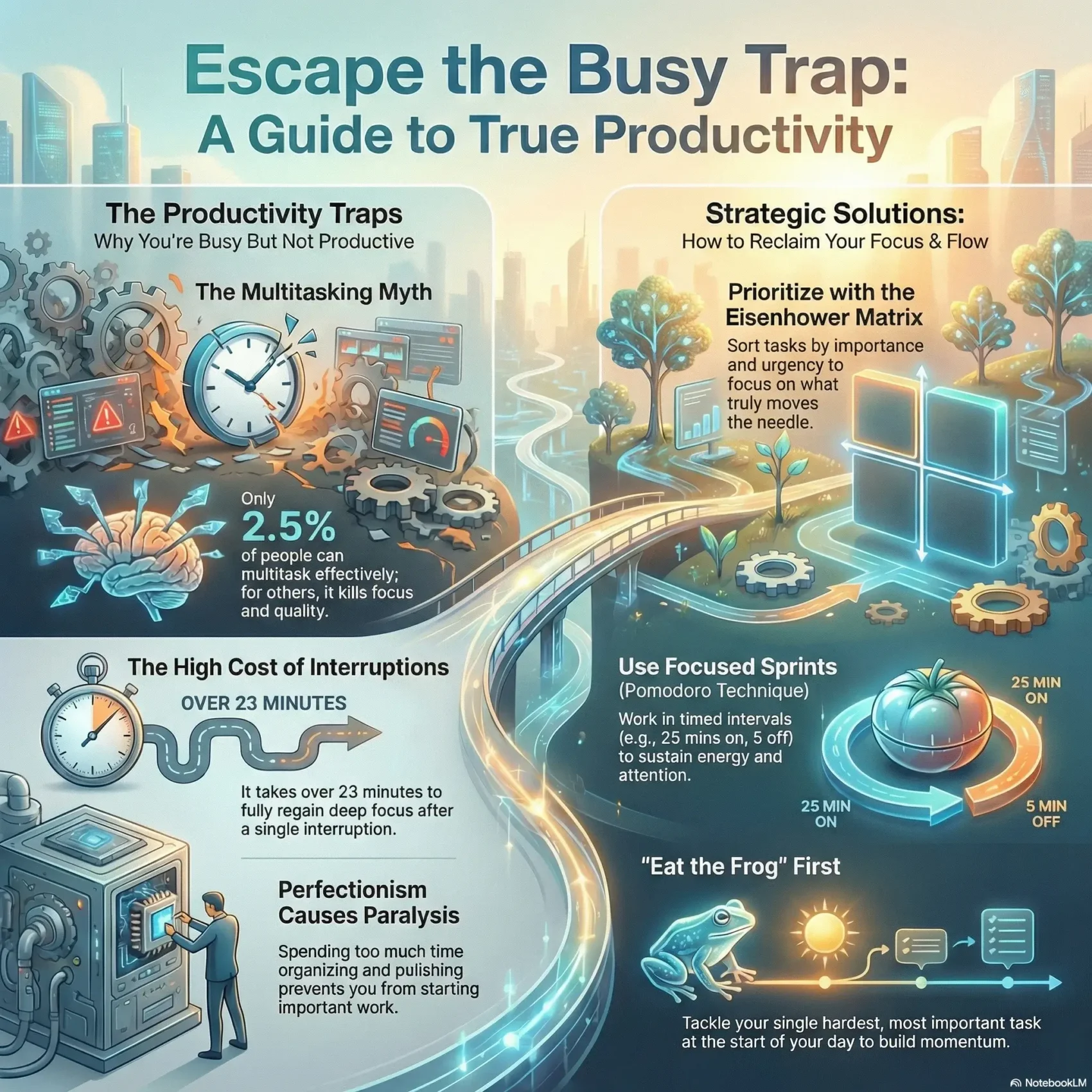
The Eisenhower Matrix is a quick way to sort this out. It splits tasks by two questions: is it urgent, and is it important?
- Urgent and important: do it now.
- Important, not urgent: schedule a block for it this week.
- Urgent, not important: delegate it or handle it in a short batch.
- Neither: drop it.
The last category is where most over-organizing hides. A not-to-do list makes those decisions stick, so you do not re-sort the same low-value items every morning.
Pitfall 3: Working against your own schedule
Most people have a few hours a day when thinking feels easiest. For many it is the late morning, but it varies. If that window goes to admin and inbox cleanup, the hard work gets your leftover energy.
Track your energy for a few days, then protect your best two hours for demanding work. Block them in your calendar like an appointment. A maker-style schedule, with long uninterrupted stretches, helps when your work needs concentration.
Two simple methods make those blocks easier to use:
- The Pomodoro Technique: work in focused intervals (the classic version is 25 minutes on, 5 minutes off) to sustain attention and manage energy.
- Eat the frog: start the day with the hardest task tied to your goal, before messages pull you elsewhere.
End each day by choosing tomorrow’s first task and laying out what you need for it. Starting then takes seconds instead of a planning session.
Pitfall 4: Multitasking and constant switching
Doing several things at once feels efficient. For almost everyone, it is not. University of Utah researchers Jason Watson and David Strayer tested this in a 2010 study published in Psychonomic Bulletin & Review. In the test, 200 people drove in a simulator while doing memory and math tasks on a phone. Only about 2.5%, roughly 1 in 40, performed as well on both tasks together as on each alone. The researchers called them “supertaskers”.
The hidden costs of switching
What feels like multitasking is usually rapid switching, and each switch has a price:
- Attention residue. Management researcher Sophie Leroy showed in 2009 that part of your attention stays on the previous task after you switch, which lowers performance on the next one.
- Lost time getting back. Informatics researcher Gloria Mark has said in interviews that people took around 23 minutes on average to return to an interrupted task, often after detouring through other work. That exact figure does not come from a published paper, but her peer-reviewed work found that interrupted people compensate by working faster, at the cost of more stress and frustration.
- Tool toggling. A Harvard Business Review study followed 137 employees at three Fortune 500 companies. They toggled between apps roughly 1,200 times a day and lost just under four hours a week, about 9% of work time, reorienting afterward. The sample was small, but the pattern matches what many people notice in their own day.
That last point matters for this topic. Every extra app in your productivity setup is one more place to check and one more switch to make.
How to single-task in practice
- Write a one-line definition of done for the current block.
- Give the block a name, such as “Draft intro”, and decline new inputs until it ends.
- Close unrelated tabs and keep a notepad nearby to park stray thoughts.
- Note how long common tasks really take so your next plan is more accurate.
For a deeper look at the evidence, see our summary of single-tasking research.
Pitfall 5: Perfectionism and analysis paralysis
Perfectionism turns small decisions into full stops. Analysis paralysis, the state where weighing options takes so long that you never choose, keeps you in preparation mode. It looks like research and planning, but nothing ships.
Three changes help most:
- Fewer decisions. Limit your options, batch similar choices, and set a short time limit for each decision. Too many choices in a row wear you down and make each next choice harder.
- A “good enough” standard. Decide in advance what the minimum acceptable version looks like, and cap the number of revision rounds.
- Tighter deadlines. Work tends to expand to fill the time available, an idea known as Parkinson’s Law. A self-set deadline forces a decision.
“Good enough” does not mean careless. For a contract or a safety check, precision matters. The point is to match the effort to the stakes. Our guide to overcoming perfectionism covers how to tell the two apart.
Pitfall 6: Letting inboxes and notifications run your day
Digital interruptions are constant. Microsoft’s June 2025 Work Trend Index report, based on Microsoft 365 usage signals, found that employees were interrupted by a meeting, email or notification about every two minutes. The average worker received 117 emails and 153 Teams messages a day.
You cannot switch that off, but you can stop it from setting your agenda:
- Batch email. Check it at two or three set times a day. Handle each message once: delete, delegate, do or defer. Our guide to email batching shows how to set this up.
- Silence the rest. Turn off nonessential alerts and let only a short list of people break through.
- Block temptations. Website blockers and app limits remove distracting sites during focus blocks, so you do not rely on willpower.
Pitfall 7: Saying yes to every meeting
Meetings are the most common place where coordination swallows real work. The same Microsoft report found that half of all meetings fell in the typical peak focus windows of 9 to 11 a.m. and 1 to 3 p.m., and that 57% were ad hoc rather than scheduled.
Protect your time with a few consistent rules:
- Ask for the basics. Accept meetings that have an agenda, a named owner and a decision to make.
- Offer an alternative. Propose a short written update when a meeting would only share information.
- Decline politely but clearly. Acknowledge the request, explain your priority, and suggest another time or person. Our guide on how to say no has ready-made wording.
When you run a meeting, timebox it and end with next steps and one owner each.
Pitfall 8: Ignoring energy and environment
Small frictions add up. A cluttered desk, a slow laptop and a skipped lunch all take a little from your focus. None of them is dramatic, which is why they are easy to ignore.
- Match tasks to energy. Put admin in low-energy hours and keep peak time for demanding work. Short movement or breathing breaks between blocks help you reset.
- Reset your desk daily. Clear surfaces at the end of the day and give everyday items a fixed place. Keep only the tools you use daily within reach.
- Maintain your devices. Install updates, remove unused apps and name files consistently so you find them in seconds.
One caution fits the theme of this article: tidying is also a classic way to avoid hard work. Set a five-minute limit and stop.
Pitfall 9: Doing everything yourself
If you hold on to every task, your list will always be longer than your day. Handing clear pieces of work to others frees time for the work only you can do.
- Pick the right person for the task’s skills.
- Define the outcome and deadline, plus any limits, so nobody has to guess.
- Agree how progress is shared and what success looks like.
- Check in briefly instead of micromanaging, then capture what you learned so the next handoff is faster.
Our guide to effective delegation goes through each step with examples.
A simple system that stays out of your way
The fix for over-organizing is not a better system. It is a smaller one, with clear limits on how much time it gets.
- One place to capture tasks. A single list or app, not three. Our guide to to-do lists explains how to keep it realistic.
- One calendar for time-bound commitments and focus blocks.
- Ten minutes of daily planning. Pick the day’s main outcome and its next concrete action, then start.
- A weekly review of about 30 minutes. Clear the list, look at the week ahead and decide priorities. A weekly review is also the only time you change your system or try a new tool.
That last rule does the most work. When system changes have a fixed slot, tweaking stops leaking into your working hours.
Conclusion
Organizing is a tool, not a result. Plan until you know your next concrete step, then stop and do it. Most productivity pitfalls, from multitasking to meeting overload, share the same root: activity that feels like progress but does not move your main goal.
Pick one change and try it tomorrow. Eat the frog, protect a two-hour focus block, or decline one meeting that has no agenda. Then judge the day by what you finished, not by how busy it felt.
Found this useful?
Make SmartKeys a preferred source on Google, and our articles will surface more often in your Top Stories, AI Overviews, and AI Mode.
Add as Preferred Source