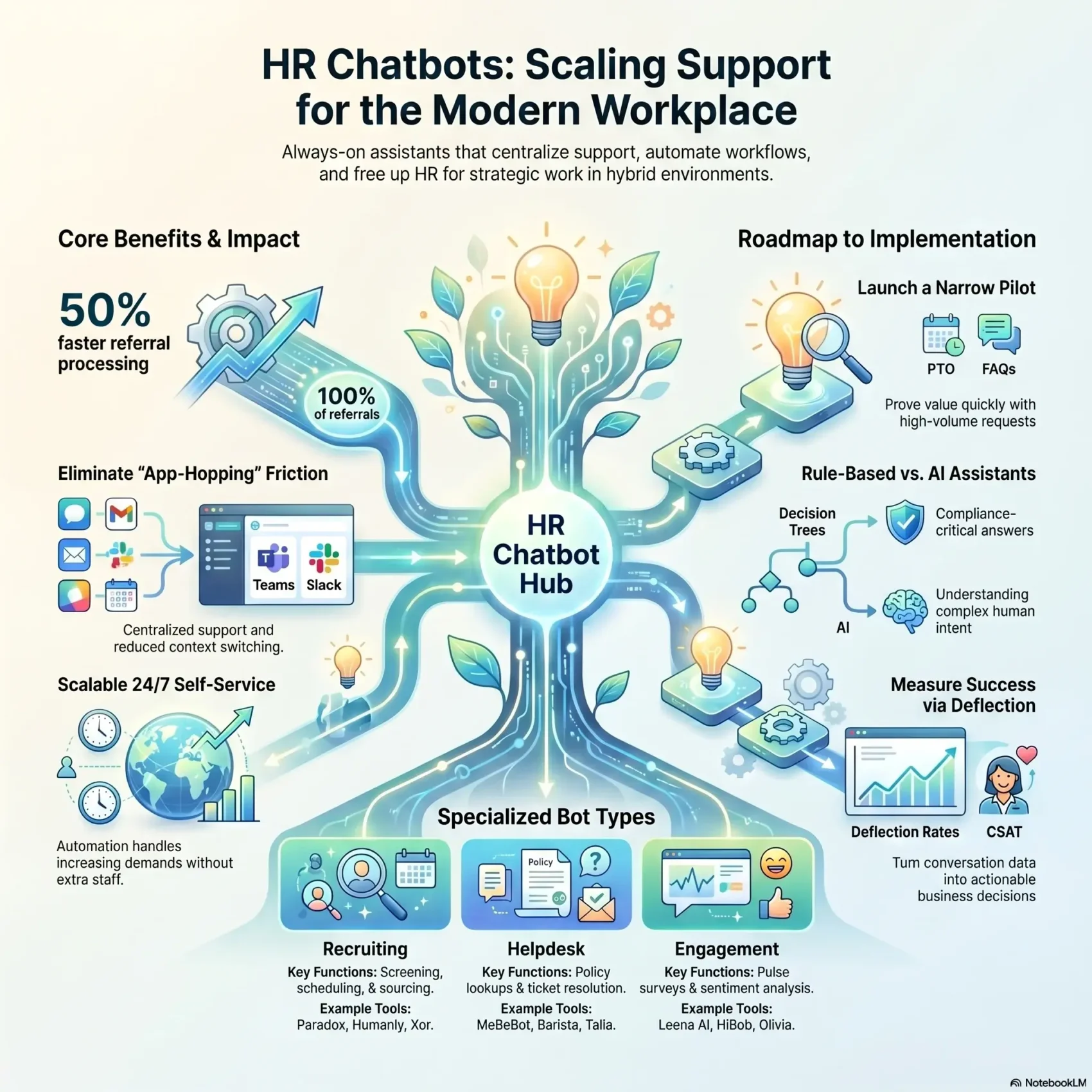
An HR chatbot is a piece of software that answers employee questions in a chat window, usually inside Slack or Microsoft Teams, and completes small tasks such as booking time off or sending a policy document. Instead of emailing HR and waiting a day, the employee types the question and gets an answer.
That sounds modest, and it is. The value is not in the conversation. It is in removing the twentieth identical question about parental leave from someone’s inbox, so that person can spend the afternoon on a hiring plan instead.
This guide covers what these tools actually do in 2026, how widely they are used, what to check before you buy one, the privacy and AI rules that now apply in the EU and the US, and how to run a pilot that produces numbers your finance team will accept.
Key Takeaways
- An HR chatbot answers routine employee questions and completes small tasks inside the chat tool your team already uses.
- Only 39% of organizations use AI anywhere in HR, according to SHRM’s 2026 survey of 1,908 HR professionals, so this is still early ground.
- Integrations decide everything: a bot that cannot read your HR system can only quote policy text.
- Since 2 August 2026, the EU AI Act requires that people be told they are talking to an AI.
- Start with one high-volume question type, measure deflection and time-to-answer, then widen the scope.
What an HR chatbot actually is
Two different technologies get sold under the same name, and they behave very differently. Knowing which one you are looking at is the first practical decision.
Rule-based bots follow a script
A rule-based bot works from a decision tree. The employee picks from options, or types a phrase the bot has been taught, and the bot returns a fixed answer or opens a form. It cannot invent anything, which is exactly why it suits compliance questions, expense rules and anything where a wrong answer creates legal exposure.
The trade-off is rigidity. Ask “can I carry my holiday into next year” when the bot was trained on “holiday carryover” and it may fail. Rule-based bots need someone to keep extending the script.
AI assistants interpret what you meant
An AI assistant sits on a language model. It reads the question, works out the intent behind the wording, and pulls an answer from your documents. It copes with typos, slang and half-formed questions, and it can chain steps together: check a balance, draft the request, route it for approval.
The trade-off is confidence without accuracy. A language model will produce a fluent answer to a question your policies never addressed. That is why the serious products restrict answers to your own approved content and show the source document, rather than letting the model improvise. The same failure mode shows up in customer-facing tools, and the lessons carry over from AI chatbots in customer service.
What “NLP” means in practice
Natural language processing, or NLP, is the part of the system that turns a sentence into something a computer can act on. It does two jobs. It works out the intent (“this person wants to book leave”) and it picks out the details, called entities (“three days”, “next Monday”).
When a vendor says its NLP is strong, ask for the boring evidence: how many distinct intents it recognizes out of the box for HR, and what it does when it is unsure. A bot that guesses is worse than a bot that says “I am not certain, shall I pass this to the HR team”.
Where HR chatbots stand in 2026
It helps to set expectations against real adoption data rather than vendor enthusiasm.
SHRM’s State of AI in HR 2026 report, based on a survey of 1,908 HR professionals, found that 39% of organizations currently use AI in their HR function. Another 23% use AI elsewhere in the business but not in HR, and roughly a third use it nowhere at all. Adoption is heavily skewed by size: 60% of organizations with 5,000 or more employees use AI in HR, while smaller employers hold back over cost and unclear returns.
Where AI is used, recruiting leads at 27% of organizations, followed by HR technology at 21% and learning and development at 17%. In other words, the common deployments are the ones this article describes: screening and scheduling, employee self-service, and training content. Broader context on how the function is changing sits in our overview of HR trends in 2026.
The individual-level results are more encouraging than the organizational ones. Among HR professionals using AI, 87% report improved efficiency and 75% report better work quality. About half report no improvement in decision-making, which fits the pattern: these tools save time on routine work, they do not make the hard calls for you.
What HR chatbots realistically fix
The honest case for a chatbot is narrow and strong. The dishonest case is broad and vague. Here is the difference.
The questions worth automating
Every HR team has a short list of questions that arrive hundreds of times a year and have one correct answer. How much leave do I have left. When does the health plan renew. Where do I find the expenses form. Who approves a laptop replacement. What is the notice period.
These are worth automating because the answer never depends on judgment, and because the volume is what makes them expensive. Fifteen minutes of someone’s attention, forty times a month, is a working week a year.
Microsoft’s 2025 Work Trend Index research found that employees are interrupted roughly every two minutes during the working day by meetings, emails and messages. A chatbot does not remove interruptions, but it does move a category of them off a human calendar and into a system that never minds being asked again.
What stays with a person
Anything involving discretion, discomfort or an exception. A grievance, a pay dispute, a request for compassionate leave, a question about a restructure. Routing those to a bot damages trust faster than the bot saves time.
Design the escalation path first. The employee should be able to reach a human in one step, from inside the same conversation, without repeating themselves. If sentiment analysis is available, use it to push frustrated or distressed conversations to a person automatically rather than letting the bot try again.
Integrations decide whether it works
This is the part that separates a useful assistant from an expensive FAQ page. A chatbot that cannot read your systems can only quote documents back at people.
The systems to connect
Link the HR information system, or HRIS, which holds employment records and leave balances. Link the applicant tracking system, or ATS, which holds candidates and hiring stages. Link the learning platform and payroll. Link your knowledge base, whether that is Confluence, Guru, SharePoint or a folder of PDFs.
Once those connections exist, the bot can answer with live data instead of general text. “You have 11 days left and 4 expire on 31 December” is a useful answer. “Please check your leave balance in the HR portal” is not. If payroll questions are a large share of your volume, the connection to your payroll provider matters most, and it is usually the hardest one to get approved.
Put it where people already are
Adoption collapses if employees have to open a separate portal. Deploy inside Slack or Microsoft Teams, because that is where the working day happens. Both platforms support bots that can search a knowledge base, post approval buttons and start a workflow without the employee leaving the channel.
If you are still choosing between the two, our Slack vs Microsoft Teams comparison sets out the pricing and the limits that actually bind. Teams that already run written-first workflows will find the fit natural; hybrid workforce tools shows how the pieces sit together.
Content quality is the hidden dependency
A chatbot is only as accurate as the documents behind it. If your parental leave policy exists in three versions across two drives, the bot will confidently serve the wrong one.
Before rollout, name an owner for every policy document, delete superseded versions, and agree how a policy change reaches the bot. That housekeeping is the least exciting part of the project and the most reliable predictor of whether people trust the answers. The wider discipline is covered in knowledge management 2.0.
Features worth checking before you buy
Vendor feature lists all look similar. These are the ones that change the day-to-day experience.
- Source citation. Every answer should name the document it came from, so employees can verify it and HR can spot outdated content.
- A no-code editor. Your HR team, not engineering, should be able to add a question or fix an answer the same afternoon.
- Clean escalation. One click to a human, with the conversation history attached.
- Permission awareness. The bot must respect who is allowed to see what. A manager may see team leave balances; a colleague may not.
- Conversation analytics. You need the list of questions the bot could not answer. That list is your content roadmap.
- Audit logs. A record of what was asked, answered and actioned, retained for a defined period.
- Language coverage. If you employ people in several countries, check which languages are genuinely supported rather than machine-translated.
For a wider view of how these assistants are being used beyond HR, see AI-powered assistants at work, and our guide to AI and machine learning for HR management for the surrounding toolset. If you are comparing full suites rather than a single bot, employee experience platforms covers the bundled options.
Privacy, security and the rules that now apply
An HR chatbot touches some of the most sensitive data a company holds. Treat governance as part of the build, not a review at the end.
Access, retention and minimization
Apply least-privilege access so only the roles that need employee records can act on them. Keep audit logs that cannot be edited, and set a retention schedule for conversation transcripts, because a chat log about a benefits query is personal data like any other.
Minimize what the bot stores. Anonymize conversation data before it reaches your analytics dashboards, and redact personal details when a conversation is handed to a human or turned into a ticket. Our guide to data privacy at work and the privacy compliance framework cover the control set in more depth.
The disclosure rule that changed in August 2026
Since 2 August 2026, Article 50 of the EU AI Act has applied. It requires that any AI system designed to interact directly with people be built so that the person is informed they are dealing with an AI, at the latest at the first interaction. The disclosure has to be clear and distinguishable, and it must meet accessibility requirements. Burying it in a terms-of-service page does not count.
There is a narrow exception where AI involvement is obvious to a reasonably observant person, but the European Commission’s guidance warns against leaning on it. The practical answer is simple: label the bot, in plain language, in its first message.
If your bot influences hiring or performance outcomes rather than just answering questions, more of the AI Act applies, and so do a growing set of US state and city rules. Start with AI hiring tools and what the law requires and AI hiring bias, then set the wider policy using our AI governance model and generative AI usage guidelines.
Draw the line at monitoring
Conversation data is tempting to mine. Resist using it to score individuals. Aggregate reporting on question volume and unanswered topics is legitimate; flagging named employees as disengaged because of what they asked a bot is not, and in several jurisdictions it is unlawful. The boundaries are set out in AI in employee monitoring and algorithmic management.
The vendor landscape in 2026
This market consolidates quickly, and several tools that appear in older buyer’s guides no longer exist as products you can purchase. Mya, a recruiting chatbot that once headed most shortlists, was acquired by StepStone and folded into its own platforms. Brazen, known for live hiring events, was acquired by Radancy and is sold as part of that suite. Check current availability before you shortlist anything from an article older than a year, this one included.
The tools below are grouped by the job they do. Prices are rarely published in this category, so budget for a sales conversation rather than a sign-up page.
Recruiting and candidate conversations
Paradox is the best-known product in high-volume hiring. Its assistant is called Olivia, and it handles application intake, screening questions, interview scheduling across calendars and candidate reminders. Named customers include Chipotle, 7-Eleven, General Motors and Nestlé. Paradox publishes its own performance figures, including a 50% reduction in recruiting administrative time; treat vendor-reported numbers as a starting point for your own pilot, not as a benchmark.
Humanly focuses on candidate engagement and screening conversations for mid-market employers, with an emphasis on consistent, structured questions.
Eightfold is a talent intelligence platform rather than a chatbot, but it competes for the same budget. Its strength is matching people to roles across both applicants and existing staff, which overlaps with the internal talent marketplace category.
Employee helpdesk and self-service
Espressive Barista covers HR and IT support in one assistant, resolving common requests and routing the rest. Leena AI works in the same space, combining employee service with surveys. Moveworks is the enterprise alternative, now part of ServiceNow.
Bloomfire is a knowledge platform rather than a bot. It is worth mentioning because its search and content-gap analytics solve the underlying problem: if employees cannot find answers, adding a chat interface on top will not save you.
Engagement and sentiment
HiBob is an HR platform with strong engagement dashboards and people analytics, suited to companies that want the survey and reporting layer alongside core HR records. For the narrower question of how to run continuous listening, see AI-powered engagement surveys.
Seven use cases you can launch this quarter
Each of these is small enough to build in days and visible enough that people notice.
- Policy answers. Connect your handbook and let the bot answer leave, expenses and benefits questions with a link to the source.
- Leave requests. Check the balance against your HRIS, submit the request and send the manager an approval button in chat.
- New starter guide. Message new hires on day one with their channels, contacts, first tasks and equipment status. It pairs well with a structured remote onboarding programme.
- Referral capture. Let employees submit a referral in chat and push it straight into the ATS, so the details do not sit in someone’s inbox.
- IT and access requests. Password resets and software access are the highest-volume tickets in most companies and the easiest early win.
- Training nudges. Remind people about overdue compliance modules and link them directly, rather than sending a monthly chase email.
- Manager prompts. Nudge managers ahead of probation dates and review cycles, which supports continuous performance management without adding a meeting.
Skip the novelty bots. Birthday announcements and automated standup prompts are easy to build and rarely the reason a project gets renewed.
How to evaluate vendors and price the deal
Pricing in this category takes three shapes, and each one fails in a different way.
Per-employee subscriptions are easy to forecast but charge you for people who never use the bot. Ask what happens to the price when headcount drops.
Usage or per-resolution pricing aligns cost with value and is attractive at low volume. The risk is the opposite: a successful rollout increases the bill exactly when adoption is going well. Model your cost at three times your expected volume before you sign.
Enterprise agreements bundle support, integrations and service levels into a negotiated figure. These are worth it when you need custom connections or contractual guarantees, and expensive when you do not.
Before signing, get four things in writing: the uptime and response service levels, what happens to your data if you leave, whether your conversations are used to train the vendor’s models, and the cost of the integrations you actually need. Vendors often quote the licence and treat connections to your HRIS as a professional services line.
A 90-day rollout plan
Narrow scope is what makes a pilot measurable.
Days 1 to 30: choose and prepare. Pull the last three months of HR tickets and count the question types. Pick the single biggest category. Clean up the documents behind it and name an owner. Agree your baseline: how many of these questions arrive per month, and how long they currently take to answer.
Days 31 to 60: build and test with one group. Configure the bot for that one category only. Release it to one department, ideally a friendly one with high volume. Review every unanswered question weekly and add content.
Days 61 to 90: measure and decide. Compare deflection rate, time-to-answer and satisfaction against your baseline. Take the result to the budget conversation with real numbers rather than a vendor case study.
Bring IT, security and works council or employee representatives in at day one, not day sixty. In several European countries, deploying a system that processes employee data requires consultation before launch, and discovering that late will cost you a quarter.
Measuring whether it worked
Four numbers tell you almost everything.
Deflection rate is the share of conversations resolved without a human. Expect a modest figure at first, and treat anything above 50% in year one as a good result for a well-scoped deployment.
Time-to-answer compares the bot against your previous response time for the same question type. This is usually where the clearest improvement shows.
Unanswered questions is the most useful list you will get. It shows exactly which policies are missing, ambiguous or badly written.
Employee satisfaction with the answer, collected as a single thumbs up or down, tells you whether the deflection is real or whether people are giving up. A high deflection rate with poor satisfaction means employees stopped asking, not that they got help.
Feed these into your wider reporting rather than keeping them in the vendor dashboard. Numbers that live only in a supplier’s console tend to stop being read the month after launch.
Getting people to actually use it
Most failed deployments are not technical. The bot works, and nobody opens it.
Announce it once, clearly, with two or three example questions people can copy and paste. Vague launch emails about digital transformation produce nothing. “Ask @HRBot how many holiday days you have left” produces a first interaction.
Tell people plainly what it can and cannot do, and that a human is one click away. Overselling creates a bad first experience, and employees rarely give a tool a second try.
Recruit a handful of people in different departments to use it early and report what breaks. Their unanswered questions are worth more than any vendor training session.
Then keep going. Review the unanswered list monthly, retire content nobody reads, and publish what changed. A chatbot that is never updated degrades quietly as policies move on, and the first wrong answer costs more trust than ten right ones earned.
Where this is heading
The direction of travel is from answering to acting. Today’s deployments mostly retrieve information and submit simple forms. The next step is assistants that complete multi-step processes end to end: collect the leave request, check the team calendar for conflicts, route it, update payroll and confirm back to the employee.
That raises the governance stakes rather than lowering them. A bot that answers a question wrongly wastes five minutes. A bot that actions a request wrongly changes someone’s pay. Keep a human approval step on anything that touches money, employment status or personal records, and build the audit trail before you widen the scope. The broader debate about where that line sits is covered in AI ethics in the workplace.
Start with one question type, prove the numbers, and expand from evidence rather than ambition.
Found this useful?
Make SmartKeys a preferred source on Google, and our articles will surface more often in your Top Stories, AI Overviews, and AI Mode.
Add as Preferred Source