Tools
Tools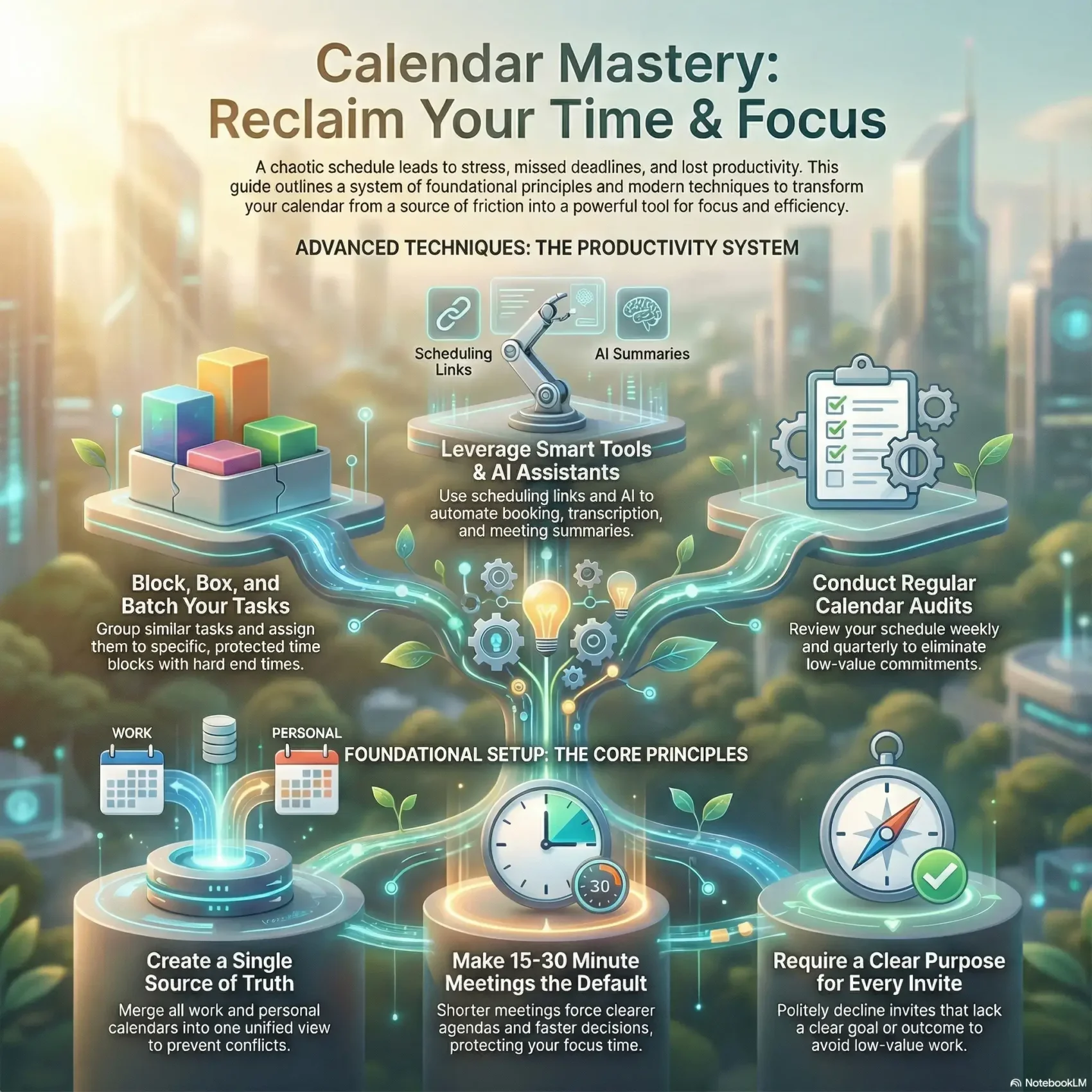
Last Updated on January 8, 2026
You juggle dozens of customer conversations each day, and without clear habits your work spills into home life. That overload creates stress and makes it hard to feel in control of your time.
This guide gives a practical way to build a reliable schedule you trust. You will learn repeatable practices like time blocking, batching, and simple invite rules that remove friction from meetings.
Think of your tools as an operating system for your day: one place that reflects real commitments, protects focus, and reduces back-and-forth. You will also see how lightweight AI assistants can help with prep, recording, and summaries so you spend less time on logistics and more on the right work.
Key Takeaways
- Create a single source of truth so your calendar reflects real commitments at work and in life.
- Use time blocking and batching to protect focus and boost productivity.
- Remove invite friction with clear purpose and dedicated links.
- Leverage small defaults—short meetings and simple tooling—to reduce stress.
- Treat this as a living process: review, adjust, and iterate weekly.
Why calendar management matters right now for your work and life
When your schedule is tidy, you can spot free windows, urgent items, and your week’s flow instantly. Good organization gives you quick control over your day and reduces last-minute scrambling.
Poor handling leads to double bookings, missed appointments, and late tasks. Those small failures pile up into lost productivity, annoyed teammates, and more stress for you.
- You gain speed: planning takes minutes when you can see availability and priorities at a glance.
- You protect focus: use clear blocks to keep deep work and personal time sacred.
- You reduce friction: a reliable view helps your team coordinate without constant pings.
Adopt a simple rule: only add requests that match your priorities and that you have room for. If not, decline or reschedule. Over time this one habit creates capacity for higher-value work and steadier control of your week.
What good calendar management looks like—and what goes wrong without it
You should be able to glance at a week and know which work needs attention and which can wait. A clear view of your day and week makes priorities obvious and reduces friction for you and your team.
Quick definition
Good calendar management means your plan is readable at a glance: titles, duration, and purpose line up with your priorities. When that happens, you spend less time shifting between tasks and more time finishing meaningful work.
Common consequences
- Double bookings and missed appointments create scramble and wasted time.
- Unclear events lead to missed deadlines and unhappy people on your team.
- Scattered tasks fragment focus and raise stress for everyone involved.
Signals you need a reset
Watch for repeated overlaps, unexplained gaps, or vague entries. Those are red flags that your system no longer reflects reality.
Fixes are simple: name meetings clearly, assign realistic durations, block focused time for tasks, and run a short weekly review to keep the view current.
Set up your scheduling system the right way before you add more tasks
Get your scheduling foundations right so new requests land in the right place. A single, reliable system gives you a true 360° view of commitments and helps you keep control over your day.
Merge all your calendars into one for a 360° view
Unify work and personal calendars so you avoid conflicts. To sync Outlook to Google, open Outlook web: Settings > View all Outlook settings > Calendar > Shared calendars. Under “Publish a calendar” pick your calendar, set “Can view all details,” click Publish and copy the ICS link. In Google, click “+” next to Other calendars > From URL, paste the link, and Add calendar.
Optimize defaults, colors, and reminders
Shorten default durations to 15 or 30 minutes via Google Settings > Event settings. Use color codes to mark internal, external, and personal events so you can scan the day fast.
- Enable reminders with sensible lead times and verify time zone settings for cross-country calls.
- Standardize event naming (purpose, attendees, link) and limit public booking slots to spaces you want filled.
- Document which tool owns which feature—this keeps the process clear and reliable.
calendar management techniques that block time and reduce stress
Block work into clear chunks so you hit priorities and avoid constant context switching. Small, deliberate windows reduce stress and help you control the day.
Time blocking and time boxing
Time blocking divides your day into blocks for specific work. Each block has one clear objective to protect focus.
Time boxing adds strict end times (for example, 9–11 a.m. feedback). Hard stops prevent spillover and keep momentum.
Task batching and day theming
Group similar tasks—emails, approvals, or follow-ups—into one block. Day theming assigns full days to areas like sales or product. This reduces switching and increases speed.
Create buffer slots for ad hoc needs
Leave short buffer blocks between meetings to handle overruns and capture notes. Reserve one prime-hour slot for quick customer calls so urgent requests don’t blow up your plan.
- Set block time with one objective per entry.
- Right-size blocks to minutes that fit the work.
- Repeat core blocks each week so others can plan around you.
The tools and AI assistants that make scheduling effortless
Small automation and clear links make it easy for others to find time with you — without email ping-pong. The right stack reduces friction and gives you back control over your day.
Appointment scheduling software supplies booking links with automatic time-zone handling, built-in video links, and default reminders so attendees arrive prepared. Use a scheduler like Avoma to let participants pick slots, attach agendas, and cut back-and-forth responses.
Meeting lifecycle assistants
Meeting lifecycle assistants automate before, during, and after tasks. They assign agenda templates, record and transcribe sessions, and generate concise summaries so you don’t miss decisions.
- Connect your calendar to conferencing so links create automatically and setup time drops.
- Turn reminders on by default and match them to the right video link for each appointment.
- Centralize summaries and action items in one place to keep follow-ups under control.
- Use role-specific booking pages (demo vs. success) so people land in the right meeting format.
Keep your stack light: pick only the features you need. That preserves focus blocks and improves overall efficiency. Over time you will see fewer reschedules, shorter cycles, and steadier control of your schedule.
Optimize meetings for efficiency, focus, and outcomes
Compact meetings force clearer decisions and protect your most valuable hours. Parkinson’s Law means work will expand to fill available minutes, so shorten slots to sharpen purpose and speed outcomes.
Shorter by default: 15–30 minute slots to beat Parkinson’s Law
Set 15–30 minutes as your default so every meeting earns its place on your schedule. In Google, change Settings (gear) > Event settings > Default duration to make short sessions the norm.
Frictionless invites: clear purpose, purposeful URLs, and the right room or link
Write invites that state the purpose, expected outcome, and prep materials. Use clear naming like Discovery: Avoma // Acme and include a purposeful URL (for example, meetings.avoma.com/…/avoma-demo).
“Make sure the right room or video link is set so attendees join without delay.”
- You’ll default to 15–30 minute meetings to force clarity and faster decisions.
- Update your calendar settings so short durations are routine; only extend when the agenda warrants it.
- Cap attendance to essential roles and share summaries afterward for others.
- End with a few minutes for decisions, owners, and due dates so action items stick.
Measure gains: track saved minutes and reinvest reclaimed time in focused work. For practical tips on structuring your day and improving time use, see time management techniques.
Audit your calendar and prioritize what actually moves goals forward
A quarterly review reveals which meetings and routines actually move your goals forward. Start by scanning the last three months to see where your hours went. This quick pass shows patterns you can fix.
Quarterly review: where your hours went and what to stop doing
Review your entries and build a concise list of recurring events to keep, redesign, or remove. Capture which commitments delivered value and which only consumed minutes.
Use the Urgent-Important Matrix to rank work and reduce noise
Apply Covey’s matrix: do Q1 now, plan Q2, delegate or avoid Q3, and eliminate Q4. Classify your tasks so you move important, non-urgent work onto your schedule before it becomes urgent.
Pomodoro with batching: 25-minute sprints plus short breaks
Block 25-minute focus sprints, take ~5-minute breaks, and batch related work. This keeps momentum, protects deep work, and improves overall productivity.
- You’ll document process improvements and schedule them as actions.
- You’ll set a recurring review so continuous improvement becomes routine.
- You’ll track a few metrics (deep work blocks completed) to measure gains.
Team calendars without chaos: shared views, playbooks, and communication
When teams share one trusted schedule, coordination gets faster and interruptions drop. Give your people a shared view so everyone can see who’s available and what type of work is on deck.
Shared views and access: who’s available, when, and for what
Use a common system—monday.com’s Work OS, for example—to show tasks and timelines in one place. Color-code internal vs. external items so availability is obvious at a glance.
Standard operating rhythms: weekly planning blocks and status cadences
Set recurring weekly blocks for planning and quick status updates. Keep the cadence light so coordination doesn’t fill your schedule. Define access rules and naming standards to keep entries readable across the team.
Async first: updates in one place to cut meetings and context switching
Default to async updates in notes, channels, or a shared doc. Reserve a live room only for decisions that need real-time input.
- Shared visibility: let people see availability and the types of tasks that need attention.
- Protect focus: group similar meetings and hold blocks for deep work.
- Recorded summaries: share briefings so people stay aligned without attending every meeting.
“Shared calendars help everyone know availability and reduce back-and-forth.”
Opt out of unnecessary meetings and protect your focus
Not every meeting deserves your presence — and saying no can be the smartest move. Treat invites as requests for your most limited resource: time. Require clarity before you accept so your day stays aligned with real priorities.
Say no to no-agenda invites and request purpose before accepting
Ask for a clear purpose and outcome before you accept. If an organizer can’t explain your role or the decision expected, decline or ask for a brief pre-read.
Make sure every invite lists the goal and required attendees. That simple rule reduces busywork and preserves hours for deep work on your calendar.
Leverage recordings and summaries so people can skip live attendance
Use platforms like Avoma to record, transcribe, and generate AI summaries. When summaries are standard, people can skip the live session and still stay informed.
“If the outcome isn’t worth live time, choose another way.”
- You’ll require purpose and outcome in every invite and say no to meetings that don’t make that case.
- You’ll make sure recording and summaries are standard so stakeholders review asynchronously instead of joining live.
- You’ll protect deep work blocks on your calendar and decline overlaps that don’t beat your priorities.
- You’ll route updates to async channels and reserve live time for decisions or sensitive topics.
- You’ll propose 15-minute decision huddles and request pre-reads so meetings use time for decisions, not one-way info.
Measure productivity by progress in focus blocks, not by attendance. Teach people when a live session is needed and your schedule will stay cleaner, with less stress and more control.
Conclusion
Wrap up with a focused checklist so your time drives outcomes, not busywork.
Start by merging your calendars into one view, shorten default meetings to 15–30 minutes, and schedule a weekly review to keep the plan honest. Use lightweight scheduling tools and AI assistants for agendas, recordings, and concise summaries so fewer things require live attendance.
Timebox work, use Pomodoro sprints, and protect deep work blocks. Share one team view and prefer async updates to cut unnecessary meeting minutes. Keep reminders and appointment links accurate so execution stays smooth.
Make these small habits part of daily routine. With steady reviews and simple playbooks, your schedule will serve your work and life—freeing hours and lowering stress.