Tools
Tools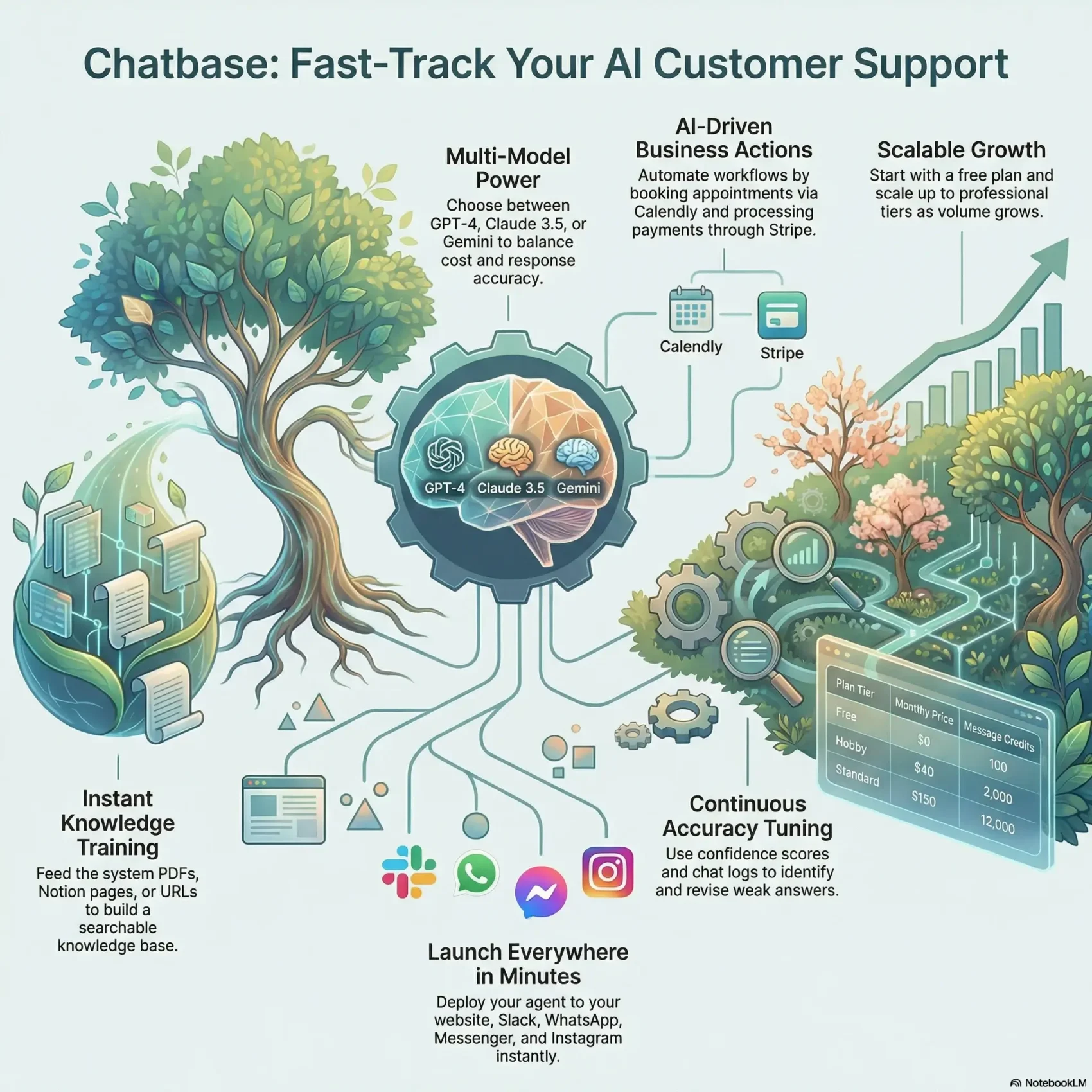
Last Updated on February 10, 2026
You need a clear, fast way to add a help bot to your site and channels. This intro gives a concise overview so you can decide if this platform fits your team’s needs.
The tool trains a chatbot on your own data — files, URLs, Notion, or Q&A — and deploys to your website, Slack, WhatsApp, Messenger, and Instagram in minutes. The Playground guides you from setup to live bot with tabs for Sources, Actions, Deploy, Analytics, and Activity.
You’ll see which features matter for support and customer experience, and how integrations like Calendly, Stripe, Zendesk Sunshine, and Zapier speed workflows. Pricing starts with a Free plan and scales with paid tiers and add-ons so you avoid surprises.
Later sections cover real user feedback, where ease of setup earns praise and billing or support hiccups appear. By the end, you’ll know whether this solution matches your users’ expectations and business goals.
Key Takeaways
- You can train a chatbot on your own data and go live quickly.
- Useful integrations cover scheduling, billing, and team alerts.
- Plans range from Free to Pro, with add-ons for credits and branding.
- Setup and knowledge-base answers get strong marks from users.
- Watch for billing and support complaints when choosing a plan.
Our Verdict at a Glance
Here’s a compact verdict to help you decide quickly. If you need a fast, no-code chatbot that improves customer support and lowers response time, this tool delivers solid value for small businesses.
Setup is simple and usable right away. Pricing starts with a Free plan and paid tiers from $40/month, so you can scale as your team grows.
Standout strengths include training the bot on your content and refining answers over time instead of building complex flows. Many users praise the performance and ease of use.
Try Chatbase Now“Easy to launch and iterate — great for quick self-service.”
- Best for businesses that want fast time-to-value, not visual flow builders.
- Core features favor knowledge access over advanced automations.
- Watch billing and support — public scores show mixed sentiment.
Verdict: reliable for FAQ-style automation; less ideal if your needs require heavy orchestration or deep marketing automations.
What Is Chatbase and How It Works
Turn your support content into a working assistant in minutes. You feed the system PDFs, docs, plain text, Notion pages, Q&A, or website URLs. The platform ingests that data and builds a searchable knowledge base the agent uses to answer customer questions.
Train a chatbot on your data
Begin by uploading files and links. The tool extracts text and indexes it so your chatbot can find answers fast.
The platform offers multiple LLM choices (GPT-4, Claude 3.5 Sonnet/Opus, Gemini). That helps you balance cost and accuracy for different use cases.
Who uses it
Small businesses, support teams, and no-code builders rely on this builder to handle recurring queries and reduce manual replies.
You can test interactions instantly in the Playground, ask real questions, and iterate before going live with customers. This content-first approach favors quick setup over complex flow design.
- Fast training: add data and see results.
- Flexible models: swap LLMs to tune performance.
- No coding: non-technical users can launch an agent quickly.

Setup Experience and Chatbot Builder
You can have a working chatbot on your site in minutes by feeding the platform a few documents, URLs, or Notion pages and clicking Create Chatbot. The builder walks you to the Playground where you test answers and tune behavior without writing code.
From signup to first answers: sources, training, and the Playground
After signup, add sources — files, plain text, web pages, Notion, or Q&A — so the agent can index your data. Training happens automatically once the content is ingested.
In the Playground you ask questions, see where the agent pulls text from, and adjust content or prompts until answers match your expectations.
Model selection, temperature, and custom instructions
Pick from GPT-4, Claude 3.5 Sonnet, or Gemini and set temperature to favor strict or creative replies. Use system instructions and custom prompts to shape tone and persona.
That control helps you keep responses on-brand for your business and customers.
Deploying to your website with widget and embed options
When ready, deploy with a copy-paste iframe or script into your website HTML. A customizable widget lets you set name, icon, colors, welcome text, and buttons.
You can enable auto pop-up to nudge users at the right time. As new data arrives, update sources and the agent adapts without rebuilding flows — saving you valuable time.
- No-code fast start: first answers in minutes via the Playground.
- Flexible models: choose model and temperature for the right voice.
- Easy deploy: script or iframe plus a branded widget and auto-show options.
Core Features That Shape Customer Experience
Your chatbot’s value comes from how core features work together to answer questions fast, act on requests, and capture leads.
AI Knowledge Base for fast, accurate answers
The agent pulls answers from a single knowledge base built from files, text, URLs, Notion, and Q&A. That reduces time-to-answer and helps users find useful information quickly.
AI Actions for bookings and lookups
With AI Actions you let agents book appointments, check orders, send Slack alerts, or run payment checks via Stripe. Integrations include Calendly/Cal.com, Zendesk Sunshine, Tavily, and connectors like Zapier, Make, API, and webhooks.
Suggestions, confidence scores, and continuous learning
Suggestions flag gaps so you can add missing content. Confidence scores highlight uncertain replies, helping you spot where training or edits are needed.
Chat Logs and “Revise Answer”
Review conversations in chat logs, use “Revise Answer” to edit responses, and the system learns from your changes. This cycle improves quality without a full retrain.
- Fast answers: reduces support time on routine queries.
- Actionable agent behavior: bookings, order lookups, and alerts move work forward.
- Lead capture: collect name, email, and phone; the widget stays until submitted—watch UX impact.
Channels and Integrations You Can Use
Connect the agent to tools that handle bookings, payments, and alerts so chats turn into actions. The platform gives you direct integrations for scheduling, billing, support, and alerts. That makes your chatbots useful beyond simple answers.
Direct integrations
- Calendly/Cal.com: enable booking flows from the widget.
- Stripe: process payments or check invoices inside chat.
- Zendesk (Sunshine): bridge to human agents via live chat and ticketing.
- Slack & Tavily: route alerts and team notifications to the right channels.
Connectors and custom workflows
Zapier and Make unlock thousands of tools so you can move data without custom code. Use the API and webhooks for tailored workflows that match your backend.
Publish everywhere: embed on your website or deploy to Slack, WhatsApp, Messenger, and Instagram. This meets customers where they are and lets agents escalate only when needed.
- Start simple, then layer integrations as use cases grow.
- Combined with AI Actions, integrations let the agent trigger real tasks, not just answer questions.
Analytics, Insights, and Performance Tuning
See how built-in dashboards turn raw chat data into clear signals you can act on. The platform gives you a fast view of chat volume, user locations, and trend lines so you spot peak times and regional patterns.
Dashboards for chat volume, locations, and trends
Dashboards show overall chat counts over time and where your users connect from. You can filter by day, week, or month to find repeating spikes.
Location data helps you prioritize languages or regional content where most questions come from.
Optimization workflow using confidence filters and answer revisions
Use confidence filters in Chat Logs to find low-certainty replies. Then revise answers or update source content so the chatbot improves on the next interaction.
Was this helpful? loops accelerate tuning by surfacing problem replies faster.
- Volume trends: plan staffing and know peak hours.
- Confidence filters: target weak answers for quick fixes.
- Continuous improvement: revise replies to boost future performance.
- Expectation: high-volume bots need ongoing review—assign ownership.
Pricing, Plans, and Message Credits Explained
Pricing decisions hinge on expected message volume and which features you’ll enable. Below is a clear look at tiers, what they include, and how credits control usage.
Free plan
The Free plan gives you 1 chatbot and 100 message credits per month. Training is capped at 400,000 characters and a 10-link limit so you can validate fit before buying.
Get Started with 100 Free CreditsHobby — $40 per month
Hobby unlocks 5 chatbots, up to 11M characters per chatbot, and 2,000 message credits. You also get API access, integrations, and up to 5 AI Actions per chatbot for practical deployments.
Standard vs. Pro
Standard ($150/month) raises credits to 12,000, includes 2 chatbots and 3 seats, plus 10 AI Actions per bot.
Pro ($500/month) suits growing teams with 40,000 credits, 3 chatbots, and 15 AI Actions. Both paid plans scale seats and collaboration features.
Add‑ons and cost control
- Extra credits: 1,000 auto-recharge $14/month or one‑time 1,000 credits $12.
- Extra chatbot $7/month, custom domain $59/month, remove branding $39/month.
- Plan add-ons help avoid a full upgrade while controlling spend.
“Message credits meter usage per response — plan accordingly if you use premium models or many agent actions.”
Tip: Count how many users and agents will manage the bot, and confirm required integrations and tools are included at your plan level to avoid surprises.
Customer Support, Documentation, and the Real‑World Impact
When your team needs answers fast, clear documentation and timely support make the difference between a smooth launch and a stalled rollout. Good docs reduce confusion and speed onboarding for your staff and customers.
Tutorials, docs, and changelog to help you get unstuck
The platform includes step-by-step tutorials, searchable documentation, an AI-powered doc search, and a changelog. These resources help your team solve common setup tasks without waiting on external help.
Use the docs to configure actions, webhooks, and API flows. That shortens the learning curve and helps new users ramp up faster.
User‑reported support quality and billing experiences
Real-world feedback is mixed. Many customers praise usability and value on Capterra (4.3/5), while Trustpilot flags billing and slow responses (2.1/5).
Before you commit, test response times during your trial month and assign an internal owner to handle ongoing tuning and revisions.
- Documentation speeds onboarding: rely on tutorials for API and action setup.
- Monitor interactions: track questions that return weak answers and update docs to close gaps.
- Watch credits and billing: set alerts and review statements monthly to avoid surprises.
- Assess lead flow UX: the persistent lead capture widget can boost leads but may affect user experience.
If customer support is mission-critical for your business, validate support SLAs during the trial and plan internal ownership for continuous improvement.
Limitations and Trade‑offs to Consider
Not every business need is a fit for a content-first approach; know the limits before you commit.
No visual flow builder: if your team relies on drag-and-drop paths for complex branching, this product may require workarounds. For multi-step logic and granular branching, you’ll likely design external flows or use integrations to compensate.
Limited marketing automations: broadcasts and sequence-style campaigns on WhatsApp, Messenger, and Instagram are sparse. That means marketers who expect built-in outreach tools will find fewer options than specialized marketing chatbots offer.
No native live chat and proactive outreach limits
There’s no built-in live chat, so you’ll need an integration like Zendesk Sunshine to route the chat to human agents. Proactive messaging on the web is mainly an auto pop-up—granular behavioral targeting isn’t available out of the box.
- If you need visual builders for complex paths, expect extra engineering.
- Marketing sequences on social are limited versus dedicated tools.
- Use Zendesk Sunshine or similar for human handoff and live chat routing.
- Proactive outreach beyond auto pop-ups is minimal.
Performance is generally solid, but test with your expected volumes and use cases. Run a trial and monitor chat logs to see how the agent performs under load and where manual escalation is needed.
“Plan simple escalation paths and train your team so users know what the bot can and can’t do.”
Bottom line: this approach fits fast, no-code chatbots for FAQs and help content. If your business needs deep automation, heavy marketing flows, or native live chat, consider alternatives or integrations before you commit.
Chatbase Review: Is It Right for Your Business?
If your priority is quick self-service for common issues, this platform is a sensible, low-friction option.
Best fit: choose this tool if your needs center on fast, accurate answers to recurring customer queries with minimal setup time. It suits small businesses that want a no-code path to self-service and low maintenance for support content.
Alternatives to weigh
If you need advanced workflows, multi-agent orchestration, or built-in live chat, consider platforms like Drift or Intercom that emphasize visual builders and sales automation.
Those alternatives trade simple setup for richer orchestration and stronger multi-agent features. Match tool choice to how many agents you need and how complex your handoffs will be.
Decision tips
Plan your credits and costs: estimate monthly credits based on expected chat volume, then add branding or domain fees to see true monthly spend.
- Confirm the integrations you rely on are supported at your chosen plan level so you avoid midstream surprises.
- Test support response times during a trial if guaranteed SLAs matter to your business.
- Design handoff paths for leads: decide what customer data the bot will collect and how agents receive it.
“Choose it when fast deployment and accurate FAQ handling matter more than advanced automations.”
Conclusion
Overall, this platform gives you a clear, fast path from your content to a live chatbot across web and messaging channels.
You train the bot with text and files, tune answers in the Playground, and watch analytics guide improvements. Deploy to your website with a copy/paste widget and iterate as questions evolve.
Keep an eye on message credits and pricing per month so your plan fits expected volume. Use Chat Logs, confidence scores, and revise tools to raise accuracy over time.
The knowledge base model plus AI Actions and integrations makes the agent useful without heavy development. If you need deep multi-agent flows, confirm add‑ons meet your needs before you commit.
Bottom line: with steady tuning and a clear plan for credits and support, this tool can become a reliable front line for customer self-service.
Visit Chatbase & Deploy Instantly