Tools
Tools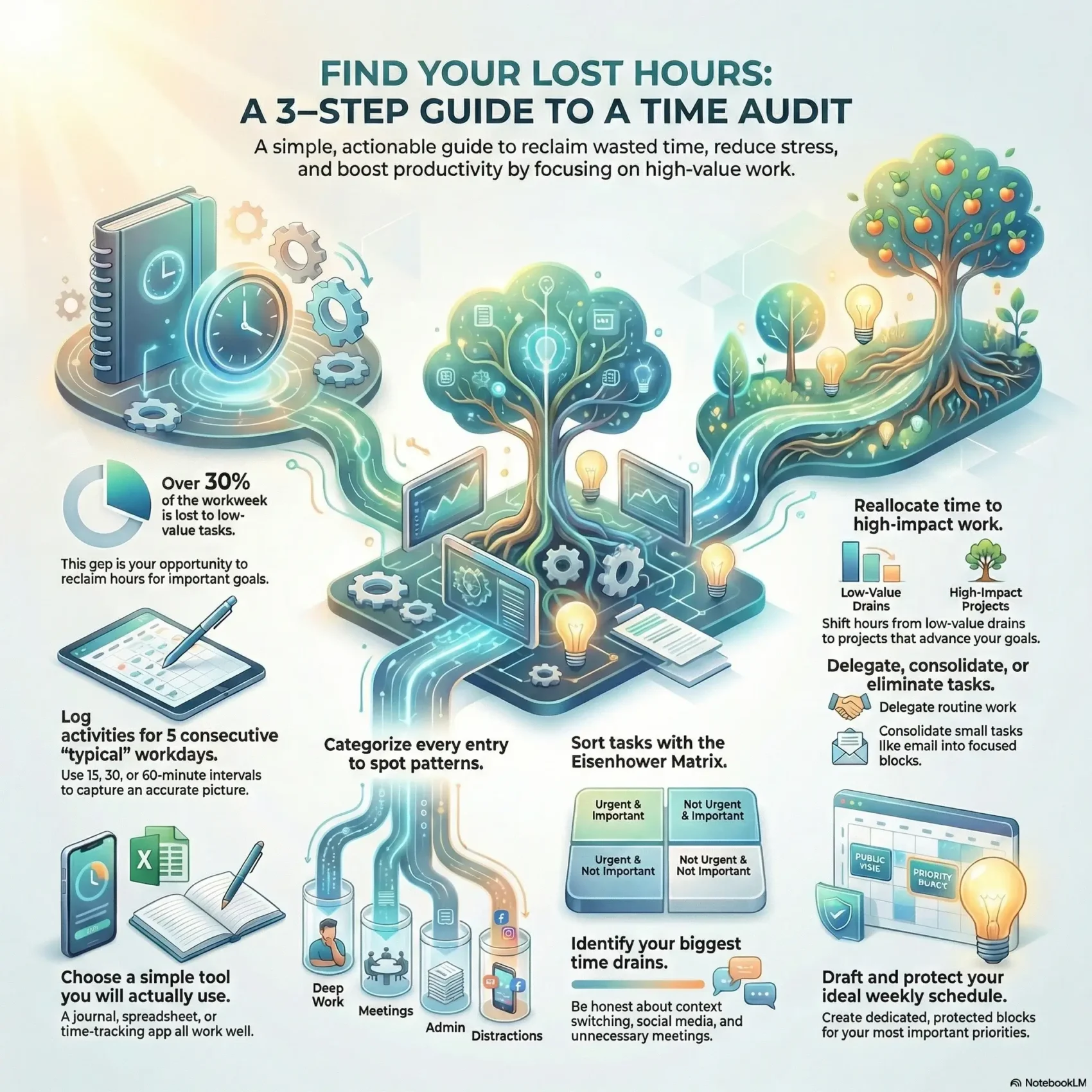
Last Updated on February 16, 2026
Over 30% of a professional workweek goes to low- or no-value activities, according to David Finkel’s research. That gap is your opportunity to reclaim hours and lift productivity across your team.
The process is simple. A time audit records what you do across a day and a week, then shows where your time goes. With clear data you can reassign tasks and stop busywork that does not move your goals forward.
Use a lightweight tool or plain notes. Time tracking apps automate entries, cut errors, and give managers reliable data for smarter management. Microsoft notes this practice aligns activities with goals and reduces stress by revealing hidden patterns.
This short guide will help you get started with a friendly, low-friction approach. You’ll see how a simple routine turns scattered activities into a clear picture of time spent and what to change so your work fuels the business.
Key Takeaways
- Professionals lose over 30% of their workweek to low-value activities.
- A clear log of tasks and activities shows exactly where your hours go.
- Choose a simple tool or manual notes to collect accurate data fast.
- Use results to align work with goals and boost team productivity.
- Get started with a short, repeatable process that fits your workflow.
Why a time audit belongs in your workweek right now
A few days of focused logging will reveal why busy days rarely equal big outcomes. Finkel’s research shows over 30% of a typical week goes to low‑value work. That gap explains why you feel busy but miss results.
Running a short check this week gives you reliable data to make decisions, not guesses. Combined daily logs across five consecutive days create a clear picture of where your hours are going in the workday.
Manual timesheets often introduce errors. Using simple tracking software automates logs and delivers accurate timesheets for teams and managers.
- You’ll connect feeling busy with missed goals by seeing where time goes.
- A few days of tracking surface low‑value patterns that erode efficiency.
- Audits reduce stress by aligning your efforts with clear goals.
- Start small so insights compound into steady productivity gains.
“Audits boost productivity, align activities with goals, and reduce stress.”
Ready to begin? If you want a quick guide to running a short review, run a short review this week and collect five days of honest tracking.
What a time audit is and the results you can expect
Record your daily blocks and short activities to uncover hidden patterns. A clear log shows how you spend time across tasks, meetings, and context switches. That honest data makes priorities obvious and helps you decide what to drop or delegate.
Clear definition
A time audit is a candid log of your activities, tasks, and meetings that shows exactly how you spend time. You track entries in simple categories — very important, not as important, and not important — to spotlight where attention belongs.
Core benefits
Expect higher productivity as you cut low-value work and focus on project milestones. You’ll align daily work with goals and feel less stressed because effort maps to outcomes.
Signals you need one
Consider a short audit when your days are busy but results lag, deadlines slip, or you can’t explain where hours went. Frequent context switches, excess media consumption, and creeping scope are clear red flags.
- Define activity categories to spot drains.
- Use a short sample of data to separate noise from essential work.
- Translate findings into clear next steps for better management and team focus.
“Logging small samples of your work reveals big, fixable patterns.”
Daily or weekly tracking: Choosing your audit cadence
How often you log work changes what patterns you spot. Picking a clear cadence helps you balance accuracy and effort. Short bursts catch context switches; longer blocks reduce interruption.
When to use daily versus weekly checks
Use daily logs when your workday shifts a lot or you have many brief meetings. Fifteen- or thirty-minute intervals reveal interruptions and hidden handoffs.
Choose a weekly view when tasks stretch across days and you want a big-picture perspective. A seven-day roll-up shows where recurring tasks live on your schedule.
How to pick a “typical” week and avoid skewed data
Track five consecutive business days for reliable data. Skip weeks with vacations, holidays, or unusual negotiations that distort results.
Try 15, 30, or 60-minute intervals based on your tolerance for logging. If your calendar is very consistent, alternate-day tracking can cut fatigue without losing insight.
- Compare cadences: Short intervals = higher accuracy; long intervals = less disruption.
- Consecutive days: A five-day snapshot smooths anomalies and improves decisions.
- Pick a typical week: Avoid exceptional weeks so your data reflects normal work.
“Consistent tracking over a normal week reveals meaningful patterns you can act on.”
How to conduct a time audit step by step
Choose a logging method that feels low-friction so you won’t skip entries. Pick a journal or spreadsheet for simplicity, or use time tracking software if you want automated timers and reports.
Select your tool
Pick a tool you will actually use. A paper journal works. A sheet with columns works. A tracking app gives timers and automated timesheets for easy data.
Plan useful categories
Define clear categories that mirror your day: email, meetings, focused work, admin, breaks. Use those labels for every entry so analysis is fast.
Set intervals and track in real time
Choose 15, 30, or 60 minutes and set lightweight reminders. Record each block in under 20 seconds. Track for five workdays to build a robust dataset.
Be honest and consistent
Capture social media checks, tab switches, and small distractions. Batch quick edits when needed, but don’t omit short activities—those add up.
- Pick a tool you’ll use: journal, spreadsheet, or software.
- Define categories like email, meetings, deep work, admin, breaks.
- Set 15/30/60-minute intervals; log quickly and track five days.
“Honest tracking reveals small drains that compound into big gains.”
Analyze your data to eliminate time wasters and boost productivity
Turn raw logs into insight so you can stop low-value habits and protect deep work. Start by sorting each entry into clear categories and label whether it advances your goals or not.
Classify activities: High‑priority tasks versus time‑wasting activities
Go line by line and mark entries as high-priority activities or obvious drains, like frequent social browsing or unnecessary discussions. This makes where your time spent most visible.
Prioritize with the Eisenhower Matrix
Map tasks into four boxes: Important/Urgent, Important/Not Urgent, Urgent/Not Important, Not Important/Not Urgent. Focus first on Important/Urgent and schedule Important/Not Urgent.
Redistribute hours: Reallocate, delegate, consolidate, and milestone
Reallocate blocks toward high-impact projects and pre-scheduled meetings that support goals. Delegate routine work, invest a few hours to train someone, then reclaim recurring hours.
- Consolidate email and small tasks into focused blocks to cut context switching.
- Break projects into milestones with estimated hours so progress stays visible.
- Pick one or two high-ROI changes first to prove value fast.
“Use data, not guesswork, to shift your schedule toward meaningful work.”
Turn insights into a better schedule and workflow
Sketch an ideal week for your top goals, then measure it against the data you gathered. Draft percentages for your top three to five priorities and note how much of your actual schedule matches that split.
Build your action plan by contrasting an ideal versus realistic week. Allocate rough percentages to each goal, then compare those targets to what your recent audit shows. Where you see gaps, adjust blocks, reassign tasks, or automate low‑value steps.
Build your action plan: Ideal vs realistic week, goals, and blocks
Pick 3–5 goals and assign blocks or percentages to each. Protect deep work windows, batch admin into short blocks, and rightsize meetings for a calmer workday.
Use tracking software and reports to refine your workday
Use a tracking software or reports to spot where time spent diverges from plan. Platforms like Hubstaff offer utilization and productivity reports, while Microsoft 365 and Copilot can help adjust schedules and delegate tasks.
- Translate findings into one clear weekly plan you can follow.
- Iterate with simple checkpoints — weekly or biweekly — to rebalance blocks.
- Coordinate with your team so handoffs and priorities match the updated schedule.
“A small, data-driven plan beats a perfect plan you never use.”
To try a concise guide for converting logs into actions, see this short review run a short review.
Real‑world examples and team applications
Real examples show how small shifts in routine create big gains for individuals and teams.
Individual wins: Reducing non‑billable hours and curbing social media
A freelancer ran a short time audit and found many non‑billable hours in email and research. They started batching email into two brief blocks and protected deep work windows.
That simple change cut interruptions and reclaimed hours for paid projects.
A student used a similar review to spot long social media sessions. They scheduled short leisure breaks and used blocking software during focus blocks. Concentration improved and study goals moved faster.
Team improvements: Meeting balance, shared priorities, and accountability
Teams can use audits to right‑size meetings and align on top projects. Overlaying data in Lucidchart exposed process chokepoints the group fixed together.
Try weekly dashboards and one‑click agenda templates to keep meetings lean. Add quick reviews so the whole team sees where hours are spent and how work maps to goals.
- Batch email and research into fixed blocks to protect project focus.
- Schedule short breaks and block social media during focus windows.
- Use visuals and lightweight software to reveal bottlenecks across the team.
- Run small experiments like no‑meeting blocks to test gains fast.
“Small experiments and clear data help teams cut noise and protect the work that matters.”
Conclusion
Finish by turning what you learned into a small, repeatable plan. Start with one clear change this week and measure its impact on your hours and focus.
, and actionable steps will help you lock in gains. A short weekly review lets you reclaim as much as 30% more productive hours and keeps your projects aligned with key goals.
Make this a living habit: say no to low‑value work, delegate routine tasks, and protect deep blocks for your highest priorities. When you get started, keep the process simple and repeatable so improvements stack over weeks.
Small, consistent checks drive big productivity wins and better efficiency for your work.