Tools
Tools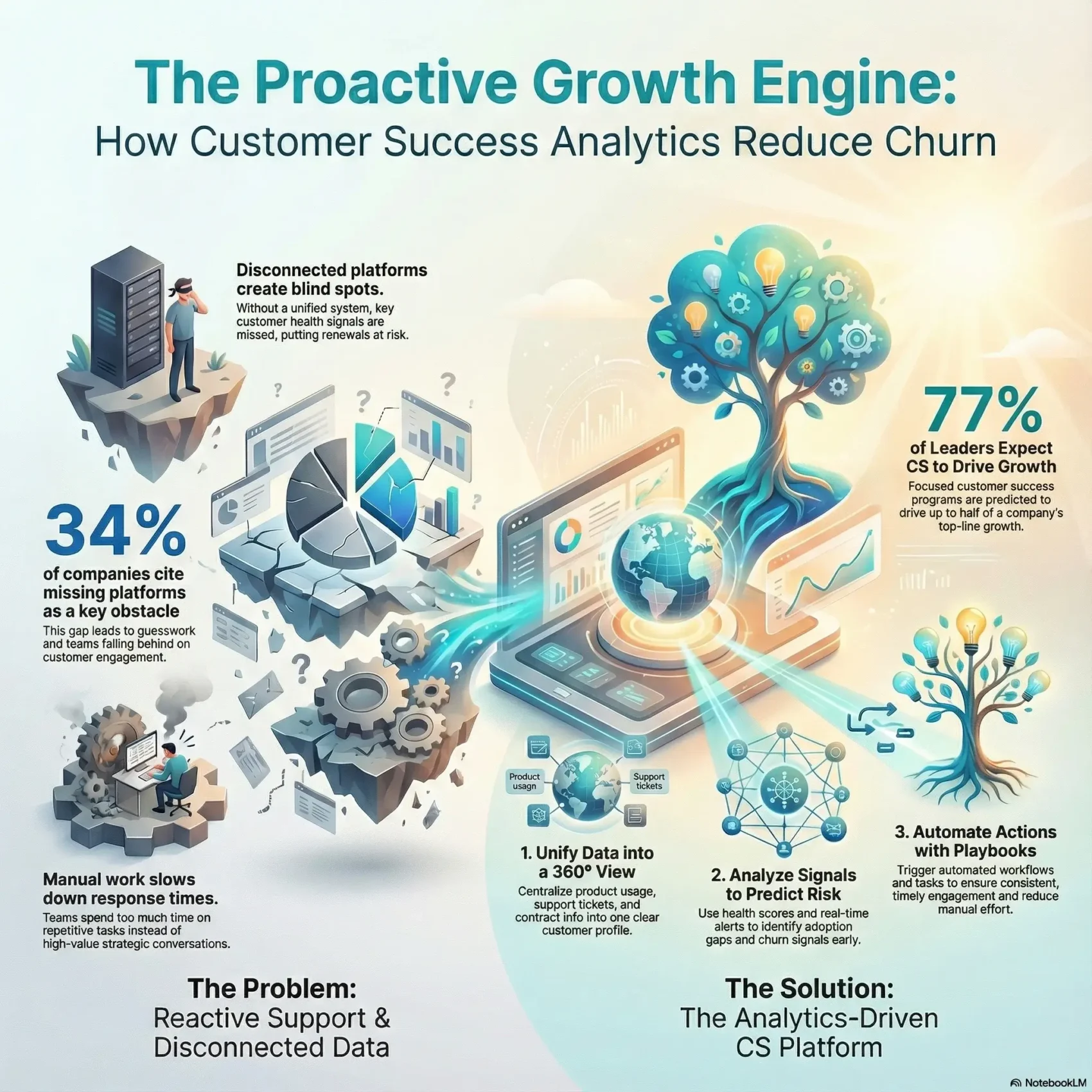
Last Updated on January 10, 2026
You need a growth engine that turns insight into action. The right customer success tools unify onboarding, support, and workflow automation so your teams can spot risk and nudge users toward value.
Analytics-driven software helps you prioritize accounts, automate repetitive tasks, and deliver timely education. Reports from industry sources show leaders expect big revenue impact when they invest in these capabilities.
In this roundup, you’ll see categories from in-app guidance and customer 360 to predictive insights. You’ll also get a quick view of vendors and the key features that tie directly to retention and expansion.
Expect practical guidance: how to match features with outcomes, what KPIs to track, and why onboarding and support belong together in one setup so you can reduce churn and scale predictable growth.
Key Takeaways
- One platform can align onboarding, support, and playbooks to cut churn.
- Analytics surface risk, adoption gaps, and expansion signals.
- Automation reduces repetitive work and speeds time-to-value.
- Pick a tool that centralizes signals for clear, actionable tasks.
- Track onboarding completion, time-to-value, NPS/CSAT, and renewal signals.
What customer success tools are and why they matter right now
Modern platforms centralize signals and turn them into predictable outcomes. These integrated systems gather usage, feedback, and billing data so your team can map journeys and automate repetitive work.
Executive momentum is real: 77% of leaders predicted that focused programs would drive as much as half of top-line growth. That expectation makes it easier to get budget for unified software that links onboarding, support, and lifecycle playbooks to revenue.
Adoption gaps are costly. Totango found 34% of respondents named missing platforms as an obstacle. Without a proper management layer, engagement and health scoring fall through the cracks and renewals suffer.
- What these platforms do: centralize customer data, run playbooks, and surface alerts.
- Core features now: journey maps, playbooks, alerts, surveys, and integrations.
- Quick win: automate manual tasks so your team spends time on high-value conversations.
“Visibility into usage and preferences, plus automation, frees teams to focus on outcomes.”
How analytics helps you reduce churn across the customer journey
Clear analytics turn vague risk into concrete actions your team can run this week. When you map signals to steps, you stop guesswork and make retention repeatable.
Proactive support and value enhancement
Define the signals that matter: usage drop‑offs, license underutilization, and stalled onboarding tasks. Link each to a playbook so reps can act immediately.
Health scoring, NPS/CSAT, and real‑time alerts
Build a blended health model with leading indicators (adoption, breadth of activity, time‑to‑value) and lagging indicators (renewals, sentiment).
Automate NPS and CSAT at lifecycle milestones. Route detractors into save playbooks and notify reps via real‑time alerts so you can keep customers before renewal time.
From signals to action: segmentation, triggers, and playbooks
Use segmentation by role, plan, and industry to tailor interventions. Configure triggers that start workflows—check‑ins, adoption nudges, or QBR prep—so humans focus on strategy.
- Translate analytics into actions tied to measurable outcomes.
- Adopt proactive support motions; Gartner links this to a 9% lift in value enhancement.
- Align help center and in‑app guidance with friction points your data shows.
- Operationalize workflow automation to reduce manual steps and reduce churn.
“Visibility into usage and timely outreach turn signals into retention.”
Core capabilities you should expect from customer success software
A modern platform should bundle guided onboarding, unified profiles, and predictive dashboards so your team can act before issues surface.
Onboarding workflows and guided adoption
Guided onboarding uses checklists, in‑app tours, and milestones to move users to value. Automated nudges and progress tracking cut time‑to‑value and lift activation rates.
Customer 360 and unified data
A single view matters. You want product telemetry, support history, contract info, and feedback in one profile so reps have context at a glance.
Platforms like Planhat and Custify centralize signals, feed health scores, and produce churn predictions from combined data.
Dashboards, reporting, and predictive insights
Expect executive and operator dashboards that show health, risk, and expansion potential. Predictive insights should highlight where to intervene next.
Workflow automation, tasks, and alerts
Workflow automation turns signals into tasks and alerts. Rules route work to the right owner and keep issues from slipping through the cracks.
Self-service, help centers, and AI chatbots
Lean on self‑service to deflect simple issues. Intercom and similar platforms add AI help desks, chatbots, and proactive messaging to keep education always on.
- Onboarding checklists and tours that nudge users.
- Unified profiles with telemetry, contracts, and feedback.
- Dashboards with predictive flags and outcome metrics.
- Automation that creates tasks, alerts, and ownership.
- Help centers and AI chat to scale education.
“Unifying relationship management signals with usage data makes prevention and expansion repeatable.”
Customer success tools for onboarding and product adoption
Good onboarding converts curiosity into consistent product habits—and that starts with the right platform.
Intercom: AI help desk, proactive messaging, and chatbot
Intercom mixes an AI-enhanced help desk with proactive product tours, outbound messages, automated surveys, and a chatbot. This blend speeds time-to-value and trims ticket volume.
Pricing tiers: Essential $39/seat/month, Advanced $99, Expert $139. Use these tiers to match scale and needed automation.
UserGuiding: interactive tours, checklists, and in-app surveys
UserGuiding is code-light and fast to deploy. It provides product tours, onboarding checklists, resource centers, segmentation, analytics, and in-app surveys.
Pricing: Basic $89/month, Professional $389, Corporate $689+. Pick a plan based on your volume of users and required analytics.
OnRamp: purpose-built B2B onboarding with templates and logic
OnRamp focuses on complex onboarding. It offers template projects, branded portals, real-time feedback, automated health scores, dynamic task logic, and bottleneck analysis.
Pricing is available via contact, which suits tailored enterprise implementations.
- Compare Intercom’s onboarding + support mix to reduce tickets and accelerate adoption.
- Evaluate UserGuiding for no-code tours and role-based walkthroughs.
- Choose OnRamp when you need template-driven, B2B project onboarding and visibility.
- Pair help center articles with in-product prompts so users can self-serve while your team monitors progress.
“Track activation rates, time-to-first-action, and milestone completion to tie onboarding to renewal outcomes.”
Platforms focused on churn prevention and customer health
Platforms that focus on churn prevention give you the signals to act before accounts slip away. These vendors blend health scoring, segmentation, and automated journeys so your team can prioritize interventions fast.
ChurnZero
ChurnZero offers deep segmentation, blended health scoring, real‑time alerts, and journey orchestration. Use in‑app communications, walkthroughs, surveys, and reporting to spot risk and run recovery plays.
Totango
Totango ships with SuccessBLOCs templates and a 360 view that supports multidimensional health and email campaigns. Plans start at Starter $2,988/year up to Enterprise and Premier tiers, and include a customer portal and outcome success plans.
ZapScale
ZapScale focuses on clear health analytics, prediction alerts, outcome tracking, and playbooks. Pricing begins at Startup $500/month with a Growth tier at $2,000/month, a fit for teams that want quick time‑to‑value.
- Shortlist ChurnZero for deep segmentation and real‑time orchestration.
- Use Totango’s SuccessBLOCs to deploy proven programs fast.
- Pick ZapScale for straightforward health analytics and prediction alerts.
- Align workflow automation to stalled onboarding, low adoption, and weak exec alignment.
“Verify that health models reflect product usage, value moments, and support trends so teams can refine scoring without engineering.”
Customer 360 and data centralization leaders
Centralizing profile, usage, and billing data into one view helps you act faster when accounts show strain. A unified profile removes guesswork and makes automated plays reliable.
Planhat: unified view and churn risk predictions
Planhat centralizes data and links with platforms like Intercom. It shows health scores, churn risk predictions, and lets you set customized triggers so reps get alerts exactly when they need to act.
Custify: full Customer 360 and automation
Custify delivers a complete customer 360 with dashboards, automation, calculated metrics, surveys, and a portal. Concierge onboarding and task alerts help your team scale workflows and keep accounts aligned.
Akita: consolidated data and rapid playbooks
Akita focuses on quick consolidation of signals, automated playbooks, segmentation, and clear dashboards. Plans start at Start $160/month and scale to Connect $480/month.
- You’ll pick Planhat when unified data and churn predictions matter most.
- Choose Custify for an all-in-one 360 view, automation, and a portal for transparency.
- Consider Akita if you want fast adoption of consolidated data and playbooks.
- Use customer 360 views to help understand contract value, usage trends, and stakeholder maps so actions are timely.
“Enrich profiles with calculated metrics and keep playbooks stable as new data sources arrive.”
Voice of the customer and feedback analytics platforms
Listening well means capturing feedback across every channel and acting on it fast. InMoment centralizes responses from surveys, chat, email, and in‑app prompts so you can spot friction where it starts.
Active Listening Studio offers reporting, dashboards, and case management that convert responses into assigned workflows. You’ll link employee input with external signals so front-line experience feeds product and relationship management.
- Cross-channel capture: turn feedback into ticketed case management workflows you can action quickly.
- Employee + customer alignment: connect internal insight to retention and advocacy programs.
- Operational tracking: monitor customer satisfaction trends alongside operational metrics to find journey friction.
You can use engagement prompts to ask the right questions at the right time so it shows customers you’re listening and acting. Integrate VoC and customer data into relationship management and success workflows to prioritize outreach and personalize touchpoints.
“When feedback becomes a workflow, teams move from guessing to fixing.”
For guidance on linking feedback across channels and designing omnichannel listening programs, see omnichannel strategies.
Team workflows, journey management, and scalable playbooks
Make playbooks the backbone of predictable engagement. When workflows are defined and automated, your team knows who does what and when. That reduces manual handoffs and keeps every user moving through onboarding, adoption, and renewal stages.
ClientSuccess: Onboarding, journey mapping, renewals, and analytics
ClientSuccess is lightweight and fast to deploy. It offers onboarding flows, journey maps, renewal workflows, and integrated analytics so you get time‑to‑value without a heavy admin lift.
Why it matters: teams report quick setup, easy health score and playbook creation, and better executive alignment.
Catalyst: Journey builder, health insights, and revenue-focused playbooks
Catalyst provides a visual journey builder, blended health insights, segmentation, and activity tracking. Use it to run revenue-focused plays that keep accounts on track and highlight expansion opportunities.
SmartKarrot: Augmented Intelligence and call sentiment analysis
SmartKarrot centralizes journeys with SmartPlaybooks, early warnings, and dynamic segmentation.
Its Augmented Intelligence and AI call sentiment analysis help you triage conversations so the right rep gets the right alert at the right time.
- You’ll consider ClientSuccess for quick implementation of journey maps and renewals workflows.
- Use Catalyst’s builder and dashboards to run revenue plays and monitor health.
- Adopt SmartKarrot to surface sentiment and prioritize outreach with AI.
- Design standard playbooks that still let reps personalize outreach per account.
- Orchestrate workflow automation to streamline handoffs, renewals prep, and escalations.
“Standardized playbooks executed through automated workflows remove friction and free your team to advise.”
Customer success tools: social proof, outcomes, and ROI
Seeing implementation timelines and hard metrics makes it easier to build an internal case. Real deployments show what your team can expect in weeks, not quarters.
ClientSuccess in the field: ease of use and fast alignment
ClientSuccess customers report fast go‑lives without a dedicated admin. Teams set up health scores and playbooks quickly, use filters to simplify daily work, and get executive buy‑in that aligns strategy with operations.
Custify results: faster onboarding and measurable retention
Custify customers cite centralized data replacing scattered sheets and predictive dashboards that guide outreach. Concierge onboarding finishes in weeks, which shortens time‑to‑value and lets more users move through milestones faster.
- You’ll see more customers managed per CSM and fewer manual tasks thanks to automation.
- Retention and NRR gains come from dynamic health scores and true 360 views.
- Operational ROI shows up as shorter onboarding, clearer renewals, and higher customer satisfaction.
“Use social proof to make informed investment cases—implementation speed, adoption, and measurable impact matter.”
After go‑live, validate the health model, tune playbooks, and roll out executive dashboards so improvements compound and you keep momentum.
How to choose the right platform for your team today
Start by matching platform capabilities to the KPIs that define value for your users. Pick features that move activation, onboarding completion, retention, and net revenue retention so your procurement decision ties directly to measurable outcomes.
Match features to goals: map workflows, playbooks, and reporting to time‑to‑value and completion rates. Custify’s concierge onboarding can get teams live in about four weeks, and integrations with Intercom and HubSpot speed data centralization.
Adoption factors matter: prioritize intuitive UX, robust integrations, and concierge onboarding so your team adopts quickly. ClientSuccess users report fast implementation and minimal admin, which shortens the ramp for operations and leadership.
Make informed decisions: run trials and demos with your real customer data. Validate dashboards, alerts, and playbooks using a sample of accounts so you can see the platform’s fit before you sign.
- Verify SSO, security, governance, and role‑based access for IT compliance.
- Score vendors on platform help: templates, playbook libraries, and calculated metrics.
- Create an evaluation matrix that weights features, usability, services, and TCO.
“Use trials with your own data to confirm workflows and reporting match how your teams work.”
Conclusion
Close by prioritizing platforms that deliver fast go‑lives, predictable dashboards, and measurable ROI.
Choose from onboarding accelerators (Intercom, UserGuiding, OnRamp) or health‑first platforms (ChurnZero, Totango, ZapScale) based on the outcomes you need. Add a customer 360 like Planhat, Custify, or Akita when unified data matters. InMoment and VoC wrap feedback into workflows so you act on real signals.
Run trials with your real data. Validate dashboards, alerts, and playbooks against daily workflows. Aim for concierge onboarding in weeks, visible gains in NRR, and fewer manual steps across management and product teams.
You’ll leave with a clear path: test, measure, phase enablement, and pick the stack that fits your users and budget.