Tools
Tools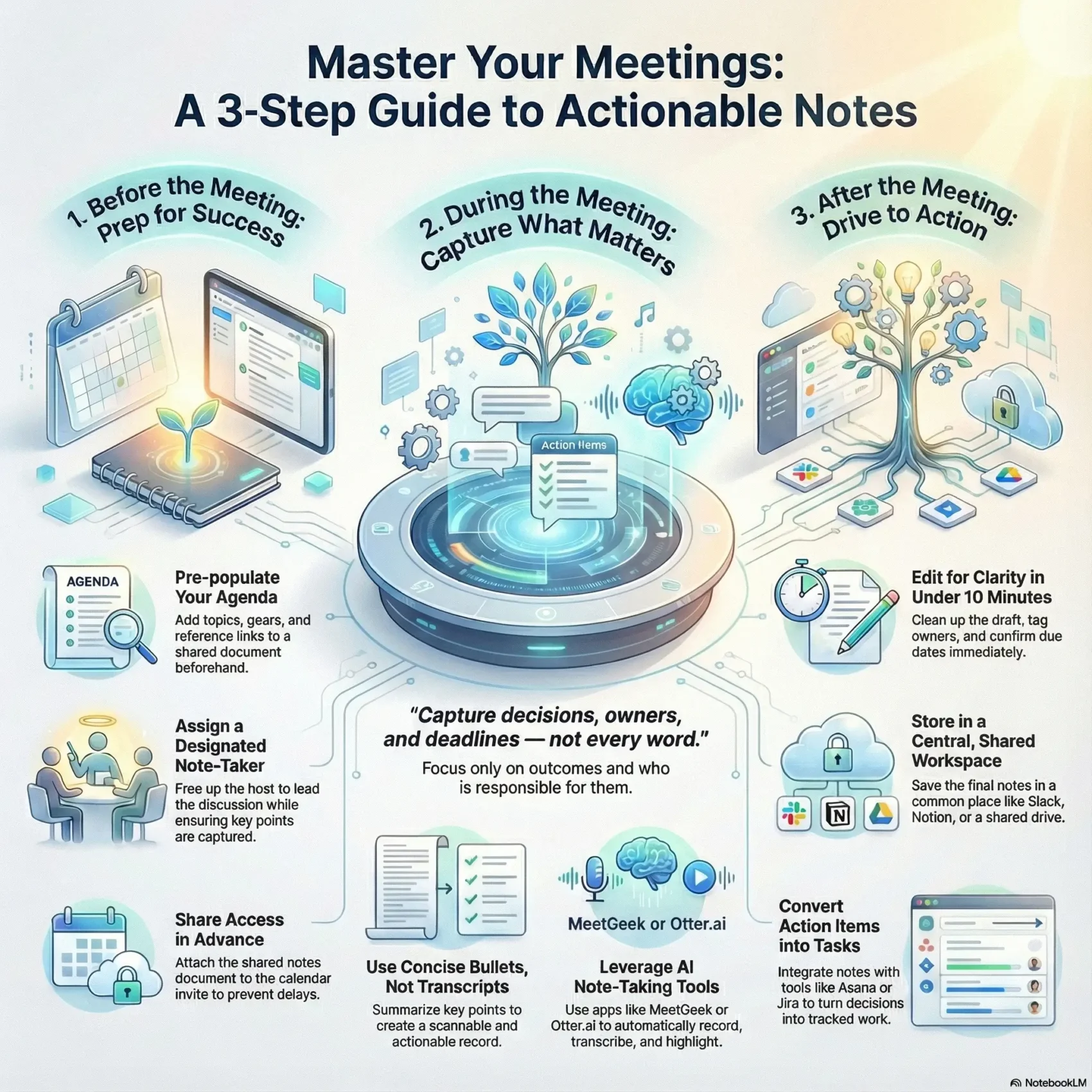
Last Updated on January 16, 2026
You need a simple way to capture what matters from every discussion. Use a clear template to record key takeaways, decisions, and action items so your team leaves with a plan. This saves time and prevents lost information.
AI tools like MeetGeek and Slack AI can record, transcribe, and organize content automatically. They keep highlights, transcripts, and summaries in one place so you spend less time writing and more time doing.
The right format gives you concise summaries with clear owners and due dates. That way teams scan points and details quickly and follow through without second-guessing what comes next.
Key Takeaways
- Use a repeatable template to capture key takeaways and action items fast.
- Keep summaries short and assign owners with due dates for accountability.
- Leverage tools like MeetGeek or Slack AI to save time and organize information.
- Focus on decisions and clear next steps to boost productivity.
- Make scanning easy by structuring points and essential details consistently.
What You’ll Achieve with Better Meeting Notes Today
When you capture outcomes and owners, every agenda item becomes a roadmap, not a loose end. Clear meeting notes summarize the agenda and decisions so teams know what to do next. That clarity turns conversations into measurable steps and reduces repeated discussion.
You’ll assign owners and deadlines so action is visible and follow-up is fast. Sharing a concise summary in Slack or email keeps people who missed the session aligned with the same information.
Better records improve cross-functional work. You’ll make sure critical details are captured once, which cuts churn and stops issues from coming up again. Over time, this consistency boosts productivity across teams.
- Turn meetings into forward momentum with clear next steps and owners.
- Documented action and deadlines make follow-through simple.
- Use your agenda as an anchor so recorded details stay focused on outcomes.
Meeting Notes vs. Meeting Minutes: What’s the Real Difference?
Not every discussion needs the same level of documentation—pick the format that fits the purpose. Use a quick summary when you want fast action and a formal record when decisions carry legal weight.
When to use informal notes vs. formal minutes
Use informal notes for internal stand-ups, project check-ins, or brainstorming. Keep them flexible. Capture outcomes, owners, and action items rather than full transcripts.
- Choose minutes for board sessions or stakeholder reviews; they serve as an official document.
- Include attendees, date, time, agenda, and signatures in formal minutes to reduce risk.
- Label the file clearly so recipients know whether this is a quick summary or an official record.
“Minutes” comes from the Latin word for a brief record — a concise account of what transpired.
Your Simple Meeting Notes Template for Instant Clarity
Start with a simple layout that makes outcomes and owners obvious at a glance. A practical template keeps the session focused and lets your team scan results fast.
Header essentials
Begin the document with a compact header: date, time, attendees, and a link to the agenda. This anchors context and saves time when someone reviews the document later.
Core sections
Use short blocks for each topic: a quick discussion summary, a separate line for key decisions, and a clear list of action items with owners and due dates.
Add-ons to capture open items
- Questions and follow-ups to track what needs more info.
- A parking lot for ideas that are off-topic but worth saving.
- Examples from past sessions to tune the level of detail.
Tip: Save this as a reusable template or one of your templates inside the shared document library. Keep the structure consistent so people know exactly where to look for key details and items each time.
Prep Before the Meeting: Set Up Your Agenda and Template
A pre-filled agenda and an open shared doc remove early friction and save time. Before people join, prepare the workspace so the session moves from start to decision without delays.
Pre-populate agenda items and objectives
Pre-populate agenda items and objectives
Open a shared canvas or doc and add the agenda topics, goals, and any reference links. Attach the file to your calendar invite so attendees have context.
Assign a designated note-taker and confirm access
Assign a designated note-taker and confirm access
Pick a person to capture key decisions and action items so the host can run the session. Confirm access rights ahead of time to avoid permission delays.
- Pre-fill the agenda with objectives so people arrive prepared.
- Open the right tools—Google Calendar attachments, Slack canvas, or an AI assistant—so you can get started instantly.
- Share access with relevant teams and plan backups for time-sensitive items.
Use lightweight, scannable templates and set clear steps and time expectations. For more on running efficient sessions, see efficient meetings.
Taking Notes in the Meeting: Capture Only What Matters
Zero in on what changes because of the discussion and who will make it happen. Keep your record short and focused on outcomes so the team can act quickly.
Listen for decisions, next steps, and owners with deadlines
Watch for action language like “Next steps…” or “Responsible for…”. When you hear it, tag the person and a due date immediately.
Use concise bullets, not transcripts
Write short bullets that summarize the key points and decisions. Avoid full transcripts—summaries are easier to scan and act on.
Clarify conflicting points in the moment
If statements conflict, ask a quick clarifying question so the record is accurate. A single follow-up can stop confusion later.
“Capture decisions, owners, and deadlines — not every word.” — Practical rule of thumb
- Focus on decisions, next steps, and who is responsible by when.
- Write short bullets so the note is readable and actionable.
- Tag the right person next to each item to drive accountability.
- Include a brief example when intent needs to be unmistakable.
- Keep an eye on time and leave space for a final follow-up step.
Proven Note-Taking Methods that Keep You Focused
Pick a capture style that matches how your team thinks. Use a linear layout when you need clear action and a visual layout when connections matter. That choice makes follow-up faster and reduces rewrite.
The Cornell Method for linear summaries
The Cornell system splits the page into three parts: a main column for the note content, a narrow column for questions and cues, and a bottom area for a brief summary.
This structure forces short, focused entries and a final recap that turns ideas into clear steps. Use the left column for prompts and the bottom for an actionable summary.
Mind mapping for visual connections and themes
Mind maps let you draw relationships between ideas and reveal patterns across meetings. Start with a central topic, branch themes, and add recurring examples to spot trends.
Standardize formatting so effective meeting notes look familiar, then switch methods when conversation shifts from tasks to exploration.
- Use Cornell when you need linear steps and clear owners.
- Use mind maps to connect scattered ideas and spot themes.
- Highlight only top points to prevent clutter and speed decisions.
Tools and AI to Speed Up and Improve Accuracy
AI helpers turn raw conversation into clear, searchable summaries in seconds.
Use modern tools to capture audio, generate transcripts, and pull automated highlights so nothing important is lost. Platforms like MeetGeek and Otter.ai can record sessions, produce text transcripts, and extract decisions and action items automatically.
Recordings, transcripts, and automated highlights
Let the tech do the heavy lifting: a reliable recording plus a transcript helps you review key information fast.
AI will also tag highlights and convert items into clear tasks, so your team spends less time rewriting and more time doing.
Share instantly across Slack, Notion, and email
Push summaries directly into Slack or Notion so teams get updates without extra steps.
Integrations save you time by moving information where work happens and reducing context switching.
Mobile and cross-platform access for hybrid teams
Pick tools that work with Zoom, Google Meet, Microsoft Teams, and mobile so remote and in-person attendees have the same access.
“Using Slack AI and huddles with automated sharing saved teams an estimated 97 minutes per week.”
- You’ll use AI recordings and transcripts so nothing gets missed.
- You’ll let tools extract highlights and action items to improve accuracy.
- You’ll share notes instantly and keep tasks flowing into your project apps.
- You’ll rely on cross-platform access so all teams stay aligned and productive.
Post-Meeting Cleanup: Turn Notes into a Shareable Summary
A quick tidy-up after the session makes decisions and tasks easy to find and follow. Spend five to ten minutes editing the capture so the final summary is clear and actionable.
Edit for clarity, tag owners, and add due dates
Clean the draft by removing side chatter and duplicates. Highlight key decisions and list action items as short bullets so owners see what to do at a glance.
Tag owners and add deadlines immediately to build accountability. Confirm any remaining steps and timelines while context is fresh.
Store in a shared workspace and link in the calendar
Save the document in a shared place like a Slack canvas or Notion so teammates find it without pinging you. Then link the file in the meeting agenda or calendar event for easy access later.
- You’ll edit for clarity in five to ten minutes.
- You’ll mark owners and due dates for each action item.
- You’ll make the final version the single source of truth for follow-up.
“A concise shared summary reduces friction and speeds execution.”
From Notes to Action: Integrate with Your Workflow
Turn decisions into tracked work the moment they happen so momentum never stalls. Push action items from your summary straight into the project systems your teams use. This makes follow-up visible and reduces duplicate entry.
Create tasks in Asana, ClickUp, or Jira from action items
Directly convert a line in your document into a task with Asana, ClickUp, or Jira integrations. Assign owners, set due dates, and link the task back to the source so context travels with the work.
Automate handoffs with integrations like Zapier
Use Zapier or native Slack integrations to move information automatically between apps. You’ll reduce manual steps and keep teams aligned by syncing status updates back into your collaboration hub.
- Convert action items into tasks in Asana, ClickUp, or Jira from your summary.
- Automate handoffs with Zapier so assignments flow instantly.
- Keep teams aligned by showing task status in real time.
- Define a simple process so every session ends with next steps as trackable work.
- Get started fast using prebuilt connectors and productivity apps.
“Standardize the step from notes to tasks so nothing falls through the cracks.”
Conclusion
Close the loop by turning key points into tasks and sharing a single source of truth.
Keep your wrap-up short and clear. Summarize decisions, assign an owner, and add due dates so work starts immediately.
Use tools like Slack AI, MeetGeek, or Otter.ai to speed capture and then push action items into Asana, ClickUp, or Jira via Zapier. This reduces rework and helps people remember what matters.
Quick reviews after the session reinforce memory and boost productivity. Use the same template and shared document each time so everyone can find the record and follow the process without friction.