Tools
Tools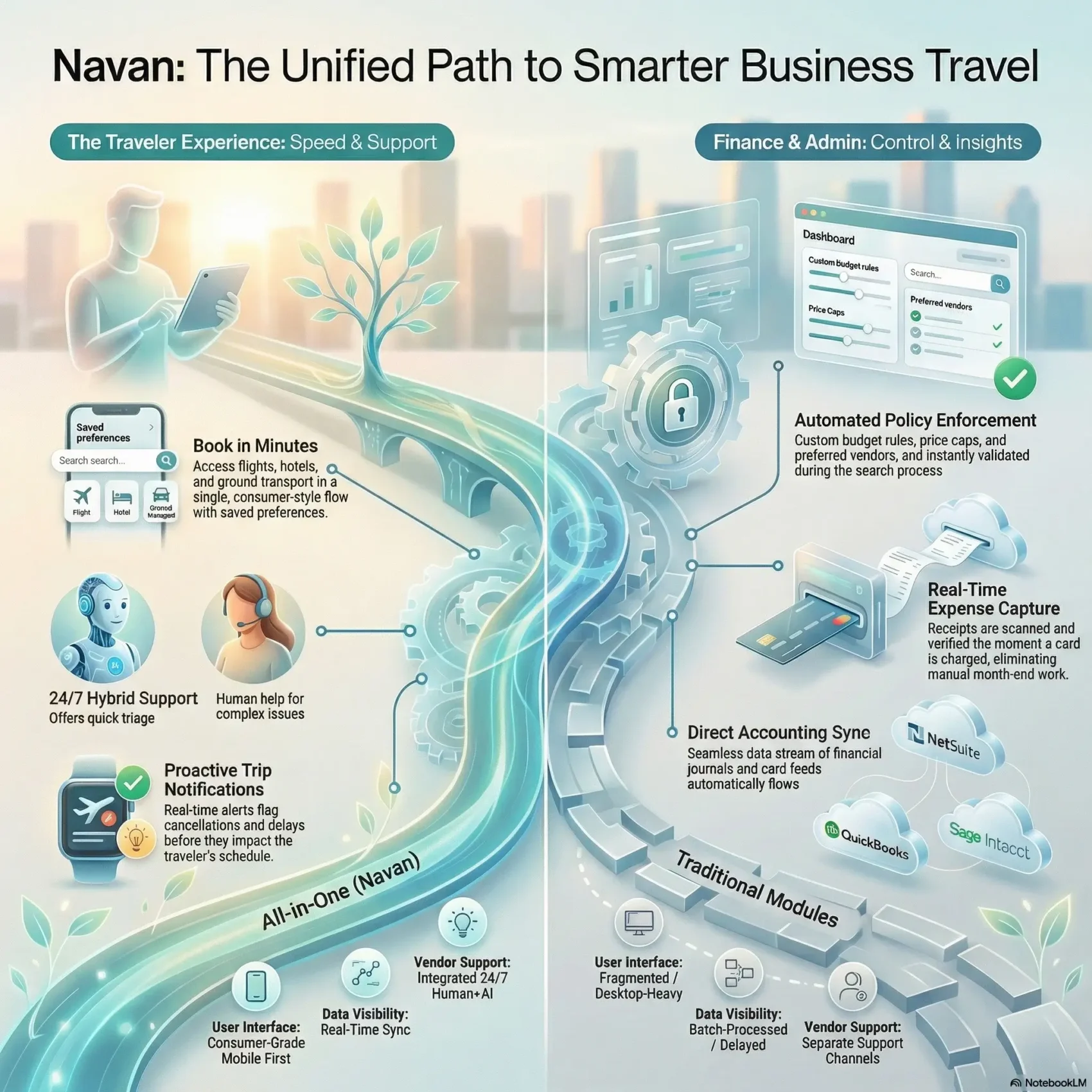
Last Updated on February 20, 2026
This short introduction shows how an all-in-one travel platform can simplify your company trips and travel expense workflows.
You’ll see how the solution blends consumer-like booking with corporate controls. Real users praise reliable uptime, 24/7 human support, and a GenAI assistant called Ava that helps with search and changes.
In one day you can search, compare, and complete booking. Automated policy checks, real-time trip notifications, and integrations with finance tools cut manual reconciliation.
We’ll also use verified navan reviews to show what works now and where the product can improve. If you want a clear picture before you commit, this guide will help you weigh the benefits for your business.
Key Takeaways
- The platform merges travel booking and expense control for easier admin work.
- Consumer-style experience makes booking fast for everyday travelers.
- Automated policies and real-time alerts improve compliance and safety.
- Integrations with finance systems speed up reconciliation and reporting.
- Verified user feedback highlights strengths and areas to watch.
- Read on to see time-to-value and how the solution fits your company.
Your At‑a‑Glance Overview of the Navan Platform
Get a fast summary of the platform’s capabilities so you can judge fit for your business travel needs.
At one place, booking, itinerary management, and expense tracking come together. You can search and book flights, hotels, and ground transport in a single flow. That unified approach reduces back-and-forth and speeds approval.
The system offers role-based user controls and clear access rules. That helps your company scale without losing oversight.
Built-in trip notifications and strong uptime keep travelers informed when plans change. Real-time policy checks and a reporting suite turn spend into actionable insight for finance teams.
- Integrations: NetSuite, QuickBooks, Sage Intacct sync accounting data.
- Support: 24/7 human help plus the Ava GenAI assistant for quick answers.
- Easy use: navan reviews highlight a consumer-like experience for corporate users.
“Centralized booking and expense management cut the manual work and keep approvals clear.”
If you’re short on time, this snapshot shows what the solution does, who benefits, and how it simplifies day-to-day travel and expense management.
See Navan in ActionUser Experience and Travel Booking: Flights, Hotels, and Cars in One Place
A single booking flow brings flights, hotels, and cars into one streamlined experience for you.
Ease of booking: You can search and compare flights, hotels, and ground options in one place. The checkout feels familiar and lets you complete booking in minutes.
Reserve flights, hotels, and ground in minutes
The process is fast for a single traveler or a group. Saved profiles and traveler preferences cut repeat entry. That makes it easy to book travel for others with minimal steps.
Global inventory and selection
The system pulls inventory from aggregators and partners so you can weigh airlines, room types, and ground providers without extra tabs. Some users note occasional differences between mobile and desktop results and rare gaps versus public search engines.
Interface and modern workflows
The interface surfaces fare rules, room amenities, and cancellation windows up front. Filters and sorting reduce clicks and keep workflows moving. Overall, the user experience emphasizes clarity and speed while still letting admins enforce policy behind the scenes.
- One place to compare options.
- Fast checkout saves you time.
- Clean interface improves ease and reduces errors.
Policy Control and Approvals: Keep Travelers Within Policy Without Friction
Policy controls should reduce guesswork and keep bookings moving. You set rules once and the platform enforces them at search and checkout. That means fewer exceptions and faster bookings for your company travel program.
Custom budget controls and automated enforcement
The system applies custom budget controls and shows what is compliant in context. Travelers see price caps, preferred vendors, and booking windows as they search. This keeps choices within policy and cuts back-and-forth later.
Easy approval flows and delegate booking for teams
Approval routing is flexible by cost, department, or seniority. You can give delegate rights to EAs or coordinators who book for a team. Approvers only see items that need review, so requests move faster through the process.
- One-pane management: adjust budgets and rules instantly across your program.
- Fewer delays: nudges and clear workflows reduce approval bottlenecks.
- Real help: support is available during checkout to resolve urgent approvals.
“More bookings are completed correctly the first time, with fewer corrections.”
Expense Management: From Real‑Time Capture to Faster Reimbursements
Capture, verify, and route expenses the moment a card is charged, keeping your books current. This keeps expense work out of inboxes and off desks.
Receipts, auto‑scan, and policy checks at purchase
You can capture receipts at the point of sale and let auto‑scan populate fields. Policy checks trigger instantly, so noncompliant items show up before you submit.
Visibility for finance and faster reimbursements
The same login links trip data and travel expense lines for context. Finance teams get transaction‑level visibility and export‑ready ledgers synced to NetSuite, QuickBooks, or Sage Intacct.
- Real‑time validation: fewer manual corrections and a shorter time to reimbursement.
- Easy use: submit from mobile between meetings or review on desktop with the same fields and statuses.
- Support team: available to help, though some customers report occasional auto‑fill, tax, or FX issues that need manual fixes.
“Fewer manual touches means cleaner books at month‑end.”
Rewards points and negotiated rates also fold into expense analytics, reinforcing savings and simplifying the reconciliation process.
Insights, Reporting, and Integrations Finance Teams Rely On
Actionable dashboards help you move from high-level program KPIs to the transaction details that tell the full story.
The platform unifies travel and expense data in one place so a finance manager can click from program overviews into individual charges. This gives real-time visibility into trends like fare inflation or hotel utilization.
Actionable reporting and real‑time dashboards
Live dashboards surface spend by traveler, department, or project. You can spot rising costs early and change budgets or policies mid-quarter.
Automated policy signals link booking behavior to spend outcomes. That makes compliance measurable and gives you a process to nudge better choices.
Accounting integrations: NetSuite, QuickBooks, Sage Intacct
The solution posts journals and card feeds to NetSuite, QuickBooks, and Sage Intacct without manual rework. That reduces month‑end cleanup and speeds reconciliation.
- One place for travel and expense data with drill-down capability.
- Real-time reporting to act on city-level fare rises or vendor usage.
- Integrations that send exports and journals directly into your GL.
Streamline Your Expenses“Real-time visibility and automated enforcement let finance teams run a tighter program.”

Support, Reliability, and Traveler Care When Plans Change
When travel plans shift, quick and clear help keeps your trip moving. The platform pairs 24/7 human help with proactive alerts so you don’t learn about a delay at the airport.
Around the clock, you can reach a live support team by chat or phone. Proactive trip notifications flag cancellations and delays before they become a bigger problem.
Ava, the GenAI assistant, answers fast questions and triages routine issues. If a case needs hands-on help, the navan team can step in to hold with airlines and rebook flights for you.
Reliable uptime means the platform is available when you need it most, so urgent tasks don’t wait. If access is interrupted, multiple escalation paths help you restore account access and keep travel moving.
- Live support any time, with proactive alerts for delays and cancellations.
- Ava handles quick triage while agents manage complex rebookings.
- Chat, phone, and agent handoffs for faster escalation and restored access.
“Customers praise quick resolutions from knowledgeable agents, though some note delays reaching a human or occasional account suspensions.”
The goal is a consistent customer service experience: quick help, clear next steps, and minimal lost time so your traveler stays on track from booking to approval and beyond.
Navan Review: What Real Users Say About Booking, Service, and Ease of Use
Real users share why the platform feels fast for everyday travel and where it can still trip up.
What customers praise
Many customers praise the intuitive interface and a streamlined booking flow that speeds routine tasks.
Chat handles most questions quickly and agents often step in to manage holds or secure refunds. That combination makes the experience reliable for everyday travelers.
Common critical points
Some users report app bugs, slow pages, and inconsistent mobile/desktop results that create frustration during urgent bookings.
Inventory gaps versus public search and occasional account suspensions are flagged as access-related issues to watch for.
EA and admin perspective
Executive assistants and admins value having one place to manage multiple travelers, simplified approvals, and duty‑of‑care dashboards.
For your company, a short pilot can confirm if the service, performance, and support meet your program needs.
- Intuitive interface and fast navigation for common tasks.
- Chat and agents resolve many problems, but reaching a human can vary.
- Performance and consistency issues are the main drawbacks to evaluate.
“A strong everyday experience for many, with specific issues—performance, access, and consistency—that your company should evaluate in a pilot.”
For related help desk comparisons, see a concise help desk comparison.
How Navan Compares to SAP Concur, Amex GBT Egencia, and CTM
Choosing between a unified travel and expense approach or separate modules can change how your team works daily.
The G2 Grid for Spring 2026 ranks this all-in-one option highly for combining booking and expense in one stack. That matters if you want fewer integrations and faster time to value.
All‑in‑one travel and expense vs. separate modules
If your company wants consolidation, the unified stack folds travel booking, expense, and reporting into a single flow.
This reduces vendor management and simplifies deployment for corporate travel programs.
Mobile‑first usability, real‑time data, and 24/7 human support
Mobile-first design and a consumer-grade interface make booking travel and approvals faster for everyday users.
Real-time data gives instant insight into program performance, so you can react to spend trends immediately.
- Support: 24/7 human help adds a safety net for after-hours disruptions.
- Admins and EAs: praise automated compliance and a familiar interface that cuts training time.
- Integrations: a unified solution lowers integration overhead for corporate travel teams.
Explore the All-in-One Solution“Focus on interface, support, and data freshness — not just feature checklists on paper.”
Savings, Compliance, and Program Management ROI
A clear mix of policy, preferred rates, and rewards makes it easier to lock in savings every time you book. This section explains how negotiated rates and program design turn everyday choices into measurable wins for your business.

Negotiated rates, Rewards, and policy‑driven savings
You can capture negotiated rates and loyalty points automatically at checkout. Preferred vendors and rate caps steer travelers toward lower fares and hotels while keeping selections within policy.
Points and program credits add up quickly when policy nudges encourage earlier purchases and preferred partners.
Reducing manual work and improving time to approval
Cleaner submissions cut back on corrections and speed approvals. Requests route with the right context so approvers say “yes” faster and your team spends less time on rework.
- Less manual work: fewer exceptions and cleaner travel expense lines.
- Faster time: approvals move quicker with contextual routing and dashboards.
- Better management: reporting links booking to spend so your company can show ROI.
“End to end, you get tighter controls, better compliance, and clearer travel expense outcomes for quarterly business reviews.”
Conclusion
The bottom line: you can centralize booking, policy enforcement, and travel expense capture to free your team for higher‑value work.
For business travel, the platform delivers a fast booking travel flow and clear policy nudges that help travelers choose compliant options. The navan team adds 24/7 support and dashboards that speed approvals and month‑end close.
Users praise the ease of use and consolidated management that helps EAs and admins. Known items to test in a short pilot include performance, access controls, and inventory consistency so you can measure time saved and traveler satisfaction.
If you’re ready, start with a trial to track approval speed, compliance, and cost outcomes. With the right setup, using navan can give your company measurable wins on time, control, and traveler experience within a quarter.
Start Your Free Trial