Tools
Tools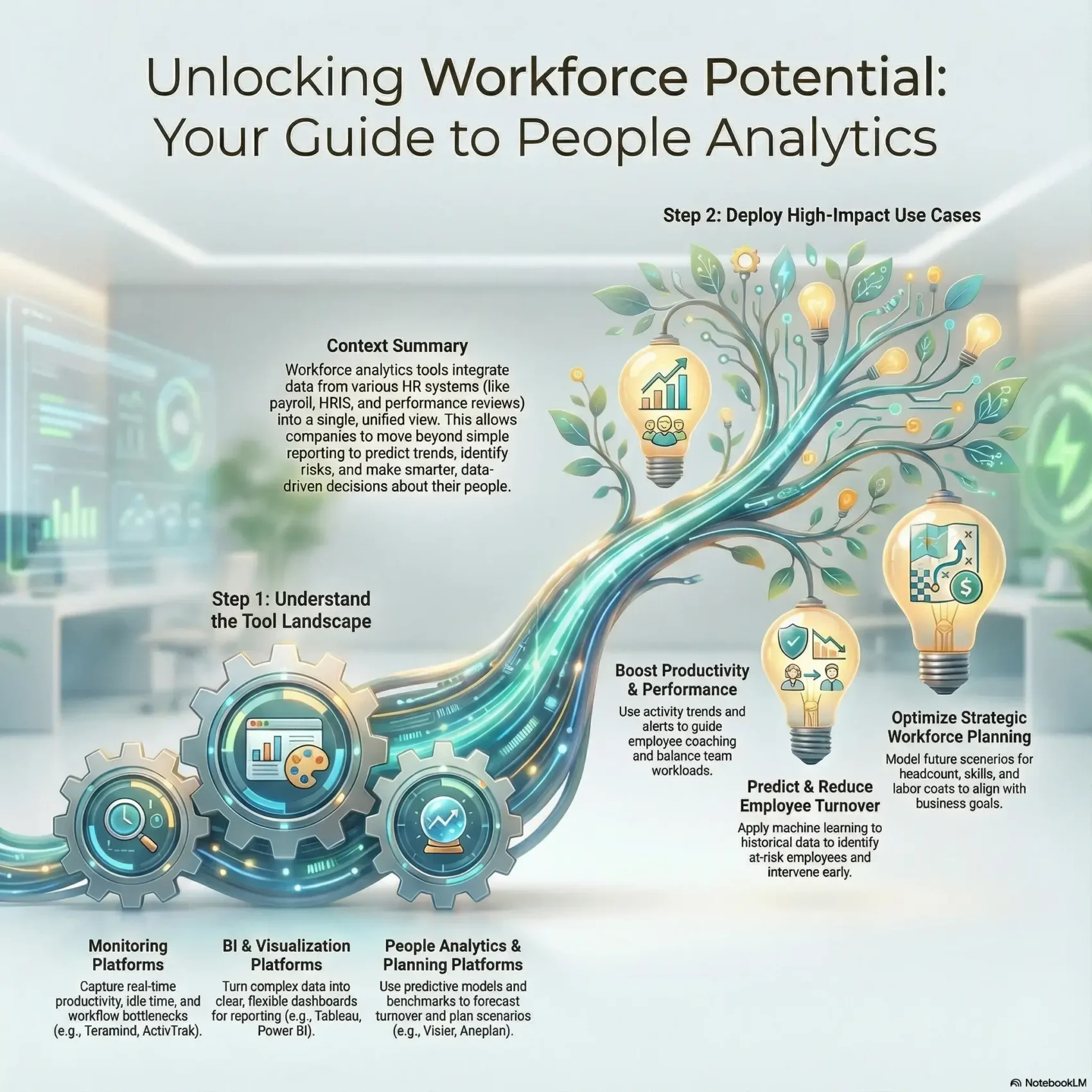
Last Updated on January 5, 2026
You need clear data to turn HR questions into measurable decisions. This guide shows how modern systems collect and shape data so you can act fast. You’ll see how analytics and analytics software help you measure employee performance and employee productivity with practical metrics.
Teramind and other leaders bring real-time activity, idle-time tracking, and predictive cues that point to early turnover risk. When you connect payroll, HRIS, and performance feeds, you create a single view that yields actionable insights. That view helps you drive better business outcomes and make routine decisions with confidence.
Across this guide, you’ll learn which categories of solutions match your maturity, which features to pilot first, and which roles to involve so your rollout delivers quick wins. By the end, you’ll know how to turn weekly data into progress you can measure.
Key Takeaways
- Link your HR systems to create one data source for faster decisions.
- Prioritize dashboards, integrations, alerts, and privacy for early wins.
- Use predictive signals to spot turnover and protect productivity.
- Match monitoring, BI, and people analytics to your team’s goals.
- Engage HR, IT, ops, and finance from the start for accuracy.
Why workforce analytics matters now for HR and management in the United States
Right now, connecting core HRIS, payroll, recruitment, performance, and time feeds gives you a single view of your people and operations.
That combined data helps you respond faster to tight labor markets, hybrid work shifts, and widening skills gaps. You’ll reduce manual reporting and free your teams for higher-value analysis.
Clear metrics improve risk management, from compliance exposure to labor shortages that affect margin. They also strengthen hiring funnels: measure time-to-fill, quality of hire, and onboarding speed so you can act on real signals.
- Align workforce data to current U.S. trends for faster, smarter HR action.
- Cut overhead by integrating systems so your teams focus on results.
- Use consistent metrics to boost retention, productivity, and performance.
Start with practical dashboards and executive sponsorship, then evolve toward predictive insights as your data foundation matures. That way, your reports tie directly to margin, hiring outcomes, and distributed team visibility.
Understanding the workforce analytics software landscape today
Start by mapping the four solution categories so you can pick a stack that fits your data maturity. Each category serves a specific role in turning raw signals into clear, timely metrics.
Core categories: monitoring, BI/visualization, people analytics, and planning
Monitoring platforms like Teramind and ActivTrak capture active vs. idle activity and workflow bottlenecks. BI and visualization platforms such as Tableau and Power BI power flexible dashboards and fast data preparation.
People analytics platforms offer pre-built metrics and predictive turnover models. Planning platforms (Anaplan, IBM) enable scenario modeling and KPI scorecards for connected planning.
From descriptive dashboards to predictive and prescriptive analysis
Your maturity curve moves from descriptive dashboards to diagnostic drill-downs, then predictive risk flags and prescriptive models for planning.
Data sources you’ll connect
Common feeds include HRIS, payroll, performance systems, time and attendance, and activity logs. Staging that data for BI while feeding curated metrics into a people platform is a common architecture pattern.
Trends shaping 2025
- Machine learning risk models for attrition and smarter forecasting.
- Expanded visibility for remote and hybrid work that delivers faster actionable insights.
- Use of accelerators to shorten time-to-value and unify data across systems.
“Blend monitoring, BI, and planning so you get both operational visibility and strategic scenarios.”
How to choose analytics tools that fit your teams, data, and outcomes
Start with the decisions you must make. Map those decisions to the specific information and reports you need. That makes it easier to compare vendors on real value instead of features alone.
Key capabilities checklist
- Integrations: connectors to HRIS, payroll, ticketing, and project systems for clean data flows.
- Dashboards & reporting: customizable views, scheduled exports, and API access for downstream analysis.
- Scalability: support for growing users, larger datasets, and faster query times as your company expands.
Privacy-first design
Choose platforms with role-based access, field-level redaction, and full audit trails. Verify data residency and compliance for U.S. rules.
Total cost and time-to-value
Balance out-of-the-box templates against custom analysis needs. Quick templates speed time-to-value, while custom models support deeper planning and performance questions.
“Run a short pilot with scored use cases — turnover risk, productivity trends, and executive reporting — to validate fit.”
Top workforce analytics tools roundup: strengths, use cases, and standout capabilities
Here’s a quick tour of leading platforms so you can match features to outcomes. Each entry notes core strengths, typical use cases, and why you might pick it for faster reporting or deeper models.
Teramind
Real-time productivity and active vs. idle tracking help you spot bottlenecks and insider risk. UBA, OCR, and predictive turnover signals make it strong for security-conscious teams focused on employee productivity.
Tableau & Microsoft Power BI
Tableau delivers rich visuals and Accelerators for rapid dashboards with broad integrations. Power BI gives accessible reporting and deep Excel synergy so analysts adopt fast.
Visier, ActivTrak, and HCM platforms
Visier ships pre-built people metrics and benchmarking for planning. ActivTrak surfaces digital work patterns and burnout signals. Oracle, SAP, and ADP combine DEI, headcount movement, and compensation trend reporting inside core HCM flows.
- Pick monitoring platforms for operational visibility and security.
- Choose BI for dashboarding and broad reporting needs.
- Use planning platforms for scenario-driven workforce planning.
Comparing platforms by what matters most to you
Start your platform comparison by checking how each system converts multiple feeds into a single, trusted view. That first pass separates vendors that promise speed from those that actually deliver consistent metrics you can act on.
Dashboards and reporting: clarity, customization, and stakeholder sharing
Grade dashboards on clarity and how easy they make decisions for HR, finance, and line managers. Look for personalization, scheduled exports, and embedded views that keep context intact.
Test speed: build a KPI like headcount or attrition and filter by region, department, and manager. Note how long it takes to get a trustworthy view.
Data integration: APIs, HRIS connectors, and “data multiple” sources harmonization
Compare native HRIS connectors, APIs, and file loaders. Prioritize platforms that harmonize a data multiple of sources into validated, repeatable metrics.
- Check data lineage, refresh cadence, and error handling so leaders trust Monday reports.
- Evaluate governance that protects PII while enabling broad access to aggregated data.
- Factor in accelerators, semantic layers, and APIs that shorten build time and extend capability.
“Pick the platform that matches how you share insights and grow your reporting needs.”
High-impact use cases you can deploy this quarter
You can run three practical use cases in weeks that link data to immediate business outcomes. Start small, prove value, then scale with the platform and models your team trusts.
Boost employee productivity and performance with trend analysis and alerts
Stand up trend analysis that uses activity signals and benchmarks to guide coaching and balance workloads. Teramind flags workflow bottlenecks and active vs. idle time, while ActivTrak surfaces burnout signals.
Set automated alerts for drops in productivity or spikes in overtime. Use short sprints (two to four weeks) to move from data prep to manager training.
Predict and reduce employee turnover with machine learning on historical data
Launch a pilot attrition model that scores turnover risk from past records and HR feeds. Visier and SAP SuccessFactors already offer interpretable models you can adopt.
Tie each flagged case to a retention playbook so managers can act. Start with simple, explainable drivers and add machine learning gradually.
Strategic workforce planning: headcount, skills, and labor cost optimization
Build a quarterly planning scenario for headcount, skills mix, and labor cost. Anaplan and IBM Planning Analytics enable scenario modeling and AI forecasting for alignment with sales and ops.
Present targeted dashboards that track productivity, utilization, and compensation trends from ADP DataCloud. Tie each use case to a measurable outcome, like lower backfill cost or faster time-to-productivity.
“Schedule short sprints, document results, and iterate—small wins compound into measurable business outcomes.”
- Run sprints to deliver a use case in 2–4 weeks.
- Score and act on employee turnover risk with interpretable models.
- Measure gains in employee productivity and performance against baselines.
- Document results and refine thresholds with stakeholder feedback.
Security, privacy, and governance in workforce analytics tools
A good security posture for people data combines policy, tech, and clear communication. You should protect sensitive employee data with layered controls that limit exposure and support fast response.
Protecting sensitive employee data:
- Use role-based access and entitlements so only authorized roles see PII.
- Apply automated redaction for screenshots and logs to remove names and identifiers.
- Deploy smart rules and behavioral detection to flag insider risks while reducing noise.
- Integrate with SOAR or CEF feeds to speed incident response and preserve audit trails.
Balancing monitoring with privacy and ethics
Write clear policies that explain why you monitor and how data supports coaching and engagement, not surveillance.
Run regular access reviews, audit logs, and bias checks. Maintain disaster recovery and business continuity plans so critical data and dashboards stay available during outages.
“Transparent controls and regular reviews build trust and make security sustainable.”
For a practical guide to predictive risk modeling and privacy-aware deployment, see predictive analytics for employee risk.
Implementing your platform: from pilot to organization-wide adoption
Begin your rollout by cleaning source records and mapping every field to the KPIs leaders use daily. That first step builds trust in reports and makes later automation reliable.
Data readiness: cleaning, mapping, and aligning KPIs to business outcomes
Start with field-level cleanup: standardize job codes, departments, and dates so your metrics match HR and payroll systems.
Harmonize your data multiple sources—HRIS, payroll, performance, and activity logs—into a single model to cut reconciliation time.
Change management: stakeholder buy-in, training, and role-based access
Run a 60–90 day pilot focused on two or three use cases and document success metrics, assumptions, and an enablement plan.
Design role-based access so executives, HRBPs, and managers see appropriate views while sensitive employee data stays protected.
Iterate for impact: automate reporting and refine predictive models over time
Automate weekly scorecards and monthly packs with SLAs for refresh time. Use Power BI or Tableau for rapid reporting once data is clean.
Expand to predictive planning with IBM Planning Analytics or Anaplan and add pre-built metrics from Visier. Teramind can power alerts and detailed reporting as you scale.
Pro tip: schedule regular office hours and quick training paths so people adopt new dashboards without analyst bottlenecks.
- Codify governance: data dictionaries, metric definitions, and change logs.
- Iterate dashboards and models from feedback and trusted baseline metrics.
- Measure gains in employee productivity and employee performance with defined KPIs and clear reporting.
Workforce analytics tools: turn workforce data into decisions that drive outcomes
Turn raw people signals into clear action. Use data to decide who to hire, where to retain talent, and how to staff teams so your business outcomes improve.
Combine predictive employee turnover models from Visier or SAP SuccessFactors with ADP DataCloud trends to flag roles at risk. Then pair those signals with targeted programs to cut replacement costs and protect critical skills.
Share one trusted view. Tableau, Power BI, or Qlik dashboards align leaders around the same numbers so decisions happen faster and debates about reports fade.
- Plan: link scenario planning in Anaplan or IBM Planning Analytics to hiring and budgets.
- Act: translate insights into coaching, schedule shifts, and workload moves to lift performance and productivity.
- Govern: use Oracle Fusion HCM Analytics for data storytelling and DEI monitoring while enforcing privacy and ethics.
“Make quarterly reviews the rhythm where data steers strategy before small issues become big problems.”
Next steps: expand use cases across recruiting, DEI, and skills-based planning so your company turns reporting into repeatable, measurable outcomes.
Conclusion
Wrap up your rollout with a short roadmap that ties pilots to clear business metrics.
Start small: pick one pilot, set measurable targets, and document the steps you used. Use that example to standardize metrics so managers share the same view of employee progress.
Focus on compounding wins. Small gains in productivity and performance stack over time and speed hiring outcomes for the whole company.
Commit to continuous improvement: review trends, refine models, and expand the scope as your team gains confidence. Include HR, finance, IT, and leaders so insights turn into action across people and organizations.
Keep expectations realistic: this is a journey. Start simple, learn fast, and scale what works.