Tools
Tools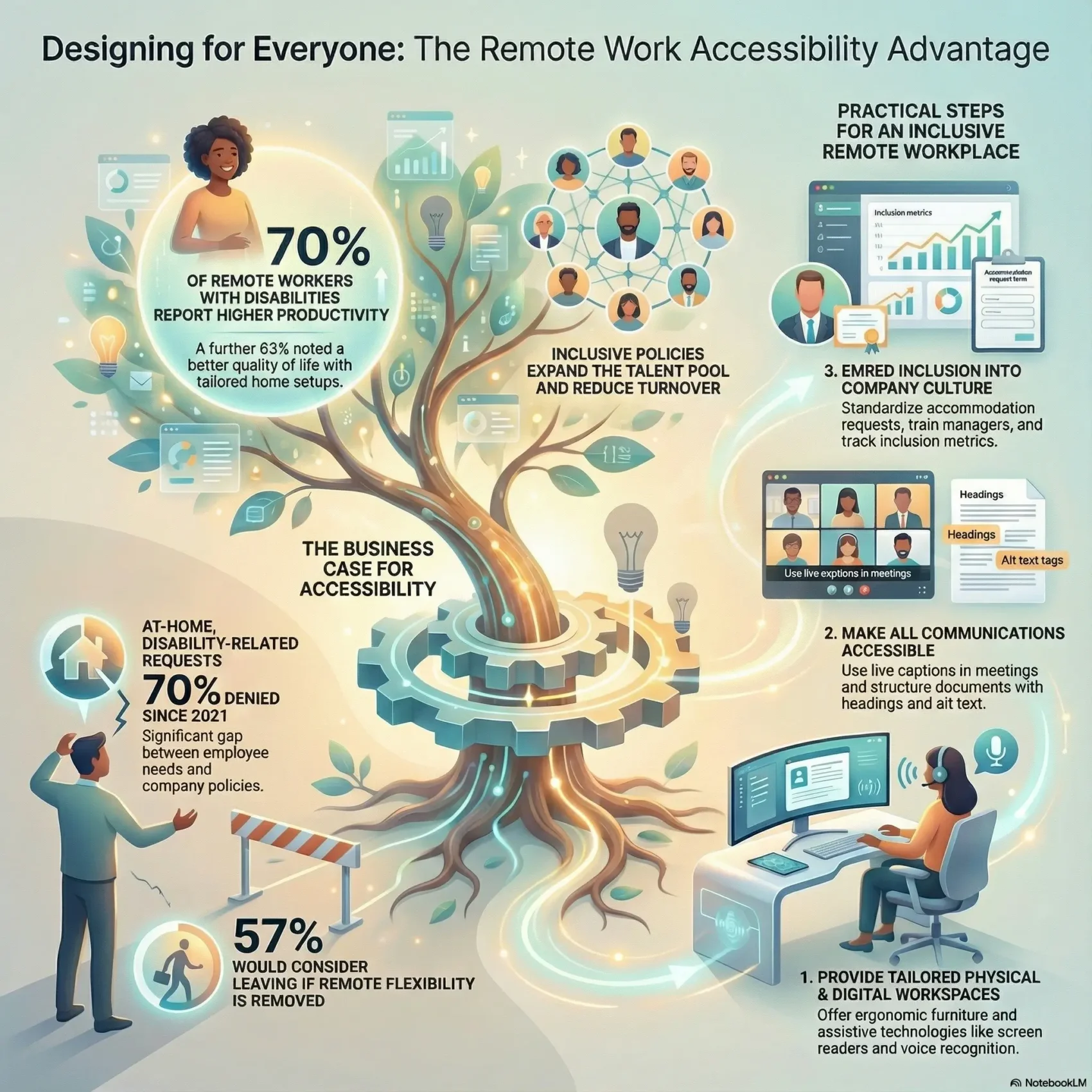
Last Updated on August 9, 2026
Designing inclusive ways for your team helps everyone do better. You’ll learn what true remote work accessibility means and why centering people with diverse abilities improves daily performance and morale.
A National Organization on Disability study found that among people with disabilities who worked remotely during the pandemic, 70% reported higher productivity and 63% noted better quality of life. Those gains came from tailored home setups, like wheelchair-friendly desks and ergonomic tools.
When companies make inclusion a design principle, teams get flexible environments that scale. You’ll see how simple changes — from captions to adjustable desks — remove office barriers and let employees focus.
If you’re building or updating your policy, this hybrid work policy template gives you a practical starting point for putting these principles into writing.
Key Takeaways
- Inclusive design boosts productivity and quality of life for many employees.
- Personalized home setups reduce daily friction and improve focus.
- Designing for diverse needs benefits all team members, not just a few.
- Simple tools like captions and ergonomic gear make inclusion practical.
- Accessibility aligned with business goals grows engagement and opportunity.
Why Remote Work Accessibility Matters Today—and How It Lifts Everyone
A fivefold jump in at-home arrangements since 2019 changed expectations about inclusion and employment. Hybrid and remote setups are now the default at most companies rather than the exception, which makes accessibility a day-one design question instead of an afterthought.
From pandemic shift to lasting inclusion: what the data shows
Usage of remote arrangements is far higher than before the pandemic. Surveys report 65% of employees want to work fully from home, and 35% feel more productive when they do.
Still, Bloomberg Law notes employers denied roughly 70% of at‑home, disability-related requests since 2021. That gap shows policy lags behind real need for people with disabilities.
The business case: productivity, retention, and broader talent access
Designing inclusive options pays off. When companies treat flexible setups as an accessibility tool, they boost productivity, cut turnover, and widen the talent pool.
- Improve productivity: more people report better focus and life balance.
- Reduce turnover: 57% would consider leaving if flexibility is removed.
- Expand hiring: disability employment trackers show gains when organizations benchmark inclusion.
- Enhance career paths: accessible models help people with disabilities grow long-term.
“Access to Good Jobs for All.”
How to Design Accessible Remote Work Experiences That Meet Diverse Needs
Designing inclusive setups starts with a home layout that suits how people move, rest, and focus during the day. Begin by fitting furniture and tech to bodies and daily tasks so employees can perform without extra strain.
Set up a tailored home workspace that supports comfort and mobility
Choose lower desks for wheelchair clearance, adjustable chairs with lumbar support, and clear floor paths. Keep frequently used tools within arm’s reach to reduce repetitive strain while working home.
Leverage assistive technologies and built‑in accessibility tools
Match software to needs: screen readers, magnifiers, high-contrast themes, and speech recognition like Dragon NaturallySpeaking help people control their screens and stay efficient.
Make meetings inclusive with captions, transcripts, and keyboard navigation
Use closed captions and live transcription in Zoom or Microsoft Teams, enable keyboard shortcuts, and share transcripts after calls so everyone can follow and contribute.
Create accessible documents, emails, links, and training materials
Send materials before sessions, keep emails text-forward, use descriptive link text, and structure documents with headings and alt text so screen readers parse them easily.
Choose software with strong accessibility features across your stack
Prioritize vendors that publish conformance details, support screen readers, offer scalable UI, and include captioning and keyboard support.
Invest in skills: accessibility training and trusted resources
Train teams with W3C WAI tutorials and checklists. Standardize meeting norms and assign ownership so accommodations are routine, not exceptions.
“Good design removes barriers and helps every employee do their best.”
From Policy to Practice: Embedding Accessibility, Accommodations, and Inclusive Culture
Turn policy into predictable practice by making accommodations routine, funded, and visible across teams. Start with simple rules that clarify who approves requests, what documentation is needed, and which budgets cover assistive tech or ergonomic furniture.
Ask for and provide reasonable accommodations in hybrid roles
Make asking easy. Offer standard request forms, a clear timeline, and a single contact in HR so employees know how to proceed.
Fund equipment or captioning tools when needed. Many employers already provide financial help for chairs, software, or home modifications when asked.
Know your rights and align company policies with disability goals
Train hiring managers on legal protections and company standards. Tie HR policy to measurable disability employment goals so decisions match intent.
Use the neurodiversity inclusion resource to shape training, mentoring, and opportunity pathways, and see these diversity and inclusion trends for the bigger policy picture.
Measure what matters: track inclusion, hiring, and career growth
- Track hires, promotions, retention, and engagement for workers with disabilities.
- Publish yearly trends so leaders can course-correct with evidence.
- Centralize budgets and criteria so practices scale across offices and home options.
“Access to Good Jobs for All.”
Conclusion
You’ve seen how thoughtful design turns flexible setups into lasting gains. Inclusive choices helped 70% of people with disabilities raise productivity and 63% report better quality of life. Many employees prefer to keep options that support balance after the pandemic.
Move from intent to action. Equip teams with the right tools, set meeting norms that boost communication, and craft content that serves everyone from the start. Update policies, measure employment outcomes, and train managers so accommodations are routine, not rare.
When companies make inclusion part of culture, you open access to more opportunity, protect careers, and deliver benefits that endure beyond any single year.