ShiftLink reports 99.9% uptime and millions of annual notifications, which helps healthcare and social services cut overtime and agency costs. Workeen AI adds an AI solver for auto-scheduling, real-time updates, and non-disruptive rescheduling to speed accurate roster creation.
Moving from manual planning to an AI-guided approach reduces admin work and tightens the link between staffing levels and on-the-ground needs. You reclaim hours each week through automated callouts and instant notifications, so teams spend more time on high-value work.
Cloud delivery keeps tools current and light on IT, while round-the-clock support lowers operational risk. In this guide, you’ll get a buyer-focused view of how these capabilities drive ROI—lower overtime, fewer agency hours, and better resource use—without sacrificing fairness or experience.
Key Takeaways
- You’ll learn how smarter planning reduces guesswork and aligns hours to demand.
- Automation cuts admin time and improves workforce efficiency.
- High uptime and 24/7 support lower operational risk for your business.
- AI solvers speed accurate schedule creation and non-disruptive updates.
- Expect ROI from less overtime and improved resource utilization.
What Intelligent Shift Scheduling Means for Your Business Today
Manual rosters cost you hours each week and quietly drive up payroll costs. Small changes often become big headaches as managers call around to cover missing shifts.
Why manual employee scheduling drains time and increases costs
When you build employee schedules by hand, one absence can force hours of rework. Managers chase availability, match qualifications, and retry combinations until coverage looks right.
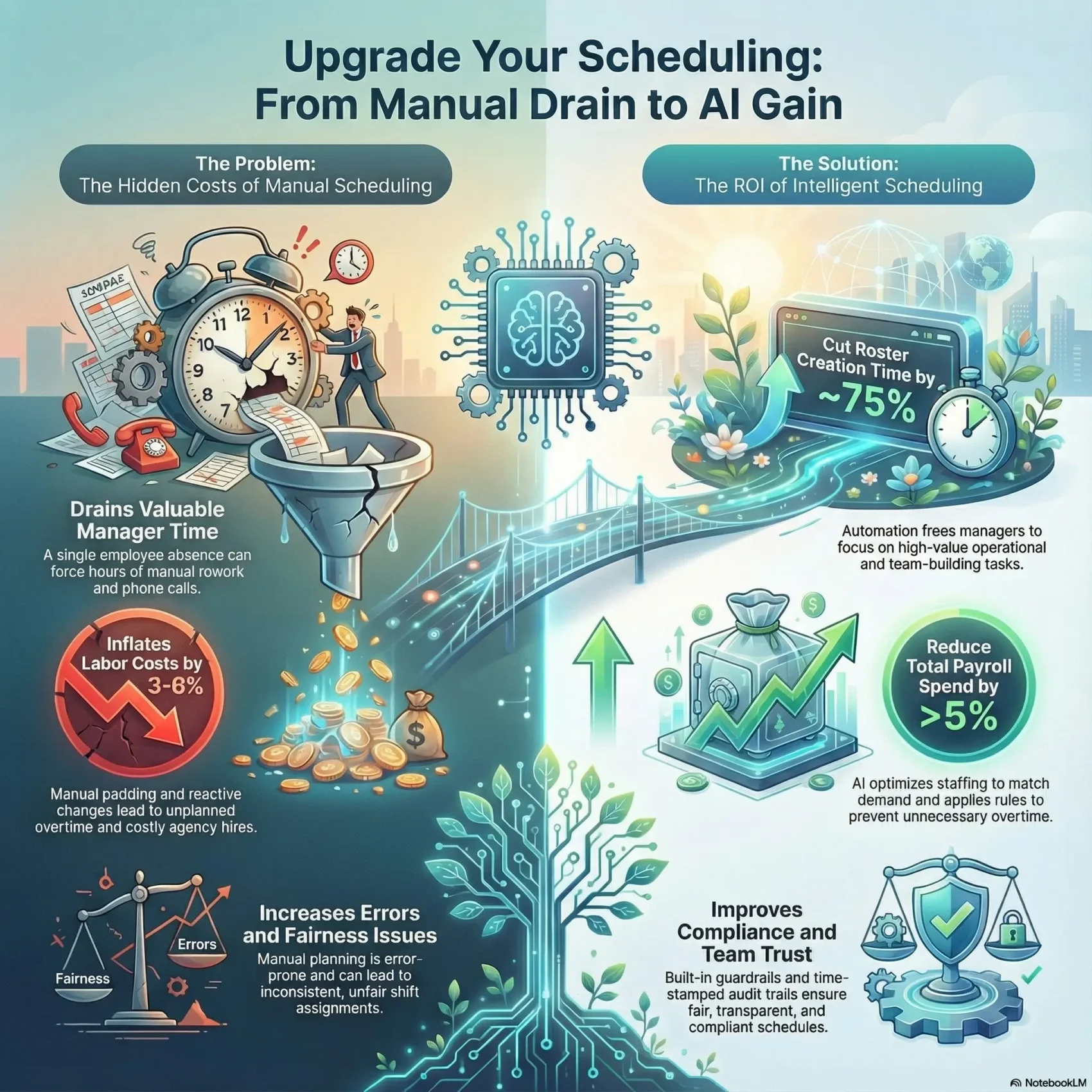
Those delays lead to unplanned overtime and more agency hires. Workeen AI notes that manual planning is error-prone and time-consuming when any change requires full rearrangement.
How AI-driven scheduling improves coverage, fairness, and efficiency
AI-generated rosters react fast to disruptions, placing qualified staff where they’re needed and cutting overtime. Real-time adjustments keep coverage steady without manual edits.
ShiftLink automates callouts so employees get instant updates and time-stamped records that strengthen fairness and transparency.
- Reduce time spent rebuilding rosters after one absence.
- Cut overtime and agency costs with algorithmic checks.
- Keep staff informed instantly and preserve trust with audit trails.
Buyer’s Guide at a Glance: How to Evaluate Scheduling Software
Start by defining what you truly need. Compare core capabilities that fix real problems to add-ons that look nice but add cost. This helps your purchasing team spend wisely and avoid feature bloat.
Must-have capabilities vs. nice-to-have features
Look for a clear split between essentials and extras. Essentials include auto-scheduling, real-time adjustments, audit trails, and permissions that simplify management.
- Need-to-have: auto-scheduling, real-time updates, time-stamped records.
- Nice-to-have: advanced analytics, branded mobile apps, marketplace integrations.
- Tip: prioritize tools that reduce rework and overtime.
Scalability, uptime, and round-the-clock support you can rely on
Confirm vendor reliability with hard metrics. For example, ShiftLink publishes 99.9% uptime, millions of annual notifications, and 24/7/365 support with low ticket volume.
“Choose vendors with pay-as-you-go SaaS options, automatic upgrades, and proven multi-device access.”
Also verify scalability so the software grows with your business and keeps your team productive without painful migrations.
Core Features to Look For in Scheduling Software
The right platform balances open shifts, fairness, and coverage so managers can focus on operations. Choose features that minimize manual work while keeping employee routines stable.
Auto-scheduling and real-time responsiveness speed up roster creation. Workeen AI builds a complete shift plan under your rules, qualifications, and preferences with minimal edits. Real-time scheduling reacts to call-offs and late changes by rebalancing coverage automatically.
Non-disruptive rescheduling keeps most assignments intact. The goal is to make the smallest set of edits that fix conflicts so an employee’s routine is preserved and morale stays high.
Multi-site, multi-role support for 24/7 operations
For businesses that span locations, look for a system that posts multi-vacancy shifts in seconds and gives equal callout opportunities across sites and roles. ShiftLink supports long-term schedules by location and department, which reduces setup time and improves visibility.
- You’ll want auto-scheduling that follows your rules and qualifications.
- Real-time scheduling should absorb call-offs while keeping coverage intact.
- Bulk posting of open shifts with fair awarding logic speeds fill rates.
- Built-in collaboration and intelligent alerts prevent overtime or gaps before a schedule is awarded.
Compliance, Overtime Control, and Fairness by Design
Protecting your people and payroll starts with built-in rules that stop illegal or unsafe assignments before they happen. These guardrails make compliance part of daily operations so you don’t scramble when a gap appears.
Guardrails for laws, certifications, and overtime limits
Automated checks prevent assigning unqualified staff or breaching labor limits. ShiftLink and Workeen AI apply rules for certifications, rest periods, and local labor requirements so managers approve changes with confidence.
Time-stamped records, audit trails, and equitable callouts
Every callout and award gets a time-stamped record so you can show who was offered work and when. That data helps resolve questions quickly and supports regulatory reviews.
- You’ll use guardrails to block unqualified assignments and protect against labor violations.
- Automated alerts flag overtime risks before a change is finalized.
- Historical data boosts fill rates and treats employees consistently.
- Clear management controls balance speed with oversight for better people management.
Fair, transparent callouts build trust with your staff and reduce grievances. For context on broader HR trends, see HR trends that influence how you set these rules.
Team Communication, Alerts, and Mobile App Experience
Your team responds better when alerts arrive where they already live — phones and inboxes. Fast delivery of updates keeps everyone informed and reduces last-minute confusion.
Instant notifications via app, email, and SMS
ShiftLink sends prompt alerts by app, email, and SMS so open shifts and schedule changes reach your staff immediately. Real-time notifications improve response rates and lower no-shows.
Team communication that reduces chaos
In-app chat centralizes replies and avoids fragmented side channels. That keeps managers and staff aligned and makes it easier for an employee to confirm availability.
- You’ll reach everyone fast with instant app, email, and SMS alerts so updates don’t get missed.
- A purpose-built scheduling app for iOS and Android gives field teams access without a laptop.
- Centralized communication shortens the loop between posting needs and confirming coverage, smoothing daily work.
iOS and Android access for staff on the go
Workeen AI provides mobile access so employees can check upcoming shifts, acknowledge changes, and confirm availability from their phones. That mobility keeps your work moving and your team connected.
Data, Insights, and Workforce Management KPIs
Good metrics change how you plan and run your teams. Start with clear measures so managers spot waste and make smarter choices fast.
From schedule padding to optimized labor costs
Workeen AI shows manual rostering and unintentional schedule padding raise labor costs by about 3%–6%. Optimized rules and automation typically cut total payroll spend by more than 5% on average.
Forecasting demand and staffing using historical data
Historical records let you forecast peaks and staff to real need. Automated roster creation reduces time spent building schedules by roughly 75%, freeing managers for higher-value work.
Reporting that empowers managers and HR to act fast
ShiftLink gives time-stamped records and dashboards so HR sees exceptions at a glance. Reports surface overtime risks, unbalanced loads, and missed qualifications.
- You’ll quantify padding and visualize how data-driven planning trims costs.
- Dashboards align operations and HR with clear, shared targets.
- Embedded tools and software analytics support continuous improvement across locations.
Industry Use Cases: Healthcare, Social Services, and Beyond
When your operations require round-the-clock coverage, modern roster platforms make quick, fair choices you can trust. They help you keep the right people on duty without constant firefighting.
Healthcare: balancing coverage, burnout prevention, and patient care
ShiftLink is built for healthcare and social services to reduce burnout with an intuitive app. Fair callouts give employees equal chances to respond across multi-site, 24/7 settings.
That fairness and mobile workflow frees your staff to focus on patients and improves retention.
Hospitality, transportation, and facilities: real-time agility at scale
Workeen AI supports hotels, transport, and facility teams with real-time updates for last-minute route or guest changes. Operators report a 30% drop in conflicts and smoother 24/7 operations.
- Quick adjustments for guest volumes and day-to-day events.
- Instant updates keep drivers on the clock when routes change.
- Multi-department schedules across locations route qualified people where needed.
For tools and assistant options, see AI assistants to explore integrations that fit your schedule and staff model.
Multi-Location Operations and Distributed Teams
Coordinating teams across many sites demands rules that travel well and local leeway when plans change. You want a single source of truth for current and future schedules so everyone sees the same plan.
Coordinating schedules across sites, roles, and time zones
ShiftLink creates long-term schedules segmented by location and department, giving you clear runway for coverage and budgets. That long view reduces last-minute scrambling when hours or roles shift.
Workeen AI supports multi-site coordination from any device so remote supervisors and on-site staff stay on the same page. Instant notifications inform staff of changes and alert you about hours before awarding a new assignment.
Centralized rules with local flexibility
You’ll use consistent workforce management logic to preserve fairness while allowing local managers to adapt to sudden needs. Central rules prevent illegal or costly assignments.
- You’ll coordinate schedules across locations and time zones using centralized rules that respect local realities.
- Long-term planning segmented by department and site gives you a clear runway for coverage and budget alignment.
- Built-in alerts for hours and overtime help you assign the right shift before issues arise.
- Distributed teams stay aligned with instant notifications and a shared source of truth for current and future schedules.
- You’ll use consistent scheduling logic for fairness while allowing local managers to adapt to sudden changes.
- Cloud access from any device means remote supervisors and on-site staff stay on the same page.
Implementation Made Easy: From Setup to Change Management
Getting your new system live can be surprisingly quick — no servers, no long installs, just a browser and a login. That simplicity lets you focus on planning and the day-to-day work instead of IT headaches.
Cloud deployment, security, and automatic upgrades
Workeen AI’s SaaS system needs only an internet connection, a browser, and a login. Automatic upgrades run in the background so your team sees the latest features without downtime.
Security and stability protect data and keep operations running if a device fails during a busy day. Pay-as-you-go licensing lets you scale without disrupting hours or budgets.
Onboarding managers and frontline staff in minutes
ShiftLink’s intuitive app speeds training so new managers and staff learn in minutes. The interface keeps core tasks easy use and reduces resistance to changes.
“You’ll keep planning moving while the software handles version updates in the background.”
- You’ll launch quickly with a cloud system—no servers or complex installs.
- Built-in change management lets you roll out new workflows without overwhelming teams.
- Managers and staff get up to speed fast with an app-first experience for employee scheduling software.
Proving ROI: Time Savings, Cost Reductions, and Productivity
A clear ROI story begins with a simple metric: how much time you burn creating schedules each week. Measure that first, then compare real results after rollout.
Quantifying payroll savings and scheduling time reduction
Workeen AI reports automated tools cut roster creation time by about 75% and can reduce total payroll spend by over 5% on average. ShiftLink customers say supervisors reclaim hours by eliminating phone trees and emergency fixes.
Measuring engagement, retention, and operational efficiency
Track direct and indirect gains. Lower no-shows and fewer overtime spikes translate to clear cost savings.
- Benchmark time saved vs. current build times to show real time gains.
- Link optimized staffing to reduced labor costs and fewer agency hires.
- Model no-show and overtime penalties against variance cut by real-time tools.
- Use dashboards to track engagement, retention, and overall efficiency.
- Tie outcomes to KPIs: coverage rate, fill speed, and balanced workloads for better management.
Intelligent shift scheduling: Vendor Checklist and Questions to Ask
Before you sign a contract, make sure the vendor proves uptime, integrations, and live support that match your operations. That initial check keeps rollout delays and surprise costs to a minimum.
Reliability, support, and integration readiness
Confirm hard uptime numbers and SLA details. ShiftLink posts 99.9% uptime and millions of notifications per year with 24/7/365 support—ask for similar guarantees and response times.
Validate integration points with payroll, HR, and rostering tools so the system fits the way you already run planning and hours tracking.
Roadmap, AI transparency, and real-world customer results
Ask how AI applies constraints and enforces fairness. Request examples showing how preferences and certifications are honored in real deployments.
Demand customer references in your sector. Workeen AI offers a scalable SaaS solution with automatic upgrades, mobile apps, and case studies that show fewer conflicts and faster fills.
- Uptime & SLAs: confirm numbers and escalation paths.
- AI transparency: how constraints, fairness, and preferences are handled.
- References: results on staffing, hours, and operations at scale.
- Controls: planning rules, audit logs, and admin management for safe governance.
- Roadmap: vendor plans for the next 12–24 months and how tools will evolve.
- Adoption: mobile experience, training, and rollout support so every employee and manager adapts smoothly.
Conclusion
,Turn reactive cover calls into a predictable routine that saves time and reduces costs. With the right scheduling software and app, you move from firefighting to planned work that supports your employees and your bottom line.
ShiftLink offers instant callouts, time-stamped records, multi-site 24/7 coverage, and 99.9% uptime with round-the-clock support. Workeen AI delivers auto-scheduling, non-disruptive rescheduling, and real-time responses that cut schedule build time by ~75% and lower payroll by over 5%.
Choose a workforce solution that gives clear data, fair processes, and strong team communication. You’ll save time, contain labor costs, and give your staff steadier work schedules with fewer surprises.
Found this useful?
Make SmartKeys a preferred source on Google, and our articles will surface more often in your Top Stories, AI Overviews, and AI Mode.
Add as Preferred Source