If your business runs outside a single nine-to-five day, somebody has to decide who works when. On a team of five that is a spreadsheet and a group chat. On a hospital ward, in a hotel or across a bus depot, it becomes a weekly puzzle with hundreds of pieces: qualifications, contract hours, rest periods, holiday requests, and a hard legal ceiling on how much anyone may work.
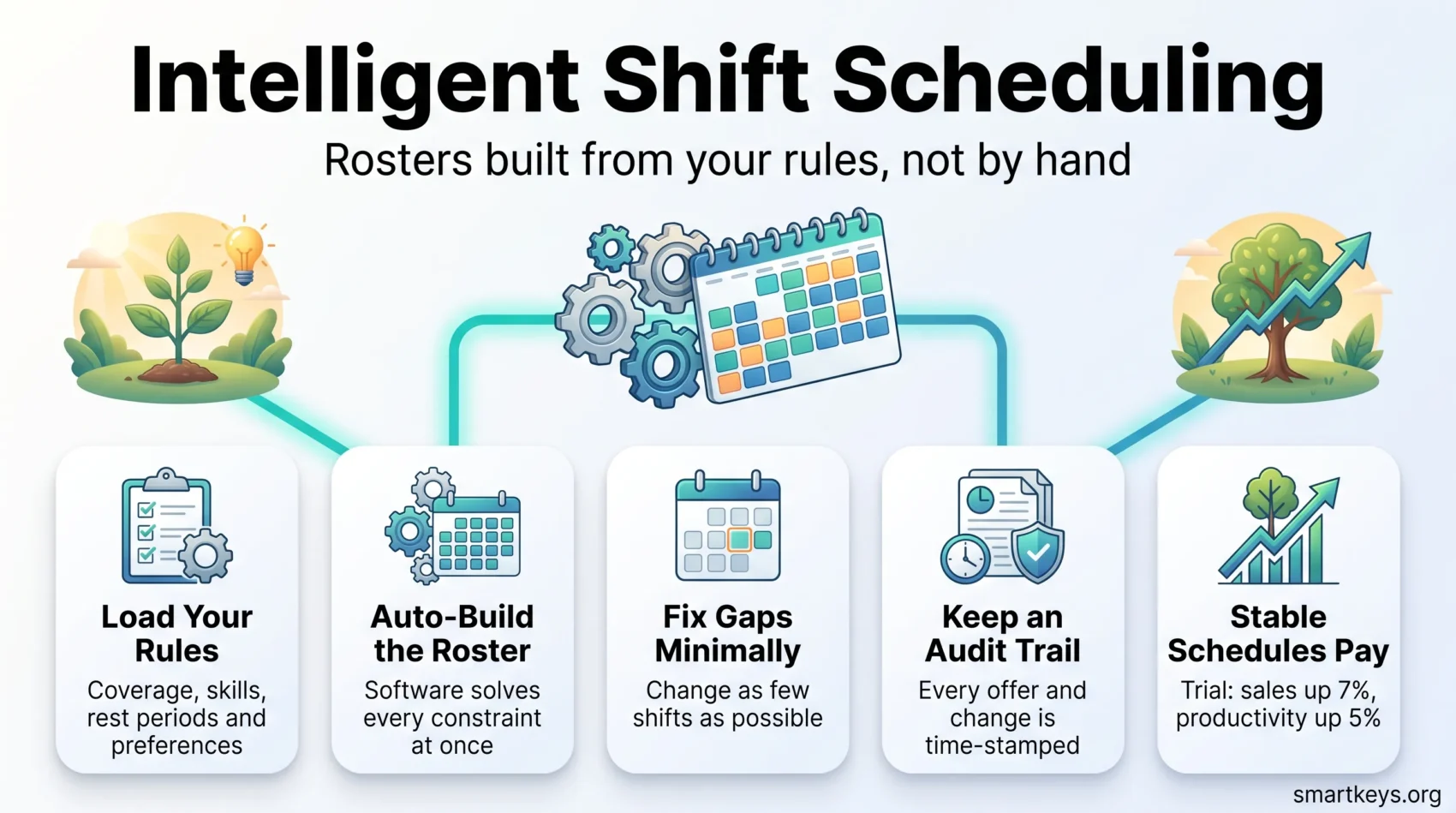
Intelligent shift scheduling means handing that puzzle to software that solves it against your rules, instead of a manager solving it by hand every week. You feed in your demand forecast, your staff list and your constraints. The tool produces a roster. When someone calls in sick on a Sunday morning, it recalculates the affected shifts rather than starting the whole week again.
That is the whole idea. The rest is detail: which constraints the tool understands, how much of the schedule it disturbs to fix a gap, and whether it leaves a record you can defend. This guide covers all three, plus the laws that now govern both the roster and the AI that builds it.
Key Takeaways
- Scheduling software solves a constraint problem: coverage, skills, rest rules and preferences at the same time.
- Stable schedules are not just kinder. A randomised trial at Gap stores raised median sales 7% and labour productivity 5%.
- Overtime rules, fair workweek ordinances and working time law all have to be encoded before the tool is useful.
- Illinois has required notice for AI used in employment decisions since 1 January 2026. The EU AI Act’s high-risk duties now start 2 December 2027.
- Judge a vendor on constraint handling, audit trails and integrations, not on marketing numbers you cannot check.
What Intelligent Shift Scheduling Actually Does
A scheduling engine is a constraint solver. You give it hard rules it must never break, soft rules it should respect where possible, and a target such as covering demand at the lowest cost. It then searches for an assignment of people to shifts that satisfies the hard rules and does as well as it can on the rest.
Hard rules are things like: a nurse without a paediatric certification cannot take a paediatric shift, nobody works two shifts at once, and everyone gets their legal rest. Soft rules are the human layer: Maria prefers early shifts, Tom asked for Thursdays off, and night duty should be spread evenly rather than landing on whoever complains least.
Where Manual Rostering Breaks Down
Building a roster by hand is manageable until something changes. One absence on a Friday afternoon can undo a week of work, because the replacement needs the right qualification, room under their hours cap, enough rest, and the willingness to come in.
So the manager starts calling. Each call costs a few minutes and the sequence usually follows who is easiest to reach rather than whose turn it is. Two things go wrong. First, gaps get filled with overtime or agency staff because they are the fastest option, not the cheapest. Second, the same reliable people keep getting asked, which is exactly how employee burnout starts.
Software does not remove the need to fill the shift. It removes the search. It knows in a second who is eligible, who is under their hours, and who has been asked least often. That last point matters more than buyers expect, because it turns a fairness argument into a rule the system applies automatically.
What the Evidence Actually Supports
Most claims in this market come from vendor marketing and cannot be checked. One piece of independent evidence is worth a dozen of them.
The Stable Scheduling Study, run by researchers from the University of Chicago, UC Law San Francisco and the University of North Carolina in partnership with Gap, was a randomised controlled experiment across 28 retail stores in the San Francisco and Chicago areas between November 2015 and August 2016. Nineteen stores were randomly assigned to give staff more consistent daily and weekly schedules. Median sales in those stores rose 7% and labour productivity rose 5%. The researchers linked much of the gain to keeping experienced staff, who work faster and need less supervision.
That study is about schedule stability rather than about AI. It is still the most useful benchmark a buyer has, because it tells you where the return comes from. Predictable hours keep experienced people, and experienced people sell more and make fewer mistakes. A scheduling tool earns its licence fee if it makes schedules more stable and more predictable. If it simply optimises labour cost week by week and leaves staff with a different pattern every week, it can easily destroy more value than it saves.
Features That Matter, and Features That Sound Good
Auto-Scheduling Against Your Own Rules
The core capability is generating a full period roster from your rules, skills matrix and demand forecast. Judge it on how much of your reality it can express. Can it handle split shifts, on-call rotations, minimum staffing by role rather than by headcount, and contracts with guaranteed hours? A solver that only balances headcount against a demand curve will need constant manual correction, which puts you back where you started.
Rescheduling That Changes as Little as Possible
When a shift falls through, the naive fix is to re-solve the whole week. That produces a mathematically better roster and an angry team, because forty people find their plans changed to cover one absence. Ask specifically for minimal-disruption or non-disruptive rescheduling: the system should make the smallest set of changes that closes the gap. This is the single feature most likely to decide whether staff accept the tool.
Multi-Site, Multi-Role and Open Shifts
Operations that span sites need open shifts posted to every eligible person at once, with clear rules for who gets the shift if several accept. First come, first served is simple but rewards whoever happens to be looking at their phone. Rules based on seniority, remaining hours or how often someone has been offered extra work recently are fairer and easier to defend.
Genuinely useful extras include shift swapping with automatic eligibility checks, demand forecasting from your own history, and integrations with payroll and time tracking. Things that look impressive in a demo but rarely change the outcome: branded app skins, social feeds, and dashboards that repeat what your payroll system already tells you. Some of the more capable products now bundle AI assistants that answer staff questions about their own hours, which does reduce inbound queries to managers.
The Rules Your Roster Has to Obey
A scheduling tool is only as good as the constraints you load into it. These are the ones that carry legal consequences.
Working Time and Overtime
In the European Union, Directive 2003/88/EC sets minimum standards that national law must meet or exceed. Workers get at least 11 consecutive hours of rest in any 24-hour period and at least 24 hours of uninterrupted weekly rest per seven days. Average weekly working time, including overtime, may not exceed 48 hours, averaged over a reference period of up to four months (longer in some member states). Night workers are limited to an average of 8 hours per 24, with no averaging where the work is hazardous or strenuous. A break is required once a shift passes six hours.
In the United States, the Fair Labor Standards Act requires time and a half for hours over 40 in a week for non-exempt staff. Several states go further: California, for instance, adds daily overtime after 8 hours. Since these thresholds are what actually drive the payroll bill, a scheduler that warns you before a shift pushes someone over the line is worth more than one that reports it afterwards.
Fair Workweek Laws in the United States
A growing set of jurisdictions regulates not just how many hours you schedule but how much warning you give. Oregon is the only statewide law. The rest are municipal: New York City, Seattle, San Francisco, Philadelphia, Chicago, Evanston, Berkeley, Emeryville, and both the City and County of Los Angeles.
The common pattern is a 14-day advance notice requirement for covered employers, usually in retail, food service and hospitality, with penalty pay owed when the employer changes a posted schedule late. Chicago, for example, requires 50% of a shift’s wages when a shift is cancelled with less than 24 hours’ notice. New York City’s fast food rules require a premium for so-called clopening shifts, where someone closes at night and opens the next morning. Details differ by city, so check the ordinance that applies to each of your locations rather than assuming a single rule.
The practical consequence for software selection is simple. If you operate in any of these places, notice periods and predictability pay have to be constraints the tool enforces, not report lines you read later.
Rules That Apply to the AI Itself
Using AI to decide who works when is now regulated in its own right, separately from the schedule.
Illinois has required this since 1 January 2026. An amendment to the state’s Human Rights Act obliges employers to give notice whenever AI is used to influence or facilitate an employment decision, and the covered decisions explicitly include the terms and conditions of employment, which is where shift assignment sits. Notice must name the product and vendor, say which decisions it affects and what data it uses, and go to current employees annually and within 30 days of a new or substantially updated system. Records must be kept for four years.
In the European Union, the picture changed in 2026. Regulation (EU) 2026/1744, published on 24 July 2026, pushed the high-risk obligations under Annex III of the AI Act, which cover AI used for worker management and task allocation, from 2 August 2026 to 2 December 2027. Three things were not postponed. The Article 5 prohibitions still apply, including the ban on emotion recognition systems in the workplace. The AI literacy duty under Article 4 has applied since 2 February 2025. The Article 50 transparency duties have applied since 2 August 2026. If you want the wider picture, our guide to EU AI Act compliance covers the phased timeline in more detail.
In Colorado, SB 24-205 was replaced by SB 26-189, signed on 14 May 2026, which drops the discrimination-prevention duty in favour of a notice-based approach and takes effect on 1 January 2027.
None of this makes AI scheduling risky to adopt. It does mean disclosure and record-keeping belong in your rollout plan rather than in a panic six months later. The same rules shape AI hiring tools and AI employee monitoring, so treat them as one governance question.
Fairness, Records and Trust
Every offer, acceptance and change should leave a time-stamped record. That log does two jobs. It answers the employee who believes the good shifts always go to the same people, with data rather than assurances. And it answers a regulator or a tribunal asking how a particular assignment was made.
Rosters also hold sensitive personal information: availability, absences, sometimes the reason for them. Under the GDPR and comparable US state laws, that data needs a defined retention period and access limited to the managers who need it. Our overview of employee data privacy sets out what current rules require of employers holding staff records.
Transparency also has a business payoff. When people can see the rules that produced their schedule, disputes get shorter and trust holds up, which feeds directly into employee engagement and staff retention.
Communication and Mobile Access
Frontline staff do not sit at desks. If the schedule lives somewhere they cannot reach in thirty seconds on a phone, they will keep texting their manager and the tool will not change anything.
Look for full feature parity on iOS and Android, push notifications with email or SMS as a fallback, and the ability to accept or decline an open shift in one tap. In-app messaging keeps schedule conversations in one place instead of spread across personal phone numbers, which also helps when someone leaves the company.
Set response-time expectations deliberately. Instant notifications make it easy to reach staff outside working hours, and that convenience turns into pressure fast. Deciding which alerts may fire outside a shift protects work-life balance, and it is a policy question rather than a software setting.
The Numbers Worth Tracking
Before you buy anything, measure your current position. Without a baseline you cannot tell whether the tool helped.
- Schedule build time: hours managers spend creating and fixing rosters each week.
- Overtime hours as a share of total scheduled hours, and how much of it was unplanned.
- Agency and temporary cover spend, which is usually where late gaps become expensive.
- Fill rate and fill speed: how many open shifts get covered, and how long it takes.
- Schedule volatility: how much a person’s hours change week to week, the variable the Gap study connected to sales.
- Late changes made inside your notice window, which in fair workweek jurisdictions carry a direct cost.
Most scheduling platforms report these natively. If you want to combine them with turnover, absence and engagement data, that is the job of dedicated workforce analytics tools, and it is where predictive analytics on workforce data starts to earn its place.
Where It Pays Off
Healthcare and Social Care
Round-the-clock coverage, mandatory certifications and strict rest rules make healthcare the hardest scheduling problem and therefore the one where automation helps most. The constraints are non-negotiable, which is exactly what a solver is good at. The pay-off is fewer last-minute agency bookings and rotations that spread nights and weekends evenly. Scheduling is usually one thread of a broader digital transformation in healthcare rather than a standalone project.
Hospitality, Retail, Transport and Facilities
These sectors share volatile demand and thin margins, so the temptation is to schedule as tightly as possible. The Gap evidence argues against squeezing too hard: schedules that shift constantly cost you experienced staff. Transport adds its own wrinkle, since driver hours are separately regulated and a route change mid-shift has to respect the same limits. Distributed teams working across time zones face a different version of the problem, closer to follow-the-sun scheduling than to shift coverage.
Where roles are being reshaped by automation, scheduling data also shows you which skills you are short of, which is the starting point for redeploying staff into hybrid roles rather than losing them.
Running Multiple Sites
Multi-site operations need central rules with room for local judgement. Compliance logic, fairness rules and hours caps should be defined once and applied everywhere, so a site manager cannot accidentally schedule someone into a violation. Everything else, such as local demand patterns and shift templates, belongs at site level.
Two practical requirements follow. Long-range schedules segmented by location and department, so budget holders see coverage months ahead. And a single source of truth, because the moment two versions of a roster exist, somebody turns up on the wrong day.
Implementation and Proving the Return
Cloud deployment has made the technical side of rollout close to trivial: a browser, a login, and upgrades that happen without your involvement. The work that remains is organisational.
Start with one site or one department. Run the new system in parallel with your current process for two or three cycles, and compare the rosters. That is when you discover the constraint you forgot to encode, which is always cheaper to find on one ward than across twelve. Get your rules written down before configuration begins, because most implementations stall on a rule that everyone follows but nobody has ever documented.
Then measure honestly. Compare your baseline numbers, not the vendor’s case studies. Time saved on schedule building is the easiest gain to demonstrate and the least valuable. The real return sits in reduced unplanned overtime, less agency cover, fewer late-change penalties, and lower turnover among experienced staff. Give it two or three months, since a scheduling change takes a full cycle to show up in payroll and longer than that in retention. If you are also evaluating automated scheduling for meetings and office work, keep the business cases separate: the drivers are completely different.
Vendor Checklist: What to Ask Before You Sign
- Constraints: can it express every hard rule you actually have, including the awkward ones? Ask for a demo using your rules, not the vendor’s sample data.
- Rescheduling behaviour: how many existing assignments change when one person calls in sick? Ask to see it happen.
- Jurisdictions: which fair workweek ordinances and national working time rules ship as pre-built templates, and who maintains them when the law changes?
- AI transparency: can the vendor explain in writing how shifts are ranked and offered, in language you could put in an employee notice?
- Integrations: payroll, time and attendance, HR system. Ask which are native and which need middleware.
- Audit and export: what is logged, for how long, and can you take your data out in a usable format?
- Uptime and support: ask for the contractual SLA and the remedy if it is missed, not the number on the website.
- References: customers in your sector, at your size, using the same constraint set.
Treat any headline percentage a vendor quotes as a hypothesis about your business, not a fact. Ask what was measured, over what period, against what baseline.
Conclusion
Intelligent shift scheduling is not really about AI. It is about writing down the rules you already work to, letting software apply them consistently, and keeping a record. Done well, that turns a weekly scramble into a routine and gives staff hours they can plan a life around.
The evidence points in a clear direction: stability is where the value is. Optimise for predictable schedules and fair distribution, keep your compliance rules current across every jurisdiction you operate in, and measure against your own baseline rather than a vendor’s slide. If you are looking at the wider picture of AI in business operations, or at how flexible work schedules and the four-day week reshape staffing models, scheduling is the layer where those policies either work in practice or quietly fail. Our overview of current HR trends sets the context.
Found this useful?
Make SmartKeys a preferred source on Google, and our articles will surface more often in your Top Stories, AI Overviews, and AI Mode.
Add as Preferred Source