AI communication etiquette is the set of habits that decide whether an AI assistant saves your team time or quietly creates work for someone else. It covers two relationships at once: how you talk to the software, and how you treat the colleagues who receive whatever comes out of it.
That second part is the one most companies skip. Gallup surveyed 23,717 employed US adults between 4 and 19 February 2026 and found that half now use AI at work at least occasionally, with 30% using it daily or several times a week. Tools spread through offices far faster than the rules for using them.
This guide covers what good practice actually looks like in 2026: how to phrase a request so you get something usable, what has to be checked before AI output leaves your desk, what must never go into a prompt, and what the law now requires you to disclose.
Key Takeaways
- Clear context and a stated format improve answers far more than polite phrasing does.
- Treat every output as a draft. You remain responsible for anything you pass on.
- Agree team rules early: what may go into a prompt, who checks the result, and how use is disclosed.
- Since 2 August 2026, EU rules require people to be told when they are interacting with an AI system.
- Most companies have an AI policy on paper. Far fewer make it reachable for the people who need it.
Why This Matters More Than It Sounds
“Etiquette” sounds like a question of manners. In practice it is a quality control problem with a politeness label on it.
Here is the concrete version. A colleague asks an assistant to summarise a customer contract, pastes the summary into an email, and sends it to the client. Three things could have gone wrong, and none of them involve rudeness: the contract may have contained data that should never have been pasted into an external tool, the summary may have invented a clause, and the client has no idea a machine wrote it. Habits are what prevent all three.
The gap between having rules and following them is well documented. The Thomson Reuters Foundation’s AI Corporate Data Initiative reviewed 1,000 companies across 13 sectors and found that 76% reported management-level oversight of AI, while only 41% made their policies accessible to employees or asked them to acknowledge the rules. A policy nobody can find is not a control.
Earlier evidence pointed the same way. IBM’s 2022 Global AI Adoption Index found that 74% of adopting organisations were not taking steps to reduce bias, 68% were not tracking performance variation or model drift, and 61% could not explain the decisions their AI systems produced. Four years later the tools are far more capable, and the checking has not kept pace. If you want the structural fix rather than the personal one, our guide to building an AI governance model covers who owns what.
What Etiquette Means When the Other Side Is Software
An AI assistant is not a colleague, and pretending otherwise leads to bad habits. It has no memory of your project, no stake in the outcome, and no way to tell you what it does not know. What it does have is a strong tendency to produce a confident answer whatever you ask.
So the useful version of etiquette has two halves.
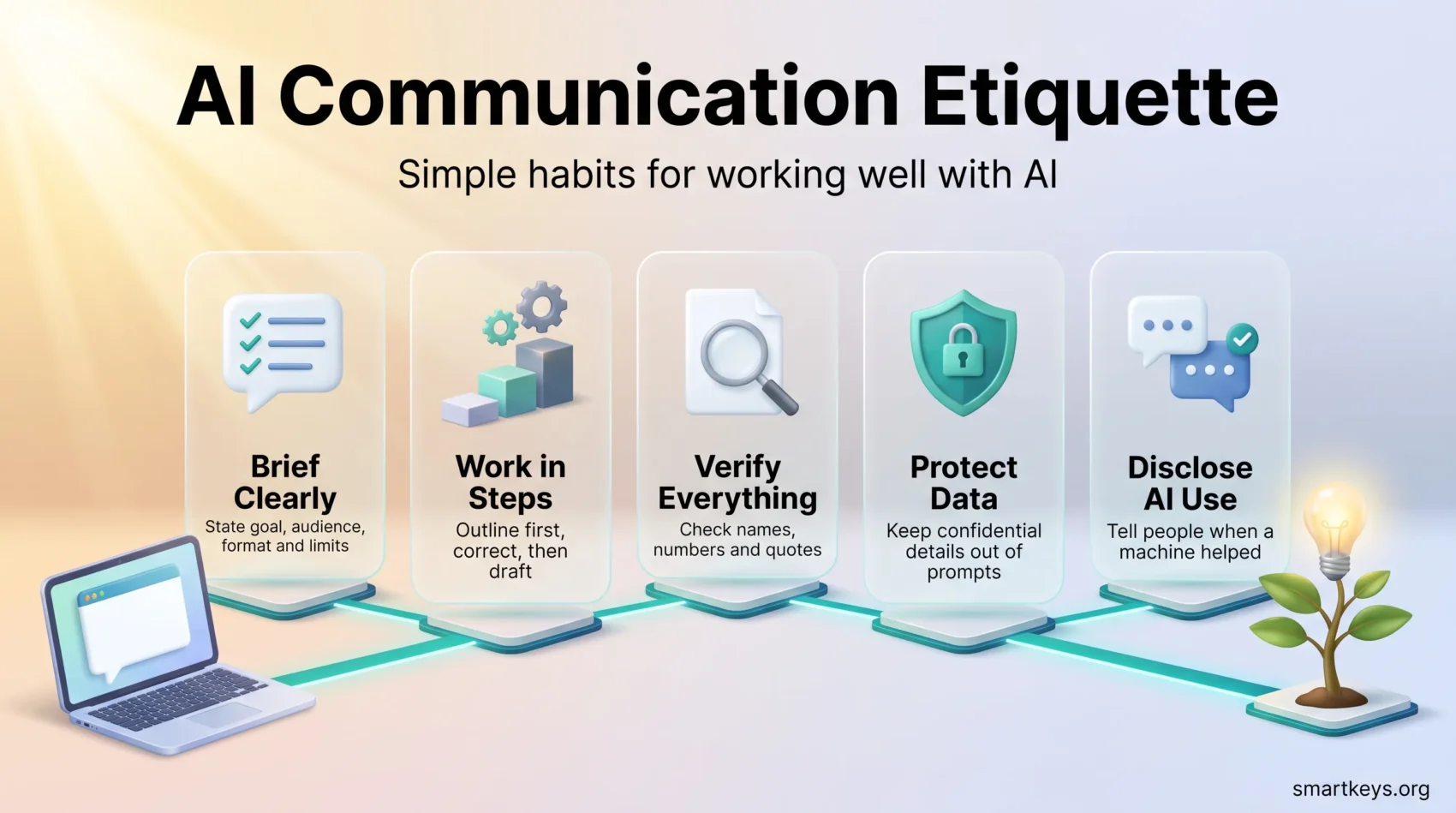
Toward the tool: give it enough to work with. State the goal, the audience, the format and the constraints. Ambiguity is the main cause of useless output, not tone.
Toward people: be honest about what you did. Check before you forward. Say when a machine helped. Do not let a colleague discover it themselves.
Does Politeness Actually Improve the Output?
This is worth answering honestly, because the popular advice runs ahead of the evidence.
A short 2025 study by Om Dobariya and Akhil Kumar tested 50 questions in maths, science and history, each written in five tones from very polite to very rude, and ran all 250 through ChatGPT 4o. Very polite prompts scored 80.8% accuracy; very rude prompts scored 84.8%. That result runs against earlier work, which found the opposite, and the authors describe their own study as preliminary.
The sensible reading is not “be rude to your chatbot”. It is that tone is a weak lever and specificity is a strong one. Please and thank you cost nothing and keep your own writing habits intact, particularly when prompts get shared or pasted into a team prompt library. Just do not expect courtesy to fix a vague request.
How to Write a Request That Gets Something Usable
Most disappointing answers come from prompts that left the model guessing. Four habits fix the majority of them.
Say what the finished thing looks like
Name the output format and its size: a 200-word summary, a five-bullet list, a table with three columns, an email to a client. Without that, you get an essay when you wanted a list.
Supply the context the model cannot see
The assistant does not know your audience, your deadline, your house style or what you already tried. A request like “rewrite this for a non-technical customer who has already complained once” produces something usable. “Make this better” does not. The same discipline that improves briefs for people improves them here, which is why clear written communication is the underrated skill in this whole area.
Work in steps
Ask for an outline, correct it, then ask for the draft. Correcting a structure costs one sentence. Correcting a finished 800-word draft costs a rewrite. This is also the pattern that works best when assistants are chained into longer AI agent workflows, where an early mistake is copied into every later step.
Say what you do not want
Constraints are as useful as instructions: no statistics you cannot source, no marketing language, British spelling, under 400 words. Negative instructions narrow the output faster than more description does.
Etiquette Toward the People Who Receive the Output
This is the half that protects your reputation.
Check before you forward
Treat every output as a first draft from someone who has never been wrong out loud. Verify names, numbers, dates, quotations and legal claims against a primary source. If a figure cannot be traced, remove it rather than soften it. Anything that feeds a real decision needs a named human reviewer, a point we cover in more depth in our guide to AI in decision making.
Say when a machine helped
Disclosure is cheap when you do it upfront and expensive when someone finds out later. A single line is usually enough: “First draft generated with an AI assistant, reviewed and edited by me.” Different contexts need different thresholds, and agreeing those thresholds as a team beats leaving each person to guess. Our template for generative AI usage guidelines sets out where to draw the lines.
Do not use a machine where a person is expected
Condolences, performance feedback, apologies to customers and difficult conversations with staff are the wrong places to save time. The same applies to AI meeting notes: recording and summarising a call is fine, but tell participants it is happening before you start.
Keep credit where it belongs
When AI helped with a piece of work, do not let it quietly absorb a colleague’s contribution either. The goal is collaborative intelligence, where the tool handles the repetitive part and people keep the judgement, not a race to look more productive than the person next to you.
What Must Never Go Into a Prompt
Anything you paste into an external tool has left your building. Treat that as the default, then check your vendor contract for exceptions rather than the other way round.
Keep out of prompts:
- Customer or employee personal data, including anything in an email thread you are summarising.
- Credentials, API keys, contract terms under NDA, unreleased financials and source code your licence does not allow you to share.
- Health, disciplinary or recruitment records. Screening and monitoring uses carry extra legal duties, covered in our pieces on AI hiring bias and AI employee monitoring.
Where a real example is needed, replace names and numbers with invented ones. The structure of the problem is what the model needs, not the identities. Your wider obligations around staff information are set out in our guide to data privacy at work.
There is a second, quieter risk: staff signing up for tools nobody approved because the sanctioned one is too restrictive. That is shadow IT, and the fix is an approved tool that actually does the job plus a clear route to request new ones, which is what a bring-your-own-application policy is for.
Copyright and Originality
Generated text and images are not automatically safe to publish. Two checks are worth building into the routine.
For text, run anything customer-facing through a plagiarism check and confirm that any quotation is real and correctly attributed. For images, audio and video, confirm what your tool’s licence actually permits, especially for commercial use, and route anything resembling a real brand, person or existing work to legal before it goes out. The practical trade-offs are covered in our piece on AI in creative work.
What the Law Now Expects
Etiquette and compliance have started to overlap.
Under Article 50 of the EU AI Act, transparency obligations apply from 2 August 2026. Systems that interact directly with people must make clear that the person is dealing with an AI system, no later than the first interaction, and not buried in terms and conditions. AI-generated synthetic content must be machine-readable as such, with an extension to 2 December 2026 for systems already on the market. Deployers publishing AI-generated text to inform the public on matters of public interest must label it, unless it has been through substantive human review with clear editorial responsibility.
The obligations split between providers and deployers, so an ordinary company using a third-party chatbot on its website carries some duties and not others. Our guide to EU AI Act compliance walks through which side you are on, and our overview of explainable AI covers the related question of being able to justify an automated decision.
A Short Checklist You Can Actually Use
- Before the prompt: is any of this confidential? State the goal, audience, format and limits.
- During: outline first, correct, then draft. Save the prompts that worked.
- After: verify every fact, figure and quotation against a source. Delete what you cannot confirm.
- Before sending: does the recipient need to know AI was involved? Does anything here need a human decision instead?
- Once a quarter: review which tools people are actually using and whether the written rules still match reality.
Training matters more than the checklist itself. Anyone who touches customer data, public communication or hiring should get role-specific guidance rather than a company-wide email, and basic data literacy makes the difference between a team that spots a wrong number and one that forwards it.
Conclusion
Good AI communication etiquette is mostly unglamorous. Give the tool enough context to be useful. Check what comes back. Keep confidential information out. Tell people when a machine was involved. Write the rules down where colleagues can find them.
None of that slows anyone down once it becomes habit, and all of it prevents the kind of mistake that is expensive to explain afterwards. Start with the two rules that carry the most risk, which are what may go into a prompt and who signs off before something leaves the company, then build from there as your team’s use of these tools grows.
Found this useful?
Make SmartKeys a preferred source on Google, and our articles will surface more often in your Top Stories, AI Overviews, and AI Mode.
Add as Preferred Source