Tools
Tools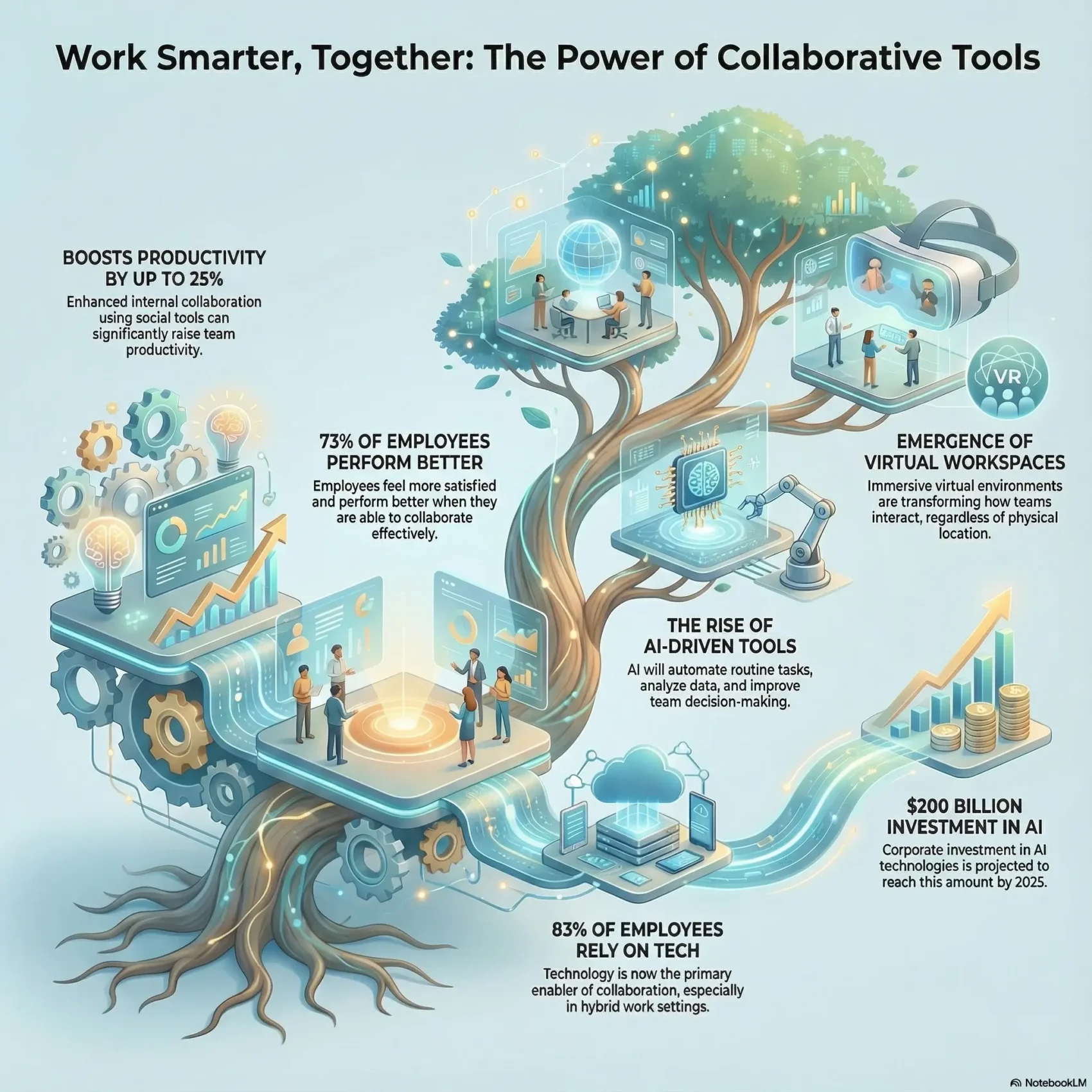
Last Updated on January 3, 2026
The work environment is undergoing significant changes, especially with the growth of remote and hybrid models. Collaborative tools have emerged as crucial for success in today’s workplaces. You might be curious about how these tools can improve communication and increase productivity. This piece will delve into the world of team collaboration software, highlighting various solutions suitable for different industry needs. By understanding the importance of these platforms, you can find the best tools for teamwork that turn your workplace into a center of innovation and efficiency.
Key Takeaways
- Collaborative tools help reduce turnover rates by up to 50%.
- Employees in collaborative settings are over 50% more effective in task completion.
- 73% of employees perform better and feel more satisfied when collaborating.
- 83% of employees rely on technology for collaboration, especially in hybrid settings.
- 72% of companies plan to invest more in virtual tools for enhanced future collaboration.
The Remote Work Revolution
The transformation of workplace dynamics has surged, especially since 2020. Remote work, once a niche for small startups, has become a global norm. The COVID-19 pandemic was a key driver, pushing companies to adopt this shift. Now, remote collaboration tools are vital for effective communication and teamwork in a virtual world.
Tools like Slack, Zoom, and Microsoft Teams have changed how teams interact. These online collaboration tools make it easier to work together, no matter where you are. Cloud services like Google Drive and Dropbox ensure secure data access from anywhere, boosting productivity and team efficiency.
Remote work has led to better work-life balance for many. With various work arrangements available, professionals can choose careers that fit their lifestyle. Gen Z is drawn to side gigs for extra income and to pursue their passions, gaining valuable experience.
Yet, adapting to remote work comes with challenges. Keeping a strong company culture remotely requires effort and planning. The use of immersive environments, such as virtual reality spaces, is becoming more common. These platforms improve teamwork and build community. The shift to remote work is more than a trend; it’s reshaping our approach to productivity and teamwork.
The Importance of Collaborative Tools Work
In today’s fast-paced work environment, the role of effective collaboration is paramount. Team collaboration software is crucial for improving communication and boosting team efficiency. Features like videoconferencing, instant messaging, and discussion channels facilitate seamless virtual team interactions, regardless of location.
Research shows that prioritizing collaborative tools can significantly increase productivity. For example, the McKinsey report highlights that enhancing internal collaboration through social tools can raise productivity by 20 to 25%. Moreover, companies that foster a collaborative culture are five times more likely to excel.
Even basic tools can have a profound effect. Slack, with its social media-like interface, creates a welcoming space for users. On the other hand, Microsoft Teams integrates smoothly with Microsoft 365, catering to users who value efficiency in their collaborative tasks.
Investing in team collaboration software can yield significant cost savings and a higher return on investment. These tools streamline workflows, eliminate silos, and enhance project planning and accountability. By prioritizing effective collaboration, teams become more cohesive, share common values, and propel businesses towards success.
Types of Collaborative Tools for Various Industries
Different industries have unique needs for effective collaboration. Teams can leverage various project management collaboration tools to ensure projects run smoothly, keeping everyone on the same page.
- Cloud Storage Tools: These enable remote data storage, providing a centralized location for information accessible to all team members, ensuring everyone has the latest files.
- Document Synchronization Tools: They maintain identical documents by reflecting edits made in one version to others, ensuring teams always access the most recent information.
- Online Whiteboard Tools: Ideal for visual communication, these tools allow teams to share ideas through graphics, drawings, and text, simplifying collaboration.
- Video Conferencing Tools: Essential for remote interactions, they facilitate live meetings, enabling visual conversations among teams located in different areas.
- Calendar Sharing Tools: These tools enhance coordination by providing visibility into each participant’s schedule, making it easier to find suitable meeting times.
Organizations can choose from a wide array of solutions tailored to their specific needs. For teams working in creative fields, Filestage can enhance multimedia content creation through collaborative feedback management. On the other hand, Asana and Trello simplify project management, helping teams stay productive and manage tasks more efficiently.
Choosing the right virtual teamwork solutions is key to optimizing collaboration across various projects. Microsoft 365/Teams serves multiple functions, blending instant messaging, voice, and video communication, which is vital for organizational collaboration. Tools like Zoom and Slack are popular choices, making it easy for teams to stay connected and engaged regardless of location.
Benefits of Online Collaboration Tools
Online collaboration tools offer significant advantages, reshaping the way we work. They boost productivity by providing instant messaging and real-time document editing. This makes tasks easier to manage, allowing teams to quickly adjust to new developments without losing focus.
Organizations see notable improvements when they adopt these platforms. Employees become more satisfied and innovative when they work together. The ability for real-time communication ensures everyone is up to date, minimizing the chance of missing crucial updates or emails.
Studies show that employees spend about 28% of their time on emails and 19% searching for information. By cutting down on these time-wasting activities, online collaboration tools can greatly improve efficiency. This allows more time for engaging in meaningful projects.
Tools like Kanban boards, to-do lists, and reporting give project managers crucial insights. These tools help track project progress effectively, ensuring deadlines are met and resources are used wisely. Thus, collaborative software not only improves project outcomes but also builds a unified team environment.
Key Features of Effective Collaboration Platforms
In today’s work environment, effective collaboration platforms are crucial for team success. When evaluating these platforms, focusing on their key features can significantly enhance usability. At the forefront, you’ll find robust communication options such as chat, video conferencing, and messaging. These elements create a seamless channel for interaction, allowing you to connect with your team in real time.
Another important aspect involves task assignment and document sharing. These features help streamline the workflow and keep projects organized. Real-time collaboration capabilities are vital for maintaining productivity, ensuring that your team stays aligned on deliverables. Tools like Zoom offer free video conferencing options for up to 100 participants, making it easier to engage without financial barriers.
Integration capabilities with existing software should not be overlooked. These allow for the smooth incorporation of additional tools, minimizing downtime during transitions. Platforms like Google Drive and Dropbox provide options that range from free plans for startups to expansive paid plans for larger organizations. By choosing collaboration tools that fit your unique project demands, you can strengthen your overall work culture.
Popular Team Collaboration Software
As teams evolve, choosing the right collaboration software is crucial. Many tools meet diverse needs, aiding teams in optimizing their workflows and boosting productivity. Here are three top picks among the best teamwork tools that can revolutionize your collaborative efforts.
Hive: All-in-One Collaboration Dashboard
Hive is a leading team collaboration software that combines project management, communication, and file sharing into one platform. Its intuitive interface allows users to manage tasks, monitor progress, and collaborate effectively. Hive is ideal for teams aiming to improve their project management skills.
Google Slides: Streamlined Presentation Creation
Google Slides is perfect for teams crafting compelling presentations. It offers a collaborative space for real-time editing and sharing. This tool makes creating visually appealing presentations easier, enabling multiple users to contribute at once. Google Slides showcases how online collaboration can spark creativity.
Slack: Instant Messaging and Team Communication
Slack is a go-to for team communication. It provides various messaging features like channels and threads for organized discussions. With customizable options and integrations with other tools, Slack is a flexible choice for any team. Starting at $8.75 per user, it’s an affordable option.
Remote Collaboration Tools for Hybrid Environments
In today’s hybrid work settings, the key to effective teamwork lies in the adoption of specialized remote collaboration tools. With 71% of the global workforce now favoring hybrid or fully remote work, the demand for technology that connects in-office and remote teams is clear.
Tools such as Zoom and Microsoft Teams are crucial for virtual meetings across various team structures. Zoom, for instance, allows free users to host 40-minute meetings with up to 100 participants. For more extensive collaboration, the Pro plan offers advanced features. Microsoft Teams, on the other hand, enhances discussion fluidity with threaded conversations.
Project management tools like Trello and Asana are also essential in hybrid environments. They support workload management and track project progress efficiently. Slack, with its integration with over 2,600 third-party tools, enriches communication by offering direct messaging options.
Effective remote collaboration tools empower teams to work together without geographical barriers. Applications like Troop Messenger and Chanty ensure secure communication through end-to-end encryption and provide user-friendly features like task management and screen sharing.
Adopting these tools leads to numerous benefits, including enhanced employee engagement and communication workflows, and reduced costs associated with physical office spaces. Organizations that integrate remote collaboration tools can create a more connected and productive workforce.
Choosing the Best Tools for Your Team’s Needs
Selecting the right tools for teamwork demands a strategic approach, focusing on your team’s specific needs. Start by assessing factors like scalability and integration capabilities. It’s crucial to find solutions that can expand with your organization and integrate smoothly with your current systems.
Scalability and Integration Capabilities
Scalability is a paramount consideration when picking tools. As your team grows or projects become more intricate, the tools must adapt to new users and features without disrupting workflow. Integration capabilities are equally vital; tools that seamlessly connect with your existing software stack simplify maintaining efficiency.
Ease of Use and User Experience
User experience is a critical factor in tool adoption within a team. Seek solutions with intuitive interfaces that reduce the learning curve. Additionally, robust customer support can boost user satisfaction by helping team members overcome issues or explore new features. Focusing on ease of use ensures you invest in tools your team will fully utilize.
Navigating Challenges with Collaborative Tools
Collaborative tools boost productivity, yet, they come with challenges. A major concern is security concerns, as companies must shield sensitive data from breaches. Moreover, fostering employee engagement in remote or hybrid settings requires deliberate strategies; the absence of face-to-face interactions can disrupt team dynamics.
Inadequate training often leads to incorrect tool usage, causing project delays and unnecessary subscription costs. When team members lack proficiency in using software, time is spent rectifying errors. This can result in not fully utilizing costly tools. To address this, regular team briefings, video demonstrations, and tailored training sessions are crucial.
- Having too many tools can lead to confusion and miscommunication.
- Choosing a few central tools for all team members clarifies things.
- Defining clear work hours and professional email addresses helps manage work-life boundaries.
Effective communication is key to overcoming these hurdles. Companies should opt for a centralized communication channel to keep all team members informed and on the same page. Regular team meetings enhance shared understanding and direction, thus boosting productivity.
Moreover, resolving trust issues among collaborators is vital for maintaining open communication. Regular interactions build a supportive atmosphere where team members feel secure sharing goals and roles. An inclusive culture and dependable communication tools can greatly enhance employee engagement and productivity in collaborative settings.
Future Trends in Collaboration Technologies
The collaboration technology landscape is rapidly evolving with new trends on the horizon. Organizations are increasingly valuing AI-driven tools and virtual workspaces for their role in the future of teamwork. These innovations promise to boost productivity and improve the employee experience.
AI-Driven Enhancements and Augmented Reality
By 2025, corporate investments in AI technologies are expected to hit around $200 billion. AI-driven tools will automate routine tasks, analyze vast data sets, and improve decision-making, leading to better outcomes. Currently, 88% of companies use AI technology, but only a few have established regulatory frameworks for these tools. As you plan your collaboration strategy, consider integrating AI-driven solutions to streamline your operations.
Emergence of Virtual Workspaces
Virtual workspaces are transforming how teams collaborate. With Generation Z’s growing presence in the workforce, companies are adopting environments that support connectivity and inclusivity. Research indicates that 43% of employees seek workspaces that encourage collaboration. Tools like Microsoft Teams’ Immersive Spaces and Meta’s mixed reality hardware show how immersive tech can enhance team interactions, regardless of location. These virtual spaces often lead to better performance, with over 75% of employees excelling in collaborative environments.
Conclusion
Collaborative tools play a crucial role in shaping the future of work. They enhance teamwork and boost productivity significantly. As more organizations move to remote and hybrid models, the importance of these tools grows. We’ve seen a shift from basic email and calendars to advanced systems with video conferencing and file sharing.
Modern tools offer real-time collaboration, document versioning, and integrations with various apps. These features facilitate efficient communication and help teams overcome distance. This is vital for sectors like healthcare, which needs secure data sharing, and marketing, which benefits from coordinated campaigns. Collaboration tools centralize project management, making tasks more efficient. They help in assigning tasks, tracking progress, and setting milestones.
Investing in collaborative tools is a strategic move for businesses aiming to succeed in the digital era. These technologies can revolutionize how teams work, fostering creativity, engagement, and efficiency. By adopting the right tools, you’ll prepare your team for success in this dynamic work environment.