Tools
Tools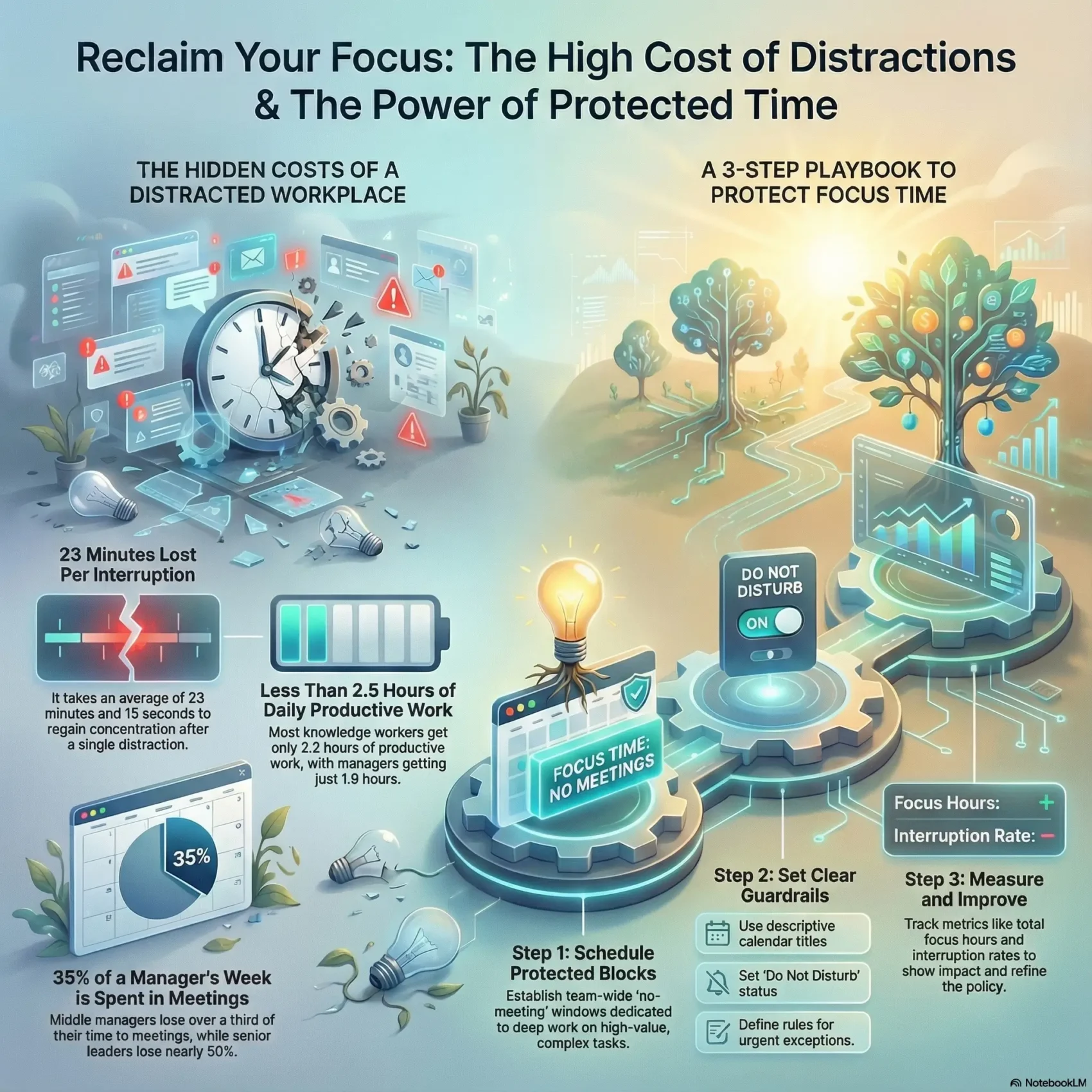
You need clear rules so your team can protect blocks for deep work and finally move high-impact projects forward.
Managers and individual contributors spend much of their day trapped by meetings, email and chat. Managers average only about 1.8 hours of productive work per day, while other knowledge workers get about 2.2 hours. Interruptions cost more than you think: it takes over 23 minutes to get back on task after each break.
A simple focus time policy sets no-meeting windows, defines what counts as deep work, and aligns async updates. This reduces context switching, reclaims thinking space, and raises overall productivity without hiring more people or adding complex tools.
Key Takeaways
- Reserve no-meeting blocks so your team protects heads-down work and gets more done.
- Interruptions fragment days; a policy lowers context switching and restores rhythm.
- Define deep work and async norms to cut unnecessary pings and meetings.
- Use calendar rules and naming to make availability clear while allowing urgent escalations.
- Measure impact with simple metrics and iterate so the policy drives real work done.
Why your team needs protected focus time today
When meetings and pings rule your calendar, real progress quietly slips away. You’re not short on effort — you’re short on uninterrupted stretches that let you solve hard problems.
The cost is real: each interruption demands about 23 minutes and 15 seconds for you to get back into a task. Middle managers spend roughly 35% of their hours in meetings, and many workers lose nearly 28% of their day to email and notifications.
Chat apps add overhead too: Slack can eat 90 minutes daily. That fragmentation shrinks productive work to under two and a half hours for most people. The result is busy calendars but fewer meaningful outcomes.
The path from busyness to results
Protected windows let you batch shallow tasks and reserve long blocks for deep efforts. As interruptions drop, accuracy and speed rise, and you finish higher-impact projects faster.
- Reduce distractions and the refocus penalty.
- Convert meetings into decisions, not daily status noise.
- Reclaim parts of your day so you can actually get done what matters.
What focus time is and how it powers deep work
Designated calendar windows let people dive into hard problems and protect creative momentum.
Define it simply: focus time are dedicated, uninterrupted blocks on the calendar for high-value work. These windows give your brain space to plan, execute, and finish complex tasks without pings or quick interruptions.
Cal Newport’s frame helps teams sort work into deep work and shallow work. Deep work demands sustained concentration and produces the biggest outcomes. Shallow work includes emails, quick admin, and chat that you can batch into separate sessions.
Deep work vs. shallow work: Cal Newport’s framework applied to teams
- Deep work — long sessions for hard cognitive tasks; aim for contiguous blocks and clear goals.
- Shallow work — low-demand chores; bundle these so they don’t bleed into your deep windows.
- Role fit — makers get larger blocks; managers split sessions but protect shorter, focused runs.
How single-tasking improves quality, speed, and flow state
When you single-task during protected blocks, you reduce errors and rework. Staying with one task from setup to finish lets you reach a flow state faster.
“Sustained concentration accelerates problem solving and raises output quality.”
Practical rules: size sessions to match cognitive load (most people cap out near four hours of deep work per day). Enter each block with a checklist, clear assets, and an end deliverable to preserve context across your day.
Evidence that distractions drain your day
Data shows that everyday interruptions quietly shave hours from your workday. When you look at the numbers, the cause of shrinking output becomes obvious: meetings, email, and notifications keep pulling attention away from priority work.
Meeting load, notifications, and email: what the data shows
Employees spend roughly 28% of their workday on email and check messages about 11 times per hour. Add ~200 notifications daily and 90 minutes in Slack for many people, and you get constant context switching.
Managers report about 3.6 hours of task work per day but only 1.83 hours are truly productive. Non-managers average 4.2 hours with 2.24 hours productive. Middle managers spend ~35% of their week in meetings; senior leaders are closer to 50%.
The 23-minute refocus penalty and its impact on your workday
“It takes about 23 minutes and 15 seconds on average to get back into a task after an interruption.”
This matters: a handful of pings a day multiplies that penalty and wipes out large chunks of your best hours. Even when you try to multi-task, quality drops and rework rises.
- Fragmented schedules directly reduce delivered output.
- Reactive behavior—answering the latest ping—replaces deliberate progress.
- Protecting focus time reduces interruptions, improves decisions, and restores calm work rhythms.
Designing a team no-meeting hours policy
A deliberate no-meeting policy gives your team breathing room to complete priority tasks. Start by choosing whether your company needs one universal window or staggered department windows that match collaboration patterns and customer zones.
Choosing company-wide hours vs. department-level windows
Company-wide hours simplify scheduling and create shared quiet blocks (for example, daily 9–11). They work well if your team overlaps most of the day.
Department windows let teams align with local customers and different roles. Makers often need longer contiguous stretches; managers may keep shorter blocks for task switching.
Setting guardrails: exceptions, escalation paths, and visibility
Define what qualifies as an exception and who can override an inviolable block. Map a clear escalation path for urgent customer incidents so outages and high-severity issues get immediate attention.
Name calendar events with the actual work (for example, “Write strategy brief”) so colleagues respect the intent and don’t interrupt for small asks.
Communications norms: Slack/Teams DND, response expectations
Set DND rules on chat tools during protected blocks and publish reasonable response-time expectations. Create a short async update template so multiple people can share status without breaking others’ sessions.
- Decide weekly protected hours and where they live on the calendar.
- Use automated tools to auto-decline conflicts when appropriate.
- Review the windows regularly and tune them as workloads and seasons change.
“Clear guardrails and visible calendar naming make protected blocks easier to respect.”
Focus time
Carve predictable windows into your day to make progress on priority projects without constant pings.
Focus time is a scheduled, uninterrupted calendar event for cognitively demanding work. During these blocks you minimize notifications and pause collaboration so you can finish high-value tasks.
Keep daily deep sessions realistic. Most people do best with no more than about four hours of deep work per day, mixed with short recovery breaks to sustain quality.
Size blocks to the task: set minimum and maximum durations so sessions aren’t too short to be useful or too long to burn out. Stack your highest-energy hours for the hardest work and move shallow chores outside these windows.
- Label events clearly, turn on DND, and set expectations so colleagues know what you are defending.
- Use entry criteria (objective, materials ready) and exit criteria (decision, draft, milestone) to measure progress.
- Track hours focus time across the week and inspect patterns to place demanding sessions where you naturally do best.
“Protected blocks give you the space to produce thoughtful work instead of just reacting.”
Make scheduling flexible enough to handle true urgencies but keep your weekly total defended. For a practical sprint method, see the focus sprints guide to set up reliable sessions that stick.
Set up scheduling in calendars without friction
Make your calendar a tool, not an obstacle: set clear rules so work blocks stick. Small, consistent habits in Google Calendar and Outlook Calendar cut booking friction and protect your best hours.
Google Calendar and Outlook basics for simple blocking
Create precise events for deep work—use descriptive titles like “Draft Q4 board memo.” Color-code sessions to show deep work, meetings, and shallow tasks. Align visibility so blocks are visible enough to avoid collisions but private on details when needed.
Naming conventions that deter interruptions
State outcomes, not vagueness. A title such as “Analyze NPS drivers – draft insights” signals importance and reduces casual pings. Add a short checklist in the description so you start ready and leave with a clear next action.
- Connect calendar integrations to flip Slack/Teams to DND during blocks.
- Add 10–15 minute buffers before and after blocks to prep and debrief.
- Set recurring templates and reserve daily free time to absorb surprises.
To learn practical routines for blocking weeks, schedule focus time with templates that actually stick.
How to enable Focus Time with Microsoft Viva Insights in Outlook
Enable Microsoft Viva Insights in Outlook and let the app protect blocks so you can get more done. Viva Insights schedules guarded sessions, suggests smart slots, and shows interruption patterns from your calendar data.
Turn on the Focus Plan inside Viva Insights to auto-place guarded blocks or add them manually when you prefer. Pick proactive scheduling for always-on defense or choose reactive scheduling so blocks appear only when your week looks crowded.
- Enable Auto-DND in Outlook and Teams and set an auto-reply that directs people to async updates for non-urgent asks.
- Sync external calendars so sessions persist across tools and avoid double-booking in your outlook calendar or time calendar.
- Use Viva Insights data to move sessions away from noisy windows with many notifications and meetings.
Set realistic session lengths and daily caps based on your energy. Aim for longer, uninterrupted runs early in the day for deep work and lighter tasks later. Document escalation rules so urgent issues get handled without breaking most blocks.
“Use insights to adjust when interruptions cluster and protect your best hours.”
Measure and improve using Focus Time metrics
Numbers tell the story: track a few clear signals so you know whether protected blocks are producing deep work and fewer interruptions.
What to track: total hours, interruption rate, meeting density
Track total guarded hours per week, how often sessions get broken, and meeting load on the calendar. These metrics show whether your policy creates real contiguous work or just shifts meetings elsewhere.
Using Worklytics to spot fragmentation
Worklytics links with Outlook Calendar and email metadata to identify uninterrupted blocks of at least an hour, count interruptions, and surface fragmentation trends. It reports totals and trends while keeping content private.
Benchmarking roles: realistic targets for makers vs. managers
Compare hours/day across roles—makers need longer contiguous blocks; managers need shorter runs. Use dashboards to track progress, free time left for urgent issues, and tie task completion rates to these metrics.
- Track total hours, interruption rate, and meeting density.
- Analyze calendars to move recurring meetings and create bigger blocks.
- Share simple dashboards so your team can track gains and celebrate wins.
Practical techniques to protect and use time blocks
Structure beats willpower: set clear sprints and rituals so deep runs survive interruptions.
Pomodoro breaks big goals into short 25-minute sprints with brief rests. Use Pomofocus on desktop or mobile to run timers, log sessions, and keep a steady cadence across longer guarded blocks.
Pomodoro and Pomofocus for structured sprints and breaks
- Run 25-minute pomodoros for intense work, then take 5-minute recoveries to stay fresh.
- Use Pomofocus to track counts and export patterns so you can repeat what works.
- Treat timers as a permission slip to ignore pings until your scheduled break.
Task batching, day theming, and to-do prioritization
Batch similar tasks—approvals, quick emails, and small asks—so they don’t invade deep stretches.
- Theme days or half-days (e.g., strategy, ops, writing) to reduce setup costs.
- Start each session with a short to-do list and a clear definition of done.
- Prepare a pre-session checklist (links, briefs, datasets) so you don’t waste minutes trying to get back into context.
“Small rituals and clear entry/exit rules raise the odds of real work done.”
Rollout playbook: from pilot to team-wide adoption
Test the policy in one department for 4–6 weeks so you can learn before you scale. Run a pilot with clear success metrics and weekly feedback loops.
Pilot scope, success metrics, and iterative feedback loops
Start metrics: aim for +2 hours/week of focus time and a -20% drop in interruptions. Gather short weekly surveys and quick demos of work you got done.
Use Worklytics to spot fragmentation and validate gains. Share simple charts that show hours protected, interruptions prevented, and tasks completed.
Meeting audits and calendar hygiene to create space
Run a meeting audit to cut low-value recurring events, shorten defaults, and cluster collaboration. Enforce descriptive titles and 10–15 minute buffers so protected hours survive sloppy scheduling.
Handling edge cases: urgent meetings, flexible holds, and rescheduling
- Codify flexible holds that convert only for true emergencies.
- Enable auto-decline for guarded blocks and document a lightweight rescheduling protocol.
- Configure scheduling defaults so guarded blocks land during your best cognitive hours and scale rules by role and region.
“Start small, measure modest wins, and expand gradually until the habit sticks.”
Conclusion
Adopt a simple focus time policy and you’ll turn no-meeting windows into a repeatable system that protects your biggest priorities. This helps your team move from reactive scrambling to deliberate progress on important work.
You’ll get clear steps to schedule and defend deep sessions, set DND norms, and align the team on when to collaborate versus when to go heads-down. Measure outcomes, iterate, and keep sessions realistic so energy and quality stay high.
Respectable schedule habits make it easy for others to honor your calendar and for you to produce more productive work today. Revisit the policy quarterly to keep unlocking clarity, momentum, and focus on important work.