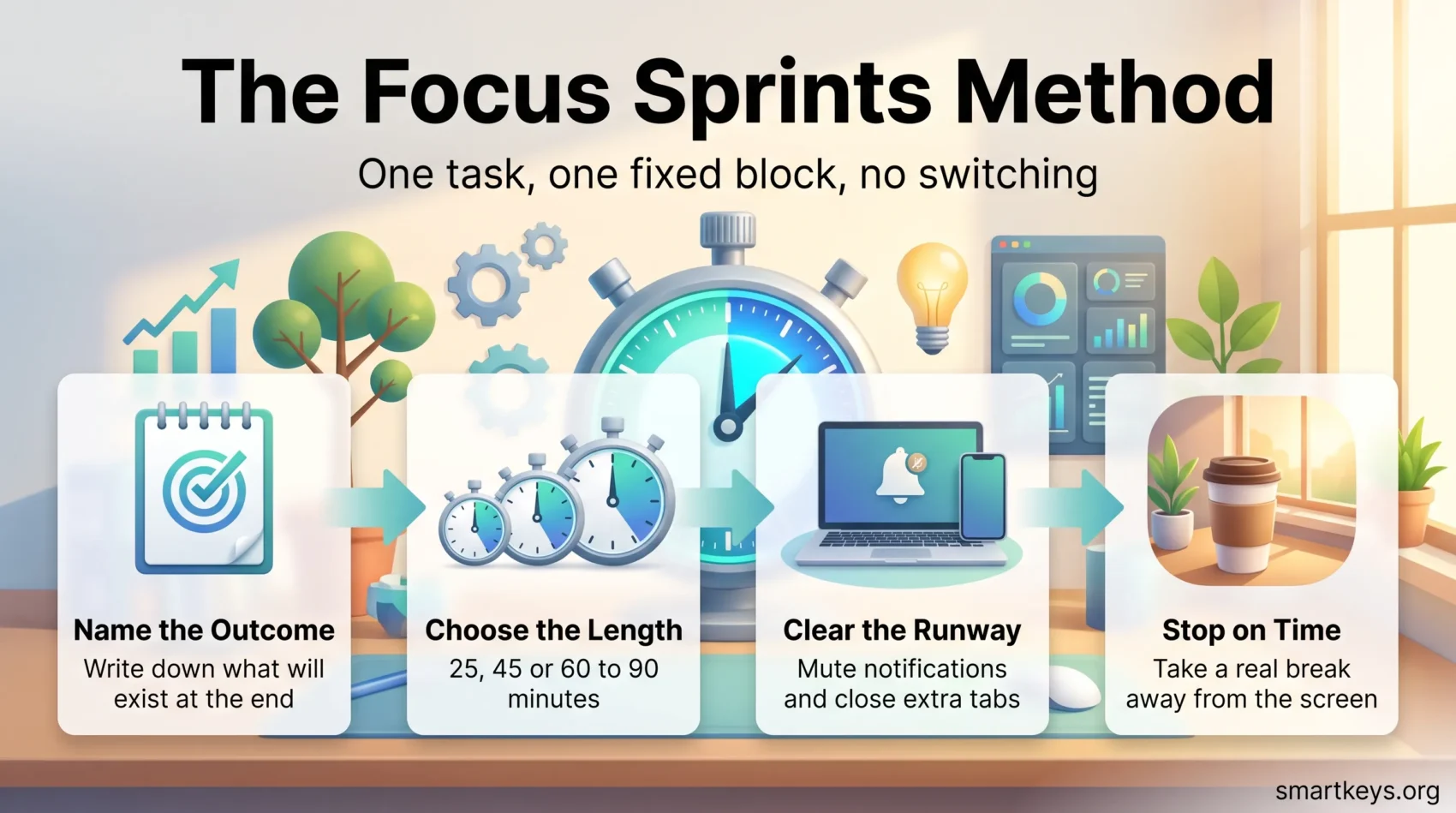
A focus sprint is a short, fixed block of time in which you work on one task and nothing else. No inbox, no chat, no quick look at a second tab. When the timer stops, you stop. That is the entire method.
It sounds too simple to matter. It matters because an ordinary workday no longer leaves much uninterrupted time on its own. Microsoft’s Work Trend Index special report of June 2025 found that people working in Microsoft 365 are interrupted by a meeting, email or notification roughly every two minutes during core hours, and that 48% of employees describe their work as chaotic and fragmented. A sprint is a deliberate fence around one piece of that day.
This guide walks through the focus sprints method step by step: what a sprint is, how long to make one (from a 25-minute block up to a 90-minute focus sprint), what the research on breaks and interruptions actually supports, and where the method stops helping.
Key Takeaways
- A focus sprint is one task, one fixed block of time, no switching.
- Match the length to the work: 25 minutes suits admin, 60 to 90 minutes suits demanding thinking.
- Scheduled breaks beat breaking whenever you feel like it, at least for concentration and motivation.
- Define a finished outcome before you start, not a topic.
- Remove the likely interruptions before the sprint, not during it.
- A focus sprint is a personal work session. It is not the same thing as an Agile sprint.
What a Focus Sprint Actually Is
A focus sprint has three rules, and all three have to hold or the block stops being a sprint.
One task. Not a project, not “work on the report”, but a single piece of work you could describe in one sentence. Writing the methodology section counts. Doing the report does not.
One fixed length. You set the end point before you start. The timer decides when the work stops, not your energy level and not whether you happen to finish.
No switching. For the length of the sprint, nothing else gets attention. A message that arrives waits. A better idea gets written on a scrap of paper and waits too.
That third rule is where most attempts fail, and it is also where the value sits. Every switch away from a task carries a cost in time and accuracy, which is the core finding behind the research on multitasking. Protecting one block from switching is cheaper than trying to recover focus repeatedly across a whole afternoon.
The Pomodoro Technique, the best known version
The most familiar focus sprint is the Pomodoro Technique, developed by Francesco Cirillo in the late 1980s. You work for 25 minutes, break for 5, and after four rounds you take a longer break of 15 to 30 minutes. The fixed 25 minutes is the point: it is short enough that starting feels easy and long enough to get somewhere.
Pomodoro is one setting of the dial rather than the definition. Our guide to using the Pomodoro Technique covers Cirillo’s original steps in detail, and the comparison of Pomodoro versus longer focused sprints explains when each length pays off.
Why Short Bursts of Focus Work
Three things explain most of the effect. None of them require a leap of faith.
The workday is interrupted by default
The Microsoft figures above describe a workday that is fragmented before anyone makes a single bad decision. Research from Gloria Mark’s group at UC Irvine points the same way: the average time people spend on one screen before switching has fallen sharply since the mid 2000s, to well under a minute in her more recent measurements.
You cannot fix that pattern by trying harder. You fix it by carving out blocks where the interruption sources are switched off, which is exactly what a sprint does. If interruptions come mainly from colleagues rather than devices, a shared focus time policy does the same job at team level.
Scheduled breaks beat improvised ones
Here the evidence is more specific than most productivity writing admits. Biwer and colleagues (2023, British Journal of Educational Psychology) compared students who chose their own break timing with students given systematic breaks, including a Pomodoro style pattern of 6 minutes off after 24 minutes on. The self regulated group studied for longer, but reported more fatigue and distraction and less concentration and motivation. The systematic groups finished comparable work in less time.
That is a study of students, not office workers, so treat it as suggestive rather than settled. Its practical message still holds up: deciding in advance when you will stop protects your attention better than waiting until you feel like stopping. Our overview of what the evidence says about short breaks goes further into how long a break needs to be, and movement breaks covers the case for getting up rather than scrolling.
What about 90-minute cycles?
You will often read that the brain runs on 90-minute ultradian rhythms and that work blocks should match them. The underlying idea comes from Nathaniel Kleitman’s basic rest activity cycle, which is well documented in sleep. Extending it to waking productivity is a plausible hypothesis rather than an established finding, and the evidence for a fixed 90-minute daytime work cycle is thin.
So use it as a rough ceiling, not a law. Most people can sustain deep concentration for somewhere between 45 and 90 minutes before quality drops, and the exact number is personal. Track your own pattern for a week instead of adopting someone else’s. Managing your energy rather than only your time is the more useful framing.
How to Run a Focus Sprint
Step 1: Name the finished outcome
Before the timer starts, write down what will exist at the end. “Draft the client email” is a sprint. “Client stuff” is not. A concrete end point tells you whether the block worked, and it removes the small decisions that eat the first ten minutes.
If the task is too big to finish in one block, cut it until it fits. That habit is the whole point of breaking large goals into smaller steps. For choosing which outcome deserves the block at all, our guide to setting goals you actually reach helps.
Step 2: Choose a length that fits the work
The length should follow the task, not your favourite method. Short blocks suit work with a low startup cost. Long blocks suit work where you need to hold several things in your head at once, because the first ten minutes are spent loading them there.
A practical starting grid:
- 25 minutes: email, expenses, small edits, anything you have been avoiding.
- 45 minutes: routine analysis, slide building, code review, meeting prep.
- 60 to 90 minutes: writing, design, planning, debugging, any work that needs a running start.
Two or three long sprints in a day is a realistic ceiling for most people. Trying to string six of them together tends to produce four bad ones. Grouping similar small tasks into one block, the approach described in batch processing, keeps the short sprints from multiplying.
Step 3: Clear the runway first
Interruptions are much easier to remove before a sprint than to resist during one. Two minutes of preparation buys you the whole block.
Close the tabs you are not using and put the phone out of reach, not just face down. Set your chat status and mute notifications for the length of the sprint; our guide to managing work notifications covers the settings worth changing permanently. If your own browsing is the problem, a website blocker removes the decision entirely.
Keep a scrap of paper next to you. Every stray thought, task or worry goes on it and stays there until the sprint ends. Writing them down stops them circling.
Step 4: Stop when the timer stops
Stopping on time is the rule people break first, usually because the work is finally flowing. Doing it anyway has two benefits. You protect the recovery that makes the next sprint possible, and you arrive at the next block still knowing exactly where you left off.
Take the break away from the screen if you can. Five minutes of standing, walking or looking out of a window restores more than five minutes of scrolling.
Fitting Sprints Into a Real Calendar
A sprint only happens if there is room for it, which makes the calendar the real constraint. Reserve your long blocks at the hours when your concentration is genuinely best, and put meetings and admin around them rather than through them. Time blocking is the natural companion here, since it turns intended focus time into a defended appointment.
Protect the block the way you would protect a meeting with your most important client. Two defended 90-minute sprints a week produce more than a calendar full of intentions. This is easier to sustain when you carry fewer priorities overall, the argument made in prioritization.
Tools That Support Focus Sprints
Timers
A timer is the only tool a focus sprint genuinely requires, and a kitchen timer is enough. Cirillo used one deliberately: winding it is a physical commitment, and the ticking is a reminder that the block is running.
App timers add session logs and blocking, which helps if you want to see how many sprints you actually completed this week rather than how many you planned. Our roundup of focus tools covers the main options.
Task and project tools
Task tools do not create focus, but they decide what you sprint on. The value is having one trusted list, so that choosing the next block takes seconds instead of a scroll through three apps.
Trello works well for visual tracking of a small personal queue. Asana suits shared work with owners and deadlines. Jira is built for software teams and is heavier than a solo workflow needs. Whichever you use, the point is the same: a list you trust means the sprint starts with work rather than with deciding.
Focus Sprints Are Not Agile Sprints
The word sprint is doing two very different jobs, and mixing them up is a common source of confusion.
An Agile sprint is a team planning cycle, usually one to four weeks long, in which a development team commits to a set of work and reviews it at the end. It is a way of organising a project across people.
A focus sprint is a personal work session lasting minutes or hours. It is a way of organising your own attention inside a single day.
They can coexist. A developer might run four focus sprints during a two-week Agile sprint. What does not work is applying one set of rules to the other, for example describing a personal focus block as “about two weeks long”. If you are looking for the team version, the project management reviews above are the better starting point.
Where Focus Sprints Fall Short
The method has real limits, and knowing them prevents disappointment.
Reactive roles. If your job is support, operations or anything where a fast response is the service you provide, long uninterrupted blocks are not available for most of the day. Sprint around the edges: early morning, or a covered slot agreed with a colleague.
Collaborative work. A sprint protects solo work. It cannot make a conversation or a review faster, and blocking out an afternoon does not help if you are waiting on someone else’s answer.
Work that resists a clean end point. Some tasks, exploratory research in particular, do not fit neatly into a fixed block. In those cases the timer is a check-in rather than a stop sign: pause, decide whether the direction is still worth it, then continue.
Overuse. A day made entirely of back-to-back sprints is not a productive day, it is a day without slack. Thinking, conversation and recovery all need unscheduled space. If you find yourself constantly switching between blocks anyway, the problem may be workload rather than method, and managing task switching is the more relevant fix.
Conclusion
Focus sprints work because they replace an intention with a decision made in advance. You choose the task, the length and the boundary before you start, so the block does not depend on willpower once it is running.
Start small. Pick one task tomorrow, set a timer for 45 minutes, turn off the notifications, and stop when it rings. Note what you finished. Do it again the next day, adjusting the length up or down until it matches how your attention actually behaves.
That is a smaller promise than most productivity advice makes, and it is why the method survives contact with a real workweek. If you want to go further in the same direction, deep work covers the longer form of the same idea.
Found this useful?
Make SmartKeys a preferred source on Google, and our articles will surface more often in your Top Stories, AI Overviews, and AI Mode.
Add as Preferred Source