Tools
Tools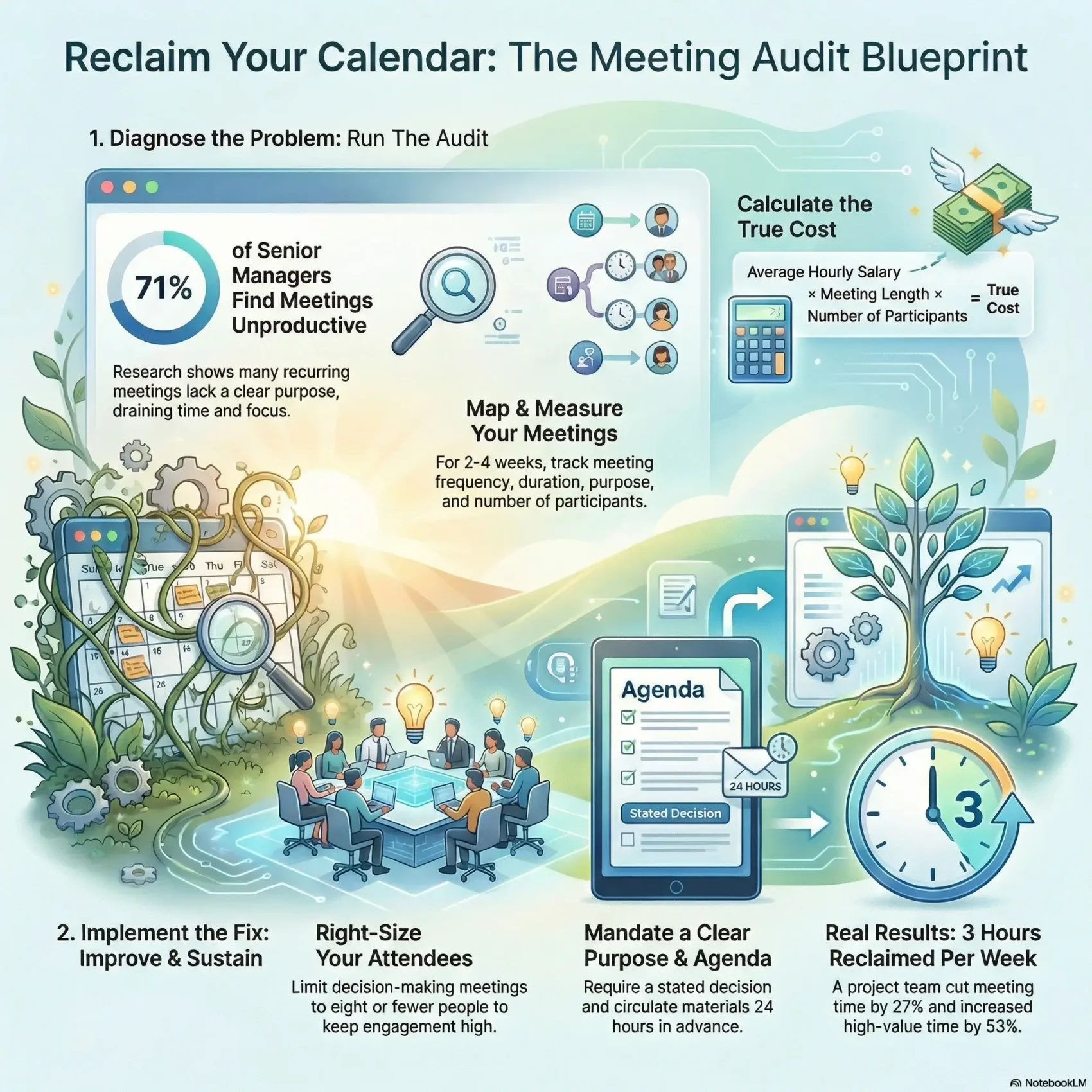
Last Updated on February 26, 2026
You likely feel your calendar is out of control. As new people joined your organization, different habits multiplied. That left too many people in the room, frequent overruns, and days filled with back-to-back sessions.
Doing a focused meeting audit makes the problem visible. Analyzing calendars and simple data shows where time is wasted and where small changes can free hours each week.
This guide walks you step-by-step through a practical way to reclaim your schedule and boost productivity without hurting collaboration. You’ll learn what success can look like: fewer gatherings, tighter agendas, clearer outcomes, and more strategic time across your teams.
We’ll also preview the numbers to capture—total time spent, percent of week in meetings, and the mix of low- versus high-value discussions. Use those figures to target fixes and communicate changes so they stick.
Key Takeaways
- Use a calendar review to turn vague complaints into clear data.
- Small structural changes lead to better outcomes and follow-through.
- Track total meeting time and percent of your week to set targets.
- Spot recurring sessions with no purpose and trim participants.
- Follow a friendly, no-blame approach and consult a time audits guide for practical tips.
Why your calendar feels broken—and how a meeting audit fixes it
Small scheduling choices stack until your workday feels full and fragmented. Over time, recurring sessions multiply. That slow accretion leaves too many attendees, duplicate discussions, and frequent overruns.
Numbers make the problem real. Research shows 45% of gatherings serve no purpose and 71% of senior managers find sessions unproductive. Those stats explain why productivity slips and frustration grows.
“Limiting decision meetings to eight or fewer attendees helps avoid low-participation sessions.”
- You’ll see how recurring slots quietly consume focus and much time.
- Collecting simple data exposes where time spent spikes and information is lost.
- Right-sizing participants and clarifying purpose turns vague rhythm into a clear process.
Result: you get a way to translate raw numbers into targeted changes. That lets you cut or redesign low-value meetings, answer management questions, and win quick, sustainable wins with minimal disruption.
Meeting audit: what it is and why it matters
First, name the boundaries of your review so it stays time‑bound and practical.
The meeting audit is a focused review of calendars to quantify and improve how recurring sessions run across your organization. Define scope by prioritizing recurring meetings you can influence and excluding ad‑hoc 1:1s or ceremonies owned by other teams.
Define the audit scope, goals, and end date
Set a clear end date—about 1.5 quarters—to capture a full cycle without dragging on. Pick measurable goals like reducing percent of time in recurring meetings and raising high‑value focus hours.
Link the audit to outcomes: time saved, better decisions, lower cost
Tie goals to what leaders care about: faster decisions, clearer ownership, and lower cost from shorter sessions or fewer attendees. Keep the process light: gather only the data you need and schedule a couple of quick check‑ins on frequency and progress.
- Purpose: show time reclaimed and better outcomes.
- People: align teams with a friendly, no‑blame process.
- End: wrap with a short report that management can act on.
Run your meeting audit step by step
Begin with a clear map of your calendar footprint across teams and tools. Focus on recurring meetings for two weeks to a month so patterns emerge and overlaps become visible.
Map and gather core data
Capture simple fields: name, category, purpose, frequency, duration, number of participants, and whether an agenda exists.
Add a short value rating and light notes so information stays actionable. Use a spreadsheet to calculate total time and percent of week spent in recurring meetings.
Prioritize, decide actions, then track changes
Group slots by category and stakeholder before tackling individual items. That helps solve patterns across teams rather than repeating fixes.
- Evaluate with quick questions: What’s the purpose? Who really needs to attend?
- Choose an action: Keep, Needs Investigation, Evaluation, Improved, Cancelled, or New.
- Replace cancelled items with alternatives like a Slack channel, ticket, or knowledge base to preserve information flow.
Lock your baseline and track every change on a working sheet. Review early results with management, confirm progress, and iterate until the new way sticks.
Measure time and meeting cost to drive decisions
Start by turning calendar entries into clear numbers you can act on. A quick baseline gives you the hours per person and the percent of your workweek tied to recurring sessions.
Calculate hours per week and percentage of time in meetings
Track at least two weeks; a month is better. Sum each person’s total hours in meetings, then divide by their available work hours to get percent time spent.
Estimate meeting cost by salary, length, and participants
Use a simple formula: average hourly salary × meeting length × number of participants. Tools and a Meeting Cost Calculator make those numbers quick and shareable.
Track high-value vs. low-value time to focus improvements
Label sessions as high- or low-value, then prioritize cuts where the cost is high and outcomes are low. Use data from calendars or tools like Flowtrace to find overruns and low-participation slots.
- Action: run numbers to support shortening, merging, or trimming participants.
- Compare: before-and-after hours and cost to prove impact.
- Share: convert savings into time back for better productivity and faster decisions.
If you want a practical primer, see the time audits guide at time audits guide.
Upgrade purpose, agendas, and participation for better outcomes
When you define a sharp purpose up front, time is used toward real outcomes. Clear intent helps people prepare and keeps discussions focused.
Set clear purpose and expected decisions. Before you schedule, state the decision(s) required and what success looks like. That simple step reduces confusion and speeds outcomes.
Build and share robust agendas with roles and materials
Create an agenda with timeboxes, roles, and required materials. Share links and brief pre-read notes so participants arrive ready to act.
Right-size attendees for decisions and inclusive discussions
Include only the participants who add value. For decision sessions, limit live participants to eight or fewer to keep engagement high.
End with decisions, action items, and a written summary
Close by stating the decisions, owners, and next steps. Publish a short summary and light notes with links to supporting information.
“Define the decision before you start and you halve the follow-up.”
- Confirm purpose for every meeting.
- Circulate agenda and materials 24 hours ahead.
- Record outcomes, assign action owners, and share a brief summary.
Turn audit insights into lasting change across your organization
Turn your findings into simple, shared rules that make daily work easier. Define norms for length, frequency, attendee limits, and no‑meeting days so everyone knows the new way forward.
Create clear guidelines for length, frequency, attendees, and no‑meeting days
Write a short policy that covers standard durations, who should be invited, and which days remain focus time. Keep it practical and role-specific so teams can apply it immediately.
Share the report, invite feedback, and align next steps
Publish a concise report and ask teams and team members for feedback. Use a friendly forum or a short survey to collect suggestions and lock in priorities.
Leverage tools and analytics for ongoing visibility
Use analytics like Flowtrace to track attendance, frequency, and overruns. Pair data with a simple process for proposing changes, testing them, and adopting what works.
- Who owns it: assign clear owners for each category.
- How to propose: a short form, a trial, and a review after two cycles.
- Close the loop: set an end date, celebrate wins, and keep light check‑ins instead of endless reviews.
Conclusion
Finish strong: translate calendar data into decisions that give people back focused work time.
In a real project led by May Wong, PMs cut 3 hours per week — a 27% drop — while high-value time rose 53% and low-value time fell 48%. That result came from targeting recurring meetings, a clear scope, and a defined end.
Use this guide to run a meeting audit that produces measurable improvement. Pair Fellow and Flowtrace resources to quantify hours and track outcomes.
Act quickly, document decisions, and put light governance in place so improvements stick. The end result looks like fewer, clearer meetings, faster decisions, and more time for the work that matters.