Most people do not dislike meetings. They dislike the ones that could have been an email, the ones nobody prepared for, and the ones that end without a decision. Effective meetings are the opposite: a short block of shared time with a clear purpose, the right people, and a visible result at the end.
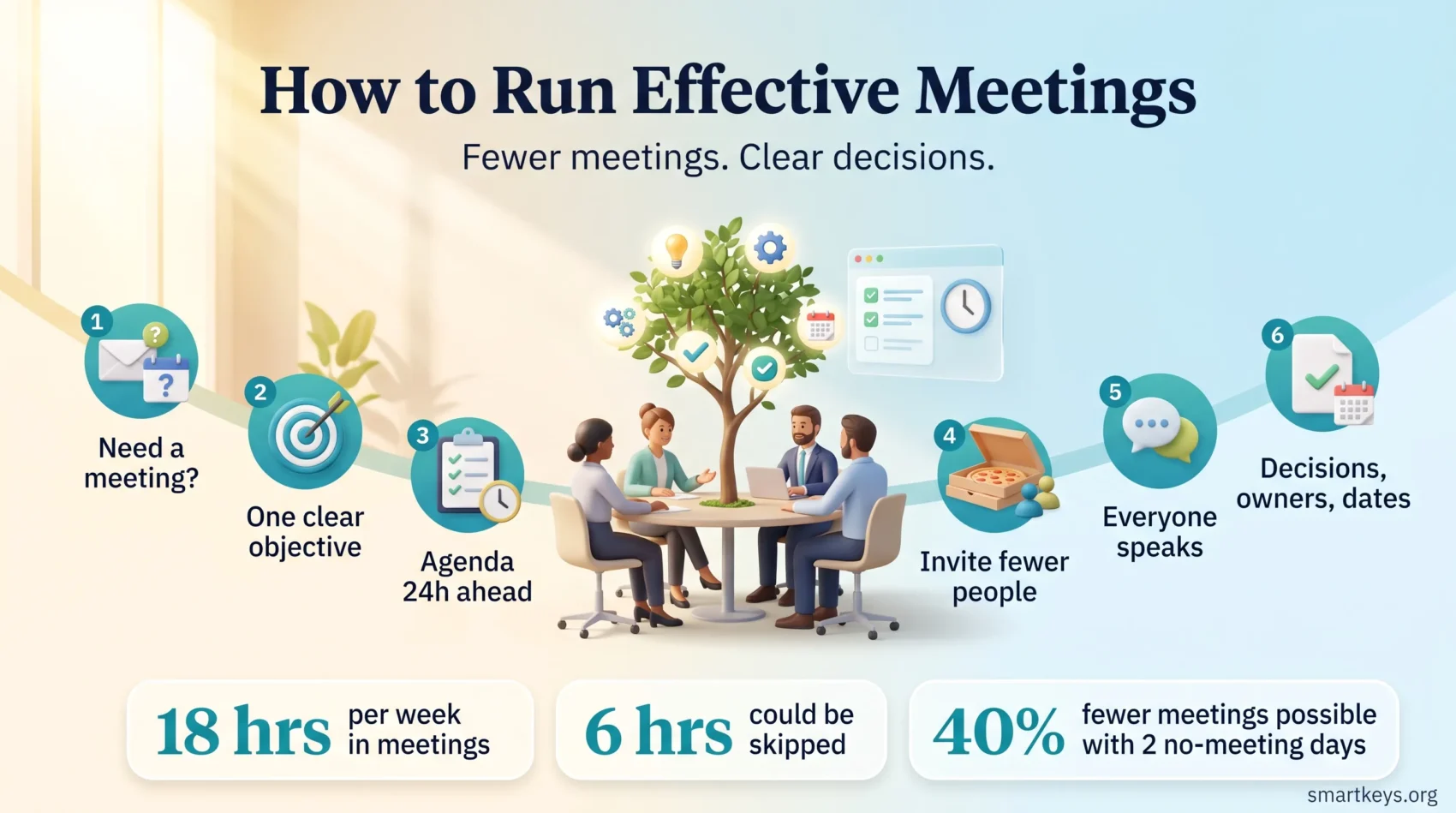
The scale of the problem is documented. In a study of 632 workers across 20 industries, organizational psychologist Steven Rogelberg found that employees spent an average of 18 hours a week in meetings and judged nearly 6 of those hours skippable if they were simply told the outcome. Just over half felt pressure to accept invitations that were not relevant to them. Microsoft’s 2025 Work Trend Index adds the texture: 57% of meetings are now ad hoc calls with no calendar invite, one in ten scheduled meetings is booked at the last minute, and meetings held after 8pm rose 16% year over year.
This guide covers what changes that: how to decide whether a meeting is needed, how to write an agenda people can prepare from, who to invite, how to run the room, and how to close with decisions.
Key Takeaways
- A meeting needs one clear objective. If you cannot write it in a sentence, cancel it.
- An agenda is only useful if it reaches people early enough to prepare.
- Smaller groups decide faster. Extra attendees add cost, not quality.
- Silence is not agreement. Participation has to be designed, not hoped for.
- Every meeting should end with decisions, owners and dates written down.
Why Meetings Go Wrong
Meetings fail for structural reasons, not because people are lazy. Three causes account for most of it.
The first is habit. A recurring meeting gets created for a real reason, the reason passes, and the slot stays in the calendar because cancelling it feels like a statement. A regular meeting audit is the simplest fix, and it usually frees more time than any facilitation technique.
The second is drift. Without a written objective, a meeting expands to fill its slot: status updates turn into debate, debate turns into a tangent, and the thing you needed to settle gets pushed to next week.
The third is scale. Every extra attendee adds someone who might speak, which lengthens the meeting, and someone who might stay silent, which raises the odds that a real objection surfaces afterwards in a private chat instead of in the room.
There is a quick way to tell whether you have a structural problem or just a busy fortnight. Track two weeks of your calendar and work out what share of your working hours went to meetings. Outside roles that are meetings by nature, such as sales or support, anything above roughly a quarter usually points upstream: unclear ownership, vague priorities, or no written record people can rely on. Read the number as a thermometer rather than a target, because the fix is almost never “hold shorter meetings”.
Researchers writing in MIT Sloan Management Review looked at what happens when companies attack the problem at the calendar level. Across 76 companies, each with more than 1,000 employees, introducing no-meeting days improved autonomy, communication, engagement and satisfaction, while micromanagement and stress fell. Nearly half cut their total meeting load by about 40% simply by protecting two days a week. If your organization will go that far, a team-wide focus time policy does more than any agenda template.
Decide Whether You Need a Meeting at All
Before scheduling, answer one question: what has to happen in real time?
Meetings are expensive because they are synchronous: they take several people’s attention at the same moment, the scarcest resource in a working day. That cost is worth paying to settle a decision with unresolved disagreement, work through something genuinely ambiguous, give sensitive feedback, or build trust with people who have never met.
It is not worth paying to distribute information. Status updates, project summaries and read-outs travel better in writing, because people read them when they have attention to spare. Asynchronous communication tools exist for this, and teams that move routine updates out of the calendar find the meetings they keep get better, because the remaining ones have something at stake.
A useful test: write the outcome as a past-tense sentence. “We chose between vendor A and vendor B.” If you cannot write that sentence, you do not have a meeting, you have an announcement. Send it. Our guide to choosing between email, chat and a meeting works through the trade-offs.
The same test works from the other side of the invitation. When something lands in your calendar with no stated objective, ask what decision needs you. If no clear answer comes back, decline, and put a replacement in the same message: a written answer, a comment on the document, or ten minutes on a call if it really is urgent. A decline with an alternative attached reads as help rather than refusal, which is what makes it something you can do repeatedly without becoming the difficult colleague.
Set One Clear Objective
A meeting with three objectives is three meetings competing for one hour, and the one at the bottom always loses.
Write a single objective at the top of the invitation, concrete enough that everyone can tell at the end whether you got there. “Discuss the roadmap” fails that test. “Agree which two features ship in Q4” passes, because at 10:50 you either have two features or you do not.
- Name the decision, not the topic. “Budget review” is a topic. “Approve the Q4 marketing spend” is a decision.
- Cap it. Three objectives is the ceiling and two is better. If a fourth appears, it belongs in a separate slot.
- Share it early. An objective seen two minutes before the call cannot change how anyone prepares.
- Open with it. Read the objective aloud in the first thirty seconds. It costs nothing and it recenters everybody.
Objectives also let you end early without awkwardness. When the decision is made, the meeting is over, whatever the calendar says.
Build an Agenda People Can Prepare From
An agenda is not a formality. It is the difference between a group that arrives ready and one that spends the first fifteen minutes catching up on context.
What Belongs on the Agenda
- Purpose: the objective, stated plainly, plus whether the meeting is for deciding, generating options or informing.
- Topics as questions: “Which supplier do we choose?” invites an answer. “Supplier update” invites a monologue.
- Time per item: assign minutes. It is a forecast, not a contract, but it signals what weight each item carries.
- An owner per item: naming who leads a topic means somebody prepares it.
- Pre-reading: attach the document or proposal, and say whether reading it is expected.
Getting the Agenda Out in Time
Send it at least 24 hours ahead, and earlier when there is pre-reading. Later than that and you are asking people to prepare in a gap they do not have. Attach material directly rather than linking to a folder they must search, and include optional attendees, so nobody arrives with a different picture of the discussion.
If the agenda is not ready the day before, treat that as information: an unprepared organizer rarely runs a productive meeting, and postponing costs less than holding it anyway. Where several meetings a week need this, a meeting notes template that keeps objective, decisions and action items in fixed positions turns preparation into a habit.
Invite the Right People
Every invitation is a claim on someone’s day. The question is not who might find this interesting, but who the meeting cannot proceed without.
Who Actually Needs to Be There
Work backwards from the objective. For a decision you need whoever can make it, whoever will carry it out, and whoever holds information it depends on. Everyone else can read the notes.
Amazon’s “two pizza rule” captures the instinct: if a group cannot be fed by two pizzas, it is too big for a working meeting. There is no magic number, but small groups let everyone speak, which is what makes a meeting better than a document. A group of fifteen has an audience, not a discussion.
The drift runs the other way in most organizations. In Microsoft’s 2025 data, meetings with 65 or more attendees were the fastest-growing type of all, which shows how quickly an invitation list grows once nobody owns it.
Three checks before you send the invitation:
- Ask what each person contributes. If the honest answer is “context”, send them the notes instead.
- Mark optional attendees as optional, and mean it, so declining carries no cost.
- Bring in perspectives, not just seniority. The person who implements the decision often sees what others miss.
Handling Conflicts and Reschedules
Send invitations early enough that people can move things, and use automated scheduling or a tool like Calendly or Doodle instead of a chain of “does Thursday work?” emails.
Set a clear norm for what happens when a key person cannot attend: either the meeting moves, or it goes ahead and they accept the outcome. Leaving that unspoken is how decisions get reopened a week later. Across regions, rotate the inconvenient slots rather than always burdening the same time zone. That is no longer an edge case: nearly a third of meetings now span several time zones, up 35% since 2021.
Timing and Scheduling
Microsoft’s data shows half of all meetings land between 9am and 11am or 1pm and 3pm, which is when most people do their best focused work. Protect at least one uninterrupted block per person per day for work that needs deep concentration, and schedule around it rather than through it. Avoid lunch, and avoid the last half hour of the day.
Leave gaps between meetings. Back-to-back calls mean people arrive still thinking about the previous one, with no room to write down what was agreed. Ten minutes between blocks is not slack; it is when the follow-up happens.
Default meeting lengths are an accident of calendar software, not a finding about attention. Thirty minutes is enough for most decisions when an agenda exists, and fifty minutes beats sixty because it builds in the gap. Recurring meetings deserve the most scrutiny, because they cost the most over a year: give every recurring slot an end date and re-justify it when the date arrives. A structured one-on-one usually earns its place. Many weekly status calls will not survive the review, and that is the point.
Ground Rules That Hold the Room Together
Ground rules sound bureaucratic until you sit in a meeting without them. They are a short, shared agreement about how the group works, and they let you interrupt a tangent without it feeling personal.
What Ground Rules Do
They give the facilitator permission. When “we park off-topic items” is an agreed rule, redirecting a conversation applies a norm rather than overruling a colleague. They also make expectations visible to new joiners. The rules that matter most:
- One conversation at a time. Side chats split the room and exclude remote attendees.
- Pre-reading is done before, not during. Or build reading time into the agenda deliberately.
- Park tangents visibly, so people see their point was captured rather than dismissed.
- Attack the problem, not the person. Especially when something has gone wrong.
- Decisions get written down. If it is not in the notes, it did not happen.
Hybrid Rooms Need Explicit Rules
A meeting with some people in a room and some on a screen goes wrong most often, because the in-room group shares side comments, body language and eye contact the remote group cannot see. Fix it deliberately: one camera per person even in the office, chat used for questions so remote attendees have a way in, and a facilitator who explicitly calls on the screen. Our guide to hybrid meeting etiquette covers the setup.
Get People Actually Participating
A meeting where three people talk and seven listen is a briefing with extra steps. Participation is a design problem, and silence usually means the format is wrong rather than the people disengaged.
Techniques That Draw People In
- Ask directly. “Priya, you have run this before. What are we missing?” beats “any thoughts?”
- Run a round. Going person by person on one question guarantees every voice is heard once, which makes the next contribution easier.
- Start with silent writing. Two minutes for everyone to write their view stops the first opinion from anchoring the room. Silent meetings extend this into a full format.
- Ask the most junior person first. Once a senior voice has spoken, disagreeing costs more.
- Give out roles. A timekeeper or note-taker stays engaged.
With a group that has not worked together before, spend the first two minutes on something human before you reach item one: not a game, just a question everyone can answer briefly. Someone who has already spoken once finds the second contribution much easier.
Building a Room Where Disagreement Is Safe
People contribute when they believe the contribution is welcome, and that belief comes from what happens after someone raises an inconvenient point. Respond to objections with questions rather than defense, credit ideas by name in the notes, and let silence sit for a few seconds after a question. Some people think before they speak, and a rushed facilitator only ever hears the fast talkers. In distributed teams the informal contact that builds this trust does not happen by itself, so deliberate team building does work no facilitation trick can replace.
The Facilitator’s Job
Someone has to own the room. Without that, the most senior or most talkative person takes over by default. The facilitator is not the chair, the expert or the decision maker. The role is to make the process work: opening with the objective, keeping the discussion on the item at hand, noticing who has not spoken, managing the clock, and closing with a summary of what was decided and by whom.
What distinguishes a good one:
- They talk less than anyone else. Their job is to create space, not fill it.
- They name what is happening. “We are debating implementation, but we have not agreed the direction yet.”
- They finish on time. Consistently ending when promised is what makes people take the next invitation seriously.
- They separate the roles. If you are also the decision maker, say which hat you are wearing when you speak.
Rotating facilitation spreads the skill and gives everyone a clearer view of why meetings drift.
Tools That Genuinely Help
Tools do not fix an unclear objective, but the right ones remove friction that would otherwise eat the meeting.
Platforms and Shared Spaces
The platform matters less than the habits around it, though differences in limits and pricing are real, as our comparison of Zoom and Microsoft Teams sets out. What helps is polling the room quickly, raising a hand without interrupting, and splitting into small groups. For anything visual, a shared canvas beats a screenshare: tools such as Miro or Lucidspark let everyone add to a diagram at once, which matters most for remote attendees who otherwise just watch someone else’s cursor. Keep slides for things that are genuinely visual. Text-heavy slides read aloud are the least efficient way to transfer information ever invented, which is why some organizations open with a few minutes of silent reading instead.
Whatever the setup, test it before the meeting rather than during it. A room waiting for someone to find the right cable loses more time than any tangent, and it costs you the opening minutes, when attention is highest.
AI Notetakers
AI notetakers now sit in a large share of calls, transcribing, summarizing and drafting action items. Used well, they remove the tension between taking part in a discussion and recording it, and the summary goes out the same day. Our AI meeting notes workflow covers the setup.
Two cautions. A generated summary is a draft, and the facilitator still owns the accuracy of the decisions in it, because a model that misattributes an action item creates a real problem later. And recording rules are not optional: several US states require consent from every participant, GDPR applies in the EU, and quietly adding a bot to a client call can breach both policy and trust. Announce the recording, and give people a way to ask for it to stop.
Close With Decisions, Not Discussion
The last five minutes decide whether the meeting was worth holding.
Make Who Decides Explicit
Most decisions stall because nobody agreed in advance who owns them. Frameworks such as RAPID, which assigns the Recommend, Agree, Perform, Input and Decide roles, exist to remove that ambiguity. The framework matters less than doing it at all: name the decision maker before the discussion, not after.
Be equally clear about the mode. Consensus, majority, and “I will decide after hearing you” are all legitimate, and each produces a different conversation. Trouble comes from pretending a meeting is a consensus process when the decision has already been made. People notice, and they remember. If a decision cannot be made, name what is missing and who will get it by when. That is a real outcome. “Let us pick this up next week” is not.
Write It Down and Send It
Close by reading back every decision and action item with an owner and a date. Doing it aloud catches misunderstandings while people are still in the room.
Send the notes the same day, keep them short, and put decisions and actions at the top. Anyone invited who did not attend should be able to read them and know what changed. Good notes are also what lets you shorten the invitation list: in the Otter.ai survey run with Steven Rogelberg, 71% of employees said they would skip an unnecessary meeting if solid notes reached the right people quickly. Where a discussion is hard to summarize, a recording with a one-paragraph summary on top does the same job, and optional attendees can then genuinely opt out instead of attending to stay informed. Action items belong wherever your team already tracks work, and a shared prioritization framework stops new items piling on top of everything else. A short weekly review that checks whether last week’s actions moved closes the loop. Without it, decisions made in meetings quietly expire.
Conclusion
Better meetings come from a handful of unglamorous habits rather than a new technique. Ask whether the meeting is needed at all. Write one objective. Send an agenda people can prepare from. Invite the smallest group that can do the work. Run the room so everyone speaks. End with decisions, owners and dates, then send them out the same day.
None of this is difficult, but it requires someone to own it. The payoff is that your remaining meetings become the place where things get settled, rather than the reason nothing does. For a next step, start with the calendar rather than the room: audit the recurring meetings, cancel what has outlived its purpose, and put the reclaimed hours toward focused collaborative work.
Then keep checking. Once or twice a year, ask the group which recurring meetings still earn their slot and what would have to change for the rest to be worth attending, and act on at least one of the answers. If you lead a team, the habits spread only when people watch you follow them: invite fewer people, write the agenda yourself, publish the notes, and turn down invitations with no stated purpose. Two months of visible practice moves a meeting culture further than any policy document.
Found this useful?
Make SmartKeys a preferred source on Google, and our articles will surface more often in your Top Stories, AI Overviews, and AI Mode.
Add as Preferred Source