Tools
Tools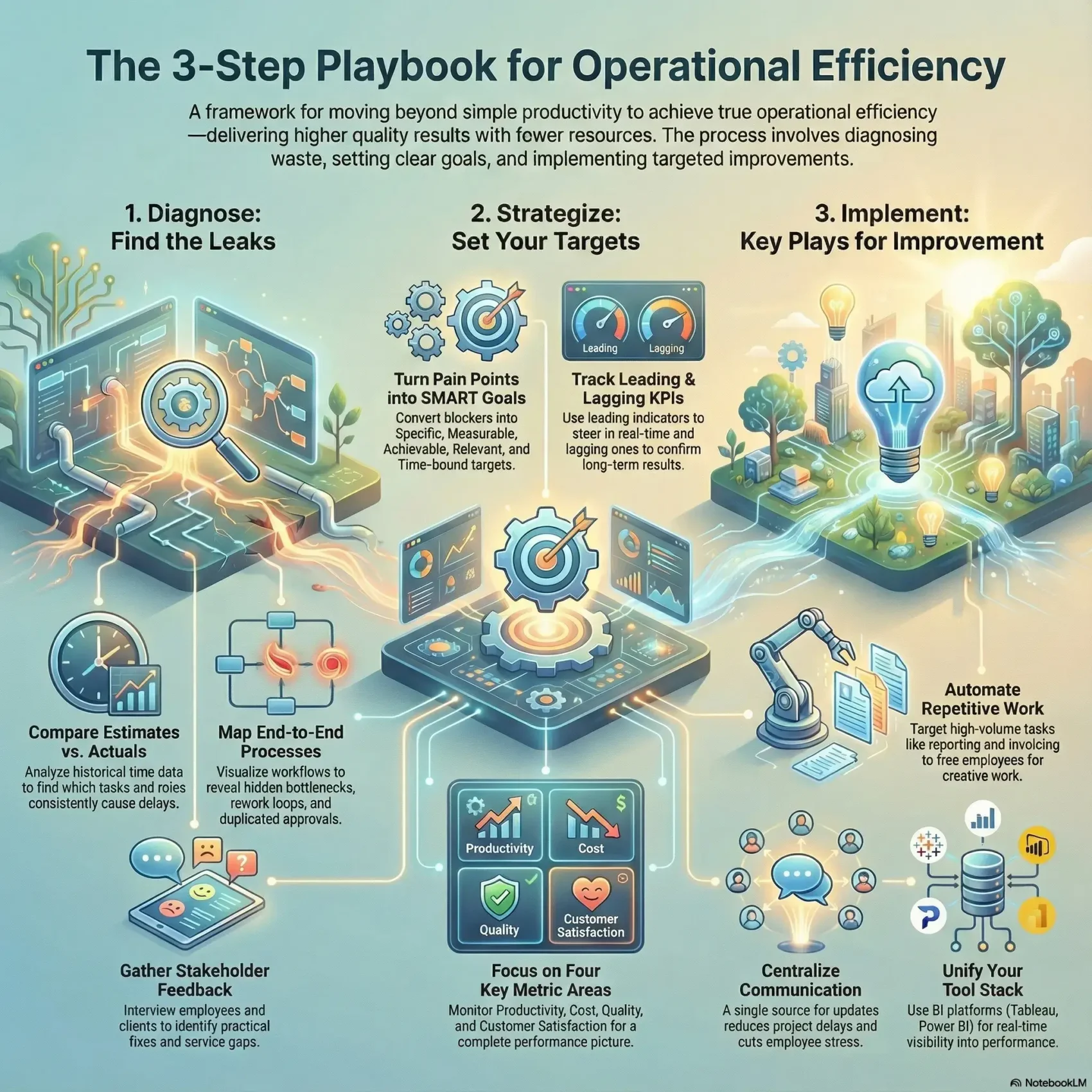
Last Updated on December 29, 2025
This playbook gives you a clear, practical path to boost output while cutting costs and wasted time.
You’ll get step-by-step guidance to align your company around a single definition of operational efficiency that maps to real metrics.
This matters because the right focus separates firms that are merely productive from those that earn better margins and healthier cash flow.
The guide shows how to centralize assets, standardize templates, and turn scattered tools into a streamlined software stack.
Along the way you’ll learn simple rituals and data-driven checks that reveal where time and money leak.
Use these tactics to free teams from admin, improve quality, and move faster on high-impact work.
Key Takeaways
- Get a step-by-step playbook to save time, lower costs, and deliver more value.
- Learn how operational efficiency differs from productivity and why it matters for margins.
- Track weekly metrics and align your company around measurable goals.
- Replace scattered tools with a unified software stack for live visibility.
- Apply tested strategies that work for both service firms and manufacturers.
What Operations Efficiency Really Means Today
Efficiency today is about smarter output: doing the right work with fewer inputs and less waste.
Operational efficiency focuses on results per resource, while productivity counts how much gets done in a set time. Two agencies can be equally productive but only one is truly efficient — the one that keeps costs down and quality high.
Service and production lenses
In a service business you optimize people, schedules, and feedback loops. Centralizing assets and templates cuts retrieval time and reduces context switching.
In production, the focus shifts to flow, changeovers, and defect reduction to keep machines and space working for you.
- Map output versus quality so you avoid rework and poor customer experience.
- Translate manufacturing tactics—like line balancing—into daily task handoffs to cut idle time.
- Find where waste hides: duplicated effort, unused deliverables, or unclear handoffs.
Use a practical approach that links small changes in handoffs and clarity to better margins and happier employees. For team-level tactics, see this guide on SOPs for team productivity.
Diagnose Bottlenecks Before You Optimize
Begin with hard numbers to find the tasks and handoffs that steal days from your schedule.
Start by comparing estimates to actuals. Pull historical project data and calculate schedule variance. This tells you where time slips and which roles or tasks repeat delays.
Time estimates vs actuals: spotting schedule variance
Track estimated versus real hours across several projects. Look for patterns by role and by task.
When the same step runs long, flag it for a root-cause review instead of quick fixes.
Finding process gaps, rework, and error hot spots
Use a tight set of metrics and indicators to measure rework, defect rates, and handoff waits.
Map processes end-to-end to reveal duplicated approvals, hidden queues, and wasted reviews that add up to days lost.
Stakeholder input loops: employees and clients
Interview employees doing the work to surface practical fixes management may miss.
Add client feedback to validate where deliverables feel slow or unclear. Then translate findings into performance gaps and a short improvement backlog.
- Quantify schedule variance with time data.
- Target risky processes using simple metrics and indicators.
- Prioritize fixes by cycle-time impact and ease to show gains in weeks.
Small diagnostics + regular cadence = fewer surprises and steady improvement.
Set SMART Goals and KPIs That Tie to Business Outcomes
Start by turning your biggest day-to-day blockers into measurable goals that drive real business results.
Use the SMART framework—Specific, Measurable, Achievable, Relevant, Time-bound—to convert pain points into targets that the company cares about.
From pain points to aligned objectives
Pick goals that link directly to revenue, margin, or delivery quality. Ground targets in historical data and industry benchmarks so they’re ambitious but realistic.
Tip: Use the ~65% utilization benchmark for agencies to set role-level productivity expectations.
Leading vs lagging indicators you can act on
Balance quick-to-change signals with outcome measures. Leading indicators like pipeline-to-capacity and on-time task starts help you steer in real time.
Lagging indicators—margin, CSAT, and delivery cycle time—confirm results and show value to stakeholders.
- Define precise metrics and an owner for each KPI so accountability is clear.
- Align department goals to company outcomes to avoid local optimization at the expense of the business.
- Turn targets into rhythms: dashboards, weekly reviews, and quarterly resets keep progress visible.
Small, measurable goals tied to real metrics make it easy to improve operational efficiency and prove value over time.
Operations Efficiency Metrics You Should Track
Good metrics cut through the noise and show which fixes will move the needle for your company.

Productivity and output
Measure tasks per employee, billable hours, and revenue per employee so you can see real output by role and level.
Use these numbers to compare teams and to set realistic targets that improve productivity without burning people out.
Cost visibility
Track labor cost share, average labor cost per employee, TCOW, and overhead ratio. These cost metrics protect margins as your company scales.
Quality and rework
Watch error rate, percent rework, and time lost to defects. Quality directly affects throughput and customer outcomes.
Customer signals
Monitor CSAT, retention, LTV, and resolution time to ensure service levels hold as you optimize work.
Utilization and capacity
Balance workloads with utilization, capacity, and cycle time so resources are used well and burnout drops.
- Select a focused set of metrics—productivity, cost, quality, and satisfaction—so signal beats noise.
- Standardize definitions and data sources so leaders across the company compare apples to apples.
- Build a short quarterly team KPI slate to lift performance where it matters fastest.
“Track fewer, clearer metrics and you will see faster, steadier gains.”
How to Measure Operational Efficiency with the Right Tool Stack
A right-sized measurement stack turns scattered numbers into fast, trusted answers. Start by choosing platforms that centralize your business data so leaders and teams see the same view.
BI platforms for real-time visibility
Use Power BI, Tableau, or Looker Studio to pipe reliable data into unified dashboards. These tools make financial, capacity, and quality metrics visible in one place.
Productivity and activity tracking
Deploy software like Teramind to surface work patterns, idle time, and repetitive tasks. Activity tracking reveals where automation will cut cost and boost productivity.
Dashboards and reporting cadences
Define one reporting way across teams so filters and time windows match. Put leading indicators on weekly views and lagging outcomes on monthly reviews.
- Assemble: BI for visibility, tracking for patterns, lightweight reporting for action.
- Align: Dashboards with business questions—where to cut cost without hurting delivery.
- Cadence: Weekly team dashboards and monthly exec reviews to keep momentum.
Continuous measurement helps you steer resources and make performance decisions with confidence.
Improve Operational Efficiency with Process Automation
Automating the right steps speeds work and cuts errors. Start by mapping a simple process you run every day. Look for repeated handoffs, manual copy-paste, and slow approvals.
Automating finance, project updates, and reporting
Target finance flows first—fetch time data, generate invoices, and route approvals. Automations reduce billing mistakes and shorten cash cycles.
For project work, trigger status notifications and compile progress summaries so managers see delays in real time. Schedule reports to land in email or Slack without manual steps.
Designing no-code workflows with human oversight
Use no-code software to wire triggers, actions, and exceptions. Pair bots with a human check at critical gates to stop quality drift.
- Automate high-volume processes first to cut repetitive work and free employees for creative tasks.
- Standardize templates and rules so improvement scales and avoids single-person knowledge.
- Integrate time capture with invoicing to boost billable accuracy and reduce waste.
Measure results: compare cycle time and error rate before and after each rollout. Build a quick feedback loop from users to tune automations and keep exceptions clear.
Small, controlled automation projects deliver fast wins and lasting improvement.
People, Capacity, and Culture: The Human Side of Efficiency
People shape how work actually gets done, so your talent strategy must match demand and skills. Start by making hiring and capacity planning part of the same conversation. This keeps your headcount tied to real demand and avoids overloading scarce resources.
Strategic hiring, development, and performance management
Hire for capability, not just titles. Prioritize roles that remove bottlenecks and give teams the skills to meet goals without extra hires.
Invest in targeted training so an employee can grow into new tasks. Link performance goals to business outcomes so every person sees how their work moves the needle.
Employee engagement and retention as performance drivers
Engaged employees perform better and stay longer. Track eNPS, turnover, and absenteeism to spot problems early.
- Balance time across roles to reduce burnout and churn.
- Create clear career paths and regular feedback to boost satisfaction.
- Celebrate wins tied to improvement so the right behaviors stick.
“Companies with highly engaged employees are 21% more profitable.”
Time Tracking that Teams Actually Use
Good time data starts when tracking fits the way people already work. Make logging quick and contextual so entries happen in the flow, not after the day is over.
Capture both billable and non-billable hours — meetings, research, and brainstorming matter. That full view reveals true project costs and improves your estimates.
Capturing billable and non-billable work for true cost and estimates
Use built-in timers, calendar sync, and from-task logging to reduce friction. When people can pin services or start a desktop widget, they record minutes as they work.
Low-friction inputs: timers, calendar integrations, and from-task logging
Link time to task-level context so you can see where estimates drift and why. Good tagging turns raw entries into actionable data.
- You’ll make tracking effortless so the company gets accurate hours to steer decisions.
- You’ll improve productivity insights by spotting focus peaks and multitasking drains.
- You’ll tighten pricing and forecasting by tying actuals to costs and feeding time into billing.
Train managers to coach, not police, and adoption will rise while data quality improves.
Build Communication Systems that Prevent Firefighting
When updates are predictable and centralized, your team spends less time chasing answers and more time delivering results. Poor communication raises stress and delays projects: 52% report higher stress and 44% cite failed timelines. You can cut those losses with simple, repeatable channels.
Centralized updates to reduce delays, stress, and missed goals
Centralize project updates so the team stops hunting for status. Put goals, owners, and due dates in one place.
This lowers rework, keeps focus, and improves satisfaction for both staff and clients.
Structured rituals and channels to keep work flowing
Define brief daily standups, weekly reviews, and a monthly demo. Make asynchronous status the default for routine updates.
Standardize where decisions live and how risks escalate so firefighting becomes rare instead of routine.
- You’ll centralize updates so the team spends less time chasing answers and more time doing meaningful work.
- You’ll reduce delays and stress by keeping goals and owners visible to everyone who needs them.
- You’ll quantify the value of better communication with fewer missed goals and tighter timelines.
Predictable communication saves time, raises performance, and preserves the value of your work.
Control Costs Without Sacrificing Quality
Control spend without cutting corners: keep delivery strong while trimming what doesn’t add value. Labor often runs near 70% of revenue, so you must manage hiring, contracts, and role mix carefully before considering layoffs.
Balancing labor, overhead, and operating expenses
Watch labor as a share of revenue and track your overhead ratio and operating expense ratio. Trim low-value spend—unused tools, excess space, or duplicate subscriptions—before touching headcount.
Pilot savings on a single team, measure impact, then scale what works across the company. This protects morale and long-term performance.
Quality assurance to cut rework and protect customer satisfaction
Don’t chase cost savings at the expense of customer experience. Retaining customers costs far less than acquiring new ones, so validate changes against quality metrics.
- Use simple QA checklists to catch defects early and reduce rework.
- Pair cost metrics with quality metrics so margin gains don’t create hidden liabilities.
- Document standards so improvements stick and don’t regress under deadline pressure.
Manage costs with surgical precision—balance labor, overhead, and operating spend while protecting service and product quality.
Operational Efficiency in the Wild: Plays and Case Examples
Concrete case plays reveal how teams cut waste, boost quality, and free capacity without big spending. Below are short, practical examples you can copy or adapt to your context.
Agencies: centralize assets and standardize templates
One creative firm centralized brand assets and feedback loops, then rolled out standard project templates.
Result: output rose while QA/UAT hours fell from 120–180 to about 60–70 hours per project.
Set utilization targets that respect team capacity so revenue forecasts become more reliable.
Manufacturing: reorganize space before you expand
A manufacturer avoided buying a new building by reorganizing production flow and storage.
They freed an extra bay and sublet it, turning potential capital spend into new revenue while cutting waste.
Professional services: use PSA software to link forecasting and margins
Professional services firms deploy PSA tools to forecast utilization, track burn, and protect margins.
Connect time, budget, and billing so you see where work drifts and which projects threaten profit.
- Adopt agency strategies to centralize assets and reduce chaos.
- Map workflow to find underused resources before buying capacity.
- Deploy software and tools to tie forecasting, delivery, and billing together.
- Document improvements so new hires inherit stable systems, not guesswork.
“Small plays adapted to your companies‘ size and client mix translate into measurable improvement fast.”
Conclusion
,
Wrap up by committing to a simple, repeatable approach that links daily work to measurable business results.
Focus on a few clear metrics, use BI and reliable data to measure operational efficiency, and pick leading indicators to steer in real time.
Invest where returns are visible: people, workflow, and tooling. That way quality rises while cost and operating friction fall.
Use lagging metrics to confirm which improvements created durable value. Align your company around definitions, cadences, and shared metrics so progress is predictable.
When you close the loop—share decisions and the data behind them—you build trust, speed adoption, and protect revenue and customer value.