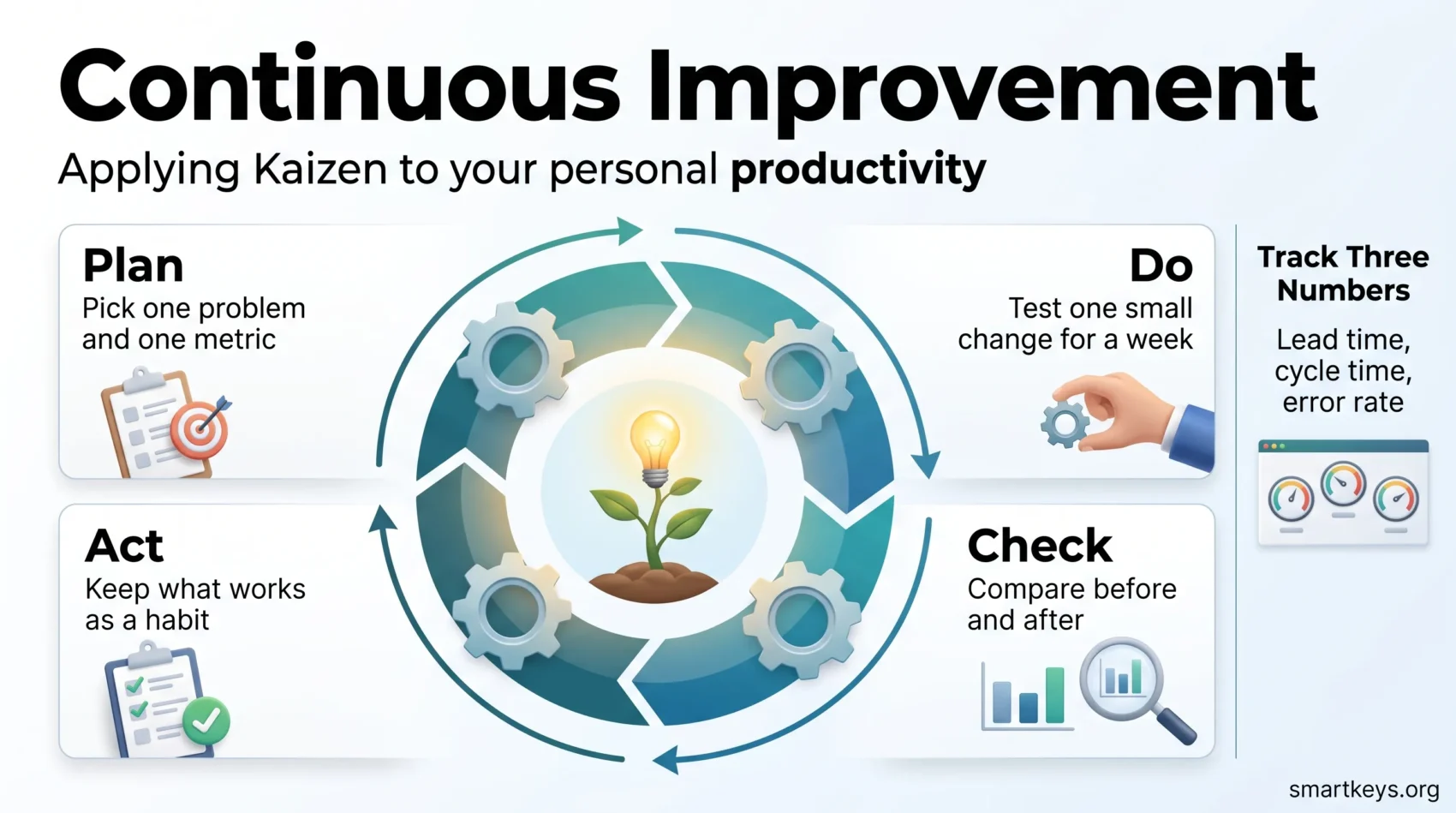
Continuous improvement means changing how you work in small, tested steps instead of one big overhaul. You pick a single friction point, try one fix for a week, look at what happened, and keep the fix only if it helped.
The idea comes from manufacturing, where it is called Kaizen. Toyota and other factories used it to remove wasted motion from assembly lines one adjustment at a time. The same logic works on a calendar, an inbox, or a project handoff.
This guide translates the factory vocabulary into things you can do this week. You will learn how to find where your day leaks time, how to run a short test on it, which three numbers are worth tracking, and how to make a change stick once it works.
Key Takeaways
- Kaizen means small, repeated improvements rather than one large redesign.
- PDCA (Plan, Do, Check, Act) is a four-step loop for testing one change at a time.
- Most personal time loss comes from switching, waiting, and redoing work.
- Three numbers cover almost everything: lead time, cycle time, and error rate.
- A change only counts as an improvement once it survives a normal, messy week.
What continuous improvement actually means
Kaizen is a Japanese word usually translated as “change for the better.” The consultant Masaaki Imai popularised it in the West with his 1986 book Kaizen: The Key to Japan’s Competitive Success, which described how Japanese manufacturers improved output through thousands of tiny adjustments suggested by the people doing the work.
The transferable part is the method, not the factory setting. Instead of asking “how do I become more productive,” you ask a much smaller question: “which single step in this task wastes the most time, and what is the cheapest way to test a fix?”
Small changes beat big overhauls, and here is why
A big overhaul fails for practical reasons. It takes weeks before you know whether it worked, it changes several things at once so you cannot tell which one helped, and it costs enough effort that abandoning it feels like failure.
A small change has the opposite profile. Say your weekly report always runs late because you chase three colleagues for numbers. The overhaul version is a new reporting system. The Kaizen version is a shared spreadsheet with a Thursday deadline, tested for two weeks. If it works, you keep it. If not, you have lost twenty minutes.
That difference matters more than it sounds. Reversible experiments remove the fear that normally stops people from changing how they work.
The Lean ideas worth borrowing
Lean is the management approach built around one question: which parts of this process actually create something the recipient values, and which parts are just cost? Everything else in Lean follows from that.
Value first, then the three kinds of waste
Start by naming who receives your work and what they actually need. For a monthly report, the recipient might be your manager, and what they need is three decisions supported by numbers, not fourteen charts. Once that is clear, the fourteen charts become visible as waste rather than diligence.
Lean sorts waste into three types, which are worth knowing because they have different fixes:
- Muda is work that adds nothing: reformatting a document nobody reads, attending a meeting to hear something you could read.
- Mura is unevenness: three quiet days followed by a Friday where everything is due at once.
- Muri is overload: a schedule with no slack, where one delay knocks over the rest of the week.
Muda you delete. Mura you smooth out by moving work earlier. Muri you fix by taking something off the list, not by working faster.
Where the time actually goes in knowledge work
Three drains show up in almost every personal workflow.
Switching. Every jump between tasks costs a few minutes of reorientation, and those minutes are invisible because they never appear on the calendar. The scale of the problem has grown: research by Gloria Mark at UC Irvine found that office workers in 2004 stayed on one screen for about two and a half minutes on average, while later measurements put that figure closer to 47 seconds. Understanding the real cost of task switching is usually the fastest way to justify a change to your own schedule.
Waiting. Approvals, replies, and reviews create dead time in the middle of your work. This is often the biggest single drain and the one people least often measure.
Rework. Anything you do twice because the brief was vague, the file was the wrong version, or nobody checked the numbers. Rework usually traces back to a missing agreement at the start.
Find the bottleneck before you fix anything
Guessing at your own bottleneck rarely works, because the annoying problems and the expensive problems are usually different ones. A short audit settles it.
For two or three normal workdays, note what you are doing in blocks of roughly 15 to 30 minutes, and mark three things: every task switch, every time you wait on someone, and every piece of work you redo. That is enough to see a pattern. If you want a more structured version, our guide to running a proper time audit walks through the whole process.
Two or three days of rough notes beats two weeks of precise tracking you abandon on day four. The point is to find one worthwhile target, not to build a dataset.
Run a PDCA cycle on your own routine
PDCA stands for Plan, Do, Check, Act. It is a four-step loop for testing one change without disrupting your week, and it is the engine of every Kaizen effort.
- Plan. Write the problem in one sentence, name who suffers from it, and pick one number that would prove a fix worked. Example: “Client reports go out two days late; the client is waiting; success means shipping on the agreed day for three weeks running.”
- Do. Run one narrow change for a fixed period, usually a week or two. Keep the scope small enough that a bad week does not derail anything. Write down what happened, including the days it did not work.
- Check. Compare the number before and after, and look for side effects. A change that cuts your email time but pushes work onto a colleague has not improved anything.
- Act. If it worked, turn it into a default: a calendar block, a template, a checklist item. If it did not, write down why you think it failed and plan the next test.
Short cycles are the reason this works. When a test lasts a week, trying something new stops feeling like a commitment and starts feeling like a question.
Three tools that make invisible work visible
Most personal processes are invisible, which is why they are hard to improve. These three tools put them on paper, and none of them takes more than half an hour to set up.
Personal Kanban: cap how much you start
A Kanban board is a simple set of columns, usually “to do,” “doing,” and “done,” with your tasks as cards moving across it. The important part is not the board. It is the work-in-progress limit: a rule that you may have no more than two or three cards in “doing” at any time.
That cap forces you to finish things before starting new ones, which directly reduces switching. It also makes blockages obvious, because a card that sits in “doing” for four days is visible in a way that a stalled task in your head is not. Our guide to building a personal Kanban board covers the setup in detail.
The 5 Whys: stop fixing the same problem twice
When something goes wrong repeatedly, ask “why” about five times in a row, each time about the previous answer. The technique comes from Toyota’s production system and is deliberately low-tech.
An example. The report was late. Why? The numbers arrived on Thursday evening. Why? Sales pulls them only when asked. Why? There is no standing request. Why? Nobody agreed a deadline when the report started. The fix is a recurring Tuesday request, not working later on Thursday.
Stop when you reach something you can actually change. Five is a guideline, not a rule.
Value stream mapping: draw the process, including the gaps
A value stream map is a sketch of every step in a process, with the waiting time between steps written in. The waiting time is the point. Most processes spend far more time idle than in motion, and you only see that once it is on paper.
Try it on something small, such as publishing a blog post or closing a support ticket. Write each step in a row, add how long each takes, then add how long the work sits between steps. The gaps are usually where your improvement is hiding.
The three numbers worth tracking
You need enough measurement to tell whether a change helped, and no more than that. Three numbers cover most personal work:
- Lead time: how long from request to delivery, including all waiting. This is what other people experience.
- Cycle time: how long you actually spend working on it. The gap between lead time and cycle time is your waiting problem.
- Error rate: how often work comes back for correction. This one keeps speed honest.
Define each term once and use it consistently, otherwise your before-and-after comparison is meaningless. A note in a spreadsheet is enough; a dashboard you maintain for its own sake is just more work. If you want to go further, our overview of personal productivity metrics covers what else is worth measuring and what is not.
One caution: any number you track will quietly become a target, and targets distort behaviour. If you only measure speed, quality will slip. Tracking error rate alongside the two time measures is what stops that happening.
Rituals that keep it going
Continuous improvement fails more often from neglect than from bad ideas. Two short habits prevent that.
A five-minute start to the day: name the one thing that must get done, and check whether yesterday’s experiment is still running. A five-minute end to the day: write down one thing that slowed you down. That single note, collected over a few weeks, becomes your backlog of things worth fixing.
If you struggle to keep these going, attaching them to something you already do reliably works better than willpower. That is the principle behind habit stacking, and the same logic applies to micro-habits generally: small enough to do on a bad day, repeated often enough to compound.
Add a longer weekly review to decide what to test next, and the loop becomes self-sustaining. Mark the wins somewhere visible. Improvement work is unglamorous, and seeing that four small fixes gave you back three hours a week is what keeps you doing it.
Doing this inside a team
The same method works with colleagues, with one addition: pick something visible. A change to a shared handoff, a meeting that gets shorter, or a report that arrives on time earns credibility far faster than an improvement only you can see.
Tie the experiment to a goal your team already cares about. “I want to try a new system” invites resistance. “Our client reports are late; I want to test a Tuesday data deadline for three weeks” invites a yes.
Then give people something to copy. A one-page template for the PDCA loop, a shared board, or a short checklist lets colleagues run their own experiments without a training session. Aligning this with how performance is discussed also helps, which our piece on performance reviews and rituals covers in more depth. Improvement work should look like part of the job, not extra credit.
Where checklists and standard work fit
Lean removes wasted steps. Six Sigma, a related method built on statistics, targets a different problem: inconsistency, where the same task produces good results one week and poor ones the next. For individual knowledge work you do not need the statistics, but two of its habits are worth stealing.
Checklists catch the mistakes you already know you make. The evidence here is unusually strong for such a simple tool. In a study led by Harvard and the World Health Organization, published in the New England Journal of Medicine in 2009, introducing a short surgical safety checklist across eight hospitals was followed by inpatient deaths falling from 1.5% to 0.8% and major complications from 11% to 7% among nearly 7,700 patients. A three-line pre-send check on your own work is a smaller version of the same idea. Our guides to using checklists in everyday work and checklists for complex projects have templates you can adapt.
Standard work means writing down the steps for a task you repeat, so you stop rebuilding it from memory each time. It sounds bureaucratic and takes about ten minutes. The payoff is that the task gets faster, the quality stops fluctuating, and you can hand it over when you need to. For team-level versions, see our guide to standard operating procedures.
What usually goes wrong
The first step is too big. If your experiment needs a free afternoon, it will not happen. Shrink it until it takes ten minutes. Something close to the two-minute rule applies here: if starting is trivially easy, you will actually start.
You change three things at once. Then you learn nothing, because you cannot tell which change did what. One variable per cycle.
You measure the wrong thing. Hours worked is easy to count and tells you almost nothing. Pick the number your recipient would care about.
You skip the Act step. This is the most common failure. A change that worked but never became a default quietly disappears within a month. Turning a successful test into a calendar block, a template, or a checklist line is what makes it permanent.
You improve the wrong process entirely. Making a task faster is wasted effort if the task should not exist. Before optimising anything, check that it still needs doing. Deciding what deserves your attention in the first place is a separate skill, covered in our guides to task prioritization frameworks and the Eisenhower Matrix.
A practical 30-day plan
One month is enough to complete a full loop and see whether the method suits you.
- Week 1: find the target. Run the short time audit. Pick one problem, name who it affects, and choose one number to track. Write the whole thing in three sentences.
- Week 2: run the test. Change one thing. Keep a rough log of what happened, especially on the days it went badly.
- Week 3: look at the result. Compare your number before and after. Check for side effects. Decide honestly whether it helped, made no difference, or made something else worse.
- Week 4: lock it in or move on. If it worked, turn it into a default and write the two-line version of what you did. If it did not, write down why and pick the next target.
After a month you will have one improvement that holds and a written record of how you got it. That record is what makes the second cycle faster than the first, and it is the part most people skip.
Once the loop runs smoothly on your own work, the obvious next targets are the areas where you lose the most time: notifications, batching similar tasks, and protecting enough uninterrupted time for deep work. Vague requests are another good candidate, since they are the usual root cause of rework; writing with more clarity in your messages removes a surprising amount of it. And when the target is a project rather than a habit, breaking a large goal into smaller steps follows the same principle.
Conclusion
Continuous improvement is less a system than a habit of asking one question repeatedly: what is the smallest change that would make this work better, and how would I know if it did?
Pick one bottleneck. Choose one number. Run a test for a week. Keep what works and write it down. Then do it again. The gains from any single cycle are modest, which is exactly why the approach survives busy weeks. The compounding is what makes it worth the effort.
Found this useful?
Make SmartKeys a preferred source on Google, and our articles will surface more often in your Top Stories, AI Overviews, and AI Mode.
Add as Preferred Source