Tools
Tools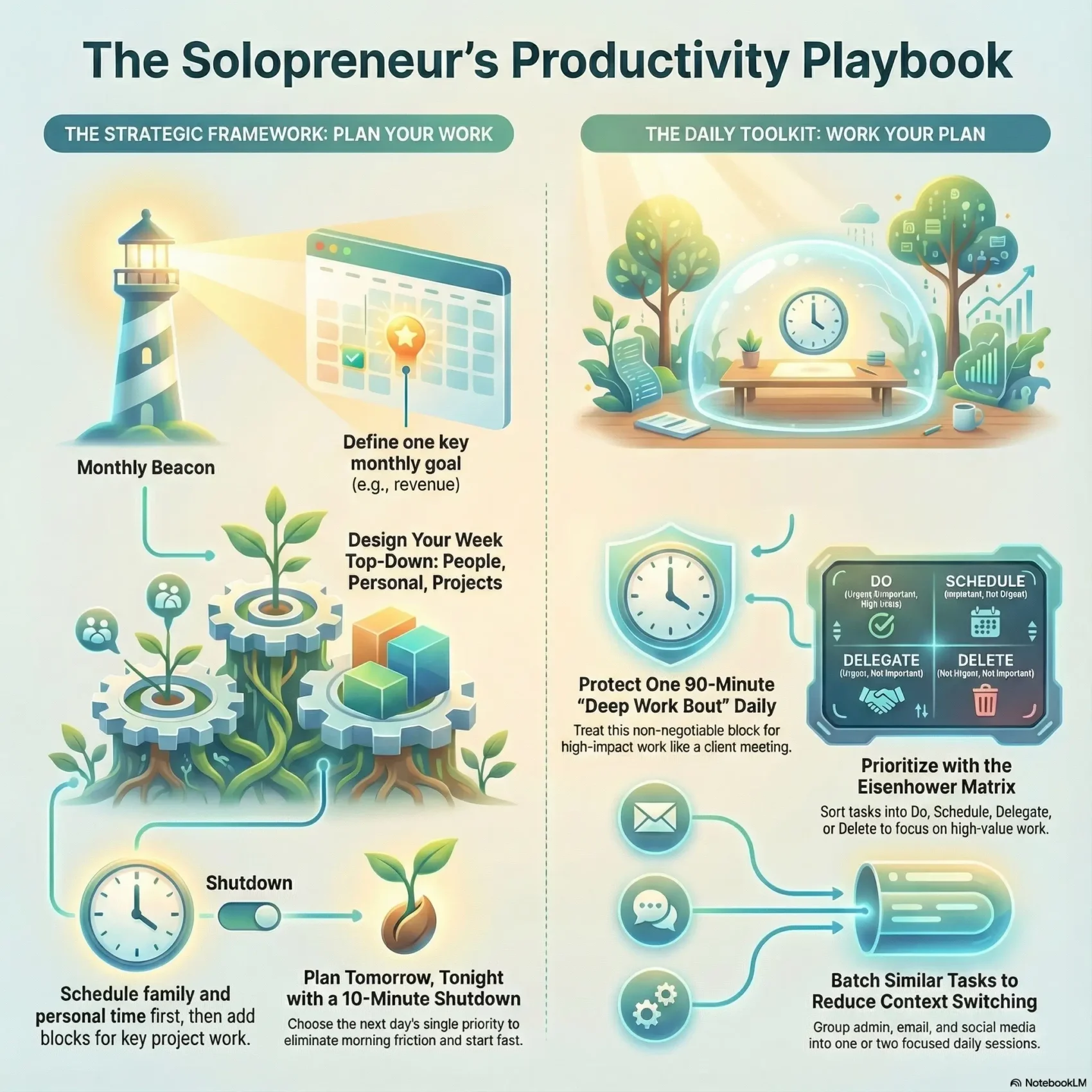
Last Updated on December 13, 2025
You run marketing, sales, delivery, and admin all by yourself. That makes every minute count. Without structure, urgent small tasks eat big goals and you end the day tired but stalled.
This playbook gives a simple, practical system that fits how you actually work. You’ll protect a daily 90-minute deep Work Bout and anchor weeks around a Monthly Beacon so your calendar reflects your values, not your inbox.
We use time blocking, batching, and the Eisenhower Matrix to cut context switching. You’ll plan tomorrow tonight, pick one true priority, and use a shutdown routine that closes loops so your mind can rest.
Expect fewer distractions, clearer progress, and a right-sized tool stack — think Google Calendar, Trello, and light automations — so you spend time doing the work, not managing it.
Key Takeaways
- Protect a daily 90-minute deep Work Bout to move major tasks forward.
- Use time blocking and the Eisenhower Matrix to prioritize and batch work.
- Plan tomorrow tonight and end your day with a shutdown routine.
- Right-size tools and batch digital tasks to reduce drag.
- Track progress weekly with fast reviews to tune your system.
What You’ll Achieve: A Practical System to Run Your Business and Life Without Burnout
Swap chaotic days for a clear system that protects your best work and your rest.
You’ll get a simple, repeatable plan that guards your energy and keeps the calendar honest. A single 90‑minute deep Work Bout each day locks in your highest‑impact work hours. Weekly accountability check‑ins spotlight real progress and friction so you can adapt fast.
Your top‑down calendar puts People, Personal, and Projects first. That creates one source of truth for commitments and a schedule that respects life and recovery.
- You replace scattered tasks with a steady plan that focuses attention on outcomes, not busywork.
- Tools serve the plan: one visible calendar, clear task hubs, and right‑sized automations.
- Monthly Beacons and nightly planning move you from reactive fire‑fighting to proactive flow.
- A 10‑minute shutdown each evening closes loops, reduces anxiety, and primes tomorrow.
Result: a reliable rhythm that keeps your business moving while protecting your energy and life.
Design Your Week from the Top Down: People, Personal, Projects
Treat the week like a blueprint: name the outcome, then arrange your time so each appointment moves that outcome forward.
Set a Monthly Beacon so each week serves a clear goal
Lock a Monthly Beacon first — revenue goal, launch, or client onboarding — so weeks aren’t just busy, they’re directional.
Map the Top‑Down model on your calendar first
Put People on the calendar before Projects. Block family, top clients, and key calls first. Then add Personal: fitness, walks, and routines that protect your energy.
Use the Space & Pace approach to avoid overload and add buffer
Distribute creative work across days and leave white space. Add buffers between meetings to absorb interruptions and protect deep work.
“Check Your Wake” every week to course-correct fast
“What got done? What got dragged? What were the wins?”
Run a 5‑minute review with those prompts to spot unclear tasks, low‑value work, or stalled decisions.
- Use your calendar as a visual plan, not a wish list.
- Reserve a daily deep Work Bout in high‑energy blocks.
- This top‑down map turns weeks into a values‑aligned operating system that compounds progress.
Plan Tomorrow, Tonight: Build a Day That Actually Moves the Needle
Close the day by naming tomorrow’s single priority and placing it on your calendar. This simple action removes morning friction and makes the first hour count.
Pick one true priority and protect it
Choose a singular priority that ties to your Monthly Beacon. Give it your best brain time so the rest of the tasks bend around it.
Block time by energy: use peak hours for strategic work
Put your 90‑minute deep Work Bout in your peak window. Map admin and shallow tasks to low‑energy slots so you don’t waste top time on small chores.
Protect one 90-minute deep Work Bout daily
Treat this block like a client meeting: no interruptions, no partial attention. Over weeks, these Bouts compound real progress.
End with an end: 10-minute shutdown to close loops
“What’s done? What’s loose? What is tomorrow’s one priority?”
Spend ten minutes checking off finished items, capturing open loops, and writing a short to‑do list tied to your Beacon. That routine cuts indecision and keeps steady progress for solopreneurs.
Time Blocking, Task Batching, and Deep Work: Structure Without Rigidity
Arrange your hours around how you actually focus, not around what screams loudest. That simple shift turns a chaotic day into a predictable rhythm you can guard, tweak, and trust.
From Blocks to Bouts to Bursts
Design your day around three focus levels so your best work gets the best time.
- Bouts: one 90‑minute deep session for creation and strategy.
- Blocks: 1–2 hour windows for delivery, calls, or concentrated admin.
- Bursts: 15–30 minute quick clears to handle small fixes.
Batch admin, email, and social media
Do similar tasks together to stop context switching. Batch email, billing, and social scheduling once or twice daily.
Protect your peak energy for creative work and problem solving. Run each session in focus mode: one task, one window, no pings.
“One task, one window, no pings.”
Use simple tools like a timer and a site blocker to support the rhythm, not to run it. Keep a short capture list during deep Bouts so distractions get recorded and you get back to work fast.
- Design days by focus level.
- Leave small buffers between blocks to stay flexible.
- Let your tools help — don’t let them dictate the way you work.
Prioritize What Matters with the Eisenhower Matrix
Sort through your to-do pile with a simple four-box method that keeps high-value work front and center. The Eisenhower Matrix separates urgent and important items so you can act with clarity.
Decide: do, schedule, delegate, or delete
The matrix maps tasks into four quadrants: do now (urgent + important), schedule (important, not urgent), delegate (urgent, not important), and delete (neither).
Delegate or drop “urgent but not important” to reclaim hours
Dump your task list and sort each item. Do what is urgent and important today. Schedule strategic items so they get real time on your calendar.
- Delegate: hand off routine emails, formatting, or scheduling to a VA or contractor with clear outcomes.
- Delete: remove low-value entries ruthlessly so your future time is protected.
- Review weekly: revisit the matrix so creeping busywork won’t repopulate your schedule.
“Do the important now; move the rest into a plan or let it go.”
Result: a simple management frame that focuses your work on what moves the business forward and frees time for real impact.
Focus Fast: Pomodoro Technique, Distraction Control, and Single-Tasking
Train your attention with repeatable sprints so your highest‑value tasks actually get done. Use short, timed sessions to build momentum and protect deep work.
Customize your intervals: the classic pomodoro technique uses 25 minutes on, 5 minutes off, with a 15–30 minute longer break after four cycles. Adjust to 20–45 minutes of focused work to match how you concentrate.
Kill notifications and run in focus mode
Silence nonessential notifications and close email during sprints. Put your phone in another room and use a dedicated focus mode so context switches don’t erode depth.
Single‑tasking and sensible breaks
- Pick an interval that fits you—20, 25, or 45 minutes—so you hit flow without hitting a wall.
- After each sprint take a short break; after three to four cycles step away for 15–30 minutes to reset.
- One objective, one tab, one timer: capture distractions to revisit later and stay on task.
When energy dips, switch to a short burst of low‑effort work instead of doom‑scrolling. End each cycle by noting what moved and what’s next. Over weeks, these sprints raise your baseline productivity and strengthen your time management control—especially useful for solopreneurs.
“One focused sprint beats scattered effort every time.”
Build Your Tool Stack: Calendars, To‑Dos, and Project Hubs That Keep You in Flow
A lean tool stack turns friction into flow so your day spends less time on admin. Choose one project hub, one calendar, and one capture method. That keeps your focus on work, not app hopping.
Use Asana or Trello to track tasks, deadlines, and progress
Pick one simple project hub like Asana or Trello to capture tasks, assign due dates, and visualize progress. Set clear statuses—Backlog, Doing, Done—so you always know what to ship next.
Run your schedule with a visible calendar and reminders
Keep a visible calendar for meetings, deep work, and personal non‑negotiables. Turn on reminders for start times and deadlines so commitments stay top‑of‑mind.
Analog vs. digital: a hybrid setup that reduces screen fatigue
Plan the week or day on paper to clarify priorities and reduce screen time. Then log outcomes and archive notes digitally for search and history.
“Keep the toolset small: one hub, one calendar, one capture system.”
- Pick one project hub (Asana or Trello) to capture tasks and deliverables.
- Use a visible calendar with reminders for meetings and deep work.
- Track progress with clear statuses so the next action is obvious.
- Plan on paper, then log results digitally to cut screen fatigue.
- Keep automations or templates light to save setup time.
Schedule a short weekly admin block to tidy boards, update dates, and re‑prioritize around your Monthly Beacon. The right technology should support flow by reducing friction and making the next action obvious.
For a list of recommended apps and setups, see our guide to productivity apps.
Automate and Delegate: Free Up Time with Smart Systems and Virtual Assistants
Automate the tiny, repeated steps that steal your time so you can focus on work that moves the business forward. Small wiring changes and a part‑time assistant reclaim hours every week.
Start by listing your weekly repetitive tasks: invoicing, saving attachments, contact syncs, scheduling, and social posts. Use Zapier or IFTTT to move data automatically—auto‑save attachments to cloud folders, sync new contacts, or post scheduled content.
Batch and schedule to kill daily context switching
Batch social media and email once or twice a week. Schedule newsletters and posts in one session to protect your deep Work Bout and regain time.
Use virtual assistants to offload non‑core work
Hire assistants for inbox triage, scheduling, research, and formatting. Start small—2–5 hours a week—and build repeatable checklists for client onboarding, publishing, and invoicing.
“Every hour you automate or delegate is an hour you can spend on higher‑value work.”
- List repetitive steps, then automate with Zapier or IFTTT so routine data shuttling happens without you.
- Batch and schedule social media and email weekly to reduce context switching.
- Create outcome‑based briefs and checklists so assistants can run tasks reliably.
- Route inbound messages through a shared inbox or tags so triage happens before you see them.
- Measure reclaimed time and reinvest it into sales, product, or your deep Work Bout.
Make automation and assistants part of your toolset—not a replacement for strategy. Track the time you free and spend it on the tasks that grow your business.
Create a Dedicated Workspace That Protects Your Focus
When your work space signals “work time,” your brain shifts faster into focused effort. A small, consistent area reduces the mental cost of starting and keeps business and family life distinct. Clear rules and simple ergonomics cut distractions and help you sustain energy for longer sessions.

Set boundaries and work hours to reduce interruptions
Decide on regular work hours and tell your household when you’re unavailable. Put those times in your calendar so family and clients know when you’ll answer messages.
Silence nonessential notifications during focus blocks. This preserves attention and lowers the risk of context switching that drains time and energy.
Ergonomics and organization to reduce fatigue and friction
Keep the desk minimal: the current task, a notepad, water, and good lighting. Store other items out of sight so visual noise doesn’t sap focus.
- Claim a consistent space to cue focus and cut setup time.
- Use a supportive chair, eye‑level monitor, and neutral‑wrist keyboard to fight fatigue.
- Keep frequently used tools within arm’s reach and stash the rest.
- End each day with a two‑minute reset: clear the desk and prep tomorrow’s first action.
“A clear space and clear rules protect your best work.”
This environment supports sustained energy, better attention, and higher-quality output. Treat your workspace as a tool in your time and task management toolkit so you can get more done without burning out.
Protect Your Energy: Movement Breaks, Recovery Rituals, and Avoiding Productivity Hangovers
Short movement breaks and clear end-of-day rules keep your energy steady. Small habits during the day stop long stretches of mental fog and physical strain. You’ll find it easier to protect deep work when recovery is part of your schedule.
Build short movement and pause slots into your schedule
Add regular breaks to your calendar so movement actually happens. A five-minute stretch or brisk walk between blocks reduces muscle tightness and lowers mental fatigue.
Use walks to reset attention without falling into a phone rabbit hole. Track how your energy shifts with different break cadences and adjust the timing to fit your time blocks.
Set a firm shutdown time and a simple night routine
Treat your daily shutdown like a client meeting: stop at a set hour and protect tomorrow’s clarity. Jot down loose ends, name your top priority for the next day, then switch to a calming activity.
- Close loops: write quick notes to capture open items before bed.
- Switch off: choose light reading, journaling, or a short walk to wind down.
- Fix the system: if you work past your hours often, re-scope, delegate, or batch tasks.
“Guard recovery as fiercely as deep work; both are required for steady, high-quality output.”
Your life outside the desk—sleep, movement, and relationships—fuels sustained performance. Protecting recovery prevents next-day sluggishness and keeps the whole week moving.
Solopreneur productivity: Track, Review, and Iterate for Continuous Improvement
Turn each week into a short feedback loop that sharpens what you actually ship. A regular, tiny review keeps momentum steady and makes planning faster next week.
Weekly accountability: what moved you forward, what dragged
Run a 5‑minute review every week. Ask: What got done? What dragged? What were the wins?
Capture quick fixes on a short list and set one reminder to align next week with your Monthly Beacon.
Simple metrics to monitor time, energy, and outcomes
- Track only a few metrics: minutes in deep work, completed deliverables, and leads advanced.
- Compare planned vs. actual time to spot scope or estimate issues and adjust time management.
- Keep a small improvement list and ship one process upgrade each week—small hinges swing big doors.
- If a task keeps dragging, choose: clarify, delegate, delete, or schedule a focused bout to finish it.
“A five‑minute weekly check turns noise into clear progress for solopreneurs.”
Document what works in a tiny playbook so your future self can reuse wins. This loop compounds progress for your business and keeps your to‑do list honest with reminders and real outcomes.
Conclusion
When you focus on the few habits that actually move the needle, the rest of the list shrinks.
Plan tomorrow tonight, protect one 90‑minute deep Work Bout each day, and run a five‑minute weekly review. Those three habits deliver the biggest, most durable gains for solopreneurs and your business.
Keep tools light—one board like Asana or Trello and one visible calendar. Batch email and social media, use the Pomodoro technique for short bursts, and automate or delegate repeatable tasks to virtual assistants to lower your mental load.
Start with one thing: block it on your calendar, guard the time, and show up. Small, steady steps turn scattered hours into real progress and a calmer life.