Tools
Tools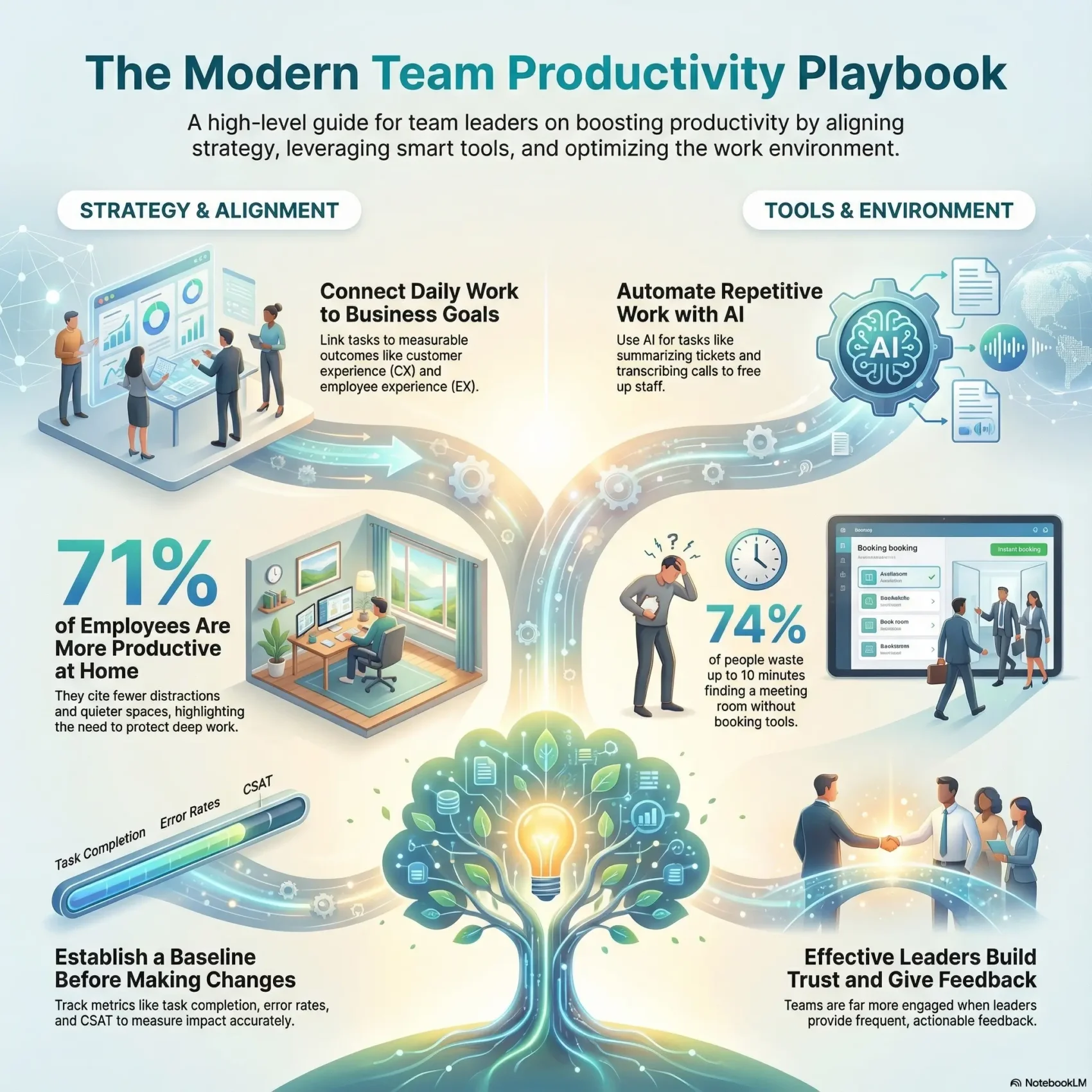
Last Updated on December 13, 2025
You deserve a clear way to improve output without burning out. This playbook shows how to balance quality and speed so your group can deliver great work and better customer experience. It focuses on practical steps, not vague advice.
Start by linking daily work to measurable business goals. When actions map to outcomes like better CX and employee experience, you can see the real impact of process changes. That clarity helps leaders and people align around priorities.
Expect a system that protects deep work, reduces rework, and adds smart automation where it matters. You’ll get simple metrics to track progress and a repeatable roadmap from kickoff through delivery.
Key Takeaways
- Balance output and quality so teams sustain results without burnout.
- Connect everyday work to customer and employee experience.
- Translate goals into clear actions your people can follow.
- Protect time for deep work and reduce unnecessary rework.
- Use automation and metrics to lift output where it counts.
What Team Productivity Means Today and Why It Matters
Clear definitions of output and quality help you judge real performance, not just busy work.
Define output as both the amount you deliver and the accuracy or usefulness of that delivery. Customers and employees notice when errors drop and resolutions speed up. That mix of volume and quality drives customer experience (CX) and employee experience (EX).
In today’s hybrid world, 71% of employees say they’re more productive at home. They cite fewer distractions, better desks, and quieter spaces. Yet many offices push open collaboration areas and miss quiet zones that support heads-down work.
Leaders measure success in several ways: employee output (64%), engagement (46%), revenue (44%), and retention (39%). Disengagement costs companies dearly, so you must track both output and engagement to see the full picture.
Practical implications
- Balance goals between outcomes and experience so gains are sustainable.
- Align leaders and members on what counts, to avoid chasing activity metrics.
- Design the workplace with quiet zones and collaboration areas so people can choose the right place for the task.
For guidance on allocating tasks and freeing up focused time, consider practical approaches like delegating work that keep quality and output aligned with business goals.
How to Measure Team Productivity Before You Optimize
Before you change processes, you need clear measures that show where work stalls and why. Start by capturing simple, repeatable metrics so you can trust comparisons over time.
Core metrics include task completion rates, on-time delivery, quality benchmarks, and error rates. Track tasks by type and complexity so you compare similar work fairly.
- Service indicators: CSAT, First Reply Time (FRT), and Customer Effort Score (CES) to gauge support outcomes.
- Workforce analytics: utilization, schedule adherence, average handle time, idle time, and hours invested.
- Baseline + feedback: pair dashboards with regular feedback from team members to find root causes behind missed SLAs or rework.
- Goals and cadence: set weekly targets, roll them up into project views, and reassess after each change.
Use simple tools to centralize metrics and comments so leaders can spot patterns and allocate resources quickly. For a practical guide to gathering baseline metrics, see measuring productivity.
Set Clear Goals, Roles, and Expectations to Align Your Team
Make company priorities tangible: set visible goals that guide daily decisions and actions.
Translate company goals into shared team goals and personal outcomes. Write goals with clear owners, timelines, and measures so each person knows what to deliver. Clarify decision rights so leaders and members know who decides what and work moves forward without delay.
Use 4DX to keep focus and momentum
Apply the 4 Disciplines of Execution: focus on wildly important goals, track lead measures, build a live scoreboard, and hold short accountability sessions. A simple scoreboard makes results visible and keeps focus sharp.
Document roles and SOPs to cut rework
Clarify each role and the outcomes expected from every person. Document standard operating procedures for recurring tasks to reduce handoffs, confusion, and delays.
- Translate priorities into clear daily actions.
- Run short, consistent meetings to review commitments.
- Encourage collaboration around blockers so others can help early.
Streamline Workflows with the Right Tools, AI, and Resource Planning
Let AI handle repetitive requests while your people focus on complex, customer-facing decisions.
Automate low-impact tasks with AI so your staff can spend more time on judgment-driven work. Use chatbots to deflect routine inquiries and summarize tickets. AI call tools can auto-transcribe conversations and surface recommendations that speed resolution.
Automate low-impact tasks with AI
AI can summarize tickets, generate call transcripts, and suggest responses. That reduces after-call work and lowers error rates. Zendesk AI and similar tools speed answers and improve accuracy.
Leverage WFM and QA for scheduling and quality
Workforce management and quality assurance tools help forecast demand, build schedules, and calibrate service quality at scale. Monese saw an 82% cut in scheduling time after adding WFM with automation.
Create visibility and protect focus time
Create a single view of projects and tasks so members self-serve status and cut unnecessary meetings. Set realistic workloads, protect time-off boundaries, and rank priorities so people know what to do first.
- Automate repetitive work to free time for higher-value tasks.
- Use AI summaries and call transcripts to move faster with confidence.
- Adopt WFM/QA to forecast demand and keep quality steady.
- Share project status centrally to reduce back-and-forth and meetings.
Design Your Collaboration and Communication System
Create a simple system that routes questions, requests, and decisions to the right place fast. Poor collaboration costs people time—64% of workers say they lose at least three hours weekly. Small rules cut that waste and protect focus.
Choose channels for speed and clarity; reduce noise and redundancy
Assign each channel a purpose: chat for quick clarifications, tickets for requests, and docs for final decisions. Tools like Slack and Microsoft Teams work well when roles are clear.
Cadence that works: structured check-ins, standing meetings, and agendas
Keep meetings short and purposeful. Use standing check-ins to clear blockers, list owners and next steps, and end with a quick feedback item.
Promote knowledge sharing and shared goals to prevent silos
Centralize answers in accessible docs and task boards so members find status without pinging others. Share visible goals so individual tasks roll up into a motivating scoreboard.
- Limit meeting sprawl: assign owners and decisions.
- Create feedback loops: capture fixes in rituals.
- Track cross-functional projects: one place for updates.
Optimize Your Workplace Environment for Hybrid Teams
Small changes to seating and booking rules cut wasted minutes and improve focus.
Nearly 90% of offices use meeting room booking software; without it, 74% of people spend up to ten minutes finding a free room. Over 70% use desk booking; without that, 62% waste the same time searching for a desk.
Address office friction: meeting room and desk booking realities
Implement booking tools so meetings start on time and people stop hunting for space. Add clear signage and simple booking norms to prevent room squatting and friction for hybrid members.
Balance heads-down focus with collaboration
Noise is a major barrier to effective work. Add quiet focus zones where a person can do deep work for blocks of hours.
Also provide nearby huddle spots for ad-hoc collaboration. That mix preserves focus in the morning and opens space for group work later in the day.
Place matters: proximity, equipment, and amenities
Let people sit near their collaborators and partner groups to speed coordination and decisions. Furnish rooms with good monitors, mics, and cameras so hybrid meetings feel equitable.
- Track time lost to room and desk hunting to show ROI for tools.
- Choose seating layouts that shorten handoffs and speed approvals.
- Set a simple rhythm: morning focus blocks and afternoon collaboration windows or the inverse, based on your work.
Leadership Behaviors that Lift Team Productivity
How leaders act, more than what they say, sets the rhythm for work and results. You can shape a culture that fuels focus and steady output by modeling both character and competence.
Build trust with character and competence
Trust rests on intent and skill. Be transparent about choices, keep commitments, and show you can deliver. When leaders prove their capability, members make faster, better decisions.
Give frequent, actionable feedback
Daily feedback matters. Gallup finds people who get weekly feedback are far more engaged. Offer one clear improvement and one strength each time.
Foster accountability with visible ownership
Create clear owners for every project and KPI. Use simple scoreboards and short reviews so progress is obvious. Treat misses as data, not drama, and agree next steps fast.
Help people choose the important, not the urgent
“Use the 5 Choices to protect focus and avoid urgency traps.”
Coach members to apply the Time Matrix each day. That keeps goals aligned to business results and improves collaboration across roles.
- Tip: Listen first, then decide to speed outcomes without losing trust.
- Recognize wins in real time and tailor praise to the person.
Conclusion
Close each day with a short review so small wins compound into clear progress. Use simple metrics to see what moves the needle and iterate weekly.
When you pair clear measurement with focused execution and the right tools, your company will see steady gains in team productivity and customer outcomes. Lean on AI, WFM/QA, and light process to cut busy work and protect deep work time.
Tune the workplace for hybrid life, lead with trust and timely feedback, and end each day by checking priorities and project status. Do this for a few weeks and the results become measurable and repeatable.