Tools
Tools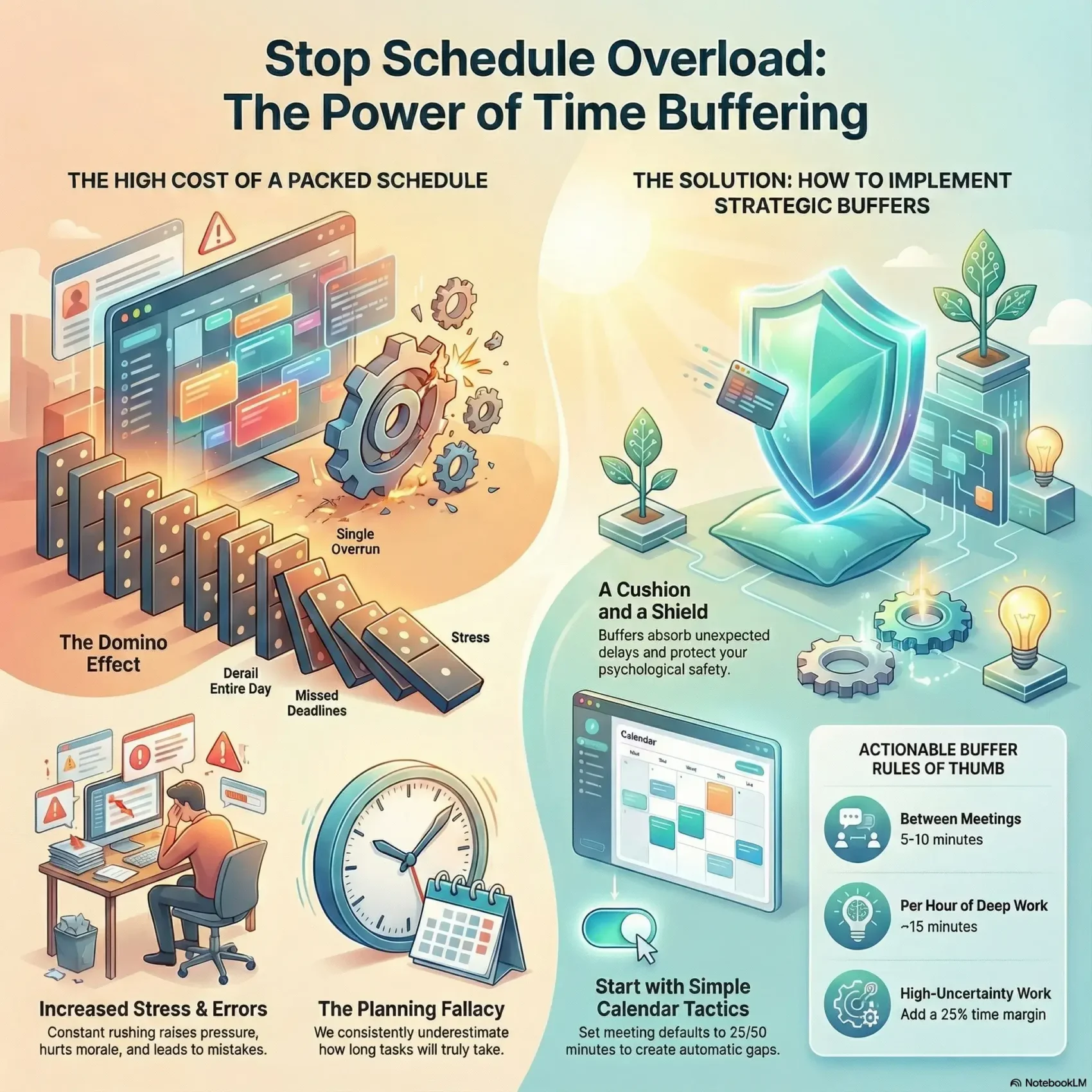
Last Updated on January 10, 2026
You can make your day less frantic by adding a little padding to your plans. Buffer time is extra space placed before or after a task to absorb problems and keep your workflow calm. It acts like a cushion that prevents small delays from turning into big headaches.
Too little buffer raises pressure and leads to errors. Too much padding can bloat costs and invite Parkinson’s Law, where work stretches to fill all available room. A simple rule of thumb is a short margin for deep work and shorter default meetings to protect focus.
Using buffer wisely helps your productivity, lowers stress, and makes planning realistic. You’ll be able to finish tasks on time more often and avoid back-to-back sprints that wear you out.
Key Takeaways
- Add modest buffer time around meetings and tasks to absorb small delays.
- Shorter default meetings and 25% margins on high-variance work improve outcomes.
- Right-sized buffers boost productivity and reduce stress without bloating your day.
- Watch for Parkinson’s Law and avoid over-padding that kills urgency.
- Use simple tools to track your day and adjust future planning.
- Start small: one buffer block today can make tomorrow steadier.
What time buffering is and why it matters right now
A little extra padding around events prevents a single overrun from wrecking your whole schedule. Buffer time is that planned padding you add before and after activities so ordinary delays don’t push the rest of your day off a cliff.
You likely underestimate how long tasks take because of optimistic planning. That habit leads to back-to-back meetings, constant context switching, and rising stress.
Common kinds include transition, travel, prep, recovery, and end‑of‑day buffers. Each one fits a different part of your work and life and protects your productivity and focus.
- Shorten defaults to 25 or 50 minutes for quick wins.
- Audit your calendar to spot overruns and add small margins.
- Use one anchor tool or rule to protect those gaps.
Even a few extra minutes or one reserved block can absorb interruptions and unexpected events. That small step turns daily friction into smoother handoffs and better project management now, not someday.
Time buffering, defined: your built‑in cushion and shield
Deliberate gaps on your calendar act like a safety net for everyday glitches. Buffer time is scheduled, not improvised: minutes you place around a task or at a project’s end so you don’t have to scramble.

Cushion vs. shield: how buffer time absorbs delays and protects your focus
As a cushion, a buffer soaks up overruns, quick fixes, and handoff hiccups so your next activities start on schedule. Even a few planned minutes can prevent ripple effects.
As a shield, it gives you psychological safety. You can work through a long meeting or a messy task without panic. That calm improves overall productivity.
Where buffers live: before tasks, after tasks, and at project end
Place buffers before tasks for prep, after tasks for wrap‑up, and at a project’s end to cover unknowns. Task buffers are usually owned by individuals; project buffers belong to project managers.
“Estimating duration with a small preplanned margin beats hoping for the best.”
- List buffer blocks on your calendar so others respect them.
- Use short labeled gaps between meetings to jot notes or breathe.
- Keep buffers visible to avoid accidental booking over them.
Benefits that compound: less stress, better focus, and realistic schedules
Small, intentional gaps in your day add up to calmer work and steadier progress.
Reducing stress and avoiding the rush effect. A modest buffer time lets you absorb micro‑delays and respond calmly to changes in scope or requirements. That reduces overtime and stops adrenaline‑driven sprints.
Reducing stress and avoiding the rush effect
When interruptions happen, you won’t have to sacrifice quality to stay on schedule. You gain breathing room that protects your energy and morale.
Preventing task spillover and improving punctuality
Buffers prevent one late meeting from pushing every following meeting off course. That helps you hit deadlines and arrive prepared for each commitment.
Boosting focus and energy with intentional recovery
Short recovery gaps after intense work let your brain reset. You’ll notice higher productivity and better decisions when you guard those pockets for rest or notes.
Avoiding extremes: the risks of too little or too much buffer
Too little buffer raises error rates, causes overtime, and hurts morale. Too much buffer can waste resources and trigger Parkinson’s Law, where work expands to fill available space.
- You’ll see how small cushions lower stress by soaking up routine delays.
- You’ll learn how buffers stop spillover and keep meetings punctual.
- You’ll understand how recovery gaps protect focus and sustain productivity.
- You’ll weigh the trade‑offs and use simple rules—cap margins, set clear scope, and review actuals—to keep urgency healthy.
“Right‑sized margins help teams deliver higher quality work without burning out.”
How to add buffer time to your day starting today
Kick off with a quick audit of your schedule to find where delays and energy dips cost you momentum.
Audit your day: look for back‑to‑back meetings, recurring overruns, and low‑energy windows. Mark the hot spots and note which tasks consistently run long.
Build transition gaps
Add short 10–15 minute buffers between tasks and meetings so you can switch context, take notes, and reset without rushing.
Overestimate then schedule
For high‑variance work, add about a 25% margin. That simple rule stops spillover and keeps your productivity steady.
Install anchor buffers
Place fixed blocks mid‑morning, after lunch, and at day’s end (for example: 20, 45, and 30 minutes). Use these zones to absorb unexpected delays and prepare for the next focus span.
Protect your blocks
Treat buffers as sacred on your calendar. Label them clearly and resist booking over them unless absolutely necessary.
Combine with time blocking
Surround deep work with protective gaps and use one tool rule: shorten default meetings to 25 or 50 minutes. Learn more about practical time blocking tactics to reclaim focus.
Example daily plan
- 9:00–10:30 deep work
- 10:30–10:45 transition buffer
- 10:45–11:30 meeting
- 11:30–12:00 admin
- 12:00–1:00 lunch
- 1:00–2:30 project work
- 2:30–3:00 recovery buffer
- 3:00–4:00 client call
- 4:00–4:30 end‑of‑day buffer
“Small, defended gaps keep your day movable without losing momentum.”
How much buffer time do you really need?
Deciding how much margin you need begins with the kind of work you do and how often interruptions happen.
Simple rules of thumb help you start fast. Aim for 5–10 minutes between meetings and roughly 15 minutes per hour of deep work. These small steps protect focus and keep your schedule flexible.
Context matters
Choose duration by activity. For travel, add commute plus a delay margin. For critical calls, add prep before and a short recovery after. For heavy tasks, give extra wrap‑up minutes to file notes and clear next steps.
Energy‑based planning
Map buffers to your peaks and troughs. Put larger gaps around low‑energy periods so you can absorb overruns. Keep peak slots lean and guarded for high‑value work.
- Start small: apply the 5–10 minute rule and 15 minutes per deep hour, then adjust from real results.
- Tailor by risk: increase buffer for uncertain events, unreliable teams, or high‑impact projects.
- Protect deadlines: pick margins that shield deliverables without killing urgency.
- Iterate: review actual durations each day and right‑size buffers for tomorrow.
“There’s no universal formula — set a rule, measure outcomes, and refine.”
Team and project management: using buffer time without killing momentum
In project work, the smart use of gaps keeps deadlines safe without killing momentum.
Task buffers vs. project buffers
Ownership matters. Individual contributors set task buffers for prep and wrap‑up. Project managers hold a project buffer at the end to cover unknowns.
Risk‑driven buffers
Assess uncertainty and allocate padding by criticality. Add buffer where work is unpredictable and trim it where tasks are routine.
Culture and communication
Talk openly about buffer assumptions so stakeholders know what protects deadlines and what trade‑offs exist. Label gaps on calendars and resist booking over them.
- You’ll clarify ownership so task buffers roll up into project planning.
- You’ll tie buffer to risk, keeping momentum while protecting deliverables.
- You’ll review actuals often and adjust buffers as changes occur.
- You’ll treat white space as infrastructure, not wasted hours.
“Add buffer explicitly where needed and protect it, so unexpected events don’t cascade into missed commitments.”
Tools, tips, and examples to operationalize buffers
Practical tools and small rituals make it easy to turn gaps into reliable protection for your day. Use simple tactics that fit your workflow so you can protect focus without extra fuss.
Calendar tactics: set 25/50‑minute defaults and labeled buffer blocks
Set meeting defaults to 25 or 50 minutes so you get automatic transition gaps. Label blocks clearly—use names like “Transition Time” or “Wrap-Up”—so colleagues know not to book over them.
Rule: defend these blocks the same way you guard important meetings.
Using Memtime insights to spot gaps and right‑size buffers
Use a tool like Memtime to see your day in small intervals and spot where you lacked protection. The app syncs calendars and shows actual durations for tasks and events.
That data helps you add buffer where you really need it and trim padding where it’s wasteful. Use brief daily reviews to tweak tomorrow’s plan.
Personal life buffers: departures, errands, meal prep, and evening wind‑down
Bring the same logic home. Add departure buffers before outings, +15 minutes for errands, and prep slots for meals.
Finish with a 30‑minute evening wind‑down to shift out of work mode. These small blocks save stress and keep your productivity steady across work and life.
“Small, labeled buffers and the right tools turn surprise delays into minor hiccups.”
- Set defaults to 25/50 minutes and name protective blocks.
- Use Memtime or a similar tool to measure real durations and tune buffers.
- Apply prep, recovery, and travel buffers around critical tasks and projects.
- Translate the rule to home: departures, errands, meal prep, and wind‑down.
For scheduling structure, combine these tips with time blocking to make add buffer practices routine and repeatable.
Overcoming common objections without overbooking your calendar
Packed calendars are rarely a badge of honor — they often hide avoidable scramble. You’ll hear the usual pushbacks: “I don’t have room,” guilt over white space, or fear that every open slot is wasted.
“I don’t have time for buffers” and other productivity myths
Start small. Add a 5–10 minute gap and watch how minor delays stop cascading into bigger problems.
Shorten meetings, consolidate related events, and trim admin blocks to free up space without stealing work hours. Label those gaps so colleagues respect them.
“Small, protected gaps act like insurance for your day.”
Reframing white space as performance infrastructure
Think of buffer as a tool for better management, not a luxury. Proper gaps improve focus, speed recovery, and raise overall productivity.
- You’ll prove buffers prevent small overruns from wrecking your schedule.
- You’ll fight guilt by seeing white space as infrastructure for sharper work.
- You’ll keep flexibility by adjusting how much buffer you need per day.
- You’ll use simple tips—default shorter meetings and quick daily reviews—to protect those blocks.
Bottom line: start with tiny experiments. Protect them, measure results, and scale the approach that boosts your productivity most.
Conclusion
Treat gaps as intentional parts of your plan and you turn disruptions into small, fixable problems instead of full blown setbacks. Use a simple rule: add short buffer time around high‑risk meetings and give deep work a modest margin. This protects deadlines and supports steady productivity.
Start with 5–10 minutes between events and roughly 15 minutes per hour of deep focus, then adjust from what your day teaches you. Use a tool like Memtime to measure actuals and refine your approach weekly.
You’ll end with a small blueprint: add tiny buffers, protect them, review results, and iterate. The benefit is clear — calmer work, fewer cascading overruns, and a schedule that finally works for your life and projects.