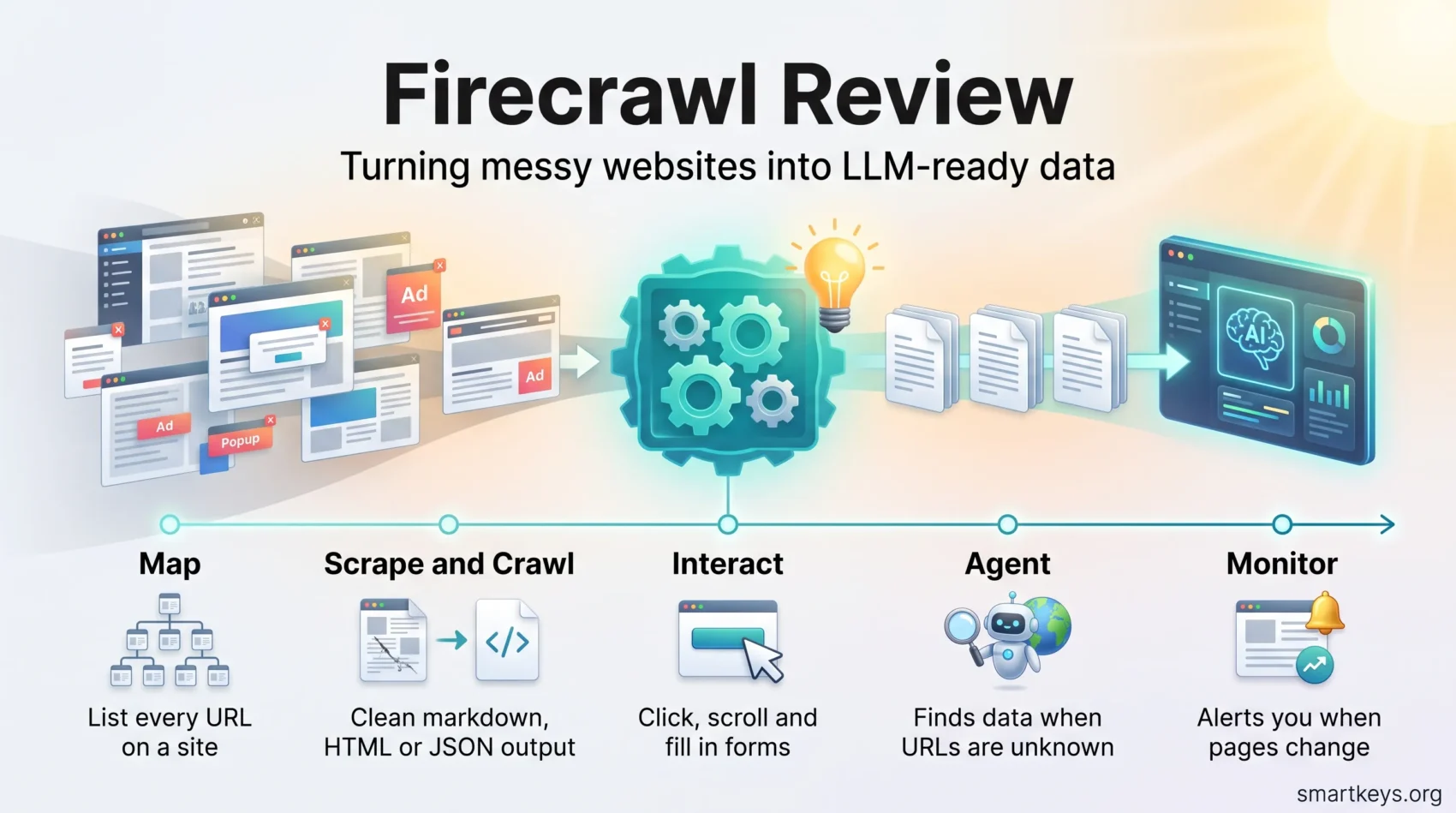
If you build anything with AI that needs current information from the web, you quickly hit the same problem: websites are messy. Pages are full of menus, cookie banners, ads and JavaScript that a language model cannot use directly. This Firecrawl review looks at a tool built to solve exactly that. Firecrawl is a web data API (an interface your code calls over the internet) that turns websites into clean text or structured data that AI models and agents can read.
The review covers what Firecrawl does, what each plan costs in September 2026, how the credit system really works, what the open-source version can and cannot do, and when a different tool is the better choice.
Key Takeaways
- Firecrawl converts web pages into LLM-ready markdown or JSON, so AI tools can use them without manual cleanup.
- Paid plans start at $19 per month (Hobby, 5,000 credits). A free plan includes 1,000 credits.
- Most actions cost 1 credit per page, but JSON extraction adds 4 credits per page and AI browser sessions cost 7 credits per minute.
- The open-source core (AGPL-3.0) covers scrape, crawl, map and search. Agent, Interact and the dashboard are cloud-only.
- It fits developers and AI teams with ongoing data needs. For occasional, no-code scraping, a browser extension is usually enough.
What Is Firecrawl?
Firecrawl is a web scraping and crawling service aimed at AI applications. Web scraping means automatically reading a web page and pulling out its content. Crawling means following links to collect many pages from one site. Firecrawl does both and returns the result in formats that large language models (LLMs, the models behind tools like ChatGPT and Claude) handle well.
The company was founded by Caleb Peffer (CEO), Nicolas Silberstein Camara (CTO) and Eric Ciarla. It grew out of Mendable, a startup from Y Combinator’s S22 batch. In August 2025, TechCrunch reported a $14.5 million Series A. On September 22, 2026, Firecrawl announced a $75 million Series B led by Smash Capital, according to Dealroom. The company says it serves 1.5 million developers and 150,000 companies. Those are vendor figures, not independent audits.
Why does this matter to you? Many AI projects depend on fresh web content. Typical examples are RAG pipelines (retrieval-augmented generation, where a chatbot looks up documents before answering), internal knowledge bases, price tracking and competitor research. Writing and maintaining your own scrapers for these jobs takes real engineering time. Firecrawl sells that work as a service.
Core Features Explained
Firecrawl bundles several functions behind one API. Each one answers a different question: “What is on this page?”, “Which pages exist on this site?” or “Where on the web is the information I need?”
Scrape and Batch Scrape
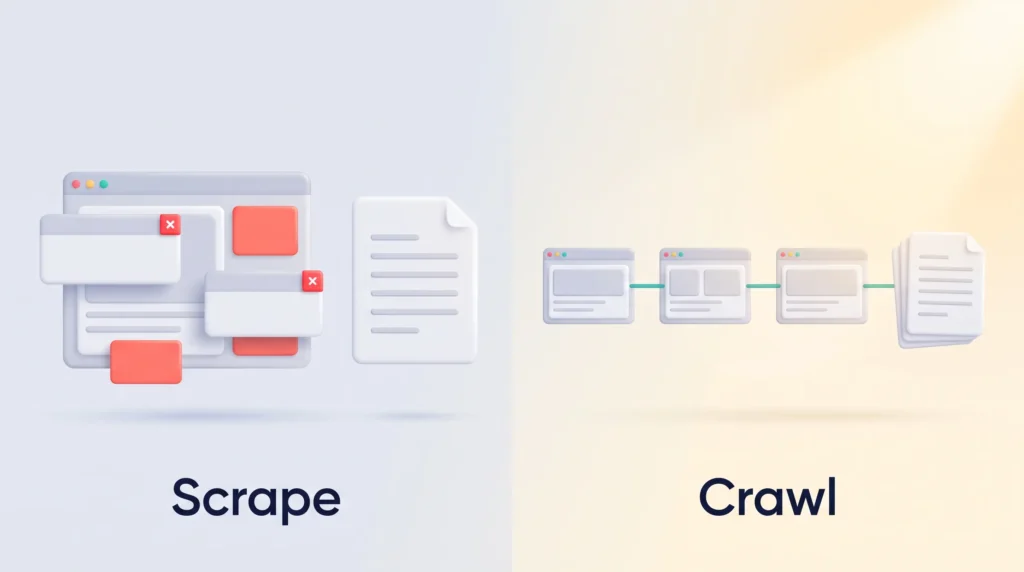
Scrape takes a single URL and returns clean markdown, raw HTML, a screenshot, a list of links or structured JSON. It renders JavaScript, so pages that load content dynamically still work. It also parses documents such as PDFs and DOCX files. Batch Scrape does the same for thousands of URLs at once in the background.
Example: a product team pastes 200 competitor pricing page URLs into a batch job and receives clean markdown for each, ready to feed into a model that summarizes price changes.
Crawl and Map
Crawl starts at one URL and follows links to collect a site’s subpages. Map is the lighter option: it lists all URLs on a site without scraping their content. A sensible pattern is to map first, pick the sections you need, and then crawl only those. That keeps credit use under control.
Search
Search runs a web search and returns the full content of the result pages, not just links. For an AI agent this saves a step, because it can read the sources right away.
Interact
Interact opens a real browser session on a page and lets you click buttons, fill in forms, scroll or type. You can control it with code or with plain-language prompts. This is useful for content that only appears after a click, such as “load more” lists or tabbed product details.
Agent
Agent is for cases where you do not know the URLs upfront. You describe what you need, and the agent searches, navigates and collects the data on its own. According to the Firecrawl documentation, the older Spark 1 models are deprecated and all requests now run on a single model, Spark 2. If you want a broader introduction to how such systems plan and act, see our guide to AI agent workflows.
Monitor
Monitor schedules recurring checks on pages, whole sites or search queries and alerts you when something changes. Notifications go out by webhook, email or Slack. An optional AI “judge” filters out trivial changes, such as a new timestamp, so you only hear about meaningful updates.
Firecrawl Pricing and Credits in 2026
Firecrawl uses a credit system. Every action consumes credits, and each plan includes a monthly allowance. Here are the plans as listed on the official pricing page in September 2026:
| Plan | Monthly billing | Annual billing (per month) | Credits per month | Concurrent browsers |
|---|---|---|---|---|
| Free | $0 | $0 | 1,000 | 2 |
| Hobby | $19 | $16 | 5,000 | 5 |
| Standard | $99 | $83 | 100,000 | 25 |
| Growth | $399 | $333 | 500,000 | 50 |
| Scale | $749 | $599 | 1,000,000 | 100 |
| Enterprise | Custom | Custom | Custom | |
“Concurrent browsers” is the number of pages Firecrawl processes for you at the same time. More concurrency means large jobs finish faster.
What Each Action Costs
- Scrape, Crawl, Map: 1 credit per page.
- Search: 2 credits per 10 results.
- JSON, question or highlight formats: 4 extra credits per page, so a JSON scrape costs 5 credits.
- Interact: 2 credits per browser minute with code, 7 credits per minute with AI prompts. Billing is per second, with a one-minute minimum.
- Monitor: 1 credit per page per check, plus 1 credit per changed page if the AI judge is on.
- Agent: 5 free runs per day, then dynamic pricing. The docs say most runs use a few hundred credits.
What This Means in Practice
The format you choose changes your bill more than the plan does. On the Hobby plan, 5,000 credits cover about 5,000 markdown pages but only about 1,000 pages in JSON mode. A team that crawls a 3,000-page documentation site once a week needs roughly 12,000 to 13,000 credits a month in markdown. That already points to the Standard plan.
Unused credits expire at the end of the month on most plans. The exception is Scale, which carries unused credits over for one month, and Enterprise, where rollover is negotiated. If you run out, you can buy extra credits in $5 packs. The pack size depends on your plan, from 1,000 credits on Hobby to 5,000 on Scale.
Open Source vs Cloud: What You Actually Get
Firecrawl’s core code is public on GitHub under the AGPL-3.0 license. This is a “copyleft” license: if you modify the code and offer it to others as a network service, you must publish your changes. The SDKs (the ready-made code libraries for Python, Node.js and other languages) use the more permissive MIT license.

According to the documentation, a self-hosted installation includes the scrape, crawl, map and search APIs. Agent, Browser, Interact, the dashboard and enterprise controls are not part of it. LLM-based extraction also works self-hosted, but you must connect your own OpenAI-compatible model provider or a local model through Ollama. Premium proxy routes, which help with sites that block automated traffic, stay in the cloud.
Self-hosting makes sense when you must keep data on your own infrastructure or want predictable costs at very high volume. You then carry the server, maintenance and blocking issues yourself. For most small teams, the cloud version is the more practical choice. Our article on open-source strategy explains how to assess licenses like AGPL before you build on them.
Strengths and Weaknesses
Strengths
- Clean, AI-ready output. Markdown without navigation and clutter reduces the tokens (the text units models charge by) you send to an LLM.
- One API for many jobs. Discovery, scraping, browser actions and monitoring share one account, one key and one credit pool.
- JavaScript and documents handled. Dynamic pages, PDFs and DOCX files work without extra setup.
- Good developer tooling. SDKs, an MCP server (Model Context Protocol, a standard that lets AI assistants call external tools) and a Playground for testing.
- Transparent pricing. Credit costs per action are published, which makes budgeting possible.
Weaknesses
- Costs rise fast with JSON and AI features. Structured extraction multiplies credit use by five, and prompt-driven browsing costs 7 credits per minute.
- Heavily protected sites remain hard. Social networks and large platforms use strong anti-bot systems. No scraping service reaches them reliably, and their terms often forbid it.
- No rollover on smaller plans. Credits you do not use on Free through Growth are lost at the end of the month.
- Agent pricing is hard to predict. Dynamic, complexity-based pricing means you only learn the real cost by testing.
- Built for developers. The dashboard helps, but getting value at scale still means writing code.
Is Web Scraping Legal?
Scraping publicly available pages is often lawful, but “public” does not mean “free for any use”. Three things usually matter: the site’s terms of service, copyright on the content you store or republish, and personal data. If you collect names, emails or profiles of people in the EU, the GDPR applies no matter which tool you use. Firecrawl is a tool; responsibility for how you use the data stays with you. Our overview of data privacy trends covers the rules most teams run into. This is not legal advice, so check with a lawyer for commercial projects.
How to Set Up a Firecrawl Workflow
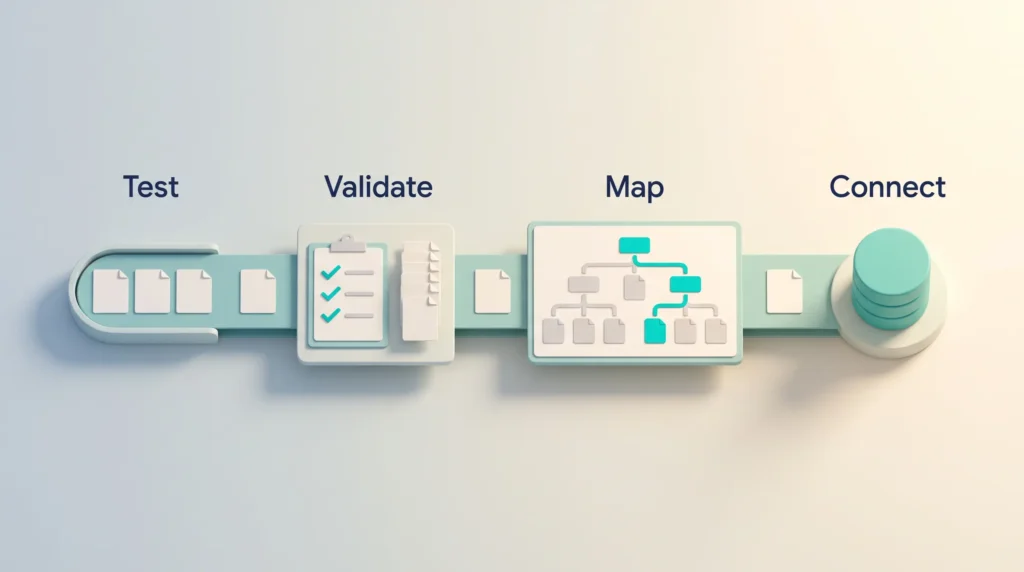
A careful start saves credits and avoids surprises later. This sequence works well:
- Test in the Playground. Try your target pages in different formats and compare the output.
- Validate one representative job. For example, one documentation crawl or 50 product pages. Check quality and credit use before scaling up.
- Map before you crawl. Use Map to see the site structure, then set page limits, path filters and crawl depth.
- Choose the cheapest format that works. Use markdown by default and JSON only where you truly need fixed fields.
- Close Interact sessions promptly. Sessions end after 10 minutes or 5 idle minutes, but every minute until then is billed.
- Connect your stack. Send results to your database, vector store or automation platform. If you use no-code automation, our Workato vs Zapier comparison helps you pick the glue between tools.
Once data flows into a model, running it reliably becomes the next task. Our LLM Ops strategy guide covers costs, retrieval and monitoring in production.
Who Should Use Firecrawl?
Firecrawl is a strong fit for these groups:
- AI product teams that feed chatbots or agents with web content, for example a support bot that answers from your public help center. For a no-code chatbot builder, compare our Chatbase review.
- Growth and research teams that track competitor pricing, product changes or news with Monitor.
- Sales operations that enrich leads with company website data. Tools like Clay cover similar ground without code.
- SEO and content teams that analyze how pages are structured and cited. See our guide to generative engine optimization for why AI crawlers matter for visibility.
It is a weaker fit if you only need data now and then, if nobody on your team writes code, or if your main targets are social networks.
Firecrawl Alternatives Compared
The right alternative depends on your coding skills, volume and whether you need an API at all:
| Tool | Type | Entry price | Best for |
|---|---|---|---|
| Firecrawl | AI-focused scraping API | Free (1,000 credits), then $19/month | LLM-ready data for AI apps and agents |
| Crawl4AI | Open-source Python library | Free (you run it yourself) | Developers who want full control and no subscription |
| Apify | Scraping platform with a marketplace of ready-made scrapers | Free ($5 usage), Starter $19/month | Teams that want prebuilt scrapers for specific sites |
| ScrapingBee | Scraping API with proxies | 1,000 free trial credits, Hobby $19/month | Raw HTML at volume with proxy rotation |
| Thunderbit | No-code Chrome extension | Check vendor site | Non-technical users exporting data to sheets or Notion |
| Bright Data | Enterprise proxy and data platform | Usage-based | Large companies with demanding scraping needs |
Apify and ScrapingBee prices come from their Apify and ScrapingBee pricing pages as of September 2026. Credit units are not comparable across tools, because each vendor charges differently for JavaScript rendering and proxies. Test your own target pages before comparing costs.
If you mainly need company logos, colors and firmographic data rather than full pages, a specialized API such as Context.dev can be simpler and cheaper.
Verdict: Is Firecrawl Worth It in 2026?
Firecrawl is one of the most practical ways to get clean web data into AI applications. Its main advantage is focus: output is ready for LLMs, and discovery, scraping, browser actions and monitoring share one API. The fresh Series B funding also suggests the product will keep developing.
The catch is cost control. Markdown scraping is cheap, but JSON extraction, prompt-driven browsing and Agent runs can use up a plan quickly. Start on the free plan, test your real target pages, and calculate credits based on the formats you will actually use.
Choose Firecrawl if you build AI products or run recurring data jobs and have someone who can write code. Choose something else if you scrape rarely, need no-code tools, or want to avoid a monthly subscription. In that case, Crawl4AI or a browser extension will serve you better.
For more context on where AI agents fit into daily operations, read our overview of AI agents in business, and look up unfamiliar terms in our AI glossary.
Found this useful?
Make SmartKeys a preferred source on Google, and our articles will surface more often in your Top Stories, AI Overviews, and AI Mode.
Add as Preferred SourceFAQ
What is Firecrawl used for?
Firecrawl is used to turn websites into clean data that AI models can read. Developers use it to feed chatbots and RAG systems with current web content, to build knowledge bases from documentation, and to track competitor pages. It returns markdown, HTML, screenshots or structured JSON, and it handles JavaScript-heavy pages and PDFs. Features like Search and Agent also help AI agents find information when the exact URLs are not known in advance.
How do Firecrawl credits work?
Every Firecrawl action uses credits from your monthly allowance. Scraping, crawling and mapping cost 1 credit per page, and search costs 2 credits per 10 results. JSON and other AI formats add 4 credits per page. Browser sessions with Interact cost 2 credits per minute with code or 7 credits per minute with AI prompts. On most plans, unused credits expire at the end of the month. Only Scale carries them over for one month, and Enterprise terms are negotiated.
Is Firecrawl free?
Yes, Firecrawl has a free plan with 1,000 credits per month and two concurrent browsers. That covers about 1,000 simple page scrapes, which is enough to test output quality on your own target sites. All users also get five free Agent runs per day. The open-source version is free as well, but you have to host and maintain it yourself, and it lacks cloud-only features such as Agent and Interact.
Can I self-host Firecrawl?
Yes, the Firecrawl core is open source under the AGPL-3.0 license and can run on your own servers. The self-hosted version includes the scrape, crawl, map and search APIs. Agent, Interact, the dashboard, premium proxies and enterprise controls are only available in the cloud. For AI-based extraction you must connect your own model provider or a local model. Keep in mind that AGPL requires you to publish your changes if you offer a modified version as a network service.
Can Firecrawl scrape LinkedIn or Instagram?
Not reliably, and you usually should not try. Large social networks use strong anti-bot protection and login walls, and their terms of service generally prohibit automated data collection. Profiles also contain personal data, so rules like the GDPR apply. Firecrawl works best on public websites such as company pages, documentation, blogs, news sites and online shops. For social media data, use the official APIs or licensed data providers.
How can I reduce credit usage?
The biggest saving comes from choosing the right format. Use markdown by default, because JSON extraction costs five times as much per page. Run Map before Crawl so you only collect the sections you need, and set page limits and path filters. Close Interact sessions as soon as you are done, since browser time is billed per second. Test in the Playground before running large jobs, and pick the plan that matches your real monthly volume.
Is Firecrawl better than Crawl4AI?
It depends on whether you want a managed service or full control. Crawl4AI is a free, open-source Python library that you run and maintain yourself, so there are no credits or monthly fees. Firecrawl costs money but handles infrastructure, browser rendering, proxies and monitoring for you, and it adds features like Agent and Interact. Teams with strong Python skills and steady workloads often prefer Crawl4AI. Teams that want to ship quickly usually choose Firecrawl.