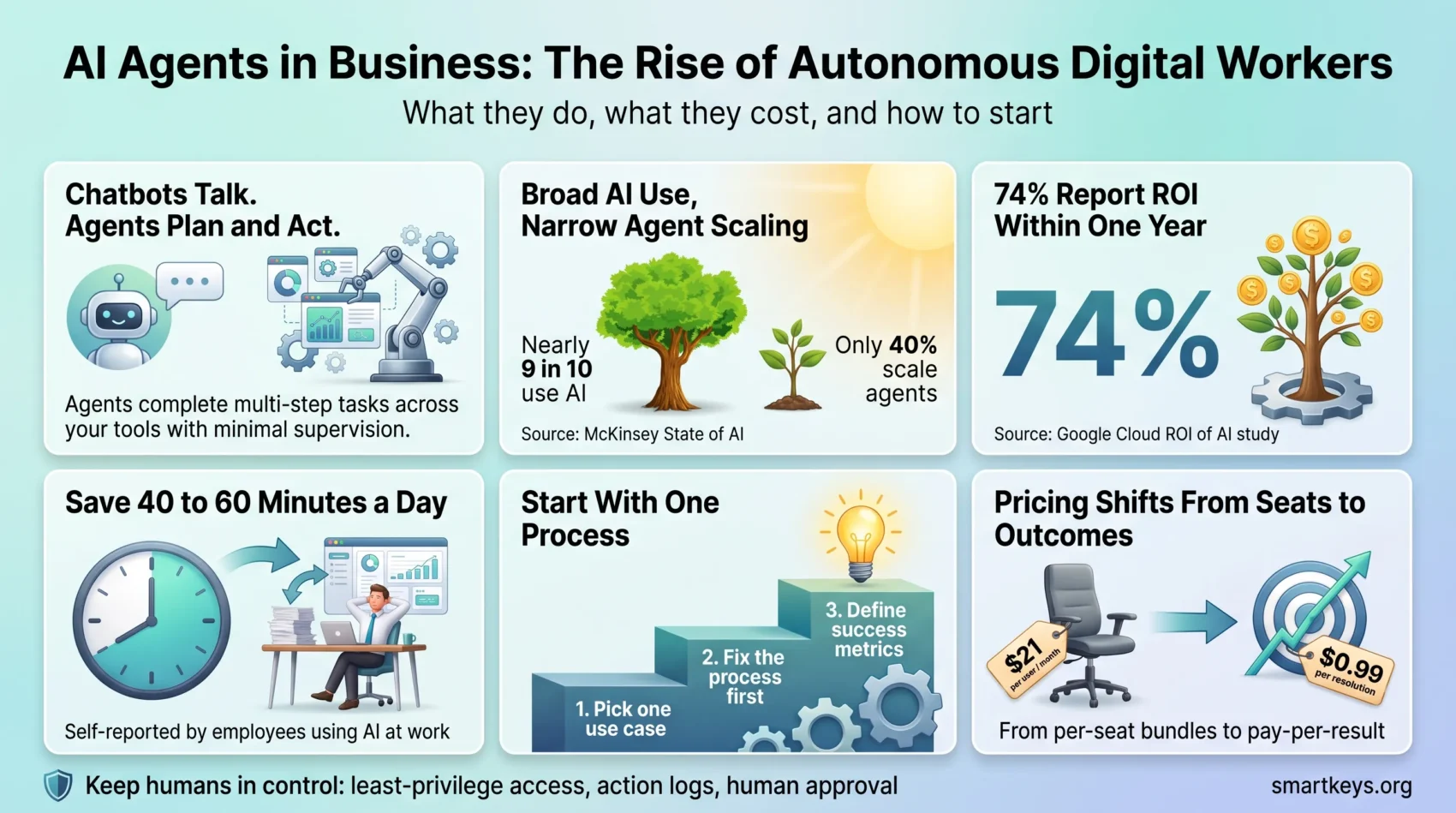
AI agents are software programs that take a goal, work out the steps, and carry them out across your tools with little supervision. Think of them as digital workers rather than digital assistants. An assistant answers when you ask. An agent picks up a ticket, checks the order system, drafts the reply, and updates the CRM (the customer database) on its own.
Interest is high, but real deployments are still the exception. McKinsey’s State of AI 2026 survey (August 2026, 1,719 respondents) found that nearly nine in ten organizations use AI in at least one business function. Only 40 percent of large organizations (those with more than $1 billion in annual revenue) report scaling AI agents, up from 27 percent a year earlier. Among smaller organizations, that share stayed flat at 22 percent.
This guide is written for founders, team leads, and practitioners who need to make a buying decision. It explains what AI agents in business actually do, what they cost in 2026, where they pay off, and how to start without a large consulting budget. For the technical side, the AI agent workflows playbook covers architecture and design patterns.
Key Takeaways
- AI agents differ from chatbots and classic automation because they plan and act, not just answer.
- Adoption is broad but shallow: most companies use AI, far fewer run agents at scale.
- Entry prices have fallen. Copilot Business costs $21 per user per month and Gemini is bundled into Google Workspace.
- The biggest wins come from one narrow, high-volume process with clear success metrics.
What AI Agents in Business Actually Are
An AI agent is a system that can reason, plan, and complete multi-step tasks with minimal human intervention. That last part matters. A chatbot responds to a single prompt and stops. An agent keeps going until the job is done or it reaches a point where it needs a human decision.
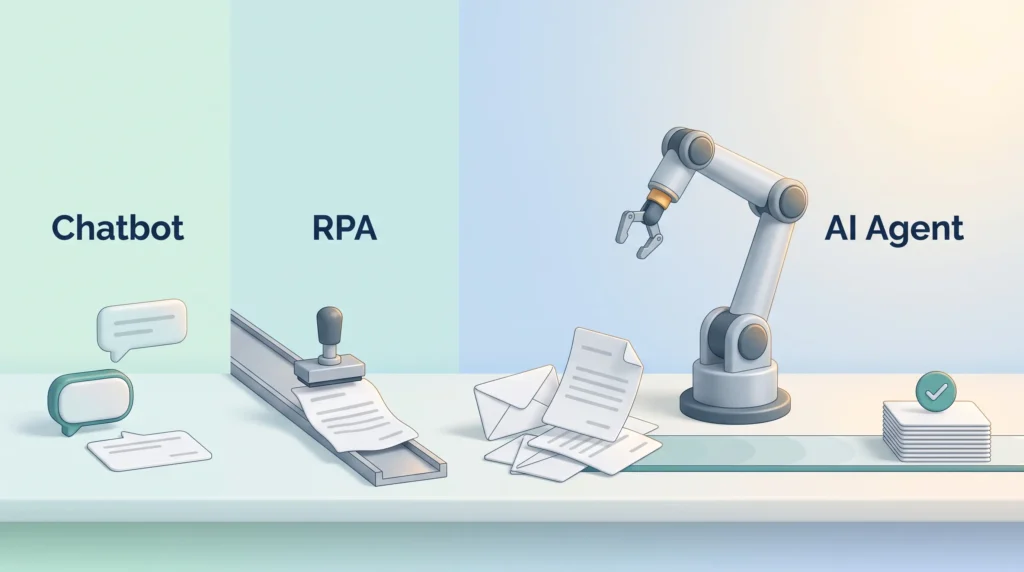
Agents also differ from robotic process automation (RPA), the older technology that replays fixed click sequences. RPA breaks when a form changes. An agent reads the new form, works out what changed, and adapts. It can also handle messy inputs such as emails, PDFs, and chat transcripts. The business automation trends overview explains how RPA and AI are converging in 2026.
IBM groups agents into five types: simple reflex, model-based reflex, goal-based, utility-based, and learning agents. For most business use, two matter. Goal-based agents are given an outcome (resolve this refund request) and choose the steps themselves. Learning agents also improve from feedback over time. Many products labeled “AI agent” are really chatbots with a nicer interface, so check whether a tool can act across your systems before you pay for it.
From Chatbots to Autonomous Digital Workers
The first wave of workplace AI was reactive: you typed a request, the tool produced text, and you did the rest. Agents flip that model. You describe the goal, and the software breaks it into steps and executes them. Modern agents can also review the outcome, take feedback from a human reviewer, and adjust the next attempt. The 2026 evidence on AI and automation at work shows where this already changes daily routines.
The next step is coordination between agents. Gartner reports a 1,445 percent increase in client inquiries about multi-agent systems between the first quarter of 2024 and the second quarter of 2025. In a multi-agent system, several specialized agents hand work to each other. For example, one agent qualifies a sales lead, a second enriches the contact data, and a third schedules the follow-up.
The productivity side is easier to measure. In OpenAI’s State of Enterprise AI report (December 2025, survey of 9,000 workers), employees reported saving 40 to 60 minutes per day. These are self-reported figures, so treat them as an upper range rather than a guarantee.
What AI Agents Deliver for Business Operations
The clearest benefit is time. Agents take over repetitive work that sits between systems: copying data from an inbox into a spreadsheet, chasing missing invoice details, or drafting the same status update every Friday. Our guide to AI augmentation shows how this division of labor works in practice.
Google Cloud’s 2025 ROI of AI study (3,466 senior leaders in 24 countries) puts numbers on this. Of the executives surveyed, 52 percent said their organizations run AI agents in production, and 74 percent reported a return on investment within the first year. Among those who saw productivity gains, 39 percent said productivity at least doubled.
A practical example: a three-person online shop uses an agent to answer shipping questions, check order status, and issue return labels. The owner spends the freed hour a day on supplier negotiations instead of the inbox.
How AI Agents Change Customer Service
Customer support is where most companies meet agents first, because the work is high-volume and well documented. A support agent classifies incoming requests, searches your approved help content, drafts an answer, and completes follow-up actions such as updating an order or sending a return label.
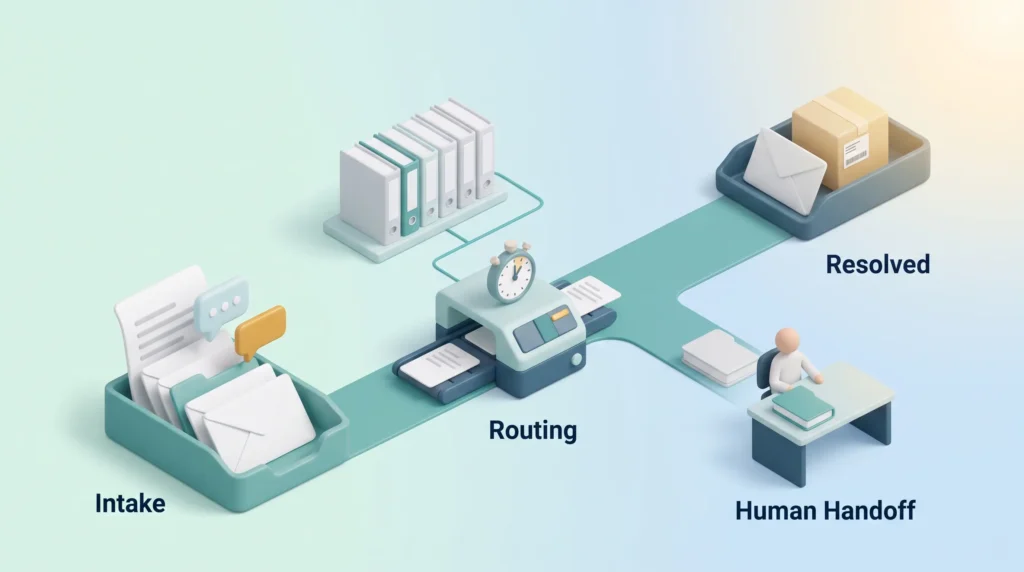
The difference from a classic chatbot is the workflow. A chatbot answers questions. A support agent connects intake, categorization, routing by service-level agreement (the response time you promised), the reply, and the follow-up. Our comparison of AI chatbots in customer service shows where the simpler option is still enough.
Pricing has moved to outcomes. Intercom charges $0.99 per resolution for its Fin agent, where a resolution is a conversation the customer confirms as helpful or leaves without asking for more. Zendesk uses a similar per-resolution model. Both are covered in our Intercom review and Zendesk review.
How many tickets an agent resolves on its own depends mostly on your documentation. A product with a mature help center gets far more value than a business whose answers live in people’s heads. When the agent hands a case to a human, it should pass on the full history. See the 2026 customer service trends for how self-service and empathy fit together.
The Building Blocks Behind a Digital Worker
Knowing the parts of an agent helps you judge vendor claims. A working agent combines:
- Model: the language model that reads inputs and decides what to do next.
- Memory: storage for context, so the agent remembers earlier steps and past cases.
- Reasoning: the ability to break a goal into steps and check its own progress.
- Tool connectivity: links to your CRM, help desk, email, and calendar, so the agent can act.
- Retrieval: access to your documents and data, so answers are grounded in your facts.
- Orchestration: the logic that sequences steps and coordinates multiple agents.
- Monitoring: logs of every action, so you can audit what happened and why.
- Human oversight: approval steps for sensitive actions such as refunds or contract changes.
Tool connectivity is what separates a real agent from a chatbot. Integration platforms make this easier; our Workato vs Zapier comparison looks at two common options. If you plan to run several models or agents, the LLM Ops strategy guide covers monitoring and cost control.
How to Implement AI Agents in Your Organization
Most agent projects fail for organizational reasons, not technical ones. Three steps keep the scope small enough to learn from.
Start with One High-Value Use Case
Pick a single process that is frequent, well documented, and painful. Typical candidates are first-line customer support, lead qualification, internal reporting, and content operations. Avoid processes where a wrong action is expensive, such as payments, until you trust the agent.
Fix the Process Before You Automate It
An agent added to a broken process produces broken results faster. Write down how the work flows today, who approves what, and where the data lives. Then decide which steps the agent handles alone, which it prepares for a human, and which stay manual. Our task automation playbook offers a simple template for this mapping.
Define Success Before Launch
Agree on measurable criteria before the agent goes live: time saved per case, cost per resolution, error rate, customer satisfaction, and revenue influenced. Run the agent in a supervised mode first, where a person reviews its outputs before they reach customers. Expand its independence only after the numbers hold up for a few weeks. Our guide to AI decision making helps managers structure these judgment calls.
Platform Options and Costs in 2026
Prices have dropped, and most vendors now bundle agent features into existing subscriptions. Here is a snapshot as of October 2026. Check the vendor pages before you commit, because plans change often.
Comparing SMB Plans and Enterprise Offerings
- Microsoft 365 Copilot Business: $21 per user per month on an annual plan (or $25 monthly) for companies with fewer than 300 users, cut from $30 in December 2025. The enterprise add-on remains $30 per user per month. A base Microsoft 365 license is required.
- Google Workspace with Gemini: Gemini is now included in Workspace plans instead of being sold as a separate add-on. Business Standard costs about $14 per user per month on annual billing, Business Plus about $22. Our Google Workspace review breaks down the tiers.
- Anthropic’s Claude Agent SDK: a software development kit (SDK), meaning a set of developer building blocks, for custom agents that connect to tools such as Slack and Google Drive, priced by usage rather than seats.
- OpenAI AgentKit: building blocks for designing and deploying custom agents on OpenAI models, also priced by usage.
- Specialized agents: tools built for one job, such as Viktor for Slack and Teams or Fin for support. These are often the fastest way to see results.
For a small team, the practical choice is usually the bundled option you already pay for, plus one specialized agent for your most painful process. Custom development with an SDK makes sense once the use case is proven.
Risks and How to Manage Them
Agents act, and actions can go wrong. Four risks come up in almost every deployment.
Integration complexity. Before an agent can act, someone has to map every system, permission, and data source it touches.
Data quality. An agent that reads from an outdated knowledge base gives confident wrong answers. Clean data comes first; a data governance strategy is the unglamorous foundation of every successful agent.
Privacy and compliance. Agents often see customer records, contracts, and internal messages. Regulation is tightening, especially in the EU. Our guides to EU AI Act compliance and data privacy trends outline what applies to business use.
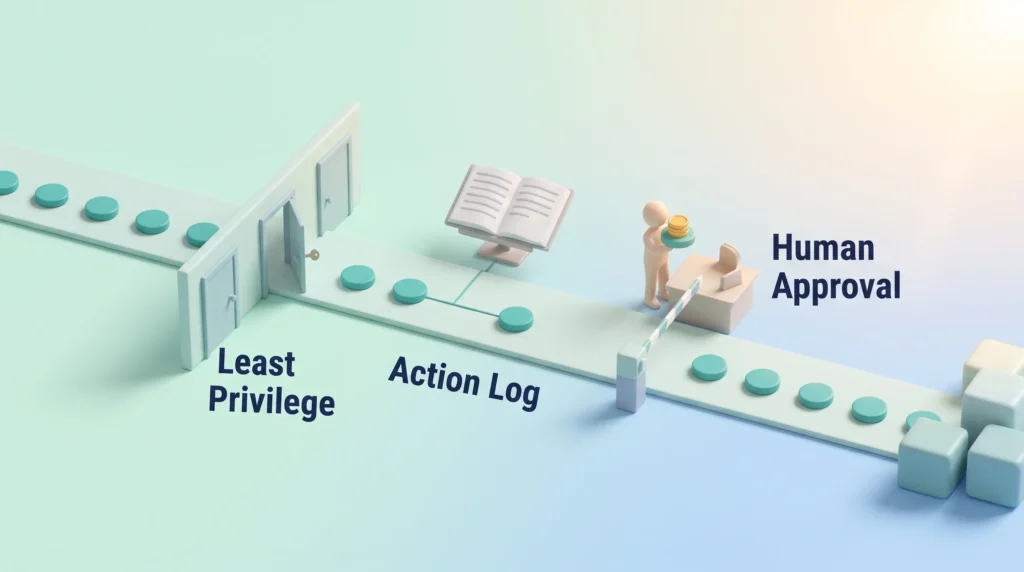
Loss of control. Give agents least-privilege access, meaning only the permissions the task needs. Log every action. Require human approval for sensitive steps, and test in a sandbox (a separate test setup with no access to live customer data) before production. An AI governance model turns these habits into a policy your whole team can follow.
Real-World Use Cases
For Small and Founder-Led Businesses
The most convincing examples are small, repeated tasks. A consultant uses an agent to turn meeting recordings into follow-up emails and CRM notes. An online retailer lets a support agent handle order status and returns overnight. A recruiter uses a sourcing agent to shortlist candidates against a written profile, then reviews only the top ten. In each case the owner keeps the decisions and drops the data entry.
Two mature categories are research and sales data. Perplexity Pro offers source-cited research for $20 per month. Clay, a sales data enrichment platform, starts at $167 per month on annual billing for its Launch plan, with monthly caps on actions and data credits; see our Clay AI review for what that buys.
Across Industries
- Healthcare: appointment scheduling and patient intake.
- Retail: personalized recommendations and stock alerts.
- Manufacturing: predictive maintenance that flags machines before they fail.
- Finance: fraud detection and first-pass risk checks.
- Education: adaptive learning paths for students.
- Logistics: route planning and delivery exception handling.
- Energy: demand and supply forecasting.
What these share is a high volume of similar decisions with clear rules and good data.
Conclusion
AI agents in business create the most value when they are tied to a clear goal, reliable data, and a person who checks the results. The gap in McKinsey’s 2026 data between broad AI use and narrow agent scaling is a reminder that discipline beats enthusiasm.
Start with one measurable use case, supervise it closely, and expand only when the numbers hold. With Copilot Business at $21 per user and Gemini bundled into Workspace, a controlled experiment no longer needs a large budget. Done well, digital workers do not replace your team; they give it back the hours that were going to copy-and-paste work.
Found this useful?
Make SmartKeys a preferred source on Google, and our articles will surface more often in your Top Stories, AI Overviews, and AI Mode.
Add as Preferred SourceFAQ
What is an AI agent in business?
An AI agent in business is software that takes a goal, plans the steps, and carries them out across your tools with little supervision. Unlike a chatbot, which answers one question and stops, an agent can read a support ticket, check the order system, draft a reply, and update the customer record on its own. It hands the case to a person only when it reaches a decision it is not allowed to make.
How is an AI agent different from a chatbot or RPA?
A chatbot responds to a single prompt; an agent completes a multi-step task. Robotic process automation (RPA) replays fixed click sequences and breaks when a screen or form changes. An agent reads the new layout, adapts, and can also work with messy inputs such as emails and PDFs. In short: chatbots talk, RPA repeats, agents plan and act. Many products labeled “agent” are still chatbots, so check whether the tool can take real actions in your systems.
How much do AI agents cost for a small business in 2026?
Entry costs are now modest. Microsoft 365 Copilot Business is $21 per user per month on an annual plan for companies under 300 users. Gemini is included in Google Workspace plans, with Business Standard at about $14 per user per month. Outcome-based tools such as Intercom’s Fin charge $0.99 per resolved conversation rather than per seat. Custom agents built with developer kits from Anthropic or OpenAI are priced by usage. For most small teams, the bundled option plus one specialized agent is a sensible starting budget.
What are the main risks of deploying AI agents?
The four most common risks are integration complexity, poor data quality, privacy and compliance exposure, and loss of control over actions. Agents act on whatever data they are given, so an outdated knowledge base produces confident wrong answers. Manage the risks with least-privilege access, full action logging, human approval for sensitive steps, and testing in a sandbox before production. In the EU, the AI Act adds documentation and transparency duties, so involve whoever handles compliance early.
Will AI agents replace employees?
In most companies today, agents take over tasks rather than whole jobs. They handle the repetitive, rule-based parts of a role, such as data entry, first-line replies, and routine reporting, while people keep the judgment calls, relationships, and exceptions. OpenAI’s 2025 enterprise report describes self-reported savings of 40 to 60 minutes per worker per day, which points to augmentation rather than replacement. Roles built almost entirely on repetitive processing are more exposed, so retraining plans matter.