Tools
Tools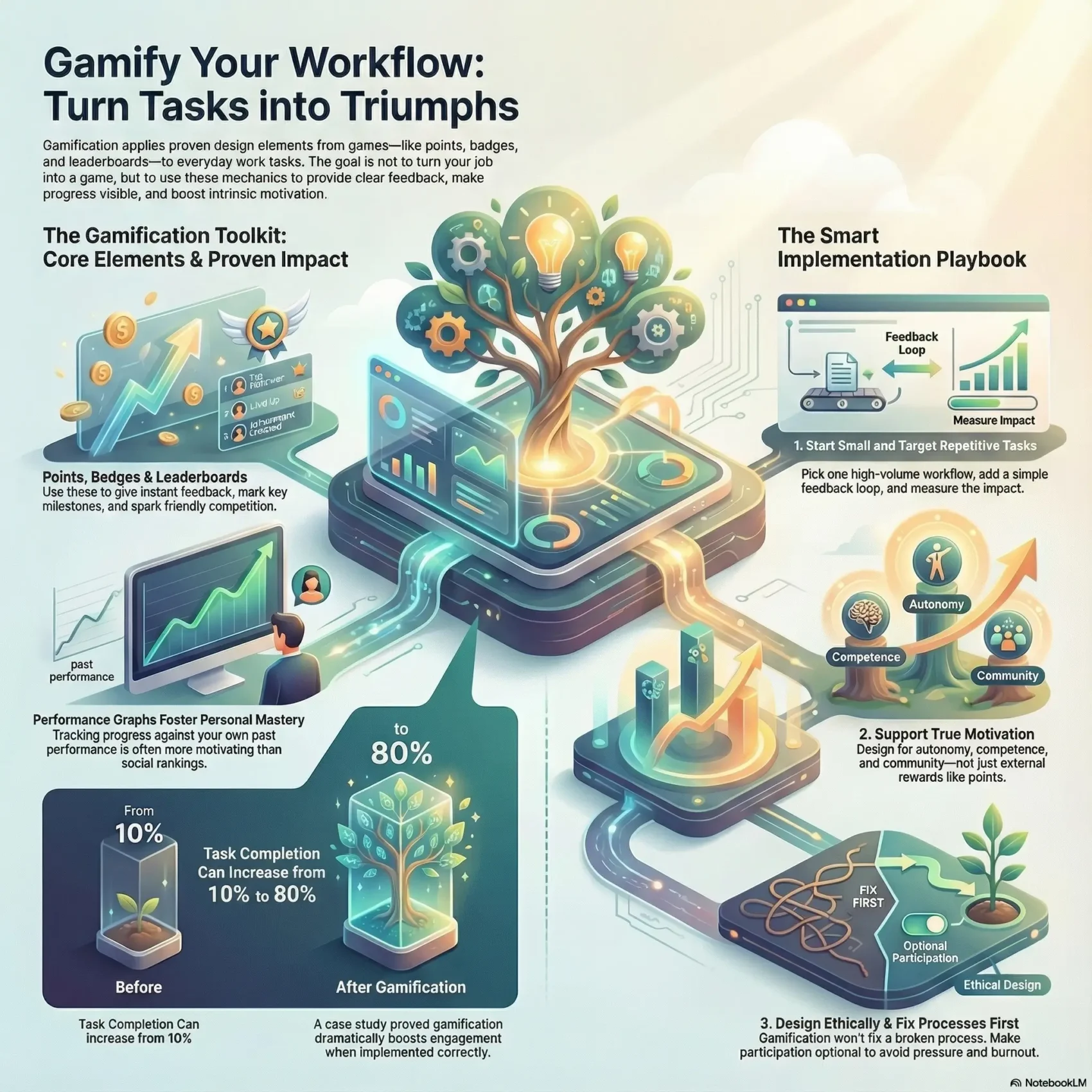
Last Updated on December 14, 2025
You can make daily tasks feel more meaningful by borrowing simple game elements like points, badges, leaderboards, and performance graphs. These patterns from game design bring clear feedback and visible progress to non-game contexts, so your efforts don’t vanish into a long to-do list.
Small design changes often spark real motivation. When you add levels, milestones, or social comparisons, participation and engagement rise. Leaderboards nudge friendly competition while personal performance graphs help you track mastery against your own past work.
The goal is not to turn your job into a game, but to use familiar techniques to shape better behavior and clearer goals. You’ll see examples from education, health, and business that show how these tweaks lift productivity and learning.
Key Takeaways
- Visible rewards make progress feel real and boost motivation.
- Use game elements selectively to improve engagement without distraction.
- Performance graphs help users measure growth against their own benchmarks.
- Social comparisons can increase participation when used ethically.
- Test small changes first and measure impact before scaling up.
What Gamification Is and Why It Works for Your Productivity
You can borrow play-tested rules from games to make routine work clearer and more motivating.
Definition: Gamification applies game design and game elements to non-game contexts so you can improve focus and productivity. It turns vague tasks into a system of goals, feedback, and rewards.
How core elements drive engagement
Points give immediate, numerical feedback. They let you pace tasks and see small wins as you work.
Badges mark milestones and make achievements visible. They subtly steer which challenges you pick next.
Leaderboards create social comparison. They boost engagement when peers are similarly skilled but can discourage users who fall far behind.
“Performance graphs often win for personal productivity because they compare you to your past self, not to others.”
- Mix mechanics: use points for feedback, badges for status, and optional leaderboards for friendly rivalry.
- Design for context: match rewards to your system so the experience nudges the right behavior.
- Check the research: competition has mixed effects—align comparisons with your team or goals.
Bottom line: A balanced system—clear objectives, visible progress, and timely feedback—reduces friction and makes work feel more doable.
The Psychology Behind Motivation: Autonomy, Competence, and Relatedness
Knowing the roots of motivation lets you build features that support choice, growth, and connection. Effective gamification draws on what people want: mastery, status, self-expression, and closure. When you address those needs, engagement becomes more stable and satisfying.
Intrinsic vs. extrinsic motivation in your daily tasks
Intrinsic motivation happens when you enjoy the task itself. You’ll stick with learning or a project because it feels meaningful.
Extrinsic motivation relies on outside rewards—points, bonuses, or praise. These help short-term engagement but can fade if they overshadow internal reasons to work.
Designing for autonomy without manipulation
Give meaningful choices. Let users pick challenges, timing, and paths so they feel in control. Keep prompts gentle and avoid tricks that feel coercive.
Building competence with progressive challenge and feedback
Use tutorials, smart scaffolding, and rising difficulty so users can see steady progress. Immediate feedback and small wins grow confidence and skill.
Fostering relatedness through social interaction and community
Design social interaction to support belonging, not pressure. Team goals, peer recognition, and collaborative tasks help people feel connected while reducing harmful competition.
“Designers should balance challenge, choice, and community so motivation remains respectful and durable.”
- Balance elements: combine narrative, choice, and feedback to support human motivation.
- Match rewards: keep incentives proportional so the user experience stays meaningful.
- Test with people: use research and real users to find when competition helps and when self-comparison is better.
Gamification Core Elements You Can Use at Work
Start by picking a few core game elements that map directly to the behaviors you want to encourage at work.

Points and experience
Points are awarded for specific actions and give immediate, continuous feedback. Use XP for accumulated progress so players see both micro-wins and long-term growth.
Badges and achievements
Design badges to mark real milestones—project phases or new skills. Badges signal status and steer choices without forcing direction.
Leaderboards and competition
Leaderboards can boost engagement when peers are similarly skilled. Replace public ranks with personal bests if leaderboards risk demotivating lower performers.
Performance graphs and mastery
Performance graphs compare current work to past performance. They encourage mastery by spotlighting steady improvement rather than social ranking.
Story, avatars, and teammates
Meaningful stories add purpose to routine tasks. Avatars let users express identity and feel ownership. Structure teammates so cooperation and friendly rivalry coexist.
“Connect every element to a clear behavior and a way to measure its effect on engagement and outcomes.”
From Dynamics to Mechanics to Components: Designing Systems, Not Just Features
Start by thinking in layers: motivations first, rules next, and visible pieces last. This hierarchy helps you build a coherent system instead of bolting on isolated features.
Dynamics: the big-picture motivations
Dynamics are narrative, social interaction, and progression. Map these to your workflow so the experience feels purposeful and steady.
Mechanics: the rules that guide action
Choose mechanics—rewards, turns, chance, and challenges—that mirror how your projects unfold. Good mechanics make behavior predictable and fair.
Components: the tangible elements players see
Implement components like quests, levels, virtual goods, and progress bars to make progress visible and reduce ambiguity about next steps.
- Align dynamics with outcomes: match narrative and social hooks to goals like learning or speed.
- Sequence components: design onboarding → mastery so users aren’t overwhelmed.
- Document rules: define reward logic and difficulty adjustments to keep the experience sustainable.
“Design systems that support users, not just features that look fun.”
Gamification
Across industries, simple play elements have changed how teams track progress and stay motivated.
Where it shows up: healthcare, finance, transportation, government, marketing, and education all use these ideas. You know Stack Overflow’s reputation system and badges. Loyalty programs like Starbucks’ check-ins reward repeat behavior.
Proof it works: DevHub moved task completion from 10% to 80% after adding points, badges, and progress bars. Research also finds leaderboards help when competitors are similar, while performance graphs promote mastery by comparing a user to their past work.
How to use it—start small and measurable. Pick one workflow, add a clear feedback loop, and measure completion, retention, and momentum rather than vanity metrics.
“Design small experiments that make wins visible, meaningful, and easy to maintain.”
- Translate loyalty and community patterns into your processes.
- Match mechanics to real goals so you amplify strengths, not hide flaws.
- Test with real users and plan mitigations for risks like unhealthy competition.
Read more about applying these ideas in the workplace at gamification at work.
Use Gamification to Supercharge Your Workday
Design your day so each task directly connects to a visible goal and a meaningful reward. Lightweight systems—streaks, XP, levels, and short quests—help you turn scattered to-dos into steady momentum.
Mapping tasks to goals, challenges, and rewards
Map each task to a clear goal and a fitting reward. Set the right level of challenge so work feels doable but engaging. Use progress bars and XP to make wins visible.
Crafting streaks, levels, and quests for focus
Borrow patterns from apps like Duolingo and Zombies, Run! to build daily practice. Create streaks to encourage habit, levels to mark growth, and quests to group related work for deep focus.
Balancing competition with collaboration on teams
Leaderboards can boost engagement, but they may add pressure for some players. Offer opt-in social features and personal performance graphs so each user can choose what motivates them.
- Keep rewards aligned with mastery and purpose.
- Calibrate difficulty over time to avoid burnout.
- Plan weekly reviews using performance graphs to refine your setup.
“Small, tested mechanics drive consistent progress when they support real goals.”
Player-Centered Design: Know Your Users, Tailor the Experience
Start with who will use the system: knowing players’ day-to-day goals shapes every design choice. Build personas that capture constraints, workflows, and core motivations so you can match mechanics to real needs.
Personas and motivations across different roles
Define clear personas. Capture what each player values, how much time they have, and what success looks like. Use interviews, surveys, and quick user tests to validate assumptions.
Onboarding and progressive disclosure to reduce friction
Teach by doing. Start with a short mission, show one mechanic at a time, and let users discover deeper features as they gain confidence. Simple icons and micro-tutorials lower the barrier to entry.
Inclusive mechanics for diverse stakeholders
Offer paths for competition, collaboration, exploration, and mastery so every user finds a fit. Let players opt out of leaderboards and track personal bests instead.
- Align rewards and tone with workplace culture.
- Plan measurement up front to manage and tune outcomes.
- Integrate systems with existing tools and keep accessibility central.
“Design that centers on people makes mechanics meaningful and lasting.”
What to Gamify First: High-Impact Workflows and Habits
Pick one repeatable workflow where a small nudge will produce measurable gains. Start with clear actions and visible outcomes so you can test quickly and learn what drives engagement.
Prioritizing repetitive tasks that need engagement
Look for high-volume tasks that stall or get skipped. These offer the largest return when you add simple feedback like points or progress bars.
Examples: form completions, review cycles, weekly reports, and routine quality checks. Pick one and instrument it.
Aligning mechanics to clear business and personal goals
Match mechanics to what matters. Use badges for skill milestones, progress bars for completion, and points for timely, high-quality submissions.
- Identify repetitive activities where small lifts yield big business impact.
- Define measurable goals so feedback maps to outcomes, not just activity.
- Choose lightweight mechanics—points, progress bars, milestones—and test one at a time.
- Integrate with existing tools to avoid extra steps that kill adoption.
- Measure and iterate: start small, then scale what improves completion and engagement.
- Align rewards with value delivered (quality, timeliness).
- Set guardrails to avoid rushing for points.
- Schedule regular reviews to tune difficulty and rewards.
“DevHub increased task completion from 10% to 80% after adding points, badges, and progress bars.”
Health and Learning Use Cases You Can Borrow for Work
Health and learning apps offer compact patterns you can copy to make work habits stick. These examples show how streaks, missions, and mastery systems support focus and steady progress.
Fitness and wellness: streaks, quests, and social proof
Fitness apps like Nike+ Run reward runs with points, levels, and badges. They compare you to past performance and peers to nudge consistency.
Borrow streaks to encourage daily consistency on key work habits. Use short quests to group related tasks and add light social proof so teammates celebrate wins without heavy rivalry.
Education and training: mission-based units and mastery
Duolingo, Khan Academy, and Quest to Learn use missions and XP to guide skill growth. You can adapt mastery-based progressions so people advance when ready, not just on a schedule.
- Keep app elements simple: unobtrusive levels and progress bars.
- Mix private and opt-in visibility: personal graphs for growth, public recognition for those who want it.
- Tie effort to meaning: Forest’s focus mechanic links attention to real-world outcomes.
Use these patterns to design training, reduce distractions, and boost engagement. Thoughtful gamification makes skill-building feel steady and achievable.
Marketing, Crowdsourcing, and Community Lessons for Teams
Smart marketing and open communities offer practical patterns your team can copy to boost contribution and loyalty.
Why it matters: Brands like Starbucks used check-in badges to reward repeat behavior. Crowdsourcing projects such as Foldit harnessed friendly competition to solve hard problems. Communities like Stack Overflow turn points into privileges that raise quality.
Loyalty loops: points and badges that actually matter
Design reward loops so recognition ties to value. Give points for useful actions and badges for real milestones.
Make rewards meaningful: access, responsibility, or curated visibility work better than tokens.
Leaderboards and contribution incentives in communities
Use leaderboards selectively and group players into cohorts so competition stays fair. Pair public ranks with private progress so casual users don’t drop out.
- Define clear contribution rules to stop gaming the system.
- Combine cooperation and rivalry with team goals and shared challenges.
- Surface good work fast and celebrate it to reinforce the loop.
“Combine recognition and responsibility so people want to contribute—and stay.”
Ethics and Pitfalls: Avoid Manipulation and “Magic Paint”
Before you add points or leaderboards, ask how the system will affect people’s health and fairness. Good intent is not enough—your choices shape behavior and day-to-day well-being.

Designing for well-being, not pressure
Design systems that support healthy habits and voluntary challenge. Avoid tricks that push users to skip breaks or chase hollow rewards.
- Make participation optional: let people opt into competitive features.
- Guardrails: cap points tied to risky behaviors and monitor for abuse.
- Transparency: explain how points, levels, and data are used.
When leaderboards demotivate—and alternatives
Leaderboards can discourage those far from the top. Use personal bests, tiers, or progress graphs instead to preserve motivation.
- Offer private performance graphs to track growth.
- Group leaderboards into cohorts so competition stays fair.
- Reward collaboration as well as individual wins.
Why gamification won’t fix a broken process
Magic paint—sprinkling game elements over bad tools—won’t solve workflow problems. Fix usability, remove friction, and then add rewards that map to real goals.
“Treat rewards as a last-mile tool: improve the process first, then add systems that sustain healthy motivation.”
Measurement That Matters: Feedback, Progress, and Outcomes
Measure what moves people: pick metrics that show real improvement, not just clicks. You want signals that tie your design to business and human goals.
Defining success: engagement, completion, retention
Define success in terms of engagement, completion, and retention. These metrics reflect outcomes rather than raw activity.
Use segments—by role or cohort—to spot where the system helps and where it needs tuning.
Performance graphs and progress bars for momentum
Points provide continuous, immediate feedback and help users feel short-term wins. Performance graphs track personal improvement over time and support mastery.
- Instrument feedback loops: points, progress bars, and status updates show impact of each action.
- Align mechanics to goals: make progress indicators map to real outcomes and quality.
- Test and iterate: A/B test streak thresholds and badge timing to find the right balance.
- Mix metrics: combine quantitative data with qualitative feedback to understand why users behave a certain way.
“Track the right signals and report results transparently so stakeholders see benefits and trade-offs.”
Implementation Roadmap: Evaluate, Iterate, and Scale
Begin with a focused experiment that validates which mechanics actually move behavior. A short pilot helps you learn fast and avoid overbuilding features that don’t fit real workflows.
Prototype the mechanics and test with real users
Prototype low-fidelity to validate assumptions quickly. Use clickable mocks or simple builds inside the tools people already use so feedback is grounded in actual work.
Collect feedback, adjust difficulty and rewards
Run usability tests to find friction and confusion before wider rollout. Collect continuous feedback and tune thresholds, rewards, and pacing so the experience stays motivating, not distracting.
Governance: monitor impact and prevent misuse
Document ownership, review cadence, and escalation paths. Monitor for unintended behaviors and have plans to recalibrate when needed.
- Stage rollouts from pilot cohorts to broader deployment with clear success gates.
- Train stakeholders so they understand intent, measures, and how to support users.
- Budget time for iteration and maintenance—these systems improve with cycles of learning.
“Prototype fast, test with real users, and let research guide your design choices.”
Inspiration from the Field: Proven Examples and Patterns
Concrete examples from popular apps show how small mechanics produce steady habits and real skill gains. These patterns help you pick what to copy and what to avoid.
Language learning, focus apps, and productivity streaks
Duolingo uses XP, levels, and streaks to make daily practice automatic. That mix keeps learners returning and tracking progress.
Forest links focused time to virtual trees and real-world tree planting. It turns short focus sessions into a meaningful outcome.
- Study Duolingo: use XP and streaks to encourage daily practice at work.
- Copy Forest’s idea: tie on-task behavior to a tangible payoff.
- Design achievements: make badges show real skill, not just activity spikes.
- Keep reminders gentle: let players opt into social features to protect motivation.
Workplace learning with XP, levels, and certifications
Many companies—SAP and Unilever among them—use XP, tiered levels, and certifications to structure employee learning. These systems map progression to real roles and responsibilities.
- Use XP to track practice volume and improvement.
- Offer tiered certifications that unlock trusted responsibilities.
- Create a pattern library of reusable modules for teams and projects.
“Proven apps show that small, repeatable mechanics build habit and competence faster than big, flashy features.”
A Brief History of Gamification and What It Means for You
Early platforms made it simple for teams to adopt game rules without building them from scratch. Around 2008 the term appeared online and hit the mainstream by 2010. Vendors such as Bunchball (2007) and Badgeville (2010) offered points, badges, and leaderboards as services to business customers.
Marketing, education, and workplace tools borrowed elements from games and pushed these ideas into everyday applications. Foursquare’s mayor mechanic proved social status could drive repeat visits. DevHub’s case shows measurable gains—task completion rose from 10% to 80% after adding gamified elements.
What this history gives you:
- Practical lineage: learn which mechanics traveled from games to apps and why they stuck.
- Tools and vendors: early platforms shaped modern toolkits you can plug into your workflow.
- Lessons learned: successes show impact; missteps teach ethical limits and measurement needs.
“Visibility of progress and status resonated with users and businesses alike.”
Use this perspective to avoid short-lived trends. Focus on durable practices: clear goals, visible progress, ethical guardrails, and ongoing research to measure real outcomes.
Conclusion
Wrap your plan around clear goals and visible steps so daily work feels purposeful and doable. Align points, badges, leaderboards, and performance graphs to measurable outcomes, not flashy rewards.
Focus on intrinsic motivation—autonomy, competence, and relatedness—then add small game elements that support those needs. Measure engagement, completion, and retention so you can tell what truly moves people.
Avoid manipulation and “magic paint.” Fix process and usability issues first, then start small, test, and iterate. Keep ethics central so your design supports healthy, sustainable performance.
You’ll leave with a clear plan to align goals, rewards, and feedback. Celebrate visible wins, learn quickly, and scale what helps your team do better work.