Tools
Tools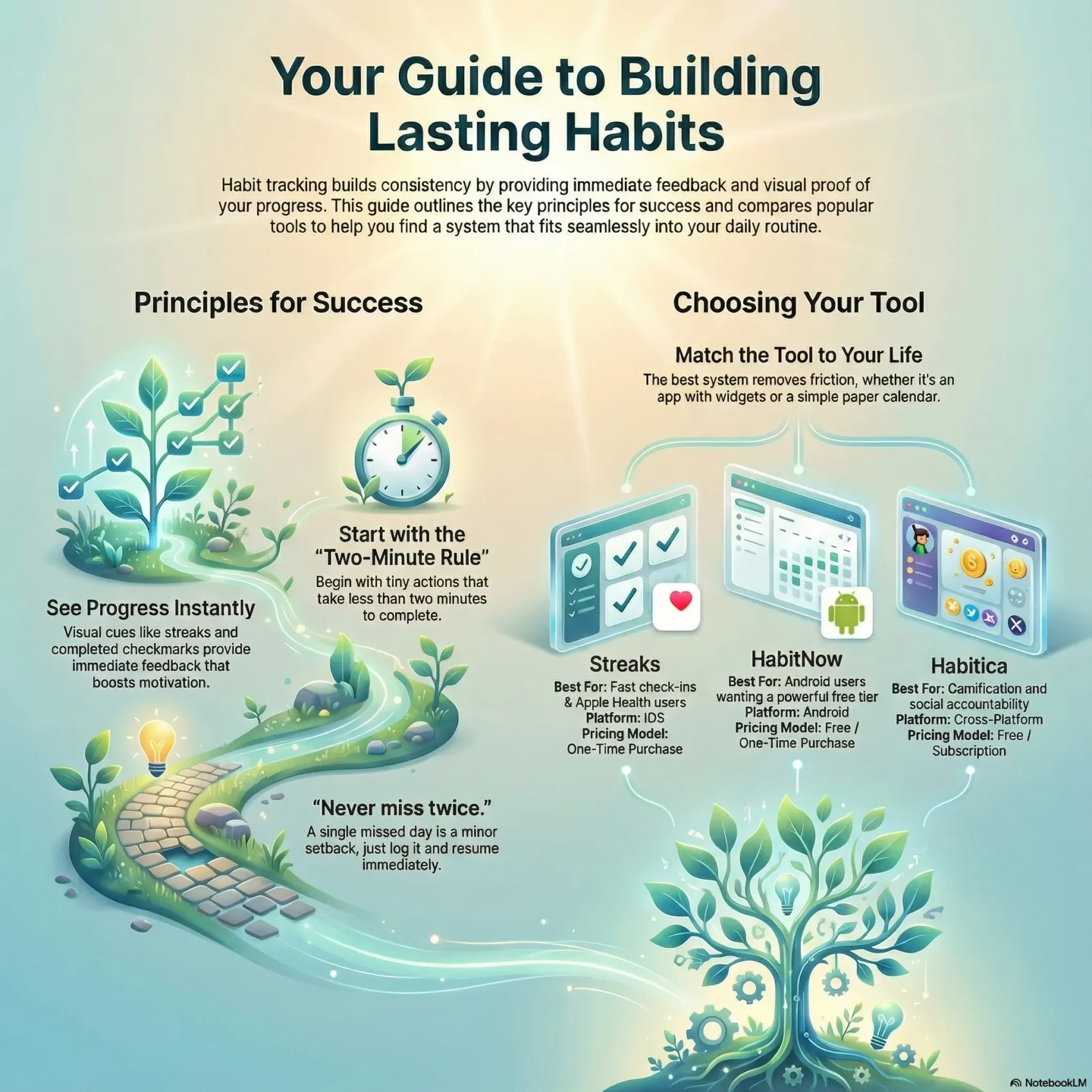
Start simple and stay consistent. Over the last decade, tracking small actions went mainstream thanks to books like Atomic Habits and Tiny Habits, plus apps that reward streaks and offer fast stats.
You’ll learn how a simple system gives immediate feedback so you can build consistency every day and stay aligned with your goals without guesswork.
This short guide maps options from analog calendars to reliable apps. We compare design, speed, and tracking features across iPhone, Android, desktop, and web so you can pick the best fit for your routines.
Expect practical examples you can plug into a template and tactics that reduce friction so check-ins feel effortless. The aim is a plan you actually use and enjoy watching improve your productivity and life.
Key Takeaways
- Immediate feedback helps you build consistency every day.
- Choose a template that matches your routines and device habits.
- Look for fast apps with good design, stats, and streak features.
- Use simple reminders and visual cues to reduce friction.
- Plug ready-made daily and monthly examples into your system.
- Focus on small wins to keep momentum even after a missed day.
Why a habit tracker works for daily check-ins
Short daily check-ins give you fast proof you acted and make the next day easier to repeat. That quick evidence turns vague goals into clear wins and keeps you honest about what actually happened.
Immediate feedback, motivation, and visual cues
Immediate feedback matters: when you mark today on your list, you see progress at a glance. That visible chain boosts motivation and makes skipping feel like breaking something you built.
Visual cues do the heavy lifting. A compact grid or simple list nudges you to act and reduces friction. Recording your behavior right after the action locks the win in and strengthens your commitment for the next day.
“Never miss twice”: recovering fast when streaks break
“Never miss twice.”
James Clear’s rule reframes setbacks: a single missed entry is normal. Log the miss, note why, and get back to your routine so a one-time lapse doesn’t become a long break streak.
- Keep check-ins simple: two taps or less.
- Use tracking as proof: the record shows real progress, not wishful thinking.
- When momentum breaks: log it, learn, and resume immediately to protect the habit streak.
How to choose the right habit tracking template or app
The best choice removes friction so you spend time doing things—not logging them.
Start by listing what must work for your daily flow: fast check-ins, flexible schedules (daily, weekly, monthly), and clear stats for trends and streaks. That list will quickly filter out apps with slow or cluttered interfaces.
Key features to prioritize
Fast check-ins and flexible targets matter most. Choose tools that let you set days-per-week goals and adjust frequency without extra steps.
Streaks and meaningful stats help you see momentum. Decide if you need quick streak views or deep analytics with exports and notes.
Platform fit and sync
Match the tool to your phone and ecosystem. iOS users often prefer Health, Apple Watch, and widgets. Android users may pick richer widget customization and a generous free tier.
Check sync across phone, desktop, and web if you switch devices during the day.
Price, trials, and long-term cost
Compare models: one-time purchases (Streaks), free tiers (HabitNow, Way of Life limited), and subscriptions (Habitify). Try free trials first and weigh your likely long-term use against the price.
“Pick tools that make tracking effortless; the easier it feels, the more you’ll do it.”
- Look for active development—regular updates mean fewer bugs and new integrations.
- Evaluate design—clean interfaces reduce time to log and increase consistency.
- Decide on data depth—notes and exports vs. a simple streak-focused view.
Best overall habit tracker apps for daily check-ins
If you want effortless daily logging, these apps balance speed, insights, and price. Each pick solves a different need: fast streak building, Android-friendly free tiers, deep journaling, day organization with integrations, or gamified motivation.
Quick picks at a glance: standout use cases and pricing
Streaks — Best for iPhone users who want fast streak building, Health integrations, and Apple Watch support. One-time price: $5.99.
HabitNow — Best for Android users who want a powerful free tier. Free for up to 7 items; Premium ~ $11.99 one-time.
Way of Life — Best for data lovers. Uses green/red/skip logic, chains, notes, and trend charts. Free up to 3 items; $4.99/month unlocks unlimited and cloud sync.
Habitify — Best for organizing your day with Areas, action lists, mood notes, and automation. Free limited use; subscription around $29.99/year for integrations and exports.
Habitica — Best if you like gamified accountability: quests, parties, and social goals. Free core app; optional extras from $4.99/month.
Features and price snapshot
- Core features: streak logic, reminders, stats, widgets, and cross-platform sync.
- Price mix: free tiers, a one-time purchase option, and subscriptions—pick based on how much automation or data you need.
- Match to goals: choose fast check-ins for daily wins, deep data for long-term trends, or social tools for accountability.
Streaks for iPhone users: fast streak-building by design
On iPhone, Streaks makes checking off daily goals so fast it barely interrupts your flow. The app is iOS-first and runs on iPhone, Mac, and Apple Watch with iCloud sync so your progress is visible on every device.
Why you’ll like it
Two-tap check-ins and long-press shortcuts mean marking a win takes seconds. Apple Health links can auto-complete items like steps, sleep, and workouts so you don’t log everything by hand.
Ideal use cases
Streaks excels for small, repeatable actions like brushing teeth, hitting step goals, or regular workouts. You can require multiple completions per day and set daily, weekday, or monthly schedules.
- Fast flow: two taps to mark done.
- Sync: iCloud keeps your streak visible on watch and Mac.
- Automations: widgets and Shortcuts boost productivity and fit into routines.
- Clean design: interface focuses on speed and clear stats.
- One-time price: $5.99 for the universal app.
HabitNow for Android users: powerful, budget-friendly tracking
For affordable, no-nonsense tracking on Android, HabitNow covers core needs with one purchase. You can start on the free tier and see if it fits your routine before upgrading.
The free plan lets you manage up to seven items, which is plenty to build a core set. When you need more scope, the Premium one-time price (about $11.99) unlocks unlimited entries and extra tools.
Free vs. premium: what you get and when to upgrade
- Free: up to 7 entries, yes/no and numeric logging, basic reminders.
- Premium: unlimited entries, checklists, timers, and extra backup options.
- Price note: one-off purchase avoids subscriptions if you want ownership.
Stats, widgets, and simple to-do list pairing
Use home-screen widgets to see today’s list at a glance and speed up daily check-ins.
Deep-enough stats include streaks, completion rates, and calendar heat maps so you can spot trends fast. The interface is clean and direct; the design keeps logging quick without extra friction.
- Track with yes/no, numeric values, or timed sessions.
- Schedule by day, week, or month to match real life.
- Pair entries with a simple to-do list for context and related tasks.
Bottom line: HabitNow is a reliable starting point if you want powerful tracking on Android without a big budget or complex setup.
Way of Life: the data nerd’s habit journal
Way of Life turns raw checkmarks into a searchable journal so you can spot patterns instead of guessing why progress stalled.
Green/red/skip logic and note-rich entries
The app uses green (done), red (not done), or skip so you don’t punish planned rest days. Each entry lets you add notes so context lives with the data.
Chains, streaks, and when to use each
Choose longest streaks when you build core routines. Pick target streaks for cycles—like three days on, one off. Red chains highlight repeated misses so you can adjust scope or timing.
- Nuance: green/red/skip gives a clearer view than simple yes/no.
- Journal: notes reveal causes that numbers miss.
- Trends: charts show if your consistency improves over time.
- iOS speed: widgets and Shortcuts speed daily logging.
- Pricing: free for three entries; $4.99/month for unlimited and cloud backup.
Bottom line: Way of Life balances quantitative tracking with qualitative journal entries, making it ideal when you need depth and context in your habit tracking approach.
Habitify: organize your day and automate check-ins
Organizing routines into time-based zones makes check-ins feel natural and effortless.
Habitify is a cross-platform app that groups your actions into Areas like Morning, Afternoon, and Evening. This layout puts the right items in front of you at the right time, lowering friction and saving mental energy.
Areas, action lists, mood notes, and social challenges
You can attach an Action list to each item so complex tasks break into simple steps. Mood notes add context, linking how you feel to your consistency.
Join Challenges to add friendly competition and extra accountability. These social ways keep motivation high when solo routines lag.
Apple Health, Google Fit, and workflow automation via integrations
Sync with Apple Health and Google Fit so steps, sleep, and workouts can auto-complete relevant items. Use Zapier or the API to automate check-ins—for example, mark a task done when a Todoist item closes.
- Cross-platform: iOS, Android, macOS, Web.
- Pricing: free limited use; Premium ~ $29.99/year for unlimited check-ins, exports, and integrations.
- Productivity-first: designed to save you time and keep daily goals visible.
Habitica: turn habit tracking into an RPG

Habitica layers RPG mechanics onto daily life: create a character, earn XP and gold for completed tasks, and pick a class once you reach level 10.
Quests and parties make accountability social. Join friends, tackle quests, and face boss fights together. If someone misses their dailies, the whole party can take damage — a real incentive to show up.
“Turning chores into progress you can see and enjoy changes how you act.”
- Gameplay rewards: level up your avatar, earn gear, and unlock new goals.
- Social stakes: party-based accountability raises the cost of skipping dailies.
- Structured logging: use Habits, Dailies, and To-Dos to organize what you mark and when.
- Tradeoffs: more fun and community, fewer granular charts than data-focused trackers.
- Price: free to start; optional extras around $4.99/month for cosmetics and conveniences.
When to pick this way: choose Habitica if standard logging bores you and social play boosts your motivation. If you need deeper analytics, pair it with a companion app for trend charts.
Habit Tracker app (Goal Tracker & ADHD Planner): flexible, ADHD-friendly design
If traditional checklists feel rigid, this app gives you flexible units and smart nudges to make tracking fit your life.
Flexible logging: count reps, minutes, or custom units so progress matches real effort. Sync with Apple Health to auto-import steps, sleep, workouts, and calories to cut down manual entries.
Apple Health sync, HRV stress, custom reminders, and widgets
Monitor HRV stress to link wellness signals with your consistency. Set smart reminders: multiple times, location-based, or context-aware nudges.
Add Home and Lock Screen widgets for instant check-ins and faster flow throughout the day.
Group support, pricing, and recent stability work
Use group goals and friendly competition to boost accountability—especially helpful if you need ADHD-friendly social prompts.
Privacy and sync: cloud backup with FaceID/TouchID and frequent iOS fixes improve stability. The developer pushed rapid updates (Oct–Nov) to resolve sync, watch, and widget issues.
“Small, smart nudges beat added friction.”
- Extras: mood logging, habit diary, focus timer, and FaceID privacy.
- Price: free tier available; premium unlocks unlimited items and a lifetime purchase option.
- Why it fits: design and features reduce friction so you spend more time on goals and less on logging.
Printable and calendar-based habit tracker templates
Paper calendars make progress visible in a way screens can’t—one shaded square at a time. A simple calendar with daily X’s or shaded boxes gives instant proof of momentum. It’s low-cost and fast to use.
Daily, weekly, monthly grids: when analog beats digital
Use daily grids for core actions you want to track daily. Weekly layouts work well for tasks you do a few times each week.
Monthly views help you spot long-term trends and keep a clear streak record across the month.
Wall calendar and journal layouts to track daily and weekly/monthly routines
- Visible cue: hang a wall calendar and shade cells to get an ever-present nudge.
- Journal pages: dedicate one page per month and one page per week to separate daily and weekly/monthly tasks.
- Color-code: mark outcomes (green/red/skip) to mirror digital clarity.
- Hybrid use: paper for a few core habits; apps for automated health data and reminders.
Tip: Keep a short list of priorities so you don’t clutter the grid. Analog design encourages focus and removes app distractions, making it easier to track daily wins.
Habit tracking ideas inspired by Atomic Habits
Use tiny actions to build big momentum. Start with a micro task you can finish in two minutes or less and log it right away. James Clear calls this the Two-Minute Rule: make the start so simple that you can’t say no.
Two-Minute Rule starters: tiny daily behaviors you can log
Simple starters stick: read one page, write one sentence, or stretch for one minute. Record the completion immediately to reinforce the loop.
Stack your check-in onto an existing cue. For example, after brushing your teeth, mark your hydration entry.
Weekly and monthly habits, plus habits of avoidance
Build a short list of weekly items—vacuum, laundry, or publish a blog post—so your week stays on track.
- Monthly tasks: finance review, deep cleaning, or a goals audit to keep long-term upkeep visible.
- Track habits of avoidance like “no soda” or “no online purchases” to protect your priorities.
- Keep the initial list small so you can log consistently without overwhelm.
Scale slowly. When tiny behaviors become reliable, raise difficulty a bit while keeping logging effortless. This approach mirrors principles from atomic habits and helps sustain momentum month after month.
“Make your habits so easy you’ll do them even on busy days.”
Set up your habit tracker for success
Set your system up so logging feels like a natural finish to the action, not an extra chore. When recording is simple and tied to your day, you reduce friction and keep momentum.
Define cadence: daily, days per week, or monthly targets
Decide if this will be a daily task, a few specific days each week, or a monthly goal you pace across the month.
Start small: pick a compact list so you never skip logging from overload. Then scale slowly as routines stick.
Create cues, reminders, and time-of-day routines
Choose time windows—morning, afternoon, or evening—that match your natural energy. Anchoring actions to a time reduces decision fatigue.
Set gentle reminders that blend with your schedule. Many apps integrate with health services to auto-complete steps or sleep data and cut down manual entries.
- Anchor: stack logging onto an existing routine so the final step happens automatically.
- Visual cues: use widgets, a wall calendar, or an open journal page as constant prompts.
- Log immediately: mark completion right after the action to lock in the day’s progress.
- Weekly review: adjust cadence and reminder timing so the system stays easy to maintain.
- Automate: leverage synced data where possible to save you time and reduce friction.
Bottom line: design your tracker around your life, not the other way around. Keep entries quick, cues visible, and the initial checklist tight so logging becomes a habit you actually keep.
habit tracker
Pick a single, small system you actually use and the rest follows. Keep logging quick, visible, and tied to a moment in your day so marking progress feels like the final step, not extra work.
Whether you go analog or app-based, the most effective tools share three traits: speed, flexible cadence, and visible streaks or stats. Match the tool to your device—widgets and watch support remove friction and make daily checks automatic.
Design your list around a few clear goals that truly matter. Start small and add items only after core actions stick. Track in the same place and at the same time to build a reliable routine you can keep long-term.
- Keep it fast: two taps or one pen stroke.
- Stay visible: use widgets, calendars, or wall charts.
- Review weekly: glance at basic stats to celebrate wins and spot trends.
The right system supports your productivity by clarifying the next action and making it easy to mark done. If your setup feels heavy, simplify until tracking becomes second nature again.
Preventing burnout: build routines that fit your life
The best way to avoid burnout is to build flexible rhythms that let you pause and return without guilt. Make targets realistic so tracking supports your energy, not drains it.
Use flexible targets to avoid all-or-nothing thinking
Choose targets per week or month instead of demanding daily perfection. Many apps let you set days-per-week goals and include skip logic so you plan rest without losing progress.
Design routines that fit real life: travel, illness, and busy stretches happen. Use a short list of non-negotiable micro-habits you can do even on hard days.
When to skip without breaking your momentum
Plan skips for high-demand days and use apps with skip or target-chain logic to preserve streaks. Follow James Clear’s rule:
“Never miss twice.”
- Match cadence: track how many days you aim to complete each week and celebrate hits.
- Plan rest: schedule skips for travel or recovery so a missed day isn’t a reset.
- Review notes: adjust your list and cadence based on what fits your week.
Feature comparison: streaks, stats, reminders, and integrations
When you compare features, focus on what actually saves time. Look at streak rules, data depth, reminder flexibility, and integrations that automate obvious work.
Streak logic and “break streak” handling
Different tools treat streaks in different ways. Some let you set days-per-week targets and allow planned skips so a missed day doesn’t wipe momentum.
Examples: Streaks uses fast check-ins and Health auto-complete. HabitNow offers widgets and an affordable upgrade. Way of Life uses green/red/skip chains to preserve context.
Data depth: notes, journals, exports, and trends
Decide how much record-keeping you want. If you journal, choose a system with per-entry notes and export options for long-term review.
- Stats: streak length, completion rates, and trend lines show real progress.
- Reminders: multiple times, windows, and location prompts matter.
- Integrations: Apple Health, Google Fit, and Zapier cut manual logging effort.
- Design: two-tap marking and clear dashboards reduce friction.
Make a short list of must-have features and test contenders before you commit. Favor apps under active development so updates keep your system stable.
Pricing overview for popular habit tracking apps
Before you commit, compare what each price tier actually unlocks so you pay for value, not noise.
Free tiers, one-time purchases, and subscriptions
Free plans let you test the interface and core flow. They usually limit the number of items or check-ins. One-time purchases give lifetime access to a stable feature set. Subscriptions often add sync, exports, and automation.
What you actually get at each price point
- Streaks — $5.99 one-time: fast check-ins and Apple integrations for a single purchase.
- HabitNow — Free / ~$11.99 one-time: free up to 7 entries; Premium unlocks unlimited items and backups.
- Way of Life — Free / $4.99 month: journaling, unlimited entries, and cloud backup for a low monthly fee.
- Habitify — Free / ~ $29.99 year: cross-platform sync, integrations, and export tools behind the subscription.
- Habitica — Free / from $4.99 month: core gamified features are free; monthly perks add convenience and cosmetics.
Quick guide: weigh the price against needed features — widgets, notes, exports, and automation. If you plan to use the app for years, a one-time buy or lifetime option can be the most cost-effective way to pay for consistent support.
Who this guide is for
This guide is for you if you want a practical, product-first approach to small daily systems. You care about real results, not trendy apps that vanish after an update.
Use this guide when you choose between analog pages and mobile tools. You want fast check-ins, clear progress, and experiments that boost productivity without extra overhead.
- Practical selection: you want a shortlist of the best habit tracker options and what each does best.
- Focus on outcomes: you value productivity at work and in life over theory.
- Fit and longevity: you prefer tools under active development that won’t break after an OS update.
- Simple rules: you accept tiny starters and “Never miss twice” to protect momentum and hit goals.
Next steps: pick one tool from the short list, set a tiny daily target, and log it the same day. Keep your initial list short and review after one week to adjust cadence or move to a different tracker.
Conclusion
Choose tools and rituals that make marking progress as easy as the action itself. Pick a single, small system that fits your platform and cadence so daily logging stays quick and useful. Use visual cues and fast check-ins to keep friction low and productivity high.
Start with a short list of tiny actions you can complete every day. If you miss one, follow “Never miss twice”: note why and resume immediately to protect momentum. Mix digital options and analog templates when that works best for your life.
Review your setup monthly and adjust reminders, cadence, or goals. For tips on daily intentions and focus, see this short guide on daily intentions. Begin today—your next check-in is the first step toward lasting progress.