Tools
Tools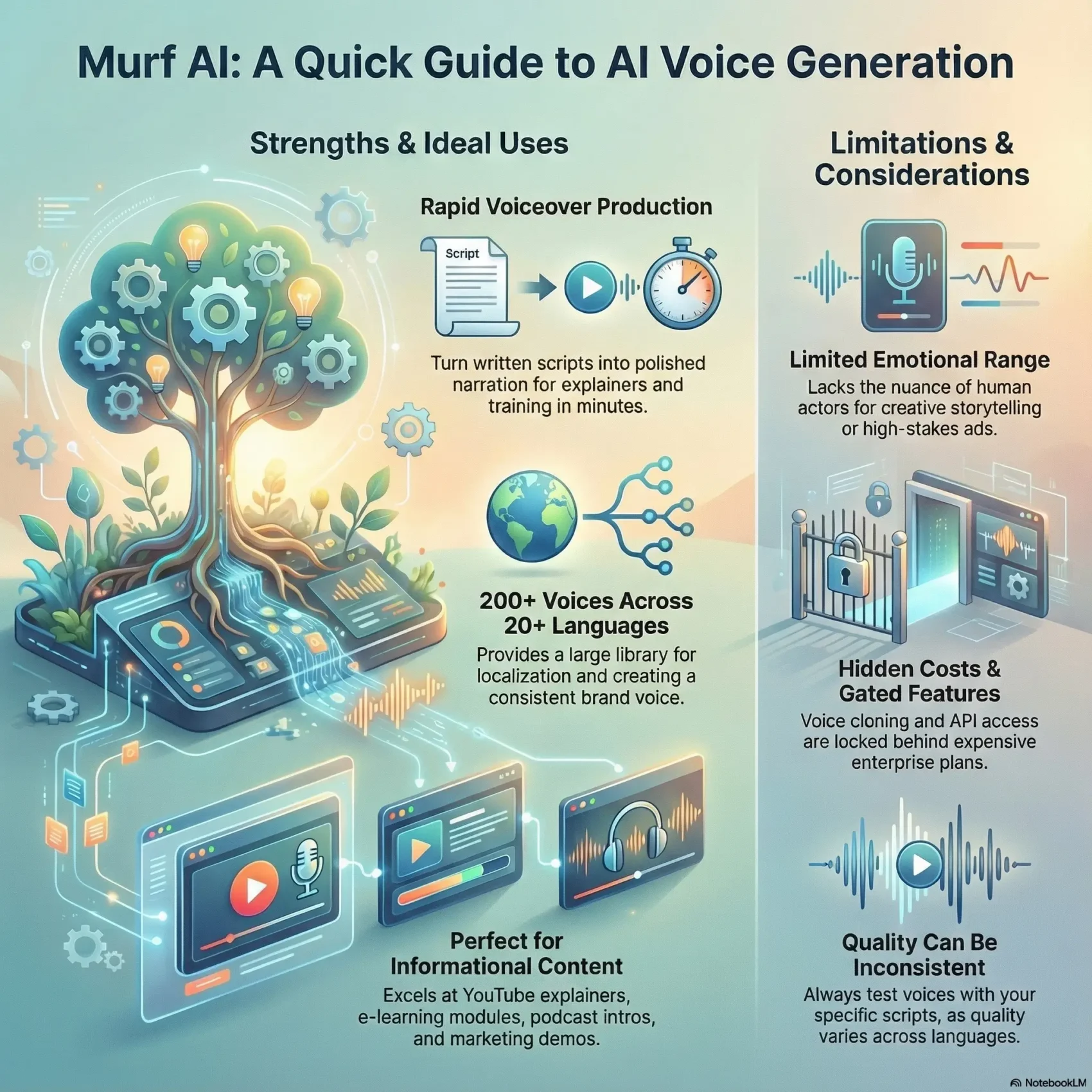
Last Updated on January 24, 2026
You’re about to get a clear, compact look at a cloud-based text-to-speech platform built for creators and teams.
The platform advertises 200+ voices across 20+ languages, plus basic dubbing and video synchronization. It integrates with Canva and Google Slides and offers API access, usually behind an enterprise gate.
This section outlines where the tool shines for rapid voiceovers in explainers, training, and presentations and where human narration still wins for emotive or high-stakes spots.
You’ll learn how murf offers a large library and multi-language reach, but why you should test accents and pronunciation on your scripts before you commit to major projects.
This intro previews real user notes: impressive realism for short-form content, plus limits like hidden costs, locked features, and uneven quality across models and languages.
Key Takeaways
- Great for quick explainers and e-learning where speed matters.
- Large voice library and multi-language support—validate accents first.
- Simple editor and integrations help creators move fast.
- Expect hidden costs and some Enterprise-gated features.
- Test with your scripts to check clarity, pacing, and tone.
Quick Take: Is Murf AI worth it for you right now?
If you need fast, consistent narration for explainers and training, this service likely fits your needs. Testing over 50 hours of generated audio shows the voice can fool many listeners in short segments. That means quick demos and internal content come together fast.
Try Murf AI for free
For longer scripts, expect occasional robotic artifacts and extra edit time. The overall quality is solid for short-form content, but not a substitute for an emotional narrator on storytelling projects.
- On pricing: entry tiers look attractive, but monthly plans cost about 33% more than annual. Unused minutes don’t roll over.
- If your team’s production spikes, model your minutes carefully so you don’t blow budget mid-month.
- Many users will find value for marketing and training content, but factor Enterprise gates (cloning, API) into any automation plans.
Bottom line: Good enough for most informational content and faster production cycles. If your project needs deep emotion or narrative nuance, plan to invest in human reads.
Murf AI Review
Designed for creators and training teams, the platform turns written scripts into polished narration in minutes. It was launched by founders Sneha Roy, Ankur Edkie, and Divyanshu Pandey and targets creators, businesses, and educators who need studio-like output fast.

What it is and who it’s built for today
The service is a cloud text-to-speech tool offering 200+ voices across 20+ languages. Core features include SSML, pronunciation control, multi-track editing, and video sync to help your content slot into timelines with less fuss.
The editor is deliberately simple: drop in text, tweak pauses and emphasis, preview, and render. That straightforward interface helps non-technical users ship usable audio quickly.
Delta 4 score and high-level verdict at a glance
After extended testing reviewers landed around a Delta score of ~3.5/5. That reflects strong time and cost savings for practical projects, while noting limits in emotional range for storytelling.
- You’ll find the neutral voice models deliver clear pacing for explainers and training.
- Speech controls and pronunciation tools cut retakes and speed up generation for routine content.
- Overall quality is reliable for corporate and instructional work, but you should compare a human baseline on key passages before scaling.
Voice quality and editor experience
The first thing you’ll notice is clear pacing and a natural-sounding voice that works well for short to mid-length content. Reviews report realistic pauses and good intonation on most sentences. That makes quick explainers and training modules feel polished fast.
Natural intonation and emotional limits
You’ll hear natural-sounding voiceovers handle calm, cheerful, or serious tones convincingly. For long-form reads, expect occasional robotic artifacts and a limited emotional range compared with professional actors.
Controls that actually help
The editor gives sentence-level control for pitch, speed, pauses, and emphasis. SSML and a pronunciation library let you fix brand terms and technical text without re-records.
- You can preview different models for diction and warmth and pick the best match.
- Small customization moves—tiny pitch or speed tweaks—improve realism more than heavy processing.
- Build a pronunciation list so your audio stays consistent across campaigns.
Overall, the balance favors fast, high-quality audio for routine work. Generate a baseline read quickly, then polish a few lines to lift the final result.
Explore the Voice Studio
Voices library and languages: breadth vs. consistency
A broad catalog of voices and language support makes quick localization possible, with some caveats. You can lean on a wide range of models for short explainers and training. But quality differs by language family, so plan tests before you finalize content.
200+ voices across 20+ languages: where quality shines and falls short
English (US/UK/Australian), European Spanish, French, and German usually offer the best audio quality and consistency. These options work well for client-facing narration with minimal edits.
Hindi, Mandarin, Arabic and some regional English variants can be uneven. Accent accuracy and tonal nuance often need extra proofreading and pronunciation fixes.
Accents and variants: American, British, Australian, and regional gaps
- You’ll map the voices library and pick language families that give the most confidence for professional narration today.
- Choose premium models when naturalness matters; they reduce edits downstream.
- Preflight scripts for dialect-sensitive lines and loanwords to avoid last-minute re-records.
- Keep a shortlist of tested voices per language to speed approvals and keep quality consistent across content.
Voice cloning reality check
Creating a custom cloned voice involves more than clicks — it needs clean recordings, contracts, and time.
Voice cloning is locked behind enterprise plans and separate legal agreements. Expect baseline pricing near $75/month for five users, plus add-ons for cloning or API access. Some teams report setup budgets of several thousand dollars—one public case showed an ~$8,000 outlay for a full cloning rollout.
Enterprise access, data needs, and expected results
You’ll need 5–10 minutes of high-quality reference audio as a minimum. Studio-grade recordings improve fidelity and reduce iteration. The cloned voice can sound convincing for straightforward narration, but edge cases and deep emotion often require extra samples and retraining.
Ethics, consent, and commercial rights considerations
Consent must be explicit and auditable. Get written permission that covers commercial use, updates, and deactivation rights. Treat cloned audio as sensitive data and limit who can export and edit voices.
“Plan for iteration: early clones usually need more samples to stabilize pronunciation and tone.”
- Budget enterprise fees and possible setup charges.
- Secure signed consent and define commercial rights.
- Compare cloning vs. using existing high-quality voice options when budgets or timelines are tight.

Pricing, plans, and hidden costs
Pricing tiers hide the real cost once you add team seats, storage, and API usage. Free plans give 10 minutes with no downloads. Creator plans run about $19–$33/month (annual), while Business tiers sit in the $26–$79/month range.
Monthly billing costs about 33% more than annual, and unused minutes don’t roll over. That makes annual billing smarter if your minutes are steady.
Plan tradeoffs and enterprise gates
Enterprise plans (starting near $75/month for five users) unlock cloning, advanced dubbing, and API access. If you need cloning or API, expect separate setup fees and legal steps.
Overages and real-world costs
- API character fees can appear—roughly $1 per 10,000 characters in some reports.
- Storage add-ons have been quoted around $50/month per 100GB.
- Agencies and fast-growing teams can see bills reach thousands when minutes, cloning, and storage scale.
“Model your minutes carefully and factor seat counts so you don’t surprise your budget.”
Overall, map your content cadence and team needs before choosing a plan. Compare options against freelancers and alternative providers to judge true business value.
Integrations and workflow fit
How a tool hooks into your stack often decides if it will speed up or slow down production. Good integrations cut manual steps and help you deliver slick presentations and short videos faster.
The Canva integration speeds drafts. You can drop narration into slides and quick video templates to produce usable clips in minutes.
Canva and Google Slides: strengths and sync limitations
Canva works smoothly for simple projects and short timelines. For complex edits, timelines can desync and force extra tweaks in an editor.
The Google Slides add-on is easy to install and handy for basic narration inserts. Timing against slide transitions is limited, so you may need manual refinement after export.
API access: availability, cost, and implementation friction
API access usually requires Enterprise-level conversations. Onboarding typically starts with a request form and a guided setup. Budget for scoping, contract steps, and possible added costs before you automate at scale.
- Quick wins: Canva integration accelerates quick videos and presentation drafts.
- Limits: Google Slides gives simple narration, but slide timing often needs manual fixes.
- Workflow: Script in docs → TTS in the tool → polish in a DAW → final assembly in your video editor.
- Support needs: Documentation covers basic setup, but some users will need an engineer or integrator for complex pipelines.
Map your current software stack and file-naming conventions so exports slot into your editors cleanly. That helps reduce team confusion and keeps your content pipeline predictable.
Use cases that work well today
This tool shines when you need steady, repeatable narration for short-form educational and marketing work. It performs best where consistent tone matters more than deep acting. You’ll move fast from script to exported audio and keep a unified brand voice across formats.
YouTube explainers, e-learning modules, and internal training
You’ll quickly spin up YouTube explainers with consistent narration and clear pronunciation, then export for assembly in your editor of choice.
For training and e-learning, pick a preferred voice and use a pronunciation library to scale across courses and languages. Light customization for pacing helps longer lessons stay engaging without sounding overproduced.
Create professional voiceovers
Podcast intros/outros and marketing demos
Automate standard podcast segments—intros, outros, and ad reads—where consistency and speed beat bespoke emotion. Marketing demos benefit from clean voiceovers that keep prospects focused on features and benefits.
- You’ll repurpose scripts into shorts, reels, and slides while keeping voice alignment consistent.
- You’ll create narration variants for regional audiences and test which accents drive engagement.
- You’ll rely on text-driven workflows to iterate quickly, regenerating content without re-recording.
Where Murf struggles
If your script relies on tiny vocal cues or shifting personas, you may notice audible gaps. The system handles steady narration well, but it can struggle with layered emotion and sustained nuance.
Creative storytelling, strong emotion, and long-form consistency
Dramatic arcs and character differentiation often underperform compared with experienced human narrators. You’ll hear scenes flatten where subtle emotional turns are needed.
Very long scripts can introduce pacing artifacts. Many users segment long audio and re-stitch to keep a steady tone across chapters.
- You’ll notice that dramatic arcs and subtle shifts lack micro-inflection compared to human talent.
- Long scripts can drift; plan to break them into sections to avoid pacing glitches.
- Content filters may block mild profanity or mature themes, forcing you to sanitize dialogue.
- High-stakes marketing may need human nuance, since persuasion depends on tiny vocal cues.
- Workarounds—more pauses, emphasis tweaks, and SSML edits—help but don’t fully close the gap.
Practical rule: use human reads for flagship brand pieces and keep the tool for efficient internal or instructional work. For more implementation tips, see this comparison guide that covers workflow tradeoffs.
Video synchronization and exports
You can drop generated voice files into a timeline fast, but how well they lock to picture depends on project complexity. For single-track explainers and simple videos, the built-in sync usually holds and speeds delivery.
Simple timelines vs. complex edits
For short sequences and slide-based videos, you’ll get clean audio that lines up with on-screen captions and cuts. That makes it ideal for demos and internal decks created in Google Slides.
When you move to multi-camera cuts, intricate b-roll, or dialogue replacement, you’ll need manual alignment. Editors often export MP3 or WAV segments and nudge them in an NLE to match precise visual beats.
Format support, bitrate control, and editor compatibility
Exports include MP3 and WAV (16-bit, 44.1 kHz). These formats give reliable playback across most software, but advanced bitrate or mastering controls are not exposed.
- Practical tip: generate short chunks to nail timing around on-screen actions, then assemble in your editor.
- Expect to manage loudness and reference tone in post—there’s no built-in mastering tool.
- Keep strict file naming and a template NLE project so regenerated lines drop in without redoing the whole timeline.
“You’ll get clean audio exports for simple sequences, but intricate cuts typically need manual fine-tuning.”
Plan your workflow so the tool handles generation and rough sync, while your video editor finalizes alignment and mastering. That split keeps production velocity high and lets you reuse voice takes across multiple videos.
Competitive analysis: Murf vs. ElevenLabs, Speechify, QCall.ai
Comparing top voice platforms shows real trade-offs you should weigh before you scale. Pick the winner based on emotion, billing, and how well the software fits your workflow.
Voice quality, emotion, and interface usability
ElevenLabs often leads on emotional range and speed. Its voices sound more expressive in demos and in longer reads.
Murf wins for simplicity: a cleaner editor and features that help teams ship fast. Speechify focuses on accessibility and mobile ease, which helps users on the go.
Pricing models: time-based vs. usage-based value
Time-bucket pricing suits steady output. Usage-based models like QCall.ai (~₹6/min or ~$0.07/min at scale) can save money for spiky workloads.
Consider your production cadence: predictable minutes work with one model, while bursty generation favors per-minute pricing.
Ecosystem depth and integrations that actually save time
Integration matters. Strong Canva and Slides hooks speed presentation and video work. Lack of deep NLE support means editors still export to third-party tools.
- Weigh cloning and API access—often Enterprise-only—against transparency from rivals.
- Factor languages, support responsiveness, and how each tool handles batch voiceovers for social media and marketing.
“Choose the vendor that matches your production rhythm, not just the best demo clip.”
Technical performance and reliability
How fast and reliable the service runs will shape your production calendar. You need predictable outputs for client deadlines and batch work. Below are practical specs and tactics to keep your pipeline stable.
Sample rate, bit depth, and processing speed by content length
Exports are typically 44.1 kHz, 16-bit in MP3 or WAV — good for web delivery and internal training. Choose WAV when you plan further mastering to preserve headroom and quality.
Rendering time scales with script length: near-instant for under 5 minutes, about 2–3 minutes for 5–20 minutes, and roughly 5–10 minutes for jobs over 20 minutes. Plan around these speed tiers and budget extra time for long runs.
Uptime, slowdowns, and failure rates in peak hours
Reported uptime sits near 99.2%, but many teams see slowdowns during US business hours. Long generation jobs can hit ~5% failure and need retries.
- Segment long reads to cut timeout risk and keep sessions smooth.
- Track model behavior on technical terms and across languages to avoid late fixes.
- Create a retry protocol, stash source text, and log timing notes for each attempt.
- Measure the practical delta between MP3 and WAV so your speech files match downstream needs.
“Budget render time by script length and schedule heavy batches off-peak.”
Customer support and documentation
Fast, clear help can be the difference between a quick fix and a missed deadline. Know what to expect from each plan so you can route issues correctly and keep projects moving.
Response times by plan level
Chat support typically answers in 15–30 minutes during business hours. That quick channel is your fastest path for small technical snags.
Email responses for non-Enterprise plans usually take 24–48 hours. Enterprise customers get assigned account managers, though reported technical depth can vary.
Common issue patterns and how you handle them
Compare cloning vs. using existing high-quality voice options when budgets or timelines are tight.illing for unused minutes, voice quality inconsistencies, integration sync with Canva/Slides, and export glitches. Prepare standard steps so your team resolves many problems without raising a ticket.
- Expectations: Enterprise gets faster, personalized support; lower tiers rely on chat, email, and docs.
- Self-serve: Keep a troubleshooting checklist for billing, sync timing, and exports to shorten downtime.
- Document: Log environment details and steps-to-repro before contacting support to reduce back-and-forth.
- Train: Teach your users to search the knowledge base and community threads first; that cuts basic how-to tickets.
- SLA decision: If deadlines matter, factor Enterprise support into total cost to protect delivery.
“Map your support path early — it saves time when production hits a snag.”
Security, privacy, and compliance
Before you enable cloning features, make sure you understand where voice data will live and who can access it. Consent-based cloning is emphasized, and the vendor publishes GDPR and SOC 2 Type II controls.
Data handling for cloning, retention, and geographic controls
You’ll confirm where recordings and generated voice files are stored and whether regional controls meet your legal needs. Retention policies are not fully clear, so get specifics in writing.
Require a data map: who stores originals, who can export, and how deletion requests are handled.
Ethical positioning vs. practical safeguards
The platform frames cloning as consent-first, but enforcement depends on contracts and internal controls. You’ll put practical safeguards in place—access controls, audit trails, and periodic reviews—to back that claim.
- Define policies for collection, retention, and secure deletion of cloned audio.
- Verify certifications (SOC 2, GDPR) and note missing standards like HIPAA or FedRAMP.
- Harden consent workflows so no cloning proceeds without written authorization.
- Plan incident response with clear escalation to legal and security teams.
“Treat cloned voice assets as sensitive — document consent, control access, and audit regularly.”
ROI, buyer fit, and total cost of ownership
For businesses with repeatable narration needs, the math often favors automated voice generation over studio reads. Reviewers estimate costs around $8–$15 per hour of finished audio versus $300–$500 per hour for polished human output. That gap drives the core ROI for many teams.
View plans & pricing
Who should buy now — and who should wait
You’ll choose this tool now if you produce steady volumes of instructional or multilingual assets and can use an annual allocation predictably.
Start smaller or wait if production is sporadic, you need high emotional performance, or Enterprise pricing and add-ons don’t fit your budget.
Implementation, training, and ongoing maintenance costs
Quantify total cost: subscription, possible Enterprise add-ons (API, cloning, storage), process changes, and staff time for QA and versioning. Some case studies show 6–12 months to break even and positive ROI in year two at scale.
- Plan light training so your team uses SSML, dictionaries, and templates effectively.
- Compare pricing impact to freelancers or in-house recording kits before you commit.
- Test critical languages early to avoid scaling a model that fails clarity checks.
- Set governance: file naming, access controls, and a review cadence so the tool scales cleanly with marketing and product needs.
“If you can consume minutes consistently, the platform often delivers real savings versus studio hires.”
Getting started: best practices and pitfalls to avoid
Begin by running short, real-world text samples through several models to find the best match. That quick test shows how each voice handles your phrasing, brand names, and pacing.
Model testing, SSML usage, and pronunciation libraries
You’ll A/B test 3–5 models on your own text to pick the clearest, most natural fit for your audience.
Use SSML to add pauses, emphasis, and small breaths. Save those templates so the whole team reuses the same cadence.
Build a pronunciation dictionary for product names, acronyms, and regional terms. That keeps output consistent across projects and reduces regeneration loops.
Planning minutes, team access, and integration checks
Plan minutes by batching jobs and segmenting long scripts. Segmenting stabilizes timing and makes edits simpler when you stitch in a DAW or video editor.
Check integrations (Canva, Google Slides, or API) before deadlines so handoffs work for your workflow. Confirm export formats and timing behavior in a dry run.
- You’ll document typical minutes per project so budgets match real consumption.
- You’ll align team access with roles so editors, reviewers, and requesters don’t block each other.
- You’ll keep a short QA checklist for speech clarity, correct terms, and timing to minimize rework.
“Test with real text, automate pronunciation, and map minutes so your pipeline stays predictable.”
Conclusion
You’ll finish the pilot with a clear sense of how the platform fits your needs. It speeds up production and delivers consistent quality for training, explainers, and some marketing work.
Plan pricing carefully: time buckets don’t roll over and Enterprise features are gated. Test a few voices and features like SSML and dictionaries to lock in a reliable experience.
Practical takeaway: this tool is best for creators who need repeatable output and fast iteration. For emotive range or flagship spots, plan human reads and DAW polish.
Keep social media variants light, compare total cost versus alternatives, and choose the path that matches your team’s volume and goals.
Get started with Murf AI
FAQ
What is Murf and who is it aimed at?
How good are the voices and naturalness?
How many voices and languages are available?
Can you clone a real voice and what’s required?
What voice controls does the editor provide?
How easy is it to sync voice with video and export formats?
What integrations are available with tools like Canva and Google Slides?
Is there an API and how costly is implementation?
How is pricing structured and are there hidden costs?
Which use cases work best right now?
Where does the platform struggle?
How reliable is performance and uptime?
What security, privacy, and compliance safeguards exist for voice data?
How responsive is customer support and what documentation is available?
How do I plan minutes, voices, and team access to control cost?
How does it compare to competitors like ElevenLabs or Speechify?
Are there ethical concerns or consent requirements for cloning?
What are best practices when getting started?