Tools
Tools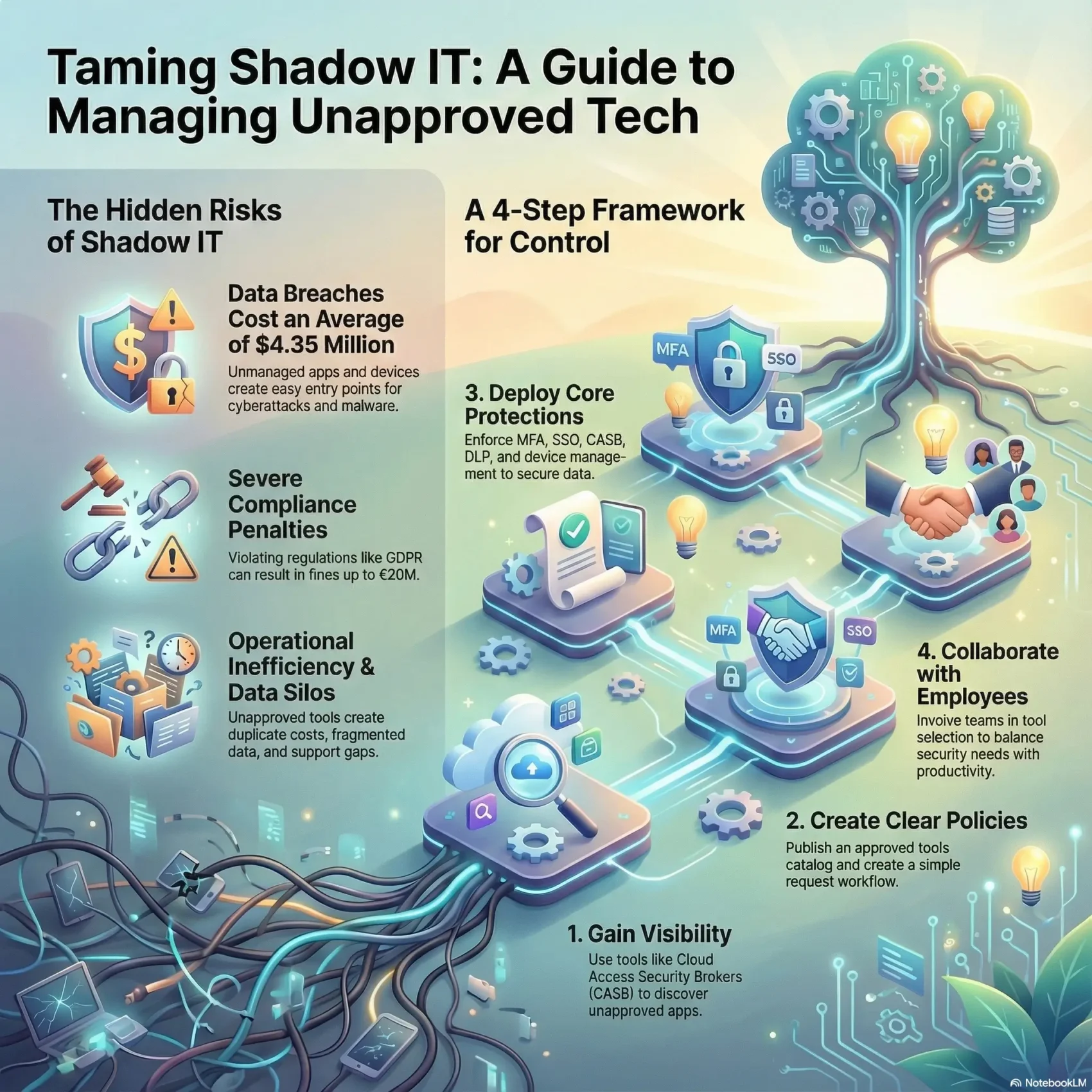
Last Updated on December 18, 2025
You need clear, practical guidance on unsanctioned software, hardware, and cloud services that appear in your company without IT’s approval. This happens as people adopt familiar SaaS like Slack, Dropbox, Google Drive, or Trello on personal or unmanaged devices.
Why it spreads so fast: device diversity and distributed work make it easy for employees to pick tools that speed tasks. What begins with good intent can create real exposure for your organization.
The risks are tangible. Unmanaged systems invite cyberattacks and data loss, with breaches costing an average of $4.35M. Compliance also matters — fines under GDPR can reach €20M or 4% of global revenue. Research shows many cloud apps in use may be unapproved, and BYOD trends keep expanding.
This article gives you a calm, step-by-step path: how to gain visibility, prioritize threats, and apply a compact control stack like MFA, SSO, CASB, DLP, and device management. You’ll balance governance with empowerment and turn unsanctioned use into better technology choices across your department and company.
Key Takeaways
- Unapproved tools often start with good intentions but create security and compliance risks.
- Common SaaS and unmanaged devices are primary entry points for data exposure.
- Breaches are costly — plan for prevention and rapid response.
- Use visibility, assessment, and prioritized controls to reduce risk without blocking productivity.
- Simple guardrails and an approved app catalog help balance governance and empowerment.
- Implement MFA, SSO, CASB, DLP, and device management as core protections.
- Communicate plans clearly to your department and leadership to gain support.
What Shadow IT Means for Your Remote and Hybrid Workplace
Unmanaged apps and personal gadgets show up fast in distributed teams, and they change how your company shares and stores data. You need a clear definition so your department can act with confidence.
Clear definition
Anything your users deploy or use without formal approval counts. That includes personal phones, tablets, laptops, cloud apps, and off‑the‑shelf software. Examples range from Slack, Trello, Dropbox, and Google Drive to an employee-installed desktop tool.
Why it’s rising now
Employees adopt familiar software and services because they want speed and simplicity. When corporate tools feel slow or hard to access, users pick alternatives to finish work.
Device diversity also expands exposure: phones, tablets, home printers, cameras, and wearables all touch your network. Departments often spin up niche applications to meet deadlines and then those tools spread.
- Practical note: this agility can reveal unmet needs in your organization.
- Policy tip: clarify what is sanctioned, what is tolerated, and how to request approval.
Next: detect and assess these practices so you can govern them without killing useful innovation.
Real-World Shadow IT Examples You’re Likely Seeing
You’ll spot common patterns where employees use consumer services to solve work problems quickly. These habits create visible cases you can catalog and fix.
Unauthorized cloud apps and personal accounts
Cloud app sprawl shows up when teams spin up Slack or Trello workspaces tied to personal emails. Files move into Google Drive or Dropbox and leave your policies behind.
BYOD and connected home gadgets
Personal devices like laptops and phones often access corporate systems without required agents or encryption. Home printers, webcams, and wearables may share the same network and introduce vulnerabilities.
Rogue projects and informal sharing
“Users create VMs, add browser plugins, or pass files by USB to meet deadlines.”
Unapproved installs, sandboxes, and side-channel sharing make it hard to revoke access or trace ownership of data.
- Quick wins: inventory applications, map endpoints, and stop data from leaving governed paths.
- Next step: offer approved alternatives and list vetted productivity apps like those on our productivity apps.
Top Security and Business Risks You Need to Control
Unmanaged tools and devices open clear pathways for attackers to reach your company’s systems. That creates immediate security risks and long-term business exposure. You must treat each unsanctioned app, device, or subnet as a potential breach vector.
Cyberattacks and malware from unmanaged apps, devices, and subnets
Unapproved applications and personal gadgets often lack proper encryption, patching, or access controls. This makes malware, credential theft, and lateral movement easier for attackers.
Data breaches and leaks: expanded attack surface and poor access controls
Files stored in personal cloud services or unmanaged accounts bypass your retention and recovery systems. Netskope research shows many cloud apps in use may be unapproved, which widens the attack surface and raises the chance of data breaches.
Compliance violations: HIPAA, GDPR, PCI-DSS exposure and fines
Compliance is not optional. HIPAA, GDPR, and PCI-DSS demand strict control over where sensitive information lives and who can access it. GDPR fines can reach €20M or 4% of prior‑year global revenue.
Operational inefficiencies: app sprawl, data silos, and support gaps
Duplicate subscriptions and siloed information slow your team and create costly overhead for support. Visibility gaps make it hard to detect anomalies across home subnets and rogue devices.
- Exploitability: unmanaged apps and devices increase exposure to malware and credential theft.
- Attack surface: more entry points let threat actors move laterally when access controls are inconsistent.
- Governance: files in personal repos lack retention, backup, or recovery aligned to your systems.
- Costs: IBM reports average breach impact in the multimillion‑dollar range; fines and reputational loss add up.
- Remedy: discover unapproved use, set clear policies, and apply targeted controls to limit these risks.
Shadow IT Remote: How You Detect, Assess, and Prioritize Risks Today
Visibility is the foundation: you can’t manage risks you cannot see. Start discovery across your network and cloud services to surface unsanctioned applications, browser extensions, and third‑party services.
Gain visibility: run network scans and CASB discovery, then build an inventory that links each app to users, authentication methods, and the data it touches.

Map endpoints and identities. Catalog corporate and personal devices, virtual machines, and mobile OS instances that touch systems. Correlate OAuth grants and session data so you can trace real information flows.
Risk scoring and triage: classify repositories and flows by sensitivity (PII, financial, IP), usage level, and external sharing. Score items by data exposure and posture to guide quick wins.
- Remove unused applications and revoke stale OAuth tokens.
- Consolidate duplicate tools to approved alternatives.
- Feed findings to your SIEM so new items trigger alerts and reviews.
Make policies practical. Define a simple request workflow so future software and services route through approval. Use continuous inventory and risk scoring to shape targeted solutions and training that prevent repeat problems.
Build Practical Policies and Train Your People
Create policies that solve real needs instead of blocking useful tools. Start with short, plain-language guidance so employees know what’s allowed, what’s not, and how to request new solutions.
Acceptable use, BYOD/BYOE, and request workflows
Keep rules simple and actionable. Write a one-page request workflow that shows how fast decisions are made and who approves pilot tests.
- Short acceptable use statements that say what devices and tools are permitted.
- BYOD/BYOE basics: encryption, screen lock, patching, and endpoint protection before access.
- Conditional approvals: pilot with a small group, evaluate security posture, then sanction broadly.
- Publish an approved tools catalog by category so teams can pick vetted options fast.
Security awareness: phishing, data handling, and hygiene
Train employees on phishing, safe data handling, and clean work habits. Use real scenarios like file sharing and third‑party app permissions to make lessons stick.
“Small daily habits prevent big incidents.”
Align department heads to co-own onboarding and offboarding so access is granted and removed cleanly. Close the loop by sharing outcomes of requests—showing you heard needs and provided alternatives builds trust and reduces hidden practices within the organization.
Secure the Stack: Controls That Reduce Shadow IT Risk Fast
You can harden access and protect data with a focused set of tools that deploy quickly. Start with a few high‑impact controls and expand them as your organization gains confidence.
Access hardening
Enforce MFA everywhere and pair it with SSO to cut password reuse and make secure access simple for users.
Require device management on any endpoint that touches company data so patching and encryption are enforced.
Use a CASB to discover cloud applications, score their risk, and apply controls based on app category and permissions.
Data safeguards
Turn on encryption at rest and in transit and align DLP policies to stop sensitive files from leaving approved systems.
Apply least‑privilege access so people only see what they need. Strengthen backup and disaster recovery to keep operations running after incidents.
Advanced defenses
Add deception and identity threat detection to trap attackers and spot lateral movement early. Feed CASB and deception telemetry into your monitoring stack for continuous visibility across network and systems.
“A right‑sized baseline of MFA, SSO, CASB, DLP, and detection tools reduces exposure fast.”
- Package these solutions as a deployable baseline you can scale.
- Focus on quick wins, then iterate with your teams.
- Measure outcomes and adjust controls to fit your organization’s technology and workflows.
Balance Control with Benefits and Collaboration
A collaborative approach lets you reduce risky workarounds while keeping teams moving fast. Start by focusing on clear benefits for employees so your company gains security without slowing daily work.
Data shows 97% of professionals see productivity gains when employees use preferred technologies. Use that momentum: offer vetted options and show how approved software helps meet real needs.
Provide a vetted app catalog and approved alternatives
Publish a curated catalog by use case so teams can pick safe tools quickly. Migrate shared boards, files, and chat histories where feasible to cut hidden use and duplicate subscriptions.
Change management with employee input
Capture employee needs with quick surveys and pilot groups. Assign department champions, run short trainings, and keep a lightweight exception process for time‑bound trials.
- Track progress: dashboards for adoption and decommissioning.
- Celebrate wins: share cases where approved tools improved work and protected data.
- Iterate: revisit the catalog quarterly to add or sunset applications.
Conclusion
When you treat unsanctioned apps as signals, you can convert them into safer solutions that help workers do their jobs.
Start with visibility, then act fast, discover applications and services in use, classify information, and close the highest risks first. Simple policies and an approved tools list make compliance easier and reduce confusion across departments.
Harden access with MFA, SSO, CASB, DLP, device management, and identity defenses. Track outcomes: fewer data breaches, faster onboarding, and better user satisfaction. For practical guidance on cybersecurity for remote work, align solutions to your organization and show one retired shadow example each quarter to reinforce change.