Tools
Tools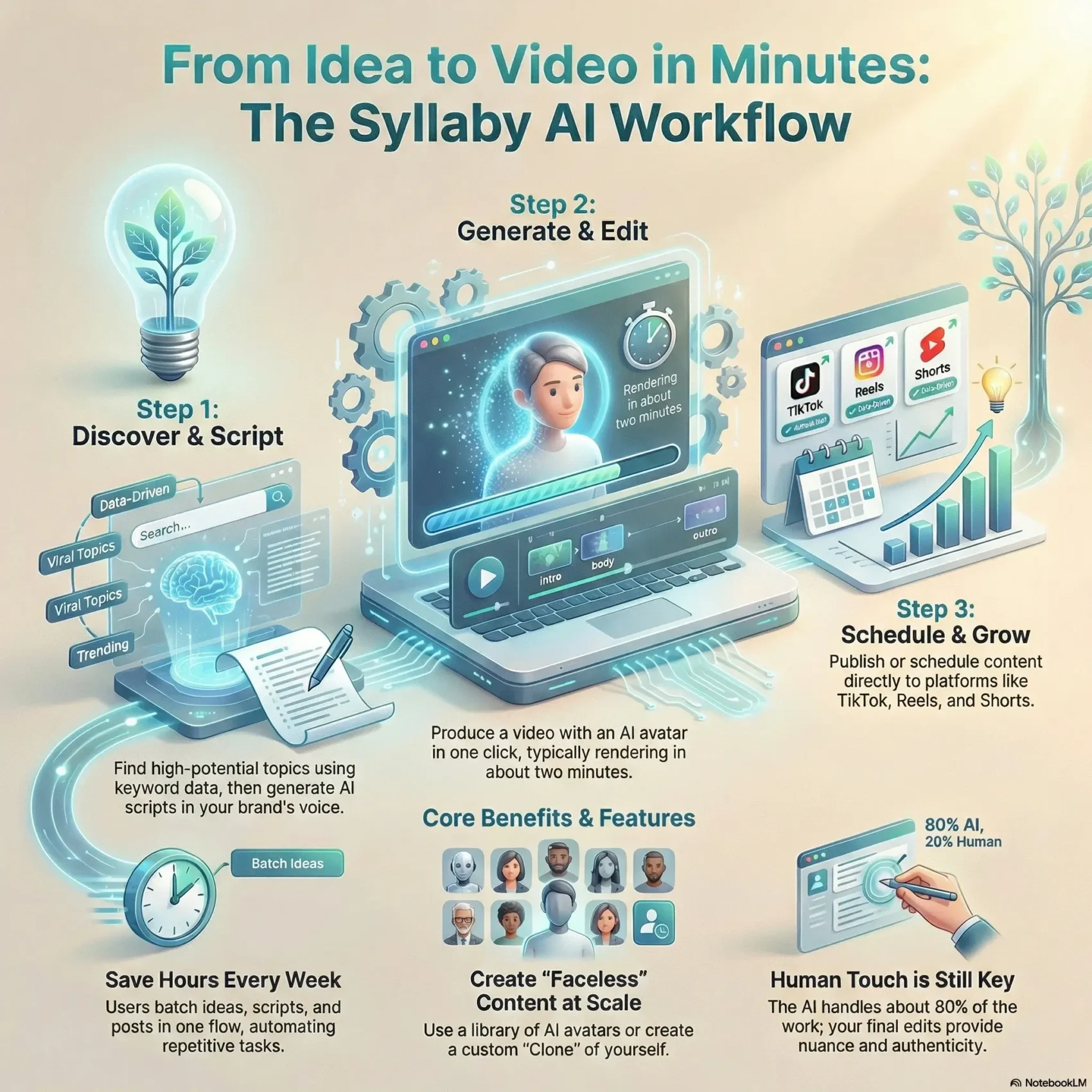
Last Updated on January 24, 2026
You want faster, better video content without losing your brand voice. This introduction shows how an AI platform can move ideas into scripts and finished social media posts. It explains key features like topic research, avatar-driven videos, and one-click rendering so you can judge fit for your marketing strategy.
The platform compresses time from idea to publish. You’ll see how keyword history recall, a drag-and-drop editor, and scheduled publishing help businesses and creators keep a steady content calendar. Expect to learn what works day to day and what you still must do yourself to keep quality high.
This piece gives practical clarity on pricing, trial options, and real user feedback. By the end, you’ll know whether the tool fits your audience, saves time, and boosts engagement so your strategy focuses on results, not busywork.
Key Takeaways
- AI can speed ideation to finished video while keeping your brand tone.
- Core features include script generation, avatar videos, and one-click rendering.
- Scheduling and keyword recall support consistent social media publishing.
- Trial access lets you validate engagement before you commit.
- We cover pricing, affiliate notes, and real user experiences to inform your choice.
What You’ll Learn in This Syllaby Review
Here you’ll find a clear checklist of what the platform promises and how it maps to your content needs. The goal is to help you decide if this tool moves the needle on reach, engagement, and efficiency.
Data-driven idea research: Learn how keyword metrics like search volume, CPC, and competition validate topics and ideas before you write a single line.
Your goals, the tool’s promise, and fit for your workflow
From script to publish: See how scripts tailored to your brand voice convert into one‑click videos, and how drag‑and‑drop editing and an integrated Publish page streamline posting to multiple platforms.
- Clarify goals so insights and scripts actually improve your media mix and social media results.
- Translate topics and ideas into scripts that match your audience and tone across platforms.
- Understand the process from idea validation to scheduling, and use keyword history for smarter decisions.
- Assess whether these tools fit your workflow or if you’re better off with tools like general chatbots for simpler tasks.
“The platform focuses on advertising principles and audience psychology to make scripts more strategic.”
Bottom line: You’ll leave this section with practical insights to test in your content strategy and a clear sense of where automation helps — and where your expertise must lead.
How Syllaby Works Today: From Content Ideas to One‑Click Video Creation
You’ll see how raw topic data turns into shareable clips fast. Start by scanning Discover Ideas, where keyword metrics — search volume, CPC, competition, and SERP count — surface strong opportunities. From any idea, you can begin building a video in one click.
Discover and Validate
Use search insights to pick ideas with real potential. Keyword history saves past research so you don’t repeat steps.
AI Script Generator
Guide the script by choosing language, length, style, and tone. The AI learns as you use it, improving pacing and clarity.
One‑Click Production and Editing
Pick an avatar, set the voice and accent, then render. Typical rendering time averages about two minutes.
You can fine‑tune with drag‑and‑drop editing to add text, shapes, and on‑screen art without leaving the platform.
“The workflow compresses time from idea to finished media while keeping control in your hands.”
- Templates keep hooks and CTAs consistent.
- Publish connects accounts so you schedule to platforms from one dashboard.
Key Features That Set Syllaby Apart
Discover the core capabilities that help you make branded videos that actually connect with your viewers. These features focus on voice, audience fit, and repeatable content generation so you stay consistent as you scale.
Personalized brand voice and audience alignment
The system adapts to your style. You’ll shape scripts so they read like you, not generic AI. The more you use it, the better it learns your tone and pacing.
AI avatars and your own Clone options
Choose between a quick Lite Avatar or a fuller Studio Avatar for polished results. The platform offers a Make Your Clone path with capture instructions and separate pricing for higher‑end production.
Data‑driven planning and analytics for engagement
Use integrated calendars and metrics to plan work and track consistency. Keyword insights help you prioritize ideas that show promise. That turns data into action and raises your odds of steady engagement.
- Personalize scripts to match your brand and audience so content lands with the right viewers.
- Explore avatar options or create a Clone to keep visuals and voice cohesive across videos.
- Rely on built‑in tools to plan, stage, and track output without stitching multiple apps together.

Syllaby Review: Pricing, Free Trial, and Plan Options
Before you commit, know what the platform gives you during the trial and what paid plans unlock.
Free trial details: You get a 7-day free trial with about 300 credits. Use those credits to run idea discovery, generate scripts, and render one‑click videos so you can judge how much time the tool saves your content workflow.
Claim Your 300 Free CreditsPaid tiers and what they include
Paid plans commonly start around $49/month, though some reviewers note a $25 entry point in practice. Higher tiers add more AI credits, larger storage, extra voice clones, and no-watermark videos.
- Features: content calendar, consistency tracker, and unlimited photo avatars.
- Practical value: map credits and storage to your publishing cadence so you don’t outgrow the plan mid-campaign.
- Business fit: no-watermark outputs and calendar tools are decisive if you publish videos at scale.
Monthly vs. yearly: which makes sense?
Monthly billing gives flexibility. Annual billing usually saves money if your pipeline is steady.
“Activate the trial, test real content creation, then choose the plan that matches your publishing rhythm.”
Note: some links and posts include affiliate disclosures. Affiliates may earn a commission at no extra cost to you, so factor that in and judge value by your results during the trial window.
Real‑World Use Cases: Creators, Businesses, and Faceless Video Channels
For busy creators and businesses, the real win is batching video ideas, turning them into scripts, and scheduling posts in one flow.
Social media marketing across TikTok, Instagram Reels, and YouTube Shorts
You’ll plan content around the social media platforms your audience uses—TikTok, Instagram Reels, and YouTube Shorts—so every video fits the format and intent of each channel.
The search-based idea workflow speeds planning. Use keyword history to reuse past research and generate video ideas that map to platform trends.
You can create content for faceless channels using an avatar, which helps you scale production without appearing on camera.
The Publish page connects to your social accounts so you schedule posts directly. That automation saves hours each week and keeps engagement steady during busy periods.
- You’ll convert keyword-backed ideas into scripts quickly, then schedule videos in-platform to build momentum.
- You’ll tailor marketing angles per channel—fast hooks for TikTok, slightly deeper beats for Shorts—while keeping the core message consistent.
- You’ll test scripts, measure engagement, and iterate on the best ideas for your next batch of content.
“Users report saving hours weekly by batching ideas, using avatars, and automating posting.”
Pros, Cons, and How It Compares to Traditional Script Writing
We break down where the platform speeds work and where you still need human judgment.
Where it saves time and boosts quality: The generator automates search-backed idea discovery using metrics like search volume, CPC and competition. That shortens research and gets you to draft scripts fast.
The one-click production, avatars, and built-in editing shrink your production time. Users report saving several hours weekly by batching scripts, rendering, and scheduling in one flow.
Limits and the human touch you still need: Automation handles structure and pacing, but you must fine-tune tone, brand details, and sensitive topics. The tool often reaches about 80% of the final work; your edits finish it.
- You’ll gain speed in content creation and basic video production.
- Expect to spend time on final edits to protect voice and nuance.
- Editing in-platform cuts friction versus exporting to other apps.
Versus manual scripting and general chatbots: Traditional script writing requires manual brainstorming and revision. Automated tools like this combine search, drafting, and rendering in one process. General chatbots lack timing and production features, so specialized generators outperform them for short-form platforms.
See a practical comparison if you want a deeper look at similar tools and workflows.
Conclusion
In short, this platform merges keyword insight and AI to make steady video production achievable.
Try the seven-day free trial and use the roughly 300 credits to turn search-backed video ideas into scripts and rendered clips. That hands-on test shows how creation speed and voice control work for your workflow.
Bottom line: the tool groups idea discovery, script generation, avatars, drag-and-drop editing, templates, and scheduling so you can scale content without losing your brand voice.
For businesses and creators, this setup makes production predictable. Use analytics to tune scripts and double down on formats that actually engage on social media.
Try Syllaby Risk-Free Today