Tools
Tools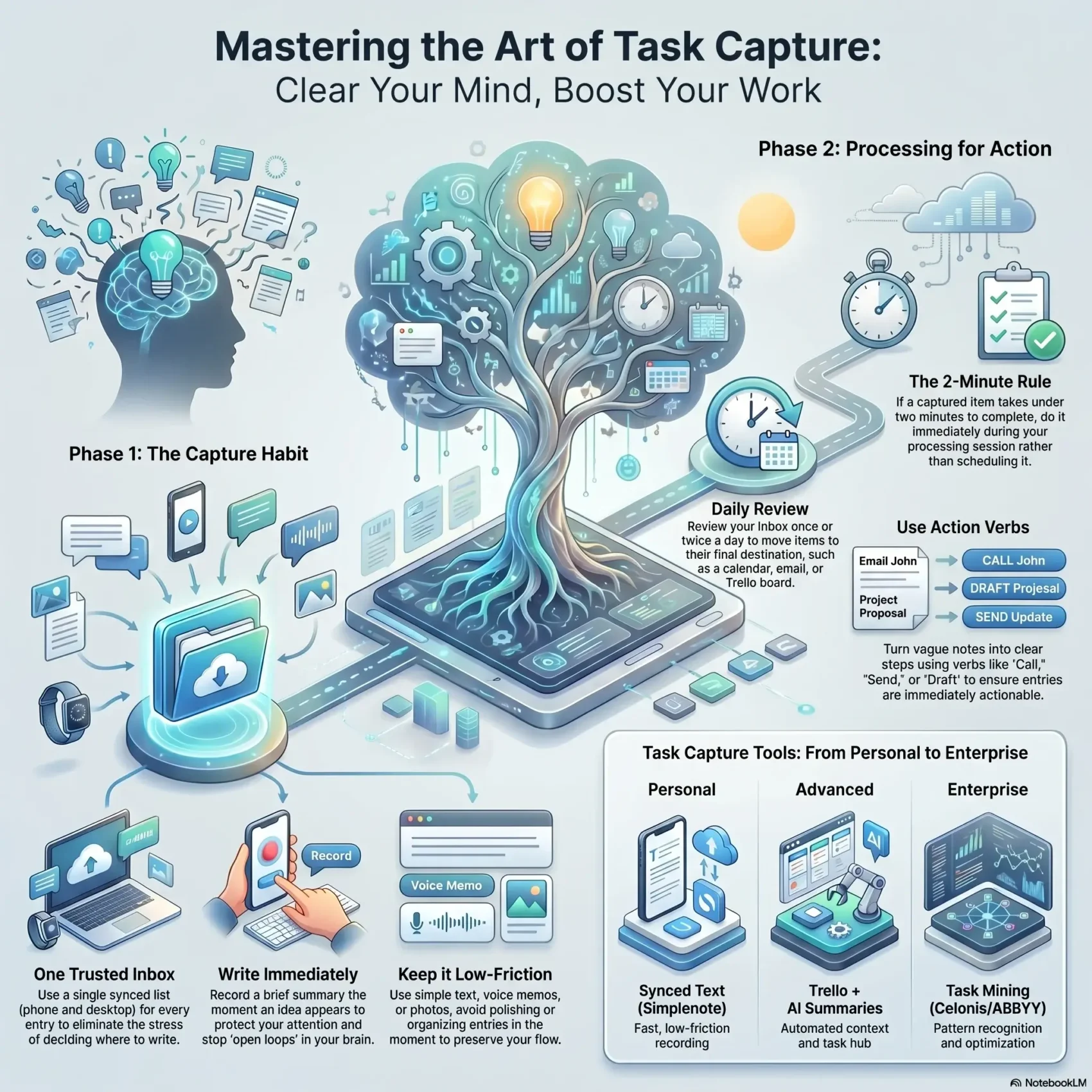
Last Updated on May 18, 2026
You can stop juggling things in your head. When an idea or to-do pops up, a fast habit to note it changes your day. A simple synced list becomes your inbox so you no longer rely on memory.
In business and in personal work, task capture ranges from lightweight notes to systems that record interactions and analyze data for efficiency. The key is one trusted place you use every time. That way, you free time for deep work and the people you care about.
This guide shows one easy way to catch items the moment they appear. You’ll learn how to build a single list, decide what to keep, and turn entries into next steps without extra fuss. Use simple tools or richer apps—the method scales with your goals and keeps friction low.
Key Takeaways
- Use one trusted list as your inbox to offload things quickly.
- Record first, organize later—avoid polishing entries in the moment.
- Turn captured items into next steps, calendar entries, or notes.
- Keep the habit low-friction so you use it on busy days.
- Task capture links personal routines to bigger business clarity and efficiency.
- Learn a fast rule to decide what to note and what to ignore.
- Start today with zero complex setup—try a simple to-do lists approach.
Why capturing tasks clears mental clutter and boosts your day-to-day productivity
A quick habit of writing things down changes how your day feels. When an idea arrives, note a short line in the same place and move on. This simple move protects your attention and reduces stress.
What “capture” really means: get ideas and tasks out of your head fast
Capture means you write a brief summary the moment an idea or task appears. Use one synced place—like a text list—so you always know where to look later.
The payoff: fewer dropped balls, less stress, and more time for meaningful work
Offloading things frees mental space for focused work and clearer decisions. You stop replaying reminders and you cut context switching.
- Write a short note immediately and return to that place daily.
- Move items to calendar, email, or a project list during processing.
- Missing an idea can cost opportunities; a simple system lowers that chance.
The result: fewer open loops, better follow‑through, and a workflow that supports both personal and business goals.
How to capture tasks consistently and turn them into action
A fast text list that lives on both phone and desktop makes it painless to record new work. Use a synced file (for example, Simplenote) as your single inbox so you can add an idea in one tap and move on.
Use one trusted inbox
Keep one place for every entry. A short text line is enough. Make the list the habit so you never waste time deciding where to write.
The golden rules
Write it immediately when it appears. Put it in the same place every time. Review the list daily so nothing gets stale or lost.
Processing your list
Once or twice a day, move items to the right destination: add a meeting on your calendar, send an email, or drop an item into task management software.
- Use clear verbs—“call,” “send,” “draft”—so each line becomes an action.
- If something takes under two minutes, do it during processing.
- Keep sensitive data out of the shared inbox; add details later in the secure tool.
“One shortest habit: one tap, one line, one short review.”
With this simple workflow you free mental space and turn ideas into real opportunities.
Tools and workflows that make task capture effortless today
A small set of tools lets you turn conversations and emails into concise, actionable entries without manual copying. Use integrations so your inbox, chat, and calendar feed one central board. That keeps your day focused and saves time.
From message to action
Forward an email or send a Slack or Teams message straight to your inbox and let AI pull out the key points. This removes repetitive copy‑and‑paste and gives you clean next steps.
AI summaries and auto‑attached links mean the original context stays with the entry for faster processing.
Trello as your central hub
Use Inbox, Boards, and Planner as a single home for to‑do items and ideas. No‑code automation can set due dates, auto‑assign, or move cards so workflows keep progressing.
- AI summaries turn long threads into clear actions.
- Card mirroring shows related items across boards for cross‑team visibility.
- Power‑Ups and integrations link docs, calendars, and other apps to your hub.
For teams and enterprises
Enterprise setups record user interaction data and run it through a pipeline: Data Collection, Processing, Pattern Recognition, Analysis, and Optimization. That gives managers real feedback on where to improve work and where automation helps most.
Examples: ProcessMaker Process Intelligence, UiPath Task Mining, Celonis Task Mining, and ABBYY Timeline.
“Automated collection and analysis turn daily work into reliable insights you can act on.”
Keep privacy first: choose solutions that mask or remove personal data to meet GDPR and other rules while still delivering actionable data for business improvement.
Conclusion
A light habit plus the right tool changes how you finish the day. Start with one trusted inbox and follow three simple rules: write immediately, use the same place, and review daily.
Keep the process fast. Add detail during processing so each entry becomes a calendar item, message, or an actionable line in your software. This turns good intentions into real task outcomes.
As you scale, task capture becomes a secret weapon for business insight. Smart apps and careful data collection help teams learn from user behavior while you protect privacy.
Capture consistently, process deliberately, and evolve your management approach—you’ll earn trust one finished task at a time.