If you remember FullEnrich as a browser extension that pulled emails and mobile numbers straight off LinkedIn profiles, that product no longer exists. The company shut it down, and how you use the platform today is fundamentally different.
That single change decides whether FullEnrich still belongs in your stack. If your prospecting depended on one-click enrichment inside Sales Navigator, you lost that. If you work from lists, a CRM, or an API, the platform is arguably stronger than it was.
This review covers what FullEnrich actually does in 2026, what it costs, where its data holds up, and who should look elsewhere.
Key Takeaways
- The LinkedIn Chrome extension was shut down on June 16, 2025 — enrichment now runs through the web app, CSV upload, API, CRM sync, or an MCP server.
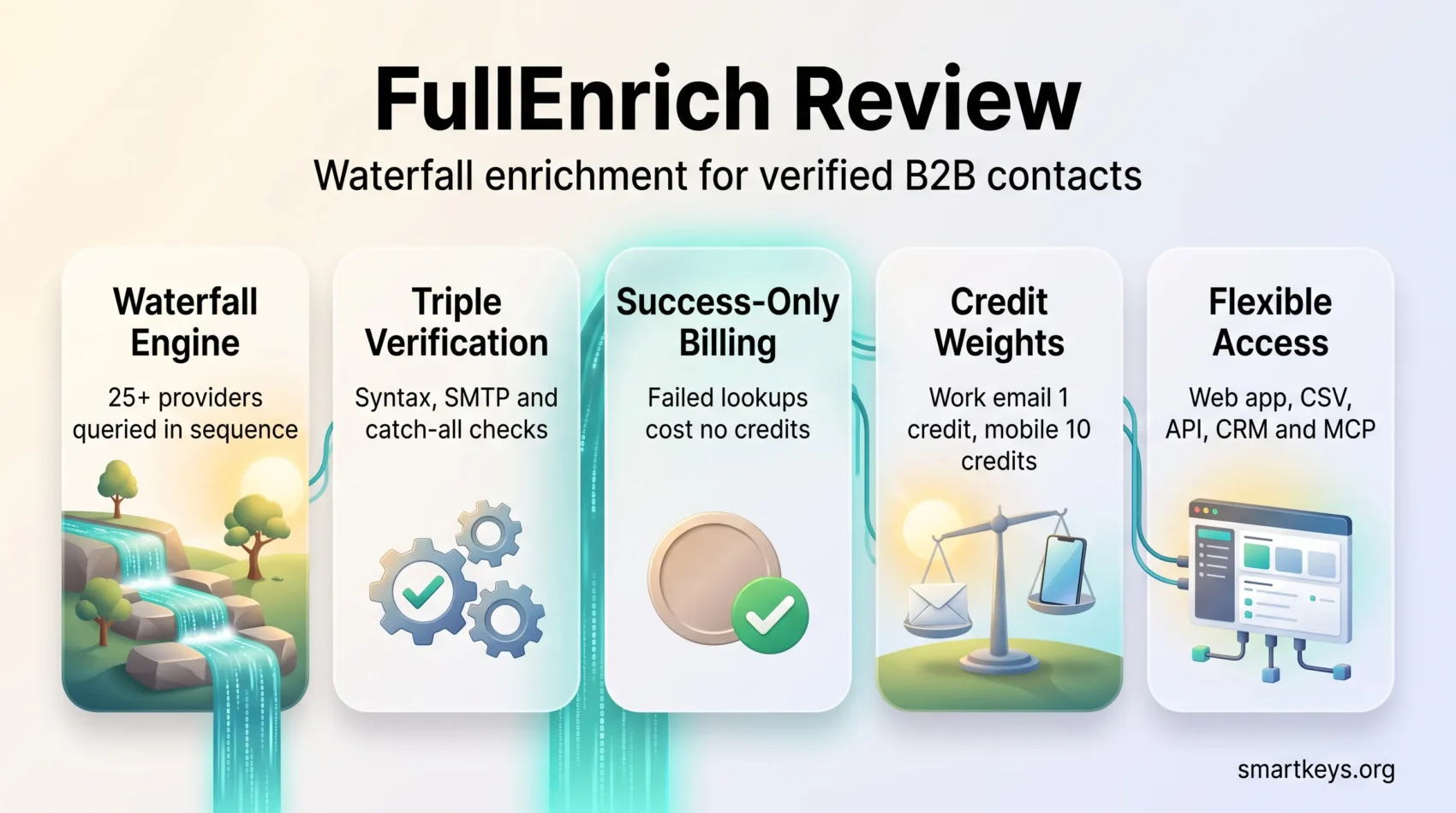
- The waterfall chains 25+ providers, and credits are consumed only when a contact is found and verified.
- Pricing is now Free / Pro / Enterprise. Pro starts at $55/month for 1,000 credits (roughly $0.055 per credit) and scales on a slider.
- A mobile number costs 10 credits versus 1 for a work email, so phone-heavy teams burn budget far faster than the headline price suggests.
- FullEnrich is enrichment only. You still need a separate sequencer to actually send.
What FullEnrich Is in 2026
FullEnrich is a French-built B2B contact enrichment platform. It does not own a database in the way ZoomInfo or Apollo do. Instead, it acts as an orchestration layer on top of 25+ external data providers.
You hand it a name plus a company (or a LinkedIn URL, or a domain). It queries providers in sequence until one returns a match, verifies that match, and hands back a work email, personal email, or mobile number.
The architectural bet is simple: no single database wins everywhere, so chaining many of them beats betting on one. Independent benchmarks broadly support this — waterfall approaches report email find rates in the 80–98% range against roughly 55–62% for single-source tools.
The platform is built for people who already have a list. RevOps engineers, SDR teams running volume, agencies enriching client data, and increasingly product teams embedding enrichment via API. If you need to build the list first, FullEnrich added a People & Company Search in 2026 (800M people, 50M companies, 15+ filters each), but that is a newer capability rather than its core strength.
If you are still deciding how enrichment fits into a broader revenue process, our RevOps efficiency playbook covers where data quality sits in the wider funnel.
The Chrome Extension Shutdown: What Actually Happened
This is the part most reviews get wrong, so it is worth being precise.
On Friday, June 13, 2025, FullEnrich CEO Benjamin Douablin emailed extension users. The following Monday, June 16, 2025, the LinkedIn functionality was switched off. Two things stopped working: enriching contacts directly from a LinkedIn profile, and exporting contacts from Sales Navigator.
The reason given was regulatory, not technical. LinkedIn had significantly tightened its rules, and FullEnrich chose to protect its relationship with the platform rather than risk the entire service. The company offered refunds on remaining credits to anyone the change broke.
What survived: CSV enrichment (up to 100,000 contacts per file), the API, CRM integrations, and connectors for Zapier, Make, n8n, and Clay. You can still enrich any LinkedIn profile — you just paste the URL into the web app instead of clicking a button in your browser.
- Workflow cost: Individual lookups now take more clicks. For one-off research this is genuinely annoying.
- Batch is unaffected: If you work in lists of hundreds or thousands, the extension was never the main path anyway.
- The broader lesson: Any tool that lives inside someone else’s browser session is one policy change away from breaking.
“Depending on a third party’s browser policies is a structural risk, not a bug.”
That last point matters beyond FullEnrich. LinkedIn and Google have both tightened enforcement on extensions, and several enrichment vendors have been forced into the same retreat. Building your process around exports and APIs rather than browser plugins is simply more durable. Our guide to automating repetitive work makes a similar case for owning your automation layer.
How the Waterfall Engine Works
Think of the waterfall as a relay race. Each provider gets a turn, and the sequence stops the moment a verified result comes back.
Source ordering and cost control
The engine queries providers in an order weighted by likely success for that industry, seniority, and region. Because it stops on the first verified hit, you rarely pay for the deep end of the cascade.
Credits are consumed only on success. A failed lookup costs nothing. This is the single most important pricing detail, and it genuinely separates FullEnrich from tools that bill per attempt.
Source depth varies by data type — FullEnrich’s own interface shows roughly 18 providers behind mobile numbers and 13 behind work emails.
Verification layers
Raw provider data is filtered aggressively. FullEnrich states that around 30% of raw data is removed before it reaches you.
For emails, that means syntax checks, an SMTP probe, and a proprietary catch-all check that the company claims resolves about 80% of catch-all domains — historically the hardest category to verify. Every result carries a confidence score.
For phones, telecom partners identify line type, and an AI layer matches the line owner’s name against your lead’s name in the US and Canada. Landlines and out-of-service numbers are flagged and cost you nothing.
Regional coverage is uneven
This is where expectations need calibrating. Independent reviewers report roughly 70–85% hit rates on US enterprise contacts, dropping to around 50–60% in APAC and LATAM.
| Region | Reported hit rate | Practical implication |
|---|---|---|
| US / Canada enterprise | 70–85% | Strongest coverage; phone verification includes owner-name matching |
| Western Europe | Strong | Solid mobile coverage; GDPR handling is a genuine advantage here |
| APAC / LATAM | ~50–60% | Budget for gaps; test a sample before committing volume |
If your ICP sits outside North America and Western Europe, run the free trial against a representative sample before you plan around any number.
Try FullEnrich for freeFullEnrich Pricing in 2026
The pricing structure changed. Older reviews still quote a “$69/month Starter” tier that no longer exists. Here is the current shape.
| Plan | Price | What you get |
|---|---|---|
| Free trial | $0 | 50 credits, no credit card, full feature access |
| Pro | From $55/mo (1,000 credits) | Slider from 500 to 100,000+ credits; per-credit price falls with volume |
| Enterprise | Custom | BYOK, SSO, dedicated AM, reseller and sub-account setups |
Every plan includes unlimited users. There are no seat fees at any tier, which is unusual and genuinely valuable for agencies and larger teams sharing one credit pool.
What credits actually cost
The headline price is misleading until you know the credit weights.
- Work email: 1 credit
- Personal email: 3 credits
- Mobile phone number: 10 credits
- Reverse email lookup: 1 credit
- B2B profile and company data: free with any enrichment (0.25 credits standalone)
Phone data is the budget killer. A team of ten reps each finding 20 mobiles and 100 work emails per week burns roughly 12,000 credits a month — about $720 on the Pro slider. Run that math before you commit, not after.
Unused credits roll over for three months on monthly billing and twelve months on annual plans. Annual billing reduces the effective rate.
Cost per record in context
On a 1,500-contact month with a 75% hit rate, you are looking at roughly $0.10 per enriched email contact. Apollo lands near $0.12–0.18 and ZoomInfo $0.15–0.30 per record at scale. For email-heavy workloads FullEnrich is competitive; for phone-heavy workloads the 10-credit weight erodes that advantage quickly.
Claim Your Free Credits NowWhat Changed in 2026
Several additions have narrowed the gap the extension left behind.
People & Company Search. You can now build lists inside FullEnrich rather than exporting from Sales Navigator — 800M people and 50M companies with 15+ filters each, plus the ability to exclude already-enriched contacts.
Native CRM integrations. HubSpot and Salesforce are both live, with contact and company push. Deeper in-CRM enrichment is flagged as coming.
MCP server. This is the most interesting 2026 addition and the one most reviews skip. FullEnrich exposes an MCP server, so AI assistants and agents can trigger enrichment directly as part of a workflow. If you are building agent-driven GTM processes, this removes a lot of glue code.
SOC 2 Type II. Alongside GDPR and CCPA compliance, the platform now carries SOC 2 Type II certification, which matters for procurement at larger companies.
Reverse email lookup. Turn an email you already have into a full person and company profile for 1 credit — useful for enriching inbound signups. If you are consolidating this kind of record into one place, our overview of customer data platforms is a useful companion read.
Pros and Cons
| Strengths | Limitations |
|---|---|
| Success-only billing — failed lookups are free | No Chrome extension; individual lookups are manual |
| Unlimited seats on every plan | Mobile numbers cost 10 credits each |
| 25+ providers with genuine verification depth | No built-in outreach or sequencing |
| GDPR, CCPA and SOC 2 Type II | Coverage thins outside North America and Western Europe |
| MCP server and API for agent workflows | No buying-signal or intent data |
That last limitation is worth dwelling on. FullEnrich tells you how to reach someone. It does not tell you when — no hiring surges, funding alerts, or tech-stack change monitoring. It is one component of a stack, not the whole thing.
How FullEnrich Compares
Against Clay: Clay is a workflow platform with enrichment inside it; FullEnrich is enrichment you plug into a workflow. Clay is more flexible and considerably more expensive, with a dual-currency credit system that is harder to forecast. Many teams run both — Clay for orchestration, FullEnrich as one of its waterfall providers. Our Clay AI review goes deeper on that trade-off.
Against Lusha: Lusha still ships an active Chrome extension with real-time LinkedIn lookup. If browser-based prospecting is non-negotiable for your reps, that alone may decide it. FullEnrich generally wins on find rate and verification depth. See our Lusha review for the full picture.
Against Apollo and ZoomInfo: Both bundle a database, sequencing, and intent signals. FullEnrich beats them on raw find rate for contact data but replaces none of the rest. You are choosing depth over breadth.
Vendor-reported results are worth noting with appropriate scepticism, since they come from FullEnrich’s own case studies. Deel reported 2.4x more mobiles found and connect rates rising from 6% to 30% across a 70-rep pilot. 11x reported contact coverage moving from 200M to 1.6B. The platform holds a 4.8 rating on G2.
Who Should Use It — and Who Should Not
Good fit: Teams with existing lists who care more about data accuracy than about tooling breadth. Agencies benefiting from unlimited seats and a shared credit pool. RevOps functions feeding verified data into a CRM. Product teams embedding enrichment through the API. Anyone building agent-driven workflows who wants MCP access.
Poor fit: Solo sellers who prospect one profile at a time in the browser. Teams whose outreach is phone-first at high volume, where the 10-credit weight compounds fast. Anyone expecting an all-in-one platform with sequencing and intent data built in. Teams targeting primarily APAC or LATAM.
If you are still shaping the outbound motion itself rather than the tooling, our pieces on account-based strategy and 2026 sales trends are the better starting point.
Verdict
FullEnrich does one thing and does it well. The waterfall genuinely finds contacts that single-source tools miss, the success-only billing is honest, and unlimited seats make it cheap for teams rather than individuals.
The extension shutdown was a real loss, and anyone telling you otherwise is selling something. But it pushed the product toward list-based, API-driven, and agent-driven workflows — which is where durable enrichment was always going to live.
The practical test is straightforward. Take the 50 free credits, run 40 work emails and a handful of mobiles from your actual target list, and measure the hit rate against whatever you use today. Coverage varies enough by region and seniority that no review, including this one, can substitute for that check.
Boost Your Outreach Hit RatesFound this useful?
Make SmartKeys a preferred source on Google, and our articles will surface more often in your Top Stories, AI Overviews, and AI Mode.
Add as Preferred Source