Tools
Tools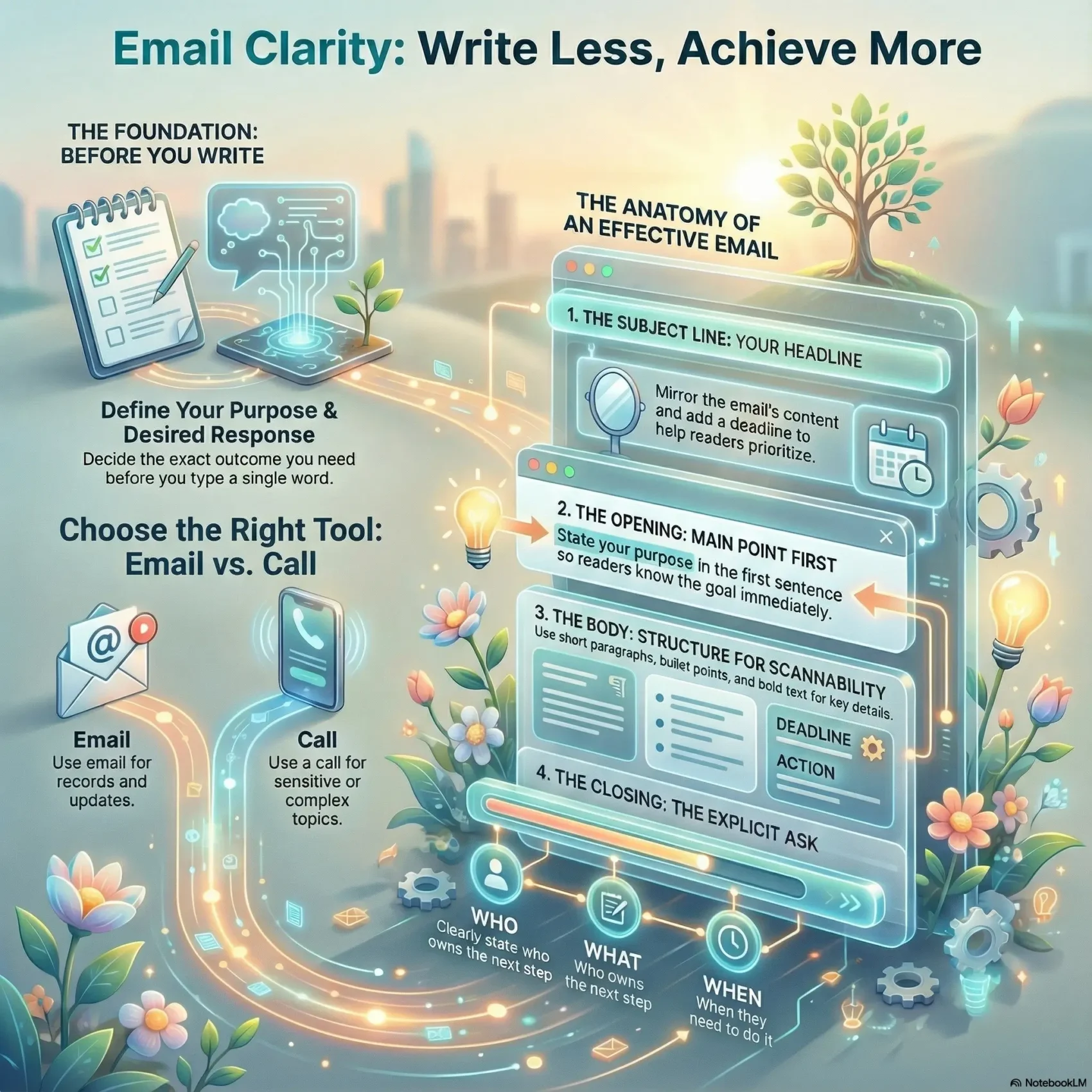
Last Updated on January 29, 2026
You write to get things done. When your message states one clear purpose, readers act faster and ask fewer questions. Short paragraphs, bullet-style lists, and a front-loaded first sentence help your team scan and respond without delay.
Use a direct subject that mirrors the request so recipients can triage and prioritize. Put the ask, owner, and due date where they are easy to spot. Limit each message to a single issue and attach only the information needed to act.
Before you send, take one minute to check pronoun references, parallel structure, and any double negatives. If the topic needs nuance or a private exchange, pick a call or short meeting instead of relying on written notes.
Key Takeaways
- Start with the main point so readers know the purpose immediately.
- Keep one issue per message and use short, scannable paragraphs.
- Make asks explicit: who, what, and when should be easy to find.
- Use subject lines that mirror the content to help inbox triage.
- Choose a call for sensitive or real-time discussion to avoid delays.
Understand Your Intent and Your Recipient Before You Write
Decide what outcome you need before you type a single word. Start by naming the exact purpose and the response you expect. That focus keeps your message short and makes it easy for the recipient to act.
Define the purpose and desired response
State your purpose in one sentence at the top. Add the minimal context the reader needs to decide. Then spell out the response you want—confirmation, a time slot, approval, or a file—and note the format.
Consider the recipient’s role, relationship, and expectations
Match tone and formality to the person you are writing to. Think about their role, how they like to receive information, and whether other people on cc need specific actions.
- One-sentence purpose: what you need and when.
- Essential context: paste brief excerpts when helpful.
- Sign-off details: include your name and title when relevant.
Before you send, check that your purpose, recipient, and requested response are easy to find.
When Email Is the Right Tool—and When It Isn’t
Choose a written message when you need a clear record, to share files, or to coordinate across time zones. This approach works well when information isn’t urgent and recipients need a reference they can consult later.
Use a friendly greeting and a precise subject so the recipient knows the topic at a glance. Expect responses to follow business hours unless you note a faster deadline.
Good fits for written communication
- Documenting decisions, sending attachments, or briefing a distributed team on a project.
- Simple approvals, routine updates, and client summaries that don’t need negotiation.
- Asynchronous coordination where people act at different time windows.
Signals to pick a meeting or a quick call
- Complex or sensitive topics, confidential details, or discussions that need tone and nuance.
- When messages spawn long back-and-forth threads that stall decisions.
- If misunderstandings are likely, offer two meeting times or a brief call and then document outcomes by written note.
Email Clarity Fundamentals
Lead with one clear purpose so the recipient can act without digging through details. When you limit a message to a single point, readers respond faster and less is forgotten.
Limit topics to one main point per message
Keep each message focused on one outcome. If you need to cover related items, separate them into short, labeled sections or a numbered list.
State context up front so people aren’t guessing
Open with a brief background line, then move immediately to the ask, owner, and deadline. Short, active sentences make your writing easier to scan.
- One point: make multi-topic threads the exception, not the rule.
- First sentence: put the purpose there so recipients don’t hunt for it.
- For questions: use a simple bullet list so answers can be given line-by-line.
Finish by naming the desired outcome and who owns the next step. This small habit boosts clarity and cuts follow-up messages.
Make the Subject Line Work Hard for You
Treat the subject like a headline that tells readers exactly what to expect. A clear subject saves time and makes the message easier to find later.
Clear, specific subjects that match the message
Mirror the body in the subject so recipients can triage quickly. Use a short phrase that names the topic and the expected action.
Time-sensitive subjects and project tags that boost response
Include dates or deadlines when time matters — for example, “Action required by Fri 5/10: Approve Q2 budget.” Start with a project or client tag to help teams filter threads.
Examples: better subject lines for reports, meetings, and invoices
- “April sales projection report – slides attached” — clear information and attachment notice.
- “Confirm: UX kickoff agenda for Tue 2 p.m.” — meeting purpose plus time.
- “Invoice #8743 – line item clarification needed” — routes finance response fast.
If a thread switches topics, update the subject and add a name only when it helps routing. That small habit keeps searches and follow-ups painless.
Structure and Formatting That Improve Understanding
Start with the required action in the first sentence to cut reading time and reduce follow-up. Then add a brief line of context and the exact outcome you expect.
Use short paragraphs and clear line breaks so your message scans on phones and desktops. Break complex points into bullet points or a short numbered list to make replies easier.
- Open: one-line action and who must act.
- Format: separate owners and due dates on their own line (Owner: Maya | Due: Thu 4/18 EOD).
- Use a single bold date or time on its own line instead of ALL CAPS.
Use cc to keep the team informed and bcc when protecting addresses, but remember bcc can be revealed by a reply-all. Attachments and links should include a one-line note describing what they are and why they matter.
“A clear structure reduces back-and-forth and helps recipients act fast.”
Use Simple Language and the Right Tone
Pick plain words and a calm tone so your message is easy to act on. Clear language and a steady tone reduce back-and-forth and show professional respect.
Cut jargon; prefer active, concise wording
Avoid insider jargon unless everyone shares the term. Use active verbs and one idea per sentence to keep your writing direct.
Short words beat long ones when speed matters. This helps global teams and business partners respond faster.
Match greetings and sign-offs to the recipient
Choose a greeting that fits the relationship—more formal for new clients or execs, relaxed for familiar teams.
Always end with your full name and a helpful signature (role and company when relevant). That routes replies correctly and avoids confusion.
Read your message aloud to check tone; jokes and sarcasm rarely travel well in written notes.
- Use names to assign ownership without sounding harsh.
- Keep grammar standard—correct punctuation supports credibility.
- When you push back, offer alternatives and stay solutions-first.
For more on improving team communication, see this short guide to active listening and productivity.
Add Essential Context and Details the Right Way
Give readers just enough background so they can act without reopening old threads. Paste a short excerpt or error line for quick reference, then name the source so people can find the full file if needed.
Paste snippets and explain attachments
Include one-line notes for each link or attachment explaining what it is and why it matters. For example: Q3_Roadmap_v2_2025-07-10.pdf — updated milestones and dependencies.
List dates, timelines, and owners clearly
- Meeting: Tue 7/15, 10 a.m. — please confirm.
- Project: UX redesign — deliverable draft by 7/22 (Owner: Maya).
- Timeline: Dev handoff 8/1; QA complete 8/15.
When you request clarification, reference the invoice number, date, or version and state the outcome—e.g., payment will proceed once questions are answered. Offer a short example or template if the structure might be unclear.
“Please confirm these dates and owners by Thursday so we can lock the plan.”
Calls to Action, Deadlines, and Next Steps
A clear request with a deadline and response format cuts follow-ups and speeds decisions.
Put your call to action on its own line near the top and repeat it at the end. That single-line ask should state who must act, what you need, and the due date.
Make the ask explicit with deadlines and formats for response
Specify the format you want: a short confirmation, comments in a doc, or two meeting times. Add timezone when your team is distributed so dates and time are unambiguous.
- Owner | Due: Maya — Due: Fri 9/12, 3 p.m. ET
- If time is tight, say when you’ll follow up and by which channel; offer a brief call as backup.
- Break big requests into small steps with staged dates so the client or team can act incrementally.
When possible, invite a quick yes/no reply — for example: “Reply ‘approved’ or ‘needs changes’ by Tue 3 p.m.” If you don’t hear back, note that you’ll call by a specific date and time to close the loop.
“Put the ask where it can’t be missed and name the owner for each next step.”
End with the desired outcome and response type: an email reply, meeting times, or approval. Include your phone number and same-day availability for urgent items so blockers can be resolved fast.
For an example workflow and checklist for follow-up steps, see this short guide to tracking next steps.
Proofread in a Minute: A Quick Clarity Checklist
A one- to two-minute pass often catches the small issues that cause big delays. Use this quick scan to clean pronouns, tighten grammar, and confirm your subject line matches the request.
Pronouns, negatives, parallel lists, and grammar checks
Check that each pronoun clearly points to a noun. Remove double negatives that flip meaning. Make lists parallel so answers can be line-by-line.
- Confirm pronouns (it, this, they) have explicit nouns.
- Fix non-parallel items—start each bullet the same way.
- Tighten weak wording and correct basic grammar errors.
Readability scan: skimmable layout and unambiguous wording
Look at formatting, short paragraphs, and bullets so recipients can scan on mobile. Ensure deadlines and owners stand out but avoid ALL CAPS.
- Scan the subject line for accurate tags or dates.
- Trim jargon; prefer plain language and short sentences.
- Verify attachments are named and referenced in one line.
“A quick proofread saves time and prevents missteps.”
Conclusion
A well-wrapped message saves time: state who will do what and by when. That one habit makes your messages actionable and reduces needless back-and-forth.
Use a clear subject line, open with the ask, add brief context, and close with ownership and dates. Choose the right tool — use email when you need a record and a call when nuance or speed matters.
Keep things simple: plain words, a friendly greeting, and your name in the sign-off. Run the one-minute checklist before you send. If a thread stalls, propose a quick call and then send a crisp recap to lock the next steps and keep your project moving.