Tools
Tools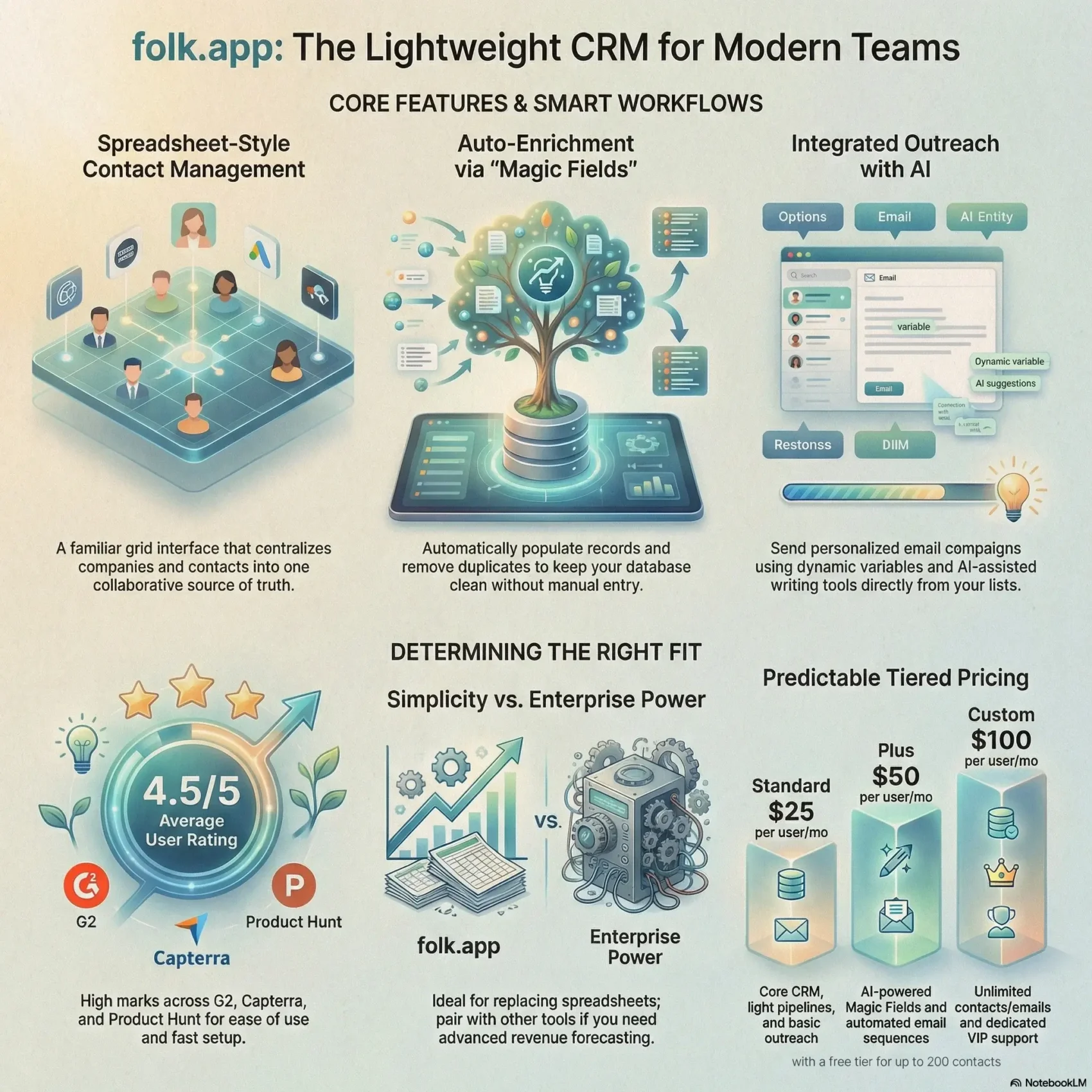
Last Updated on February 26, 2026
You’re about to read a clear, practical look at a spreadsheet-style crm designed to centralize your contacts and cut the time you spend chasing information across tabs.
The platform feels familiar on day one. It auto-enriches and deduplicates records, includes built-in emailing with personalization variables and scheduling, and offers basic reporting so your team can move faster.
Pricing starts at $25 per month per user, with higher tiers adding AI fields, sequences, and unlimited contacts. Users give strong scores across major reviews sites, and support is responsive via in-app chat.
What you’ll get here: a quick tour of core features, limits on deal tracking and forecasting, where the software fits in the market, and how to trial it with minimal friction.
Key Takeaways
- You can organize contacts and team workflows without heavy overhead.
- Built-in email, snippets, and AI copy speed outreach for small teams.
- Pricing is straightforward—expect incremental features at higher tiers.
- Good user ratings and live chat support make evaluation easier.
- Limited advanced sales features mean pairing with other apps may help.
folk.app Review: Is This Lightweight CRM Right for Your Team?
If your team values a fast, low-friction CRM that feels like a spreadsheet, this tool could save you hours each week. It targets a broad set of roles — recruiters, partnership managers, and event organizers — not just salespeople.
Setup is intentionally simple. You can import contacts from your mailbox or a CSV in a few clicks and start organizing people the same day. The spreadsheet-like layout makes contact management feel familiar to most users.
Consider this option when your teams live in email and need light management for contacts, basic pipelines, and timely follow-ups. Support replies quickly via in‑app chat, which helps when questions pop up during onboarding.
- Best for: small teams and cross-functional roles who value time savings over deep enterprise controls.
- Limits: not ideal for advanced sales forecasting or complex multi-stakeholder deal architectures.
- Pricing snapshot: entry to premium tiers at $25 / $50 / $100 per user per month fit many small businesses.
In short, if you want simple relationship management and faster adoption, this CRM is worth evaluating this quarter. For long, complex deal cycles, plan to pair it with other tools.
Quick Verdict and Who Should Consider Folk
If you want a system your whole team will actually use, this is a strong contender. Reviewers give ease of use and setup high marks (about 4.5/5), and people praise fast imports and intuitive groups that reduce onboarding time.
This tool is a solid option for freelancers and small, multi-role businesses. You get collaborative contact lists, light pipeline tracking, and built-in email features without heavy setup.
Start with a month-long pilot: import contacts, create groups, and send a few email campaigns. That quick trial is the fastest way to judge fit.
- When to choose it: you want clarity, speed, and simple features that replace spreadsheets.
- When to skip it: you need advanced forecasting, custom objects, or layered permissions.
Pricing begins at roughly $25 per month per user, and reviews suggest most teams see value quickly with minimal training. In short, pick this for practical simplicity; choose something heavier if deep enterprise reporting is required.
Try folk.app for freeCore Features and Functionality: From Spreadsheet Feel to Smart Workflows
You’ll find a spreadsheet-like workspace that turns contact lists into actionable workflows fast. The grid view keeps rows and columns familiar, so your team spends minutes learning, not weeks.
Spreadsheet-like interface for faster contact management
The shared table centralizes contacts and companies so everyone sees the same source of truth. You can sort, filter, and bulk-edit to cut repetitive tasks and free up time for higher-value work.
Custom fields and “magic fields” to enrich data automatically
Custom fields let you mirror your business data model. Magic fields enrich and dedupe records automatically, reducing manual entry and keeping data cleaner across the team.
Collaboration for teams: shared groups, notes, and activity timelines
Teams can share groups, add notes, and track email, call, and task timelines in one place. That visibility helps you know who engaged and when without hunting through other tools.
Limits to advanced CRM capabilities you should know
This tool focuses on speed and simplicity. It lacks deep forecasting, complex sales objects, and heavy reporting that enterprise software offers. For many small businesses, that trade-off is welcome. If you need layered forecasts or custom object modeling, plan to pair this with other apps.
- Fast contact management and alignment for small teams
- Built-in outreach features cut the number of external tools
- Automation targets enrichment and deduplication, not full enterprise workflows

Contact and Company Management: Centralize, Segment, and Act
Quick imports and smart deduplication protect your data so you can focus on outreach, not cleanup.
Import options include Google/Microsoft mailbox sync or a simple CSV upload. Those choices let you centralize contacts fast and keep duplicates out with a strong matching system.
Import options and automatic linking
People are auto-linked to a company record so information stays in context when you prepare emails or meetings.
Segmentation with groups, tags, and custom fields
Create groups like clients, candidates, or investors and add custom company fields (industry, size, location) for precise targeting.
Activity timelines and capture tools
Timelines show emails, calls, and tasks in chronological order for reliable tracking. Notes and tasks generate notifications so your team stays aligned on next steps.
- Centralize quickly: mailbox sync or CSV imports reduce onboarding time.
- Context matters: company records auto-link to people for clear information at a glance.
- Capture on the go: the Chrome extension adds prospects from LinkedIn or a website with one click and enriches records automatically.
Email Campaigns Built In: Personalization, Scheduling, and Reporting
Built-in email campaigns let you personalize outreach and track what actually works without leaving your contact list.
Dynamic variables let you insert first name, last name, company, and role so each message reads like a one-to-one note. Reusable snippets keep tone consistent across your team.
Dynamic variables, reusable snippets, and AI-assisted writing
You can draft campaigns in minutes and scale personalization with fields tied to your contacts. AI helps you generate subject lines, openers, and follow-ups to speed writing without losing quality.
Campaign scheduling, deliverability, and performance tracking
Schedule sends now or later and maintain formatting across inboxes. Reporting shows opens and clicks so your business can iterate on what works. The platform surfaces top-performing content for quick learning.
Sequences and follow-ups: what you can and can’t automate
The software supports delayed sends and simple sequences, but behavior-based branching isn’t available. Plan manual nudges for key prospects and use magic fields to enrich personalization that boosts replies.
- Draft and personalize fast with variables and snippets
- AI-assisted copy and subject ideas
- Basic scheduling plus open/click tracking
- Simple sequences, no advanced automation branching
Pipeline, Deals, and Activity Tracking: Visual Progress Without Heavy CRM Bloat
Visual boards make it simple to move opportunities forward without heavy setup. You’ll see every deal’s status on a kanban-style pipeline so updates are fast and obvious.
Kanban-style stages for simple pipelines
The board is customizable, letting you name stages that match your process. You can drag cards to reflect movement and keep momentum across your team.
Tasks, calls, notes, and email timelines in one place
Activity timelines consolidate emails, calls, tasks, and notes on each contact or company record. That single view reduces guesswork about who did what and when.
Where forecasting and complex deal management fall short
The interface tracks deals visually, but there’s no standalone deal object separate from contacts or companies. You also can’t run multiple pipelines per account.
Forecasting and deep analytics are limited. There’s no probability-weighted revenue forecasting, so you’ll model estimates outside the crm or use light workarounds.
- You’ll manage a clear pipeline with fast stage updates and visible deals.
- Timelines give you reliable data to tighten follow-ups and prevent stalls.
- For multi-motion accounts or long cycle approvals, plan to add reporting tools.
Integrations and Chrome Extension: Connect Email, Calendars, and Your Apps
Syncing Google or Microsoft accounts lets you centralize messages and appointments in one place. That native connection keeps email, contacts, and calendar events tied to the right records so outreach and meetings stay in context.
Native Google and Microsoft sync
You can connect your Google or Microsoft accounts to sync email, contacts, and calendar events so outreach and meetings live in the same platform. This reduces manual entry and keeps team access consistent.
Zapier and Make extend automation
Use Zapier or Make to bridge the CRM with other apps and tools you already use. These integrations let you automate routine flows without custom development.
- Automation that moves data: push contacts, tags, and events between systems reliably.
- Keep your stack light: add specialized software later without reworking core workflows.
- Pro tip: connect marketing, support, or analytics tools to keep records synchronized.
Chrome extension for one-click prospecting
The Chrome extension turns LinkedIn, X, and company websites into one-click sources of qualified contacts and companies. New records include automatic categorization and enrichment so data quality stays high.
Key benefits: email context follows new records, enrichment keeps company data consistent, and you get quick access to integrations that favor business agility over heavy builds. For examples of extending productivity across tools, see extend automation.
Pricing and Value for Money: Plans, Limits, and When to Upgrade
Start small and scale up as your outreach and contact lists grow—pricing reflects real usage limits.
Entry plan basics: The entry tier costs $25 per month per user and covers core software needs — contact organization, a light pipeline, and basic outreach. A free option exists for up to 200 contacts so you can try folk free before committing.
Plus and Custom: AI magic fields, email sequences, and higher caps
The Plus tier at $50 per month per user adds AI-powered magic fields and email sequences. That makes it a strong option when you want to scale emails and enrich contacts without extra tools.
Custom, at $100 per month per user, removes caps on contacts and emails and includes VIP support. Choose this if your teams send high volumes or manage many deals and need fast assistance.
Monthly vs. annual billing, per-user costs, and scaling with teams
Billing is per user and predictable month to month. If you commit annually, you save two months, which helps with budgeting as your business grows.
Watch usage metrics like contacts, emails, and deals in flight. Those thresholds signal when upgrading will deliver better value.
“Try Folk free” considerations before you commit
The free plan and transparent pricing with no implementation or training fees let you validate workflows quickly. Small teams often find the Plus tier delivers the best balance of price and features.
- Lower mid-range price: core CRM tools at $25/month/user.
- Scale smart: Plus adds magic fields and sequences at $50/month/user.
- Unlimited option: Custom at $100/month/user for high-volume needs and VIP support.
- Try first: free account up to 200 contacts and annual plans save two months.
Customer Support and User Reviews: What Real Users Say
Fast help and clear learning paths reduce downtime so your team stays productive. You’ll find in‑app chat replies often come within an hour during the workday. That quick support cuts the time you spend waiting on answers.
In-app chat responsiveness and the Folk Academy resources
The help center includes articles, video tutorials, FAQs, and the Folk Academy to teach your team just-in-time. Those resources let you solve common issues without raising a ticket.
User ratings on G2, Capterra, and Product Hunt
Independent reviews back up the hands-on support. Scores show 4.5/5 on G2 (230 reviews), 4.4/5 on Capterra (18 reviews), and 4.8/5 on Product Hunt (178 reviews). Many users praise simplicity, quick setup, and the Chrome extension for faster prospecting and sending emails.
- Fast support: in‑app chat is responsive and feels human.
- Self-service: Academy materials cut training time.
- What to expect: praise centers on ease of use; requests focus on deeper reporting and pipeline features, plus a mobile app.
folk vs Traditional CRMs: Simplicity vs Complexity in the Current Market
In a market crowded with heavy platforms, this tool opts for clarity and speed over layered complexity.
You trade deep, enterprise capabilities for straightforward functionality that your team will actually use. Compared with spreadsheet stopgaps, it adds deduplication, shared structure, and collaboration so lists stop becoming a maintenance chore.
How it stacks up to spreadsheets and heavier CRM software
Compared to spreadsheet stopgaps, you get cleaner data, basic pipeline visibility, and reliable email context that travels with contacts.
Against full-featured crm software, you lose advanced forecasting, multi-object deal models, and deep reporting. Traditional systems deliver those capabilities, but they add setup time and admin overhead.
- Simpler functionality: faster adoption and less admin for small teams.
- Notion-like clarity: a familiar, tidy workspace that focuses on relationships and outreach.
- Integration approach: strong Google/Microsoft sync plus Zapier and Make bridges rather than broad native connectors.
- Pipeline & deals: visible boards for moving work, not full revenue forecasting for finance.
In today’s market, a right-sized choice often wins. Start with a lightweight crm to move faster, and pair it with analytics or BI when your process needs more depth.
Conclusion
For small business teams juggling inboxes and spreadsheets, this platform turns scattered data into organized, actionable workflows.
It centralizes contacts and company records, auto-dedupes and enriches them, and bundles built-in email features with AI help and scheduling.
You get simple pipelines that keep your team aligned and easy integrations with Google, Microsoft, Zapier, and Make. The Chrome extension speeds prospecting and keeps access consistent across tools.
Support comes via in‑app chat and the Folk Academy, so you clear roadblocks fast. Pricing starts at $25/month/user with a free tier for up to 200 contacts—so the best next step is to try folk free for a month and validate your core workflows.
Start your free month now