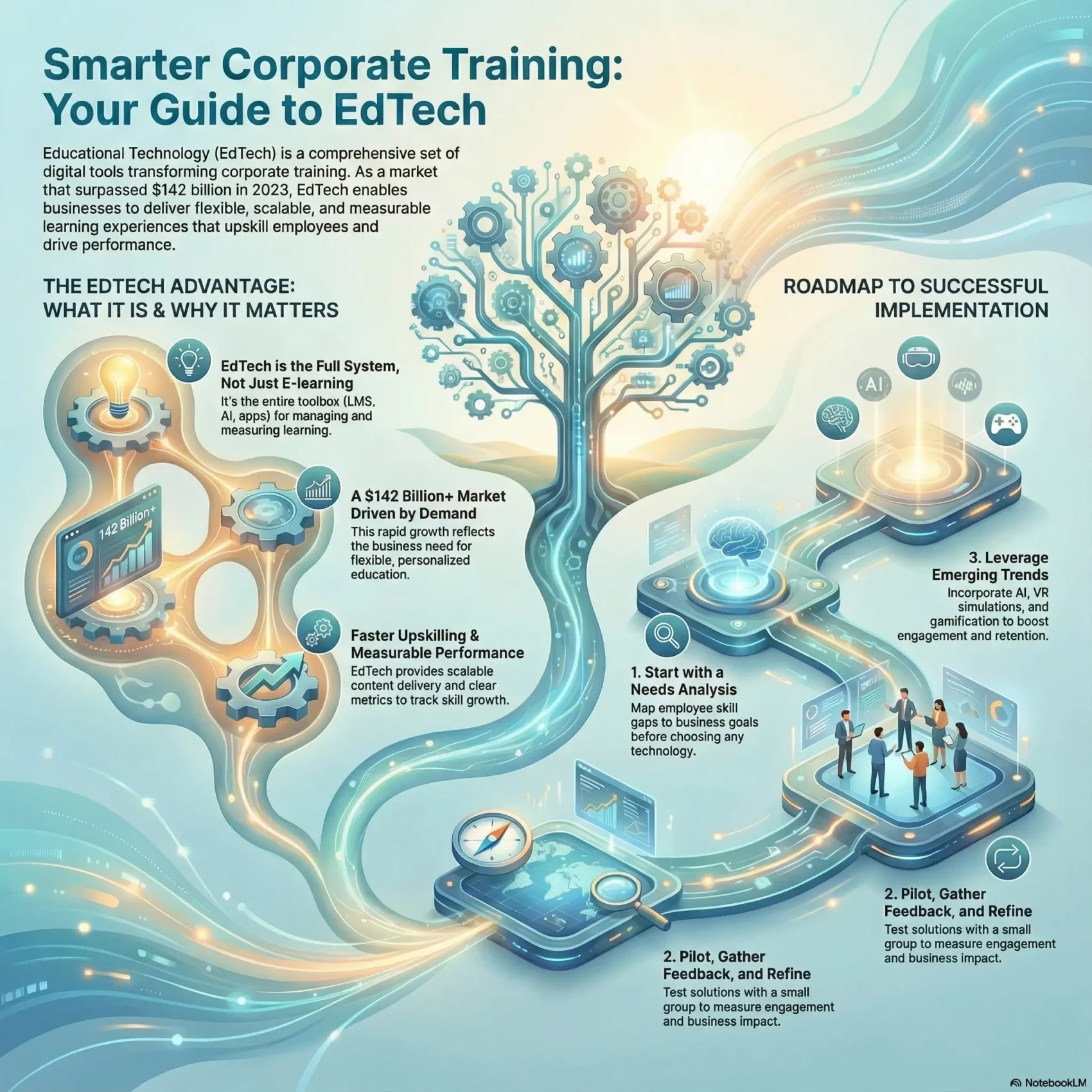
Educational technology is the set of digital tools that help you teach, learn, and measure skill growth. It covers LMSs, authoring platforms, virtual classrooms, AI, and more. In 2023 the market passed $142 billion and is set to keep growing this decade.
You’ll see how these solutions let your teams access flexible, personalized learning without losing quality. That means faster upskilling, clearer performance metrics, and content that fits busy schedules.
This guide will explain what educational technology does for your business today, how companies use platforms to scale learning, and which steps help you pick the right stack. You’ll also get practical tips to align stakeholders and build a governance plan that keeps learning effective and fair.
Key Takeaways
- Digital tools make learning more flexible and measurable.
- Platforms like LMSs and virtual classrooms support scalable content delivery.
- Investing in technology speeds up upskilling and boosts performance.
- Market momentum shows education tech is a growing business trend.
- Practical governance keeps programs compliant, equitable, and effective.
Why EdTech matters for corporate learning today
Cloud-first tools have rewritten the playbook for workplace learning and learner engagement. The market passed $142 billion in 2023, and that growth reflects demand for flexible, personalized education that fits how people work now.
The state of educational technology in the present market
Lightweight, collaborative technologies replaced heavy, single-user systems. That shift lets teams edit learning content together and deploy updates in minutes. As a result, companies can deliver timely, relevant courses that match business goals.
How digital transformation reshapes workplace training
Modern tools give employees access on any device and improve communication between trainers and learners. You can close skill gaps faster, track outcomes, and adapt learning development at scale.
“Digital platforms turn one-off lessons into lasting pathways that follow the learner.”
Challenges remain—content upkeep and stakeholder buy-in are common—but the right solutions reduce friction and lift the learner experience across the organization.
EdTech vs. e-learning: What you need to know before you build
Before you buy any platform, it helps to separate broad educational technology from straightforward e-learning so you pick the right mix of capabilities. That clarity prevents you from defaulting to a single course catalog when your needs include reporting, integrations, or blended delivery.
Definition
Learning management systems act as the central hub to host learning content, plan courses, and track progress. Look for user experience, strong reporting, integrations, compliance support, and multi-tenant management systems if you expect scale.nal technology covers the full stack that manages, creates, delivers, and measures learning: LMSs, authoring tools, collaboration apps, and AI-driven analytics. By contrast, e-learning is focused on delivering online courses, webinars, and digital content. One is a system; the other is a delivery method.
Core components
The stack has three layers: devices (laptops, tablets, smartphones), platforms (websites, apps, MOOCs, virtual classrooms), and software (Blackboard, Microsoft Teams, Slack, Zoom). Each layer supports content creation, delivery, tracking, and analytics for your learners.
Where things fit in your ecosystem
Virtual classrooms handle synchronous teaching. MOOCs and online courses give scalable self-paced options. A learning management system centralizes enrollments, assessments, and compliance reporting.
“Choose tools that match your timeline: use quick-to-launch apps for pilot sessions and invest in deeper systems when you need scale and governance.”
- Fast launch: conferencing apps for live sessions.
- Scale & control: LMS for centralized courses and tracking.
- Engagement: simulations and collaboration for hands-on practice.
From goals to roadmap: Building your best practices plan
Start by mapping what your people need to do their jobs better, then turn that map into a clear, staged plan. A short needs analysis should connect skills gaps to measurable learning objectives and the scope of your course work.
Identify stakeholders early: include HR, IT, business leaders, and employees. That alignment secures resources, clarifies ownership, and speeds decision-making.
Needs analysis and objectives
Use surveys, task audits, and interviews to define development goals. Translate gaps into specific learning outcomes and prioritized content that respect employees’ bandwidth.
Pilots, feedback, and success criteria
Run a pilot to test usability, engagement, and outcomes. Collect employee feedback and set KPIs that go beyond completion rates—measure behavior change and business impact.
- Governance & management: assign owners, keep data clean, and schedule reviews.
- Resources & support: budget for enablement so users adopt new tools with minimal friction.
- Learning management systems act as the central hub to host learning content, plan courses, and track progress. Look for user experience, strong reporting, integrations, compliance support, and multi-tenant management systems if you expect scale.nal technology covers the full stack that manages, creates, delivers, and measures learning: LMSs, authoring tools, collaboration apps, and AI-driven analytics. By contrast, e-learning is focused on delivering online courses, webinars, and digital content. One is a system; the other is a delivery method. tie results to business goals and refine your course roadmap over time.
Tip: Pilot your VR employee programs with a small group to validate effectiveness before scaling. Learn more about piloting immersive learning.
“A focused needs analysis turns scattered goals into a pragmatic plan that people can follow.”
EdTech corporate training solutions and how to choose them
Choose solutions by mapping what you must manage, create, and deliver. That makes vendor comparisons practical and helps you avoid buying features you won’t use.
Learning management systems and key features
Learning management systems act as the central hub to host learning content, plan courses, and track progress. Look for user experience, strong reporting, integrations, compliance support, and multi-tenant management systems if you expect scale.
Authoring tools and rapid creation
Authoring tools let SMEs build interactive content, quizzes, and assessments fast. Lightweight SaaS authoring like Easygenerator reduces friction and encourages user-generated content while templates and review workflows keep quality high.
Virtual classrooms and collaborative applications
Use video conferencing and virtual classrooms (Zoom, Microsoft Teams) for live coaching, sales role-plays, and product updates. Pair synchronous sessions with short online courses to reinforce learning after live events.
Cloud-based management systems for scalable delivery
Cloud-first management systems remove heavy on-prem storage costs and let learners access materials anytime. Evaluate providers and content providers for uptime, support, and roadmap fit to de-risk your purchase.
“Pick tools that match your pace: lightweight authoring for quick wins and full-featured systems for regulated programs.”
- Assess integration needs so the LMS, authoring, and conferencing applications work without extra admin.
- Run pilots and gather learner feedback to validate that courses drive performance.
- Choose solutions that match your team’s capacity—from rapid authoring to enterprise-grade systems.
Implementation that sticks: Training, support, and learner experience
A practical rollout pairs hands-on onboarding with ongoing channels so people use new tools with confidence.
Onboarding employees to tools starts with short workshops that explain benefits and set clear expectations. Follow workshops with quick-start guides and scheduled office hours so employees can ask questions as they apply new skills.
Onboarding employees to tools and ongoing enablement
Design small, role-specific sessions so learners try features that matter to their day-to-day. Supplement with in-app help and bite-sized content to keep momentum after launch.
Hybrid models that balance human interaction and technology
Mix digital modules with coaching and peer discussion to preserve community and motivation. Use reality-based practice and feedback loops so learners rehearse real tasks, not just quizzes.
Support the experience by pacing communications and using analytics to spot friction points. Then personalize help for teams that need it most.
“When you combine clear onboarding, ongoing support, and human coaching, adoption becomes part of the way people work.”
- Onboard with brief workshops and role-focused guides.
- Enable using office hours, quick guides, and in-app help.
- Balance digital practice with coaching and peer activities.
- Measure engagement and adapt content to reduce cognitive load.
Make learning a team sport: Culture, UGC, and alignment with business
When your people create bite-sized content, you shorten time-to-proficiency and surface practical tips from the field. Encourage a culture where learners and employees share simple wins so knowledge spreads naturally.
Empowering employees as co-creators and champions
Start small: pick “sweet spots” like onboarding tips or sales plays where user-generated content helps fast.
Identify champions who will model creation and rally peers. Give them easy-to-master authoring tools so contribution is low-friction.
Moderation, governance, and tying learning to outcomes
Set clear editorial guidelines, peer review steps, and ownership so content stays useful and accurate.
- Integrate: fold UGC into formal programs so practical know-how complements certified materials from providers and content providers.
- Incentivize: recognize contributors with visibility, micro-badges, or short rewards.
- Measure: link learning development outputs to metrics like time-to-proficiency, win rates, and CSAT so the business sees impact.
“Enable people to share what works and you turn everyday experience into repeatable practices.”
Current trends shaping corporate learning with educational technology
Emerging trends focus on personalization and realism so you can build more effective learning paths that fit real work.
Adaptive learning for personalized paths
Adaptive learning uses diagnostics, pre-tests, and analytics to tailor lessons to each person. This reduces boredom and overload by matching challenge to skill level.
Extended reality for hands-on, risk-free practice
Extended reality brings realistic environments into your programs. VR simulations let people practice equipment operation, onboarding tours, or shadowing experts without real-world risk.
Gamification to boost engagement and retention
Gamification adds points, levels, and quests to keep learners motivated. Fast feedback and visible progress make courses stick and encourage repeat practice.
Cloud learning for flexible, always-on access
Cloud-first delivery via SaaS lowers storage overhead and gives distributed teams reliable access. It also lets you iterate content and launch pilots quickly.
Scenario-based learning for real-world decision-making
Scenario-based approaches simulate choices and consequences so people build judgment, not just recall. Pair scenarios with virtual classrooms and online courses to reinforce skills.
- Tip: Start with one or two trends—adaptive paths or a simple VR pilot—to validate value before scaling.
- Tools: Pick authoring tools that support analytics and easy updates so you can iterate fast.
Risks, challenges, and how to mitigate them
Even the best systems hit snags: connectivity gaps, data risks, cost pressure, and uneven content quality can derail adoption. You can limit harm with clear checks, simple policies, and a hybrid approach that keeps people connected and supported.
Connectivity, access, and equity considerations
Assess device readiness and bandwidth before launch. Run quick surveys to spot regions with aging systems or limited internet.
Provide low-bandwidth versions, offline resources, and loaner devices where needed. These steps make sure employees aren’t blocked by infrastructure.
Data privacy, security, and compliance
Adopt data minimization and role-based access across every management system. Require vendor audits and encryption for sensitive records.
Document retention and consent policies so your privacy posture meets regulatory and internal standards.
Cost management and change resistance
Manage total cost of ownership by choosing SaaS tiers, phasing rollouts, and reusing existing systems where possible.
Reduce resistance with a clear “why,” short workshops, and visible pilot wins that show value to managers and learners.
Quality assurance for learning content and providers
Set QA gates for accuracy, accessibility, and consistency whether content is in-house or from content providers.
- Editorial standards: review cycles and version control.
- Vendor checks: sample audits and outcome-based KPIs for providers.
- Governance: lightweight rules that protect quality without blocking innovation.
“Mitigation is practical: reliable infrastructure, strict privacy controls, hybrid learning, and ongoing QA keep programs resilient.”
Conclusion
Make the final step a focused launch:, assign owners, set milestones, and measure your first learning cycle so momentum builds quickly.
Keep your plan simple. Run a short pilot course, collect feedback, and refine content with clear KPIs. Then scale what works.
Balance e-learning with live sessions and practice so learners apply new skills in real work. Use authoring tools and lightweight collaboration to move knowledge from experts into reusable learning content.
Protect quality by strengthening learning management and governance. For hands-on practice ideas, explore augmented approaches like augmented reality training to speed time-to-skill.