Tools
Tools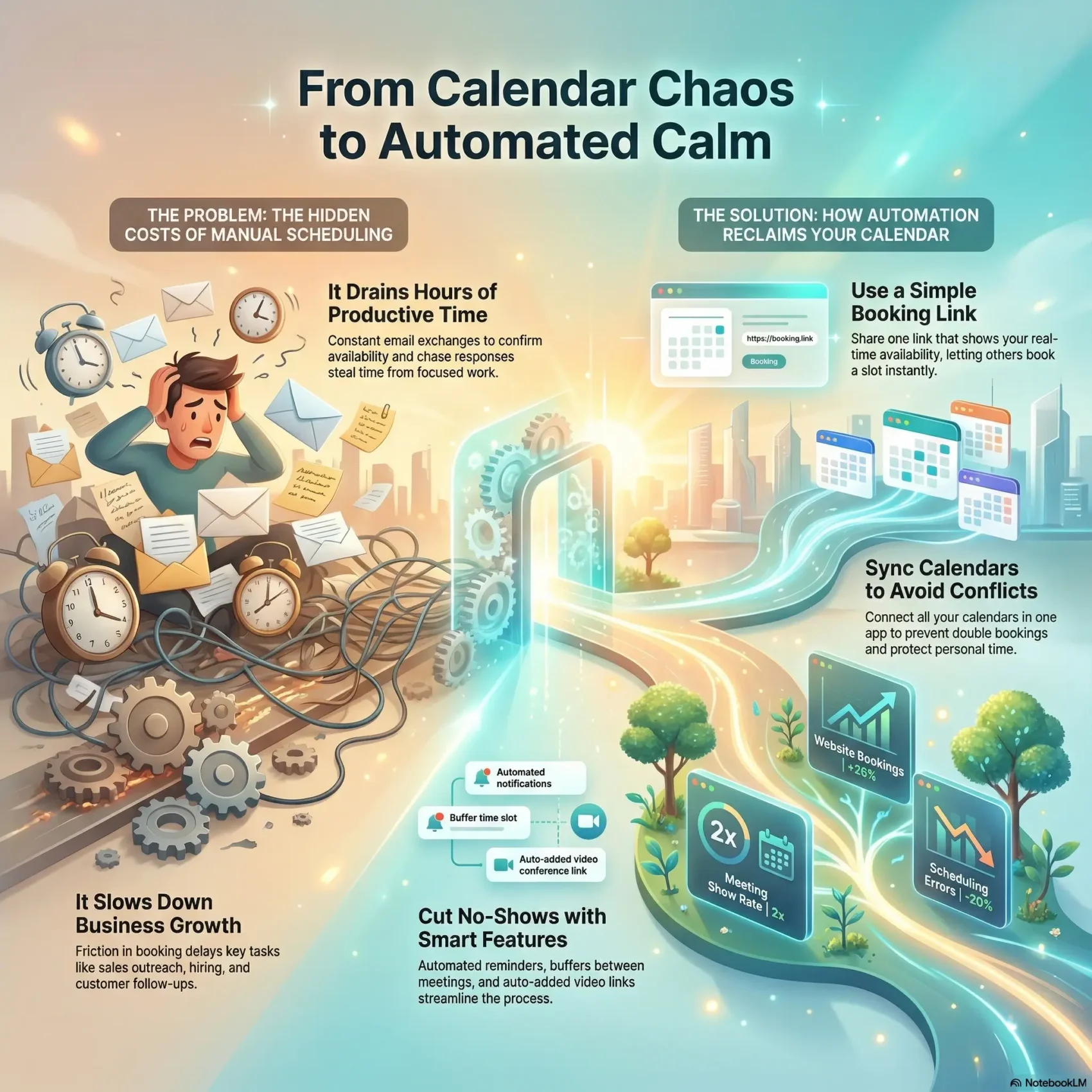
Last Updated on January 13, 2026
You need a simpler way to set meetings without the endless email volley. When you let smart tools handle bookings, you protect your calendar and get back hours every week.
Calendly syncs work and personal calendars in one app to stop double bookings. It can add video links or locations, set buffers between meetings, and push reminders by email or text so guests show up on time.
For teams, features like routing, round robin, and collective options route requests to the right person and collect payments when needed. That reduces admin tasks and helps your business scale with fewer errors and faster hires.
The result: fewer steps from outreach to confirmed time, a smoother experience for clients, and measurable gains—higher show rates and more bookings from your page.
Key Takeaways
- Use a booking link so clients can pick a slot and you stop trading emails.
- Sync calendars in one app to protect your availability and save time.
- Built-in buffers and reminders cut no-shows and streamline the process.
- Team routing and payments scale your process without extra admin work.
- Better booking tools lead to higher show rates and faster hiring.
Why automated scheduling matters right now
Small delays in booking add up fast, turning minutes into lost hours across your team.
You face constant demands to pick times, confirm availability, and chase responses. That friction steals focused work and slows key tasks like sales outreach, hiring, and customer follow-ups.
Modern tools change that by cutting manual steps and improving efficiency. A booking link on your page turns interest into a confirmed meeting in one click. Share it in email or chat and save a minute each time.
- Reclaim hours: routine coordination becomes a background task so employees can focus on higher-value work.
- Win customers faster: faster responses lift conversion and shorten sales cycles.
- Keep teams aligned: templates and rules reduce errors and standardize the schedule.
Real-world impact shows the point. Calendly reports a 26% increase in website bookings, a 160% jump in customers reached, a 2x meeting show rate, and a 20% drop in errors. Those numbers mean less manual work and more reliable availability across your business.
automated scheduling explained
Modern assistants interpret context and move tasks so you spend less time managing your calendar and more on actual work. These tools pair rules-based calendars with AI that reads your priorities and honors habits.
From smart calendars to AI-driven assistants
Smart calendars follow fixed rules. AI-driven assistants do more: they connect calendars, interpret preferences, and reorganize events when priorities shift.
Tools like Reclaim, Clockwise, Motion, and SkedPal protect focus blocks and slot tasks into real openings so you finish the work you plan.
Meetings vs. shift schedules: different problems, different tools
Think of the scheduling process as two lanes: meeting coordination and calendar management. Meeting tools handle invites, confirmations, and follow-ups.
Meanwhile, workforce apps optimize shifts, costs, and compliance for hourly teams. The right software depends on whether you book clients or staff.
What “no more back-and-forth” looks like in practice
Share a link once, let invitees pick a slot, and the system sends confirmations, reminders, and conferencing details. Clara and Kronologic reduce email threads and boost show rates.
“When technology handles the coordination, you get reliable time to do meaningful work.”
How to choose the right tool for your team and workflow
The best tool proves itself in the first five minutes: can you connect calendars and share a usable link? Pick options that let you ship a booking page fast, so your team sees value immediately.
Ease of setup, UI, and onboarding time
Look for an app with a clear interface and fast onboarding. Zapier-style simplicity matters: connect calendars and invite teammates in minutes.
Integrations that fit your stack
Confirm calendar, video, CRM, and payment integrations so confirmations carry the right links and data flows into your systems.
Rules, availability, and conflict handling
Choose a tool with granular rules: buffers, caps, working hours, and routing logic that honor your preferences and detect overlaps early.
Security, admin controls, and compliance
For teams, prioritize SSO, SCIM, roles, and audit logs. If you schedule employees, verify compliance features for hours and rest rules.
- Start small: shortlist two options and map them to your needs.
- Ask for details: request information about how the app makes rescheduling decisions.
Best automated scheduling tools for booking external meetings
The right tool makes booking fast and frictionless. Pick one that matches where your prospects start: web pages, email threads, chat apps, or outbound sales touches.
Calendly: routing, reminders, buffers, and payments
Calendly combines routing, email and SMS reminders, buffers, group polls, and Stripe/PayPal payments so clients confirm a time in seconds. A 14-day free trial helps you test advanced features quickly.
Clara: schedule by cc’ing an AI assistant
Clara works inside your inbox—cc the assistant and it proposes options, handles follow-ups, and finalizes the meeting without extra tasks from you.
Kronologic: automate booking and follow-ups for sales leads
Kronologic focuses on outbound pipeline motion. It chases leads, locks meetings, and reduces manual follow-up tasks. Pricing starts around $112/user/month, so weigh ROI for revenue teams.
Toki: schedule via messaging apps with voice and text
Toki lets people book through WhatsApp, Telegram, or Apple Messages and can call or send text reminders. It offers a free plan and paid tiers from $10/month—useful when your audience prefers chat.
- Tip: Add your booking link on every high-traffic page and signature so fewer clicks stand between interest and a confirmed meeting.
Top picks for teams and enterprise coordination
When your org needs predictable deep work and fair meeting load, pick tools that coordinate calendars and workloads across people. The right combo reduces meeting friction and protects blocks of focus.
Clockwise: orchestrate calendars to increase Focus Time
Clockwise moves flexible meetings to create 2+ hour Focus Time blocks and calculates Focus Time cost per attendee. It honors no-meeting days and working hours.
Integrations: Slack updates and analytics show hours saved and conflicts resolved.
Calendly for teams: round robin, collective scheduling, SSO/SCIM
Calendly for teams includes Round Robin, Collective, and Routing Forms to distribute meetings fairly. Enterprise SSO/SCIM keeps management secure at scale.
Motion: combine projects, tasks, and calendar with AI
Motion blends projects, tasks, and calendar into one app. AI schedules work, adds AI teammates, and documents SOPs so your people know what to do and when.
- Codify preferences and meeting windows so the software coordinates without micromanagement.
- Pair Calendly with Clockwise or Motion to cover external bookings and day-to-day workload planning.
- Evaluate features against fairness, cross-functional collaboration, and visibility into how time is used.
For more options on AI-enabled collaboration, see AI collaboration tools.
AI scheduling assistants to protect your time and habits
When meetings threaten your best hours, intelligent helpers step in to keep your routines intact and your day on track.
These apps defend recurring habits, adapt your plan, and explain changes so you trust the system. Pick tools that honor your preferences and work windows.
Reclaim: defend recurring habits and auto-reschedule conflicts
Reclaim protects blocks like workouts or learning time and flexes around urgent meetings. It supports Google and Outlook and can auto-reschedule recurring items. Plans start around $8/user/month.
SkedPal: natural language time-blocking and time budgets
SkedPal turns plain text tasks into timed blocks. Use natural language to set time budgets and let the tool remake your week. Pricing begins at $9.95/month.
Akiflow: unified task inbox with AI labels and calendar control
Akiflow pulls tasks from many apps, tags them with AI, and lets you command calendar moves. It’s for people who want fewer manual edits and more control; plans start near $34/month.
Structured: plan your day with voice across devices
Structured is built for quick capture and voice input. It’s lightweight, works across devices, and makes it easy to turn ideas into planned blocks.
- How to use them: pair a time defender like Reclaim or SkedPal with your meeting tool so deep work and external commitments coexist.
- Outcome: fewer interruptions, clearer priorities, and a better daily experience finishing the tasks that matter.
Automated employee scheduling for shift-based work
When you manage hourly teams, you need a tool that turns demand into reliable rosters quickly. Deputy uses projected units sold, staff counts, and availability to auto-fill shifts so you spend less time on repetitive tasks.
Deputy: auto-fill shifts using cost, availability, and demand
Deputy prioritizes lowest-cost staffing, equal hour spread, and past preferences to create fair schedules. Setup begins with demand inputs and the app fills the week with the most cost‑effective allocation.
Compliance safeguards: rest rules and maximum hours
Built-in rules enforce minimum rest between shifts and max weekly hours. That helps reduce legal risk and keeps your employees within safe limits.
Mobile scheduling, leave management, and shift swapping
- Managers build and edit schedules on mobile and notify staff instantly.
- Employees swap shifts and request leave from the app, avoiding coverage gaps.
- Time tracking feeds accurate timesheets to payroll and trims admin overhead.
“By combining availability, rules, and preferences, Deputy cuts manual work and raises efficiency on the floor.”
Tip: pair shift software with your meeting tool so client bookings and staff schedules stay in sync.
Features and integrations that actually save you time
The right mix of features and integrations turns clicks into confirmed meetings without extra work. You get fewer manual steps and faster results when forms, payments, and reminders work together.
Routing forms, screening, and payment collection
Use Routing Forms to qualify visitors and send them to the right expert. That cuts triage time and routes decision-makers to the right teammate.
Collect payments at booking with Stripe or PayPal so clients commit before the call. Paid bookings reduce no-shows and simplify ops for employees.
Automated email and text reminders to reduce no-shows
Set friendly email and text nudges to keep everyone on track. Reminders include meeting details and links so invitees have everything they need.
Video conferencing links added automatically
Connect Zoom or Google Meet and the correct conferencing link appears in every invite. This small feature removes a frequent source of confusion and saves time for hosts and guests.
Browser extensions and mobile apps for on-the-go scheduling
Use the browser extension and mobile app to share availability from any page or chat. Drop times into messaging threads without leaving the conversation.
- Make rules that reflect real availability and buffers so bookings don’t encroach on deep work.
- Tie tasks and follow-up workflows to meetings so outcomes convert into action with less admin.
- Place your booking link on high-traffic pages—pricing, contact forms, and post-demo screens—to turn interest into confirmed time.
“When payments, forms, reminders, and links align, you gain back the most precious resource: time.”
Pricing, plans, and free trials to consider
Pricing can change how quickly a new tool pays for itself, so pick plans that match the outcomes you need. Start with a short trial to verify core workflows—routing, reminders, and payments—before you commit your account and budget.
Compare free-forever tiers with entry-level paid plans. Free plans often cover basic bookings, but features like Round Robin, Collective, and payments usually sit behind paid tiers. Calendly offers a 14-day free trial and adds team routing and enterprise controls at higher levels.
Model per-user pricing for growth. Reclaim starts near $8/user/month, Clockwise at $6.75/user/month, Motion from $29/month, SkedPal $9.95/month, and Akiflow around $34/month. Toki has a free plan and paid options from $10/month; Kronologic begins near $112/user/month for revenue teams.
- Test first: use trials to confirm which features you actually need.
- Calculate ROI: weigh per-user fees against hours saved and fewer no-shows.
- Watch limits: check meeting seats, integrations, and overage rules before scaling.
For teams and enterprise buyers, request security docs, admin controls, and a roadmap. Keep pricing notes on a single page so your team can compare options and pick the best fit for your business.
Implementation playbook: go from signup to productivity fast
The fastest rollouts focus on three things: clear availability, simple rules, and the right integrations so your team can book without friction.
Set availability, buffers, and meeting rules on day one. Define working windows, meeting lengths, and buffers so every new booking fits your schedule. Add limits for daily meetings and per-invitee caps to protect prep time and follow-up tasks.
Connect calendars, messaging, CRM, and payments
Sync your calendar and enable conferencing details so invites include links automatically. Link your CRM, messaging tools, and Stripe/PayPal for payments so confirmations carry the right context in one click.
Share your scheduling link and standardize across the team
Install the browser extension and mobile app to drop times into email or chat with a single click. Create shared templates and a one‑minute checklist so every account uses the same core setup.
- Turn on reminders to save time chasing confirmations.
- Assign an owner to review analytics weekly and tune availability and workflows as meeting volume grows.
- Use Routing Forms to qualify requests and route them to the right teammate.
Conclusion
The right booking flow turns chaos into clear blocks you can count on. Use automated scheduling to save time and bring order to your day. Pick a tool that matches how you work and your team’s needs.
Start small: add a booking link to a key page, set rules that protect deep work, and let people pick a slot without back-and-forth. You’ll see faster bookings, fewer no-shows, and measurable efficiency gains.
For shift-based teams, prioritize compliance and rest rules so employees stay protected while coverage stays solid. Keep reviewing data and tune settings as your business grows.
Adopt the apps that fit your use case now, and you’ll reclaim hours so your team can focus on higher-value tasks and better client experience.