Tools
Tools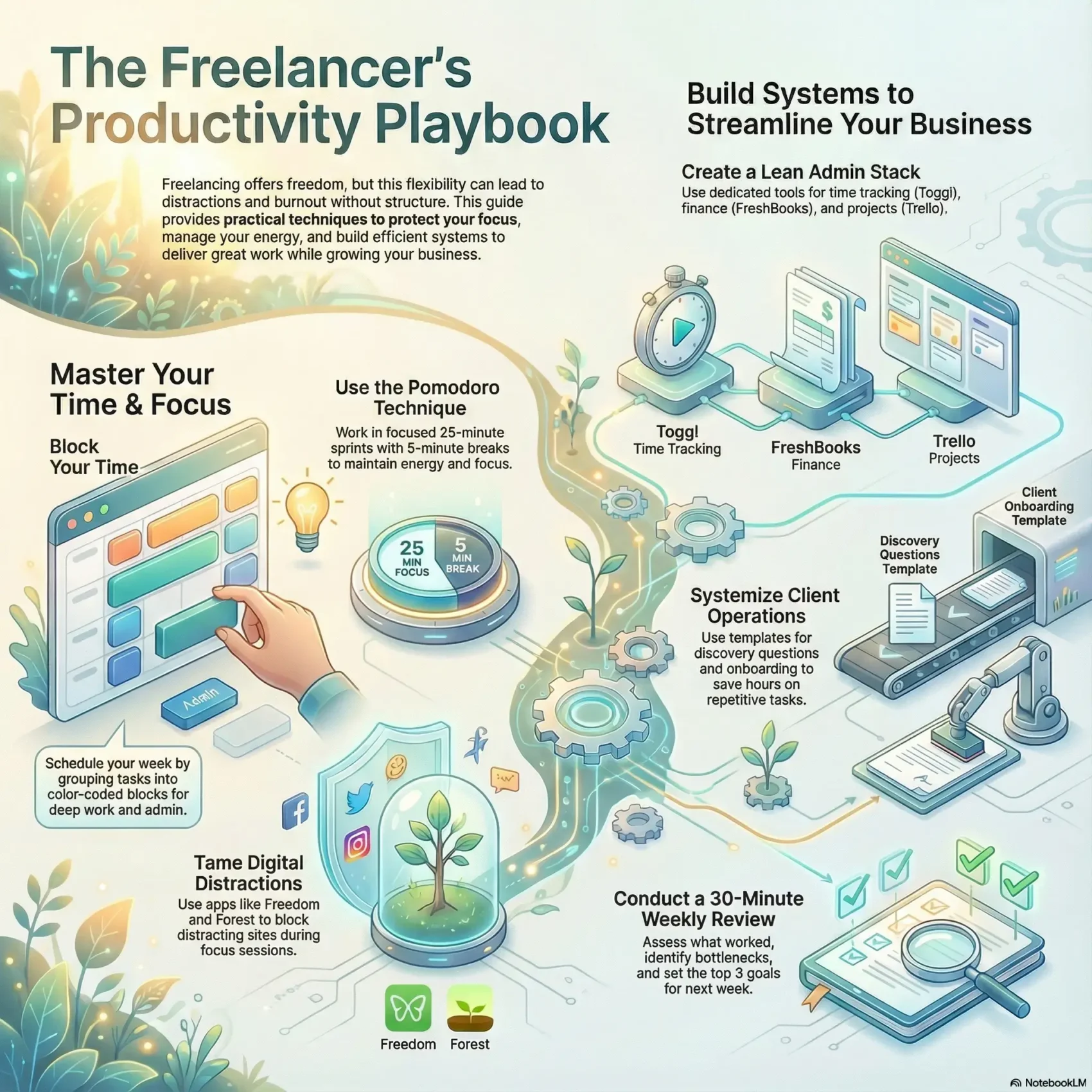
Last Updated on January 5, 2026
Your freedom to choose when and where you work is a real win. But without some structure, that freedom can turn into late-night scrambles and missed goals.
Focus matters more than time alone. Match your high-energy times to the hardest tasks and protect those hours with a simple schedule. Time blocking, Pomodoro bursts, and short buffers keep your day steady.
Home distractions—family, chores, deliveries—pull at your attention. Use tools like Freedom, Forest, and Brain.fm to turn your computer and mind into allies. These solutions help stop procrastination and cut context switching.
The goal is clear: deliver great work for clients while building your business without burning out. You’ll learn small, practical tips to plan the week, set work windows, and pair deep work with lighter admin so you make time count.
Key Takeaways
- Protect prime focus times for demanding tasks and align them with your goals.
- Use time blocking and Pomodoro sessions to limit context switching.
- Employ tools like Freedom, Forest, and Brain.fm to reduce home distractions.
- Plan your week with short priority lists and realistic buffers.
- Balance client work and business-building in the same schedule to keep career momentum.
Why freelancer productivity matters right now
You enjoy real freedom and flexibility, but that freedom brings a clear tradeoff: keeping your focus when home life pulls at your attention.
Without named work hours, it’s easy to check email late or push tasks until the last minute. Family noise, chores, and ambient distractions can turn a day into a scramble.
The freedom-focus tradeoff you face today
Simple discipline—planning when you’ll work and sticking to it—solves much of this. You can align high-energy times to complex projects and save low-energy moments for admin.
- You get unmatched flexibility, but you need boundaries so the day doesn’t expand into nonstop effort.
- Named work windows reduce after-hours checks and push back against procrastination.
- The pomodoro technique (25 minutes on, 5 minutes off; take a longer break of 15-30 minutes after four sessions) creates a reliable container for attention.
- Short, repeated sprints let you return to each task fresher and keep momentum across busy times.
Plan your week with time blocking to balance client work and administrative tasks
Start your week by carving clear blocks of work so nothing important gets shoved to the back burner. Use a simple digital calendar to map categories and protect peak energy hours for deep work.
Map your categories
Group your tasks into client projects, administrative tasks, marketing, finance, and learning. This lets you see where your week needs the most hours and where smaller items can fit.
Color-code and add realistic buffers
Build a color-coded schedule and add short buffers between blocks. Buffers absorb overruns and stop one late meeting from wrecking the rest of the day.
Daily Power Hour and focused sprints
Reserve a Power Hour each day to blitz 10-minute items like emails, invoices, and quick client check-ins. Use the pomodoro technique inside longer blocks—pick the number of minutes to match task depth so you get things done.
- Anchor big client milestones first, then layer smaller work around them.
- Place deep work in peak energy windows and park admin for low-energy slots.
- Keep one shared calendar view so commitments don’t conflict.
Use the Pomodoro technique to get things done without burnout
Small, timed work blocks make starting easier and protect attention from slipping away. The pomodoro technique is a simple rhythm: focused push, then a short reset.
25 minutes on, 5 minutes off; take a longer break of 15-30 minutes after four sessions
Set a timer for 25 minutes and give one task your full attention. Then recharge with a 5-minute break to keep your focus fresh.
After four sessions, take a longer break of 15–30 minutes to prevent mental fatigue. This pattern makes starting less painful and helps you avoid creeping burnout.
Match sessions to energy: deep work vs. shallow tasks
Chain two or three sessions back-to-back for deep work. Use single 25-minute sprints for quick items and small tasks.
- Start small: commit to one 25-minute push to beat procrastination.
- Track sessions: note how many minutes each deliverable needs to estimate future time.
- Use a parking lot: capture ideas so your session keeps flowing.
- Pair breaks with movement: stretch, drink water, and reset your energy.
- Silence notifications: return messages only between sessions to protect flow.
End your day with a brief note on what worked. That makes the next session start faster and keeps your focus steady across the day.
Prioritize what moves your career forward
Before you dive in, sort your work by impact so your time goes to what matters. Use a quick urgency-importance lens to triage your list and free blocks for real progress.
Apply an urgency-importance lens to your task list
Start by labeling each item: urgent and important, important but not urgent, urgent but not important, or neither. Do urgent-and-important items now, and schedule important-but-not-urgent items on your calendar.
- Clarify impact: this shows which tasks truly move your career and which only keep you busy.
- Protect focus: guard one to two high-importance items per day so big goals keep advancing even in a busy client week.
- Delegate or minimize: push urgent-but-not-important work to others when possible.
- Drop low-value work: free up time to reinvest in client quality or long-term growth.
- Make a simple plan: link weekly goals to daily actions and use a brief weekly review to realign and recalibrate estimates.
Tip: start your day with the highest-impact task before checking anything reactive. That habit boosts momentum and raises your overall productivity.
Set work hours and boundaries that protect your focus and flexibility
A firm start-stop routine protects your evenings and sharpens daytime focus. Pick clear work hours and treat them like meetings with yourself. That simple structure preserves your freedom while keeping your day reliable.
Create a start-stop routine, not late-night phone or email checks
Define when you start and when you stop. Use Do Not Disturb and mute notifications outside those windows to avoid late-night phone and email checks.
End each day with a short closing ritual: note top priorities for tomorrow, shut down your workspace, and log off devices. This reinforces discipline and helps you rest.
Use Calendly to control availability and reduce back-and-forth
Publish your live availability with Calendly. It can sync with Zoom, add meeting links, and enforce minimum notice. A common plan runs about $96/year and supports buffer rules for longer sessions.
- Set buffers before and after meetings so one call won’t eat into deep work.
- Tell clients your response windows so expectations and boundaries stay clear.
- Establish household rules to limit family interruptions during core time.
Make your calendar work for you so you control your time instead of reacting all day. Consistent hours reduce stress, improve sleep, and boost daytime performance.
Design a distraction-light workspace that supports your mind
A tidy, well-lit desk quietly steers your attention toward work instead of away from it.
Start by tuning ergonomics: chair height, keyboard angle, and monitor level. When your body sits right, your mind can settle into longer, deeper sessions.
Adjust lighting, air, and temperature so you stay alert. Cooler air and indirect light reduce eye strain and maintain steady energy across the day.
Sound strategy and simple layout
Excessive noise hurts cognition. Try headphones, a closed door, or a visible signal to the family when you’re in a focus block.
- Test ambient music or Brain.fm to mask interruptions and sustain attention.
- Declutter the area around your computer to limit micro-distractions and clear visual cues.
- Consider a second monitor so source material and your work stay side by side, cutting app switching and saving time.
Keep tools you use every day within reach and tuck non-essentials out of sight. Add a small standing spot or movement zone to refresh between blocks without losing flow.
“A clean desk and calm soundscape let you spend less time refocusing and more time finishing tasks.”
An example minimal setup
One monitor for output, a second for research, an ergonomic chair, warm LED light, fresh air, and headphones. End each day with a five-minute reset: clear the desk and note tomorrow’s top tasks. That small ritual makes your next time at the desk start faster and stay focused.
Optimize energy, breaks, and sleep to sustain focus throughout the day
Notice when you have the most mental clarity and schedule big work there. Small shifts in how you use your time can make a big difference for focus and results.
Align tasks to peak times; move admin to low-energy hours
Map your energy curve. Slot deep tasks into peak windows and push admin to slower periods. That keeps your best hours for high-impact work and clears easier items for the afternoon.
Micro-breaks, movement, and sleep
Take short, device-free breaks to reset attention and avoid the afternoon slump. Stand, stretch, or walk for a few minutes between blocks.
- You’ll map your natural curve and book deep sessions in prime time.
- You’ll use short, device-free breaks to reset and protect focus.
- You’ll move between blocks—stretching or quick walks—to refresh the brain.
- You’ll protect at least 7 hours of sleep so your mind clears toxins and restores clarity.
- You’ll track minutes per task for a few days to fine-tune when to schedule demanding work.
Tip: set one clear daily goal that ties to a weekly objective. Small discipline rituals—wind-down cues and consistent lights-out—make steady gains in focus and overall productivity.
Minimize digital distractions and notifications to stay on task
Small interruptions add up fast and hollow out your best work minutes. You can reclaim that time with a few simple rules and the right apps.
Blockers and focus apps
Set Freedom to block distracting sites and apps across devices during focus blocks. Try Forest to gamify attention—your virtual tree grows while you work and dies if you switch apps.
Device discipline for reliable focus
Place your phone out of reach and enable Do Not Disturb so pings don’t pull you away. Confine email to two or three windows each day and batch replies to protect deep work.
“Turn off non-essential notifications and keep only critical alerts. The fewer pings, the more uninterrupted minutes you get.”
- Block sites before high-stakes sessions and keep a short distraction trap list.
- Pair a Pomodoro technique sprint with Brain.fm audio to anchor attention.
- Cap meeting minutes and protect buffer time after calls so tasks don’t spill over.
- End each day by clearing apps and closing tabs so tomorrow starts distraction-light.
Use these tips to keep your attention on the right task long enough to get things done without constant willpower fights.
Build your freelancer admin stack to streamline time, money, and projects
A compact admin stack saves you hours each week and keeps invoicing, tracking, and deadlines tidy. Pick a few reliable tools and make them work together so admin doesn’t derail your schedule.
Time tracking with Toggl
Use Toggl to log hours by client and by category—marketing, training/CPD, new business, finance, and admin. That data helps you quote better, refine proposals, and spot over-servicing.
Finance platforms
Choose one finance app—FreshBooks, QuickBooks, or Xero—to centralize invoices and bills. Automate reminders and reconcile regularly so money tasks run in the background.
Project and task tools
Manage deliverables with Todoist, Trello, Asana, or Monday.com. Keep due dates visible on your schedule and set recurring tasks for billing, reconciliations, and backups.
- Weekly habit: review hours by category to balance administrative tasks with revenue work.
- Keep a short tool list so you spend the day doing work, not wrangling apps.
- Example workflow: track a project in Toggl, move cards in Trello, then send the invoice in FreshBooks on delivery.
- Quarterly audit: trim unused apps and connect calendars so deadlines live in one view.
“Standardize names and keep files tidy so a busy day doesn’t mean lost work.”
Systemize client operations to save hours each week
Clear client systems save you hours and stop onboarding from draining your week. Start with a short intake plan that you can reuse so each new engagement starts smoothly.
Standardize discovery questions and material requests
Create a compact discovery question set you tailor per client. Keep it to essentials: goals, audience, assets, and deadlines.
Pair that with a materials request list so clients send what you need up front. That cuts back-and-forth and lets you begin real work faster.
Differentiate discovery calls vs. paid Power Hours
Offer a short free discovery call for fit and scope, then route deep strategy to a paid Power Hour. This protects your time and shows the value of focused sessions.
Maintain a client experience log and case study list
Log every engagement in a simple spreadsheet: outcomes, testimonials, and project type. Keep a running case study list you can pull into proposals.
- You’ll template discovery, SOWs, and recap notes so repetitive tasks take minutes, not hours.
- Define handoffs, checkpoints, and approvals to keep timelines clear and reduce review loops.
- Use light tools—forms, calendar links, and a task board—to keep process consistent without overhead.
- Collect FAQs and reuse answers so you respond fast and keep momentum.
Monitor cycle time from inquiry to kickoff and trim bottlenecks. Over time you’ll save many hours each week and get things done with less friction.
Freelancer productivity: reflect, adapt, and iterate each week
Close the week with a short check-in that keeps your system honest and useful. A brief review shows whether your plan matched reality and where your time drifted.
Weekly reflection helps you keep focus and tune the coming days. Use a 30-minute slot to capture what worked, what stalled, and what to test next.
Weekly review: what worked, what to adjust next week
Set a 30-minute review to assess progress on your goals. Check where your time actually went versus the schedule you made.
- You’ll list two to three wins to reinforce good habits and stay motivated.
- You’ll identify one bottleneck and one distraction pattern, then design a small fix to test next week.
- You’ll recalibrate estimates for work that overran and block more realistic times going forward.
- You’ll confirm the top three goals for the coming week and translate them into calendar blocks.
- You’ll capture lessons learned in a brief journal so your mind can let go and start Monday fresh.
Use these practical tips to keep your system light and adaptive. Share a short summary with a peer or accountability partner so you stay consistent.
“A weekly check-in turns scattered habits into a steady plan and keeps your time aligned with real priorities.”
Conclusion
Wrap your week with a short ritual that turns scattered tasks into steady progress.
Use small habits—time blocking, Pomodoro sprints, and blockers—to match deep work with peak energy and protect your freedom. These simple tips help you get things done without slipping into late nights or burnout.
Reduce noise with sound strategies, clear communication windows, and an admin stack that runs billing and tracking in the background. For practical time management advice, see these time management tips.
Close the week with a quick review, note one tweak, and start Monday with a clear plan. Do that and you’ll keep your focus, honor your boundaries, and make steady progress on the work that matters.