Tools
Tools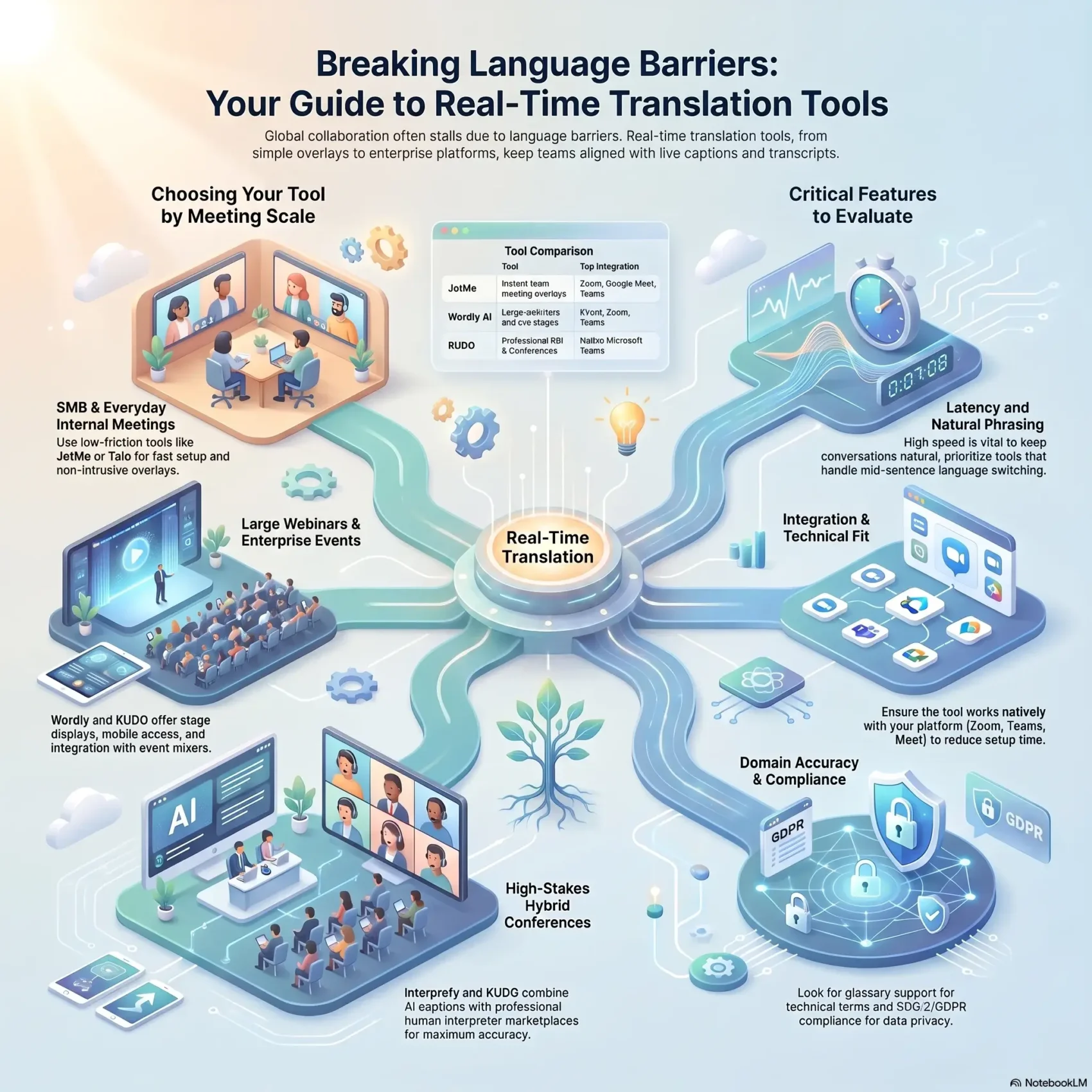
You run meetings across time zones and languages. When everyone needs to follow the same thread, caption overlays and live captions make your calls work better. After testing 20+ AI options across Zoom, Google Meet, Slack and Microsoft Teams, one platform stood out for speed and accuracy.
The right solution keeps your workflow intact. JotMe proved strong for accuracy, wide language coverage, and smooth captions without adding a bot. Event-grade options like Wordly, Interprefy, and KUDO serve large gatherings and offer integrations for Teams and embeddable widgets.
You’ll get a clear view of what fits your weekly meetings, how free tiers compare to paid plans, and where a lightweight overlay beats a full event platform. This intro sets expectations so your sales team and project leads can pilot quickly and prove value.
Key Takeaways
- Live caption overlays help distributed teams communicate in meetings without switching apps.
- JotMe scored well for live accuracy and broad language support.
- Event platforms (Wordly, Interprefy, KUDO) suit large productions and complex pricing.
- Choose free vs paid plans based on pilot scope and user count.
- Integrations for Zoom, Google Meet, and Microsoft Teams reduce setup time.
Why you’re here: choosing real-time translation tools for seamless global communication
You want meetings that don’t stall because someone needs a different language. You’re comparing options to remove language friction in everyday calls, not just large events. That means prioritizing speed, natural phrasing, and easy setup for your teams.
Know what to test first:
- Can you sign up and try the service without a sales call? JotMe lists free and paid plans openly so you can trial immediately.
- Does the option handle tone and context so translations feel natural, not robotic?
- Will captions, transcripts, and stored notes be available for follow-up?
- For occasional large gatherings, does the provider support stage captions or mobile access? Wordly integrates with Cvent and works with event mixers.
Focus on adoption: choose a translation tool that overlays inside your meeting app with minimal clicks and clear documentation. If pricing is opaque, flag that vendor and prioritize transparent plans so you can pilot without surprises.
For a quick checklist and related collaboration picks, see our guide on AI collaboration tools.
How we evaluate live translation for meetings, webinars, and events
Start with simple, repeatable scenarios to spot gaps in latency, accuracy, and platform fit. You’ll run the same script across Zoom, Google Meet, Microsoft Teams, and Webex to see how each platform handles captions, bots, and overlays.
Latency and language switching matter most. Test how quickly a system switches mid-sentence (English to Chinese, for example). In our trials, JotMe adapted nearly instantly and started translating without adding a bot.
Platform fit and integrations
Check integrations with event platforms like Cvent, Hopin, and ON24. Wordly works with Cvent and can pipe captions to mixers for on-stage displays. KUDO integrates natively with Microsoft Teams and offers widgets for Zoom, Hopin, and ON24.
Pricing, scalability, and event support
Inspect pricing transparency—can you trial without contacting a sales team? Wordly AI and Interprefy often require quote-based pricing, which affects pilot speed.
“Score each provider on attendee limits, simultaneous languages, and support readiness for hybrid or in-person interpretation.”
- Evaluate accuracy by checking tone, domain terms, and translation captioning quality for post-event records.
- Validate audio handling under noisy conditions and fast speakers to avoid surprises in executive meetings.
- Confirm security, permissions, and documentation so IT and your sales team can approve deployments.
The best real-time translation tools right now: a product roundup
This product roundup highlights the fastest, most reliable options for speech translation in meetings and events. Pick a platform by scale: weekly team calls, large webinars, or conference-grade interpretation.
JotMe — Most reliable in our tests. Launch instant overlays in Zoom, Google Meet, Microsoft Teams, and Webex without inviting a bot. You get live translation plus searchable, speaker-labeled transcripts. Free tier available; Pro from $9/month.
Wordly AI
Designed for large webinars and live events. Wordly offers live translation, captions, and transcripts with Cvent, Zoom, and Teams integrations. Stage captioning via AV mixer and attendee mobile access make it a strong choice for enterprise events. Pricing is quote-based.
Interprefy
Blends remote simultaneous interpretation with AI speech translation and captions. It supports web, mobile, and API routes and works well for complex multilingual events that need human interpreters alongside AI.
Maestra AI
Creator-focused: transcription, subtitles, dubbing, and voice cloning. Real-time tiers add captions and limited translation minutes. Good for training content, recorded assets, and creator workflows.
- KUDO — Dual modality: book professional interpreters or use AI speech translation in 200+ languages. Native Microsoft Teams integration and embeddable widgets suit high-stakes conferences.
- Talo — One AI bot translates every speaker across Zoom, Google Meet, and Teams. Simple setup for cross-border sales and onboarding.
- DeepL Voice — Natural-sounding voice translation for Microsoft Teams and mobile, useful when you need smooth audio on the go.
“Choose by audience size: JotMe or Talo for SMB meetings; Wordly or KUDO for stage and event scale; Interprefy or KUDO when you need interpreter-led sessions.”
Quick buyer tip: Compare language coverage, integration depth, minute pools versus quote pricing, and how each platform stores transcripts so your compliance and sales team can approve pilots fast.
Match the tool to your use case: meetings, webinars, conferences, and training
Match platform capabilities to the scale and purpose of each meeting you host. Pick the right live translation approach so users get clear captions, searchable notes, and minimal setup friction.
Internal meetings and sales calls:
- Choose fast setup and low intrusion. JotMe and Talo offer overlays in Zoom, Google Meet, and Microsoft Teams so your teams can keep the flow.
- Look for searchable transcripts that feed CRM fields and accelerate follow-up.
Webinars and conferences:
- Prioritize attendee-scale captions, mobile access, and stage outputs. Wordly works with Cvent and can pipe live transcripts to stage screens and mobile devices.
- Ensure translation captioning keeps accuracy for domain terms and speaker labels.
Hybrid and in-person events:
- Book RSI and human interpreters for keynote accuracy. Interprefy and KUDO combine interpreters with AI captions and marketplace booking.
- Confirm AV integration, mixer outputs, and QR flows so onsite audio and captions stay synchronized.
“For executive town halls, pair professional interpreters with AI captions for broad accessibility.”
Key features that move the needle for your team
Pick features that actually change how your teams communicate across languages. The right mix shortens meetings, improves follow-up, and keeps stakeholders aligned.
AI speech translation, captions, and multilingual summaries
AI speech translation must keep pace with fast speakers and preserve tone so nuance survives in cross-border discussions.
Readable captions — with proper punctuation and speaker labels — improve accessibility and reduce misunderstandings in meetings and events.
Multilingual summaries that turn long calls into action items save time and make content shareable across teams.
Interpreter marketplaces, glossary controls, and domain accuracy
For high-stakes sessions you’ll want access to interpreters via marketplaces while using AI for everyday scale. KUDO combines both and supports 200+ languages.
Glossary or word-priority features matter. KUDO’s Word Priority and Wordly’s 3,000-phrase glossary let you enforce product names and acronyms for better accuracy.
- You’ll check how each option supports languages and dialects, and whether it integrates with Microsoft Teams and Zoom.
- Searchable, speaker-labeled transcripts help product, legal, and training teams extract content confidently.
- Admin controls for privacy, retention, and export are non-negotiable for compliance.
- Responsive support and clear documentation speed adoption and reduce IT overhead.
“Choose features that protect nuance, enforce brand terms, and make meeting content immediately useful.”
Implementation playbook: getting from pilot to reliable multilingual communication
Kick off a pilot on one meeting type to prove latency, accuracy, and user flow. Start small so you can measure real-time captions and transcript quality without disrupting schedules.
Integration and setup: extensions, widgets, and API workflows
Choose a low-friction entry point. Use JotMe’s Chrome extension for quick overlays or a native integration like KUDO for Microsoft Teams. Test Wordly for mobile attendee reads and Interprefy when you need an API or web SDK for custom RSI.
Operational tips: language selection, attendee access, and handoffs
- Map meeting types (standups, sales calls, training) to default languages and allow mid-call switching.
- For webinars and events, define access: QR codes, embeds, or widgets and confirm stage captioning from AV mixers.
- Plan interpreter routing and backups; if you book interpreters, rehearse audio handoffs and monitoring.
- Standardize glossaries and set retention/export rules for recordings and multilingual summaries.
“Assign a producer to monitor captions, language channels, and vendor escalation so live sessions stay smooth.”
Conclusion
Wrap up with a clear pilot plan that fits your day-to-day workflow.
Start small: shortlist two vendors and run a two-week pilot to judge latency, captions, and how each option handles language switching. For speed and simplicity, test JotMe or Talo first. For larger webinars and live events, try Wordly AI or KUDO.
If interpreter-led sessions matter, pick Interprefy or KUDO’s marketplace. For recording and dubbing, Maestra AI helps you repurpose content. If your org is Microsoft-first, consider DeepL Voice or KUDO for native Microsoft Teams integration.
Standardize glossaries, capture transcripts, and publish multilingual summaries to turn every session into reusable knowledge. When you’re ready, see related picks in our AI collaboration tools guide and choose the live translation path that makes ideal sense for your business.