GetResponse bundles email, automation, landing pages, funnels, webinars and a course builder into one subscription. The question this review answers is narrower than “is it good”: which of the four plans actually contains the feature you came for, and what it costs once your list grows.
In plain terms: you will see what the free plan covers, what the 30-day premium trial unlocks, how the price ladder climbs with contact count, and which capabilities sit two tiers above where most people expect them.
All prices below are list prices from getresponse.com/pricing as of August 2026, quoted at the 1,000-contact tier unless stated otherwise.
Key Takeaways
- Four paid tiers: Starter $19, Marketer $59, Creator $69 per month, plus a custom-priced Enterprise plan.
- Starter includes only one automation workflow. Unlimited workflows start on Marketer.
- Webinars moved to Creator in the 2026 line-up; older reviews that place them on Marketer are out of date.
- The free plan is capped at 500 contacts and 2,500 emails per month, with no integrations and GetResponse branding.
- Annual billing saves roughly 18%, but annual plans are non-refundable.
Why this GetResponse review matters right now
Consolidation is the whole pitch. Instead of paying separately for an email tool, a page builder, a webinar platform and a course host, you run them from one login. You also pay one bill, and that bill scales with your contact list rather than with the number of tools.
That pitch only pays off if the bundled versions are good enough to replace the specialists. Some are: landing pages, automation and funnels hold up well. Others are adequate rather than best in class, notably signup forms and reporting depth. Where a bundled module falls short, a specialist still wins on features. A dedicated landing page builder or a standalone A/B testing platform will beat the bundled version, at the cost of another subscription.
Two practical perks survive from earlier versions. Time Travel sending delivers each message at the recipient’s local time, so a 9am newsletter arrives at 9am in Berlin and 9am in Chicago. Paid plans also include 24/7 live chat and email support.
“Consolidation only saves money if the bundled modules are good enough to cancel the specialists.”
- Ship landing pages and automations in days rather than weeks.
- Test premium tiers for 30 days, then drop to the free plan if the fit is wrong.
- Budget for the tier that holds your must-have feature, not the advertised entry price.
Who GetResponse is best for, and when to look elsewhere
Three groups get clear value: creators selling courses or paid newsletters, ecommerce brands whose emails react to what shoppers do, and small inbound teams that need pages, forms and email in one place.
If you sell knowledge products, the Creator tier’s course builder, premium newsletters and webinars can replace a separate course platform. Compare it against Kajabi and Teachable or LearnWorlds before you commit, because those go deeper on curriculum and student experience.
For ecommerce, native Shopify and WooCommerce syncs power abandoned cart flows, the emails that follow up when someone leaves items in a basket without paying. They also power segments built from purchase history. That is genuinely useful, but the comparison set is Mailchimp and Klaviyo, and Klaviyo still leads on ecommerce depth.
Look elsewhere if you only send plain newsletters, because cheaper senders do that job for less. Look elsewhere too if you need a real CRM with pipelines and deal stages, where ActiveCampaign or HubSpot fit better. Agencies managing many client accounts should price GoHighLevel alongside it, and newsletter-first publishers should look at Beehiiv.
- You run an online store and want funnels plus segments based on what people bought.
- You sell courses or memberships and want monetization inside the same tool.
- You are building an inbound engine with landing pages, chat and ads.
- You want the cheapest possible sender. This is not it.
GetResponse pricing and plans explained
The advertised price is the floor, not the invoice. Two things move it: how many contacts you store, and which tier holds the feature you actually need.
What the four plans cost in 2026
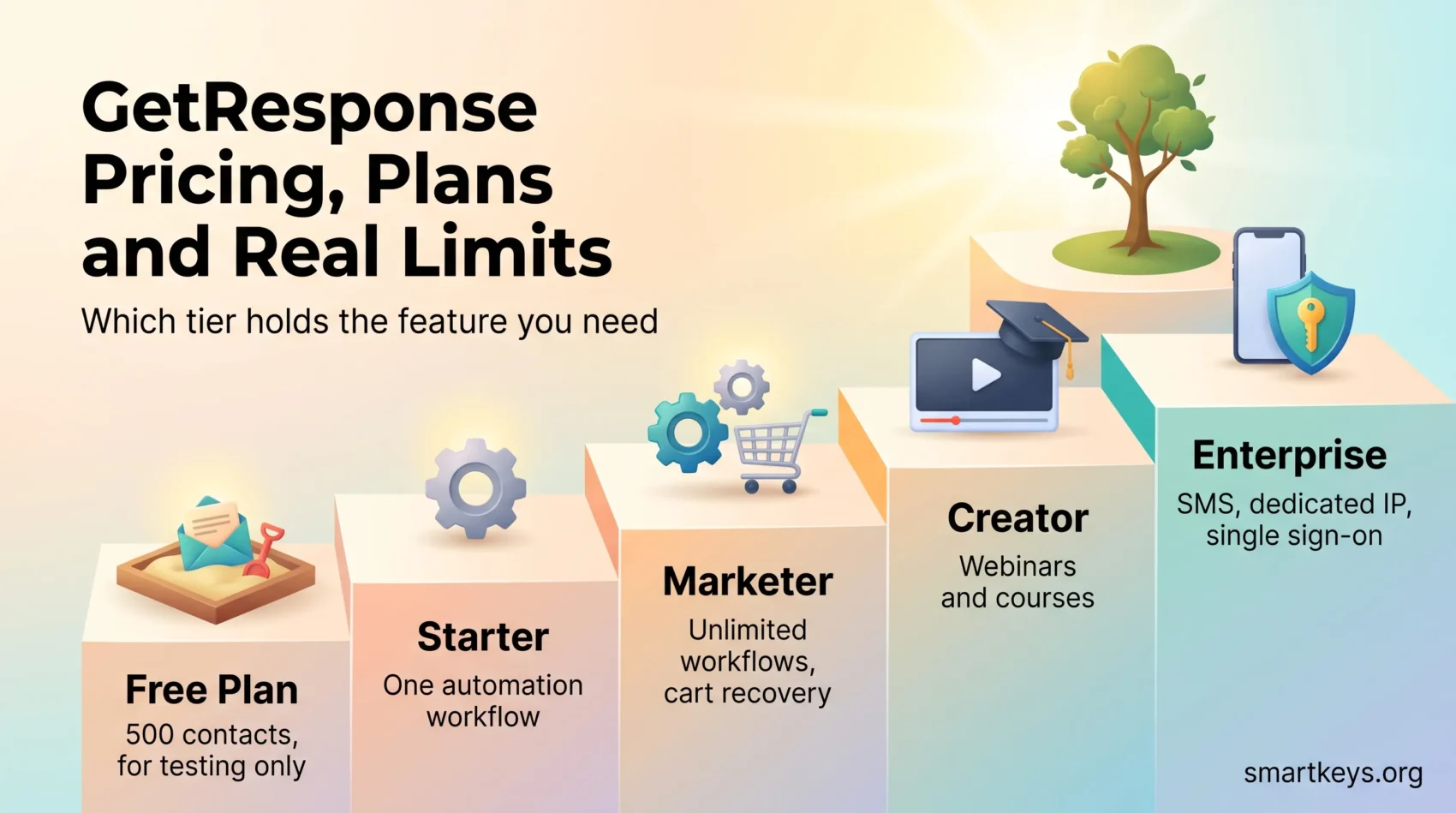
- Starter, $19/mo ($15.58/mo billed annually): unlimited emails, autoresponders, landing pages, forms and popups, plus AI content generation. One automation workflow only.
- Marketer, $59/mo ($48.38/mo annually): unlimited automation workflows, advanced segmentation, abandoned cart recovery, sales funnels, promo codes, revenue reports, web push.
- Creator, $69/mo ($56.58/mo annually): everything in Marketer plus webinars, the website builder, the course creator (up to 500 students) and premium newsletter subscriptions.
- Enterprise, custom pricing (the plan formerly marketed as MAX): unlimited users, SMS marketing, mobile push, a dedicated sending IP address, single sign-on, phone and Slack support, strategic consulting.
The single most misread line is the Starter workflow cap. A workflow is one automated sequence with its own trigger and steps. One of them covers a welcome series and nothing else: no separate win-back flow, no post-purchase sequence. If your plan involves more than one automation, budget for Marketer from day one.
Free plan limits versus paid plans
The permanently free account allows 500 contacts and 2,500 emails per month. You get one landing page capped at 1,000 unique visitors, one website with 5 GB bandwidth, one popup, and signup forms. Integrations are not available on the free plan and GetResponse branding cannot be removed. Treat it as a sandbox rather than a starting point for a real business.
New accounts get 30 days of premium features before dropping to those free limits. That is enough time to build a real workflow and see whether the automation editor suits you. If a generous free tier is the main draw, it is worth understanding how freemium tiers are designed to convert before you build a list on one.
How the price ladder climbs with contacts
Prices rise in steps as your list grows, and the jump is steepest between 10,000 and 25,000 contacts. Independent tracking by EmailToolTester puts the Starter ladder at roughly $19 (1,000 contacts), $29 (2,500), $54 (5,000), $79 (10,000), $174 (25,000), $299 (50,000) and $539 (100,000) per month, with Creator running to about $690 at the top of that range.
- Exceeding your contact limit moves you to the next tier automatically. There is no soft cap.
- Unsubscribed and inactive contacts still occupy slots until you delete them. Clean the list before renewal, not after.
- Annual prepayment saves about 18%, but GetResponse does not refund annual plans. Use the 30-day trial to decide, not the first invoice.
Test premium features for 30 days free“Price the tier that holds your must-have feature, then price the contact band you’ll reach in twelve months.”
Setup, onboarding, and ease of use
Account setup is quick. You confirm your email, answer a short wizard about what you plan to send, and land on a dashboard that separates campaign work from content creation.
CSV import maps your spreadsheet columns to contact fields and filters obviously bad addresses during upload. Sender domain authentication runs through an Entri integration that writes the required DNS records for you on supported registrars. That removes the most common reason a first campaign lands in spam.
The page builder is drag-and-drop and publishes to GetResponse hosting, so you can put an offer live without touching your own website. Signup forms support double opt-in, where the subscriber confirms by clicking a link in a first email, plus reCAPTCHA against bots. Customisation is thin: no custom CSS, no custom fields on the form itself, and no A/B testing of forms.
Migration assistance comes with every paid plan and covers up to 10 assets, meaning contacts, templates, automations and forms. That takes the worst of the switching pain off your team.
- Non-technical teammates can build pages, forms and simple automations without help.
- Set Time Travel on recurring newsletters so send time follows the subscriber, not your timezone.
Email editor, templates, and personalization
The editor is the strongest part of the product. Drag in images, text, buttons, video, spacers, social links or raw HTML, and save any block combination as a reusable header, footer or promo section.
Product blocks pull live items from a connected Shopify or WooCommerce store, so cross-sells stop being a manual copy-paste job. A stock image library and HTML import cover the edge cases.
Reusable blocks and subject lines that perform
Subject lines and body copy accept contact fields with fallbacks. A missing first name degrades gracefully instead of printing an empty bracket. Dynamic content blocks show or hide sections depending on a subscriber’s tag, field value or segment.
Template quality and dynamic targeting
EmailToolTester counts over 240 email templates organised by goal, such as welcome, educate and sell, plus close to 100 mobile-responsive landing page templates. Quality is uneven. The newer sets look current, while some older templates show their age. Inbox previews include a dark mode view and a basic spam check.
- Fast design: reusable blocks cut production time on recurring sends.
- Personalization: field-level fallbacks and dynamic blocks raise relevance without extra campaigns.
- Consistency: pair page and email templates so the funnel looks like one brand.
Marketing automation and workflows

Start with time-based autoresponders, then move to visual workflows that branch on opens, clicks, page visits and purchases. An autoresponder sends a fixed sequence on a schedule after someone signs up. Autoresponders work on Starter; the visual builder is where the real capability lives.
From autoresponders to tagging and lead scoring
Unlimited visual workflows begin on Marketer. You get if/else splits, filters, wait steps, tag and score actions, and the ability to move contacts between lists based on behaviour. Lead scoring adds points when someone opens, clicks or visits a key page, so your sales follow-up starts with the warmest contacts.
What sits behind higher tiers
Advanced triggers, product-level events, abandoned cart flows and segmentation by behaviour all require Marketer or above. SMS marketing and mobile push are Enterprise features. If you are still deciding which sequences to build first, our guide to running campaigns in short iterative cycles pairs well with the workflow builder.
Common journeys worth building
Workflow templates cover welcome, win-back, post-purchase and webinar follow-up. Start with three: a welcome series, an abandoned cart flow, and a 90-day re-engagement sequence that stops emailing anyone who never responds.
- Tagging and scoring: spotlight engaged subscribers, suppress the rest.
- Behaviour triggers: browse abandonment and cart recovery earn their keep fastest.
- Hygiene inside flows: build the unsubscribe-and-suppress branch before you need it.
“Three well-built flows beat twelve half-finished ones. Start with welcome, cart and win-back.”
Landing pages, signup forms, and conversion funnels
Paid plans publish unlimited landing pages; the free plan allows exactly one, capped at 1,000 unique visitors per month.
Page builder, A/B testing, and on-page live chat
Pick a template, edit blocks, publish. You can A/B test headlines, images and calls to action, which means running two versions at once and keeping the one that converts better. You can also drop a live chat widget onto any page to catch high-intent visitors before they leave. For a like-for-like comparison of chat widgets, see our Tidio review.
Guided funnel templates
Conversion Funnel wires signup pages, thank-you pages and promotion emails into a single sequence for lead magnets, product launches and webinar registration. It is opinionated by design. That helps when you want a working funnel today, and frustrates when you have a specific structure in mind.
- Fast setup: spin up a lead magnet funnel with prebuilt assets or your own PDF.
- Ads ready: connect Facebook, Instagram and Google Ads to drive traffic to the pages.
- Traffic first: a funnel without traffic is a nice-looking dead end, so pair it with organic work using a tool like Semrush.
GetResponse Review: the honest verdict
Where it earns its price and where it does not.
Pros: a capable automation builder with multi-condition logic, Conversion Funnel with hosted landing pages, design and spam previews, built-in live chat, ads management, and a free plan that is usable for testing rather than purely decorative.
Cons: the one-workflow cap makes Starter a newsletter plan in practice. Form customisation is limited, with no custom CSS and no form-level A/B testing. Integrations are absent on free. And at $69 per month, Creator is expensive if the only thing you want from it is paid newsletters.
EmailToolTester scores the platform 3.8 out of 5 overall. That feels about right: strong in the middle of the range, beaten at both ends by cheaper simple senders and by deeper specialists. If you want an enterprise-grade automation platform instead, the comparison is Marketo or HubSpot Marketing Hub, both of which cost considerably more.
- Best value sits on Marketer, not Starter.
- Creator is worth it for course sellers, hard to justify for newsletters alone.
- The free plan is a sandbox, not a launchpad.
Ecommerce features for Shopify, WooCommerce, and more
One-click connections cover Shopify, WooCommerce, Magento and PrestaShop, syncing products, orders and revenue back into your campaigns.
Abandoned cart, promo codes, and product blocks
Synced promo codes drop into emails and automations without manual code lists. Dynamic product blocks personalise cross-sells from live catalogue data. Abandoned cart recovery runs from Marketer upward.
Segmentation by purchase behaviour
Segmentation means splitting your list into groups you can email differently. Here you can build those groups from purchase history, order value, product category, location, tags and lead score. That is enough to separate first-time buyers, repeat customers and lapsed ones without exporting anything. If you are wiring this into a wider stack, our guide to customer data platforms covers where the boundary sits.
What requires an upgrade
Abandoned cart automation, ecommerce tracking, synced promo codes and revenue reporting all need Marketer or higher. Product recommendations and SMS sit on Enterprise. Given how much of ecommerce now happens on phones, it is worth reading our take on mobile commerce before you design the flows.
“Connect the store first. Purchase data is what turns a newsletter into a revenue channel.”
AI tools: writing, campaigns, and recommendations
GetResponse markets three AI features: an AI Email Generator, an AI Campaign Generator that assembles a full campaign from a brief, and an AI Writing Assistant for subject lines and body copy.
Starter caps AI content generation at three uses each for emails and subject lines. That is enough to judge the output quality and not enough to rely on it. Higher tiers lift the cap.
Send-time optimisation predicts when each subscriber is most likely to open, which pairs naturally with Time Travel for lists spread across timezones.
The AI website builder generates a starter site from a few prompts, and the course builder drafts outlines and lessons. Both sit on Creator. Treat all of it as a first draft. AI-generated marketing copy still reads like AI-generated marketing copy unless you rewrite it, a point our review of AI content tools makes in more detail.
- Use the generators for volume drafting, then edit for voice.
- Check the Starter AI caps before you build a workflow that assumes unlimited generation.
- Product recommendations for ecommerce require Enterprise-level plans.
Deliverability, spam checks, and design previews

Deliverability is whether your email reaches the inbox instead of the spam folder. It is decided mostly by things you control: authentication, list hygiene and engagement. The platform gives you the tools; it cannot rescue a bought list.
Authentication, hygiene, and suppression
Custom DKIM and SPF are guided from inside the account. Both are DNS records that prove to inbox providers the mail really came from your domain. GetResponse suggests a DMARC policy of p=none, a monitoring-only setting that reports failures without blocking anything, so you can watch before you enforce. Since Google, Yahoo and Microsoft tightened their bulk sender requirements, authenticated domains and a one-click unsubscribe header are no longer optional for anyone sending at volume.
Keep the list clean: built-in cleaning removes hard bounces and flags risky addresses. Suppression lists, the record of people you must not email again, block unsubscribes and complainers across every campaign. Dedicated IPs and warm-up guidance sit on Enterprise.
Previews and the limits of spam scoring
You can preview across popular clients and in dark mode before sending. The Spam Check catches obvious triggers. It will not flag subtler problems such as image-heavy layouts, aggressive link tracking, or a sending domain with no reputation yet.
“Authenticate the domain, suppress the disengaged, and send consistently. The rest is decoration.”
- Authenticate: DKIM, SPF and a monitored DMARC record.
- Hygiene: automatic bounce cleaning plus your own re-engagement cut-off.
- Preview: inbox and dark mode views, plus a basic spam score.
Integrations, API, and data flow
GetResponse advertises more than 170 integrations, covering ecommerce platforms, CRMs, ad networks, content management systems and payment gateways including Stripe and PayPal.
Native connections and the gaps
The important caveat: integrations are unavailable on the free plan. If your evaluation depends on seeing store data flow into a segment, you need a paid plan or the 30-day trial.
Zapier and the public API
Zapier, a service that connects apps to each other without code, bridges the long tail of tools without engineering time. The public API is a direct connection your developer can build against. Use it for tighter syncs such as custom events, product-level data and real-time segment updates, where a no-code connector is too coarse. If your contact data lives in a lightweight CRM, our folk.app review and Clay review cover the enrichment side of that pipeline.
- Connect the essentials first: store, CRM and website. Everything else can wait.
- Zapier: good for handoffs, poor for high-volume event streams.
- API: use it when you need purchase events in the segment within seconds, not minutes.
- Field discipline: agree on field names across tools before you build automations on them.
For a broader view of how the pieces fit together, see our go-to-market strategy playbook.
Reporting and analytics that inform decisions
Reporting is competent for campaign-level decisions and thin for attribution. Attribution here means tracing a sale back to the specific email or page that produced it. You get opens, clicks, click maps, subscriber activity, funnel step conversion and webinar drop-off at a glance.
What you can act on
Connect Google Analytics to tie conversions and revenue back to specific campaigns and pages. With a store connected, ecommerce revenue appears alongside email metrics in the same view.
- Click maps: the fastest way to find a dead call to action.
- Funnel steps: show you which page in the sequence loses people.
- UTM discipline: agree a naming convention for your link tracking tags before launch, not after the first report.
Known gaps
There are no device or mailbox provider breakdowns. Automated bot opens, including those triggered by Apple Mail Privacy Protection, inflate open rates enough that you should treat clicks and revenue as your real signals. Per-subscriber revenue and custom reports require higher tiers.
“Open rate stopped being a metric in 2021. Judge campaigns on clicks and revenue.”
Security, compliance, and user permissions
The compliance basics are handled. Mandatory unsubscribe links and consent checkboxes are built into signup flows. That covers the mechanical side of GDPR consent. The policy side is still yours.
Access control and team seats
Role-based access ships with Administrator, Marketer and Designer roles, and you can define custom ones. Seat counts run in the low single digits on standard plans. EmailToolTester puts the Team add-on at $20 per month for five additional users, then $5 per user after that. Enterprise adds single sign-on, so staff log in with your company account, and unlimited users.
Infrastructure
Redundant servers, encrypted daily backups and round-the-clock monitoring back the platform. Dedicated IPs with warm-up guidance are available for heavy senders on Enterprise.
- Add seats deliberately, because the per-user cost after the bundle adds up.
- Use custom roles to keep contractors out of the contact database.
- Single sign-on is an Enterprise conversation, not a plan upgrade.
Support, training resources, and migration assistance
24/7 live chat and email support come with paid plans, which matters more than it sounds when a send is stuck at 4am.
Channels and self-serve learning
Support runs through chat and email; there is no phone line outside Enterprise. Email support is offered in several languages including English, Polish, German, French, Spanish, Italian and Portuguese. The knowledge base and tutorial library cover most build questions.
Migration in practice
Migration assistance covers up to 10 assets, meaning contacts, automations, templates and forms moved for you. That is enough for a straightforward switch and not enough for a complex multi-brand account, where you should budget internal time regardless.
- Use chat while building; response times are the platform’s quiet strength.
- Plan the migration around your sending calendar, not the other way round.
Conclusion
GetResponse is a solid middle-of-market choice with one pricing trap. Starter reads like a full plan and behaves like a newsletter plan, because a single automation workflow rules out almost every sequence worth building.
Price Marketer at $59 as your realistic entry point if automation is why you are here, or Creator at $69 if you sell courses or paid newsletters. Use the 30-day premium trial to build one real workflow and one real landing page before you decide, rather than clicking around the interface.
Practical next step: connect your store, build a welcome flow and an abandoned cart flow, and measure revenue per send for a month. That number, not the feature list, tells you whether the subscription pays for itself.
Start your free GetResponse trial todayFound this useful?
Make SmartKeys a preferred source on Google, and our articles will surface more often in your Top Stories, AI Overviews, and AI Mode.
Add as Preferred Source