Staff availability is a continuity risk, not an HR footnote. A ransomware lockout, a heat wave, a supplier failure or one unfilled specialist role can stop your operation as fast as a server outage.
Workforce contingency planning is the answer to that risk. It is a written plan that says who covers which work, what event switches the plan on, and which tasks pause so the essentials keep moving.
The labour market makes this more urgent. ManpowerGroup’s 2026 Talent Shortage Survey asked 39,063 employers in 41 countries about hiring. 72% said they still struggle to fill roles, only slightly better than 74% the year before. For the first time, AI skills topped the list of the hardest capabilities to find.
In short: when someone drops out, a replacement from outside is slow and expensive. The coverage you build inside the company is what you will actually rely on.
What you will get here is a practical blueprint. You will form a cross-functional team, map your critical roles, set the triggers that activate the plan, line up substitutes, and rehearse often enough that the plan works under pressure.
Key Takeaways
- Write a plan short enough that a supervisor can act on it in the first hour of a disruption.
- Rank roles by impact, not by seniority. Coverage follows criticality.
- Set numeric triggers (absence rate, site status, supplier status) so activation is never a judgement call.
- Build Plan B and Plan C benches through cross-training, internal mobility and pre-signed contracts with outside help.
- Test in short drills several times a year instead of relying on one annual exercise.
Why workforce contingency planning matters more in 2026
When people are your constraint, a documented response is what keeps service levels intact. Three shifts have made coverage harder than it was a few years ago.
- Scarcity is structural. In the same ManpowerGroup survey, 69% of US employers reported hiring difficulty. Worldwide, companies with 1,000 to 4,999 employees were hit hardest at 75%. You cannot assume the job market will fill a gap quickly.
- Disruptions arrive from more directions. Cyber incidents, extreme weather, power or network failures and supplier collapse now sit alongside illness waves as normal planning scenarios. Current cybersecurity trends show why a system outage is often also a staffing problem.
- Knowledge is concentrated. Fewer people hold more specialised know-how, especially in AI, data and security roles. One resignation can leave a hole nobody else can fill.
A short plan costs little compared with what it protects. It gives managers a script for the first hours, when confusion does the most damage, and it reduces the need for expensive last-minute agency staff.
Clarify goals and scope before you plan
Decide what success looks like first, so your teams are not debating priorities in the middle of an incident.
The primary objective
Be specific. For each critical process, write down three things: the service level you must keep, the longest downtime you can accept, and the minimum number of trained people required.
Also list the licences, certifications and system access each role needs. A substitute who cannot log in is not a substitute. Sorting out access in advance stops activation from stalling on a permissions request.
Contingency plan vs. risk management
The two are related but do different jobs. Risk management lowers the chance that something bad happens. A contingency plan describes exactly what you do when it happens anyway.
Keep them as separate documents: one is prevention, the other is the playbook. If you do not yet have the prevention side, a risk management framework gives you a structured starting point.
Match the plan to your industry
Dependencies differ sharply by sector. A hospital needs clinical coverage and infection control. A factory protects safety-critical production lines. A farm is bound by planting and harvest windows. A software team protects on-call rotations and privileged system access.
Time the planning work around your peak seasons, audits or product releases, so the plan fits how you actually operate.
- Define scope: roles, processes, sites, systems and who decides what.
- Document scenarios: illness waves, cyber incidents, weather closures, supplier and utility failures, sudden resignations.
- Set measures: downtime limits, service goals and coverage ratios you can check.
Workforce contingency planning: a step-by-step blueprint
Once goals and scope are clear, you can build the plan itself. Seven steps take you from assessment to a document people can run.
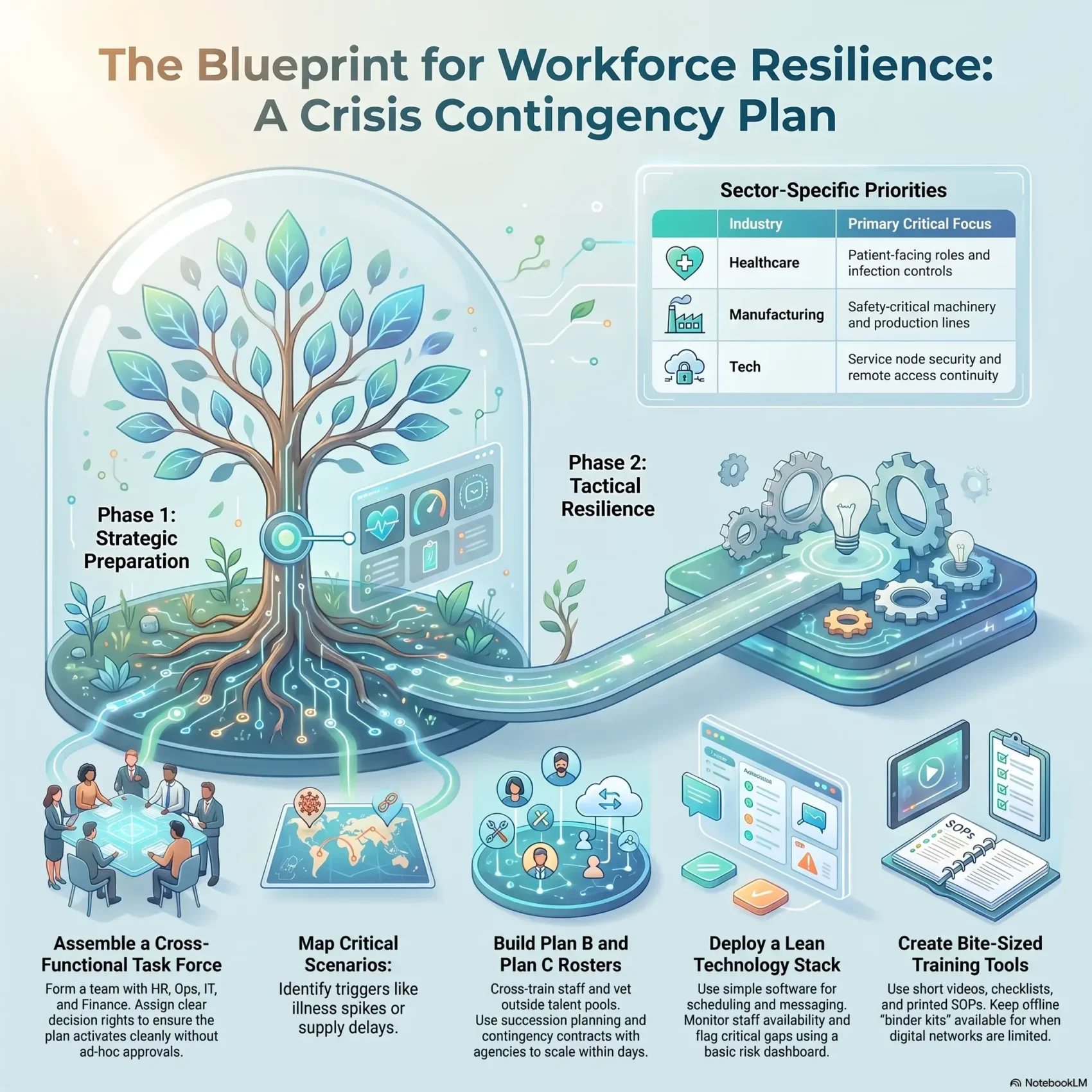
- Assemble a cross-functional team. Name people from HR, operations, IT, security, safety and finance, and agree what each of them may decide alone.
- Map critical processes and roles. Score each role by its impact on revenue, safety, customer service and compliance. Flag every task that only one person can do.
- Run a structured risk assessment. Cover illness waves, regional weather events, cyber and system outages, supply delays and the loss of key people.
- Set numeric triggers. For example: absence above 15% in a critical team, a site closure, or a supplier missing two deliveries in a row.
- Assign coverage. Match each critical role to a trained substitute, a redeployment path or a pre-vetted external option.
- Capture communication flows. Decide who informs employees, customers and partners, through which channels, and how often.
- Version, test and revise. Date every document, give it a named owner, and schedule the next exercise before you close the project.
Keep the outputs simple. Checklists, a staffing matrix (a table of roles, primary holders and substitutes) and a contact tree are what teams actually use in real time. Write down escalation paths so managers can act without waiting for ad hoc approvals.
“If activation depends on someone interpreting the situation, you do not have a trigger. You have a hope.”
Protect and prepare the workforce you already have
The cheapest continuity capacity is the people already on your payroll. Protecting them and broadening their skills beats scrambling for replacements.
Health, safety and wellbeing
Keep the basics current: hygiene supplies, protective equipment where the job requires it, sensible sick-leave rules, and support for seasonal vaccinations.
Treat workload with the same seriousness. Long understaffing is a continuity risk of its own, because people covering double shifts make mistakes and then leave. Watch for signs of employee burnout during any extended activation, and rotate people out before they break. Structured team resilience training helps groups cope with that pressure together.
Cross-training and skills mapping
Cross-train on purpose rather than by accident. Start from a current inventory of who can do what. A structured digital skills gap analysis makes the blind spots visible fast, and a clear cross-training strategy tells you which tasks are worth teaching first.
Then make redeployment easy. An internal talent marketplace, a system that matches existing employees to open roles and projects, lets you move people to where the pressure is instead of hiring from scratch.
This matches what employers already do. In ManpowerGroup’s 2026 survey, upskilling and reskilling was the most common response to talent shortages (27%), ahead of schedule flexibility (20%) and higher wages (19%). For where to focus that investment, see current upskilling trends.
SOPs people can actually use
Standard operating procedures (SOPs) are step-by-step instructions for recurring tasks. Write them in plain language, print them, and post them where the work happens. Back them with short videos stored offline as well as online.
The discipline behind good standard operating procedures is what lets a substitute perform on day one instead of week three. For expertise that does not fit a checklist, invest in knowledge management so it lives in a searchable place rather than in one person’s head.
Absence and return-to-work rules
Set clear expectations. Employees with symptoms notify a supervisor and stay home until they meet documented return criteria. Publish the rule once and apply it consistently.
Track absence as a live number, not a month-end report. That number is what tells you a trigger has been reached.
Design coverage for critical roles and operations
With your people prepared, turn to the roles themselves: find every single point of failure and remove it.
- Build Plan B and Plan C. Name a primary substitute and a fallback for each critical role, and give both a quick-reference kit.
- Formalise succession. Let high-potential staff shadow a role and take on more of its duties before you need them to step up.
- Pre-sign contingent contracts. Agreements with agencies and vetted freelancers, set up in calm times at agreed rates, let you add capacity within days. An on-demand workforce strategy helps you decide which work suits outside help.
- Keep former employees in reach. People who left on good terms already know your systems. Corporate alumni networks make them easier to call back for short assignments.
- Consider split coverage. A job sharing model keeps two trained people close to one role, which removes the single-holder risk permanently.
Protect knowledge before it walks out. Use shadowing, searchable SOP libraries and short hands-on trials. Then pilot small swaps, for example one substitute covering a role for a day, to check that service levels hold and handoffs are clean.
Operating with fewer people: hiring, tools and triage
When headcount drops, act on three fronts at once: recruit fast, coordinate well, and cut work that does not matter this week.
Recruitment channels that move quickly
Start with employee referrals. Current staff often know who can start soon and fits the team. Then use local job boards, public employment services and social channels for nearby candidates. Keep a standing shortlist of previous applicants you would hire.
A lean technology stack
Keep it simple. Three components cover most needs:
- Scheduling and absence tracking. Intelligent shift scheduling tools rebuild a roster in minutes when several people call in sick, and flag coverage gaps before they become incidents.
- Communication. One primary channel plus a text-message fallback for when networks or logins fail.
- A light risk dashboard. Absence rate, coverage per critical role and open escalations, nothing more. Workforce analytics tools can feed these numbers automatically.
If remote work is part of your fallback, set the ground rules before you need them. A tested hybrid work policy means people can switch location without a fresh round of approvals.
Minimum viable operations
Minimum viable operations means the smallest version of each function that still meets your legal and customer obligations. Define it in advance and publish it.
A customer service team, for example, might keep phone and chat support running while pausing outbound surveys and internal reporting. Coach mid-level leads to run this mode with checklists, escalation rules, a short daily stand-up and quick training on neighbouring tasks.
Industry priorities and supply options
In agriculture, protect planting and harvest windows. In healthcare, staff patient-facing roles first. Manufacturing protects safety-critical machines. Technology teams protect on-call rotations, privileged access and backups.
Staff shortages often hit suppliers at the same time as you. Pre-qualify alternate suppliers and service routes, and borrow from supply chain resilience practice, so one vendor shortfall cannot stop your business.
Standards and compliance to map your plan against
Auditors and enterprise customers increasingly ask to see the plan, not just hear that one exists. Aligning it with recognised frameworks early saves rework later.
- ISO 22301:2019 is the certifiable international standard for business continuity management systems. A 2024 amendment added climate change as a factor organisations must consider. A third edition is in progress: its committee draft went out for comment in spring 2026, so the 2019 requirements still apply for now.
- DORA, the EU Digital Operational Resilience Act, has applied to banks, insurers and other financial firms since 17 January 2025. It sets rules for resilience testing, incident reporting and oversight of outside IT providers.
- NIS2 and the CER Directive are EU laws on cybersecurity and on the resilience of critical entities. They extend resilience duties to many providers of essential services, which includes having the people and access arrangements to keep those services running.
Employment rules matter just as much. Leave entitlements, monitoring limits, scheduling notice and remote-work obligations all shape what your plan is allowed to do. Check current future of work legislation before you finalise activation rules.
Communication, drills and continuous improvement
A plan only works if people know about it and have practised it. A short, repeatable communication playbook names who informs which audience, what they say and through which channel.
Prepare messages before you need them
Draft templates for activation, schedule changes, safety notices and stand-down. Standard messages reduce errors and rumours. Set the rhythm too: a monthly note in calm periods, daily check-ins during an incident.
Test more often than once a year
Staffing, systems and suppliers change faster than a yearly review can track. A plan tested once a year is often out of date by the time it is needed. ISO 22301 already expects organisations to exercise their arrangements at planned intervals, and nothing stops you from making those intervals short.
A practical rhythm is a short drill every quarter, plus a review after every real incident or major change. A tabletop exercise, where the team talks through a scenario step by step around a table, takes under an hour and exposes most gaps. Support it with:
- Bite-sized training: posters, checklists and short videos people can open on a phone.
- Offline kits: printed SOPs and contact trees for when networks or logins are unavailable.
- Readiness metrics: coverage per role, drill results and response times to guide investment.
“After-action reviews are where plans actually improve. Log the gap, name an owner, set a date.”
A 30-day starter plan
If you have nothing documented today, this sequence gets you to a usable plan in a month.
- Week 1: Name the cross-functional team and list your top ten critical roles and processes.
- Week 2: Score each role for impact, flag single-person dependencies, and write down your activation triggers.
- Week 3: Assign a primary and fallback substitute per critical role. Draft the one-page SOP and quick-reference kit for the top three.
- Week 4: Build the contact tree and message templates, then run a 45-minute tabletop exercise on your most likely scenario and log the gaps.
Schedule the next drill before you finish. A plan that is never rehearsed quietly goes out of date.
Conclusion
Clear roles, current SOPs and pre-arranged coverage let you act fast and keep services running. With 72% of employers worldwide still struggling to hire, the bench you build now is the bench you will actually use.
Start with three moves: define your critical roles, map likely scenarios, and line up substitutes with the training to step in. Keep the documents at the point of work, so anyone can find the right action under pressure.
Then keep the plan alive. Review it quarterly, drill briefly but often, and version-control every document so nobody activates last year’s plan.
Pick one small step this week, such as documenting a single critical role or naming one substitute, and put the plan in motion.
Found this useful?
Make SmartKeys a preferred source on Google, and our articles will surface more often in your Top Stories, AI Overviews, and AI Mode.
Add as Preferred Source