“AI personalization at work” sounds like a buzzword, and often it is one. Stripped of the marketing, it means something narrow: software that watches how you work, then changes what it shows you or does for you based on that. A learning platform that skips the modules you already passed. A task list that surfaces the three items your calendar says you can finish today. A building system that keeps your usual desk area at the temperature you keep adjusting it to.
None of that is science fiction, and none of it is magic either. This guide covers what the technology actually does in 2026, what the evidence supports, where personalization turns into surveillance, and which EU rules now apply.
Gallup’s February 2026 survey of 23,717 employed Americans found that 50% now use AI at work at least a few times a year, 28% use it weekly or more, and 13% use it daily. Adoption is real, as the wider picture of AI and automation at work confirms. Transformation is rarer: only 8% strongly agree that AI has changed how their work gets done.
Key Takeaways
- AI personalization means software adapting to your patterns, not a new category of tool.
- Half of US employees use AI at work, but few say it has changed how work gets done (Gallup, 2026).
- The strongest measured productivity gains go to less experienced workers.
- Personalized learning and task routing are the two use cases with the clearest payoff.
- Emotion recognition at work is banned outright in the EU.
- Personalization runs on employee data, so consent and transparency decide whether it is accepted.
Understanding AI-Driven Personalization
Start with the mechanism. It explains both the benefits and the limits.
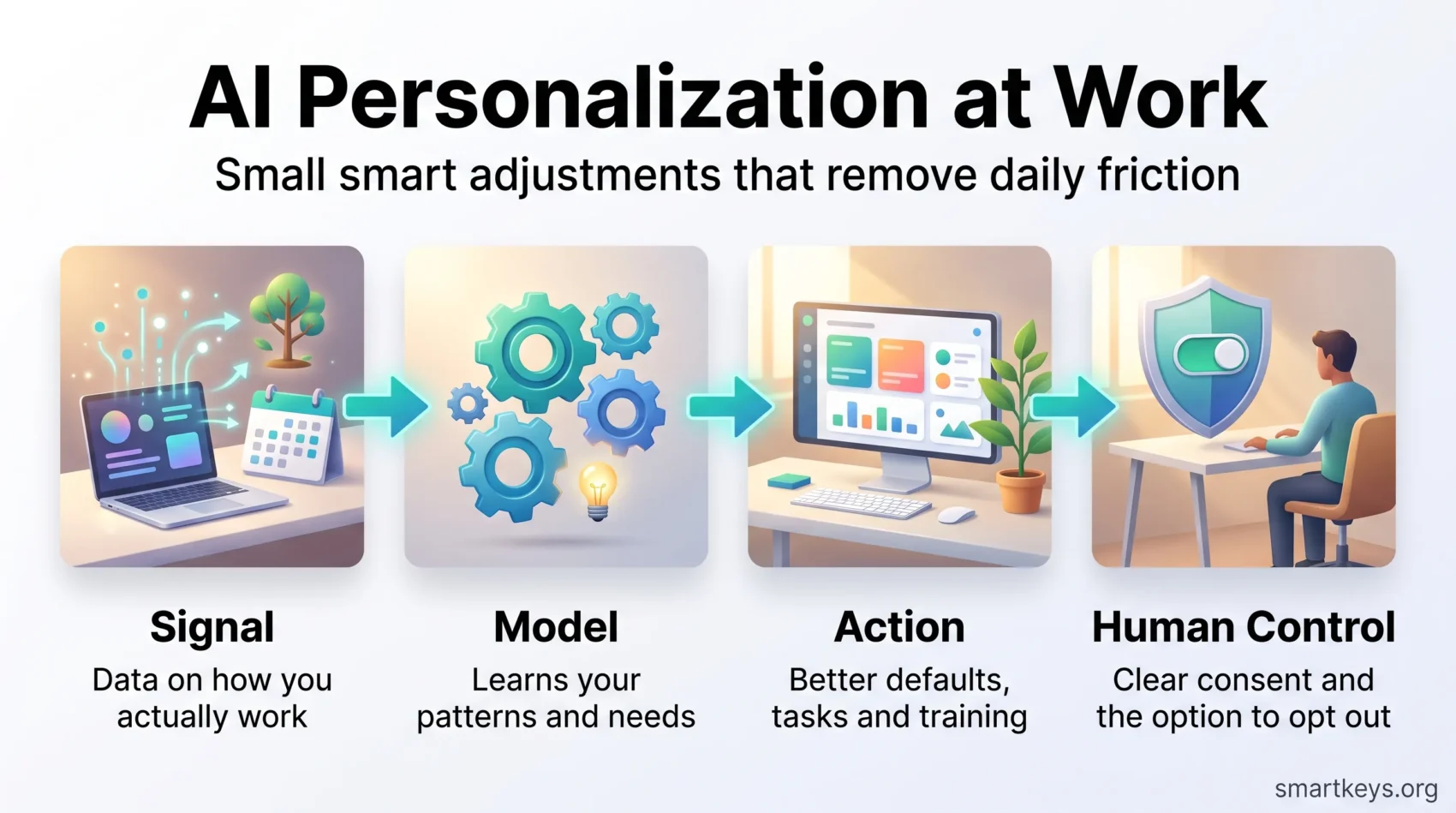
Every system that personalizes something needs three ingredients. It needs a signal, meaning data about what you did: which courses you finished, which tasks you completed late, which meetings you decline. It needs a model, meaning a statistical guess about what that pattern implies. And it needs an action, meaning a change it makes on your behalf: a different recommendation, a different default, a different order in a list.
Weak signals produce useless suggestions. A good model with no permission to act produces a dashboard nobody reads.
The Role of AI in the Workplace
In practice, AI personalization at work shows up in a handful of recognisable places. Software analyses your patterns and behaviour and then does one of these things:
- Automates routine task handling, so triage and sorting stop eating your morning.
- Adjusts your workspace settings, from screen layout to lighting and desk booking, based on habits it has observed.
- Adapts training content to what you have already demonstrated you can do.
The common thread is subtraction. Good personalization removes a decision you were making by hand. That is a modest promise, and it is the one most likely to hold. Broader claims about AI reshaping the workplace deserve more scepticism, as the measured return on business AI spending shows.
Hyper-Personalization: What It Means at Work
Vendors often use “hyper-personalization” to describe the next step up. The term means combining several data sources at once, in real time, rather than reacting to a single signal.
An example makes it concrete. Ordinary personalization notices you completed a beginner course and offers the intermediate one. Hyper-personalization also factors in your calendar (you have no free hour until Thursday), your role change last month, and the skills your team is short of, then suggests a 20 minute module on Thursday morning instead of a two day workshop.
Benefits and Where They Stop
The upside is genuine but bounded:
- Less friction: Fewer settings to configure, fewer irrelevant notifications, fewer courses that repeat what you know.
- Better fit for shift and hybrid work: People who work different hours in different places get defaults that match their pattern rather than the office average.
The limits matter just as much. Personalization cannot fix a job that is badly designed, a manager who does not give feedback, or a workload nobody can finish. Gallup’s 2026 State of the Global Workplace report puts worldwide employee engagement at 20%, down from a peak of 23% in 2023, with manager engagement at 22%. No recommendation engine moves numbers like those. Treat personalization as a way to remove small daily annoyances, not as an engagement strategy.

The Impact of AI Personalization Work on Employee Productivity
Vendor surveys report enormous productivity gains. Controlled studies report smaller and more specific ones. The controlled studies are the ones worth planning around.
What the Evidence Actually Shows
The clearest workplace evidence comes from a field study by Erik Brynjolfsson, Danielle Li and Lindsey Raymond, published in the Quarterly Journal of Economics in 2025. They tracked more than 5,000 customer support agents who were given an AI assistant trained on the transcripts of the company’s best performers. Issues resolved per hour rose by 14% on average. For novice and low-skilled agents the improvement was about 34%. For the most experienced agents it was close to zero.
That is the most useful finding in this field. Personalized AI support mainly compresses the gap between new and experienced staff, by making the tacit knowledge of your best people available to everyone else at the moment they need it.
The practical implication is a targeting decision. Point a limited budget at onboarding, at teams with high turnover, and at roles where new hires take months to get up to speed. That is where the measured gains appeared. Rolling the same tool out to senior specialists looks impressive on an adoption dashboard and changes very little.
Gallup’s data fits that reading. 65% of AI users say it improved their productivity, which is a self-report rather than a measurement. Only 8% strongly agree it changed how work gets done. Both can be true: helpful at the task level, rarely transformative at the job level.
AI-Powered Learning Platforms: Customizing Employee Education
Corporate training is where personalization has the longest track record, because the underlying problem is old. Put 30 people through the same course and you bore a third of them, lose a third, and teach a third.
Tailored Learning Experiences
An adaptive learning platform, meaning one that changes the path through a course based on how you answer, tries to fix that. It typically does three things:
- Skips content you have already demonstrated, usually through a short diagnostic quiz.
- Repeats material you got wrong, spaced out over days rather than repeated immediately.
- Recommends a next course based on your role, your recent work and the skills your team lacks.
Learning platforms such as Docebo, 360Learning and Absorb LMS all sell versions of this. Judge them on two questions rather than feature lists. Where does the skills data come from? If nobody maintains it, recommendations drift into nonsense within a quarter. And can a manager override the path? Automated sequencing is useful until it insists a new team lead take the module they are about to teach.
Personalized training also matters more than it used to because job requirements are moving. The World Economic Forum’s Future of Jobs Report 2025 estimates that 39% of workers’ core skills will change by 2030. That is the case for continuous upskilling, and adaptive delivery is how you make it fit around an actual working week. Our guide to remote corporate training covers the delivery side in more detail, and AI learning platforms compares the tooling.
Personalization Algorithms: How They Shape Your Work Experience
A personalization algorithm is just a ranking rule. It decides what appears first, what gets hidden, and what gets flagged. That sounds trivial, but the order things appear in is what most people treat as the plan for their day.
Leveraging Data for Customization
The everyday examples are unglamorous and genuinely useful:
- Scheduling tools that propose meeting slots based on when your team has historically had free time, instead of the first open gap.
- Inboxes and ticket queues that put likely urgent items at the top rather than the newest ones.
- Project tools that flag a task as at risk because similar tasks with the same dependencies ran late.
Each one saves a few minutes and a small decision. Across a week that adds up, which is why these features spread faster than any flagship AI product.
There is a trap worth naming. A ranking rule optimises for whatever it was told to optimise for. If a queue is ranked by predicted resolution speed, the hard cases sink to the bottom and stay there. Check what your tools are actually ranking by, and compare it against how you would prioritise the same work by hand. Our overview of task prioritization frameworks is a useful benchmark for that comparison.
AI Recommendation Systems: Tailoring Tasks to Individual Strengths
Task routing is the same idea applied to people. A recommendation system looks at who resolved similar work quickly and accurately before, then suggests who should take the next item.
Understanding Individual Capabilities
Support desks, field service, claims handling and code review all have measurable outcomes and repeated task types, which is exactly what these systems need. Sending a networking ticket to the person who has closed 200 of them beats sending it to whoever is next in the rotation.
Two cautions belong next to that.
First, routing on past performance concentrates work. The person who is best at a task gets more of it, which is efficient this quarter and a retention problem next year. Cap it deliberately, or you will automate your way into burning out your strongest people. Sensible retention practice means watching for that pattern rather than trusting the queue.
Second, routing on past performance freezes development. If the system never gives you an unfamiliar task, you never learn one. Some teams solve this by reserving a share of assignments, often around one in five, for deliberate stretch work chosen by a human.
Personalization Technology: Creating Optimized Work Environments
The physical version of personalization is the least discussed and the most straightforward. Sensors and booking systems learn how a space is actually used, then adjust it.
Smart Workplaces of the Future
Typical deployments cover desk and room booking that remembers your preferred zone, lighting and temperature zones that adapt to occupancy, and space planning that reallocates rooms nobody books. In hybrid offices the last one pays for itself fastest, because the alternative is heating and cleaning meeting rooms that stay empty four days a week.
This is also where accessibility gains are real rather than rhetorical. Defaults that remember an individual’s preferred contrast, font size, captioning or quiet space make a measurable difference for neurodivergent employees and anyone with a sensory or mobility need. That is personalization doing something a generic policy cannot.
AI Personalization at Work: What Employees and Regulators Expect
Personalization runs on employee data. That single fact decides whether a rollout is welcomed or resented, and it is now also a legal question.
The Rules You Have to Work Within
If you employ people in the EU, three dates matter.
Since 2 February 2025, Article 5(1)(f) of the EU AI Act has prohibited AI systems that infer emotions from biometric data in the workplace. Sentiment scoring of employees from their faces or voices is banned outright, with narrow exceptions only for medical and safety purposes. General wellbeing or stress monitoring does not qualify.
Since 2 August 2026, the transparency duties in Article 50 have applied. People must be told when they are interacting with an AI system rather than a person, and certain AI-generated content must be marked as such.
The heavier obligations for high-risk systems, which include AI used in hiring, promotion and task allocation, were pushed back. Under the Digital Omnibus agreed in May 2026, the rules for standalone high-risk systems listed in Annex III now apply from 2 December 2027. That is extra time to prepare, not an exemption. Our guides to AI regulation, data privacy at work and AI hiring tools go through the practical steps.
What Employees Actually Ask
Regulation sets the floor. Acceptance is decided by three questions employees ask themselves anyway:
What is collected? Vague answers destroy trust faster than intrusive systems do. Name the data.
Who sees it, and at what level? Aggregated team patterns feel different from an individual score visible to a manager. Say which one it is.
Can I turn it off? A personalization feature that cannot be declined is monitoring with better branding. The ethical questions around workplace AI mostly reduce to this one.
Answer those three plainly before launch. Skip them and you will spend the next year explaining yourself.
Where Personalization at Work Is Heading
Two credible forecasts frame the next few years. Both are worth quoting accurately.
Forecasting Future Developments
The World Economic Forum’s Future of Jobs Report 2025 projects that by 2030 technological change will create around 170 million jobs while displacing about 92 million, a net gain of roughly 78 million. That is churn on a large scale, not disappearance. It also means most people will be doing a job that has changed shape, which is precisely the situation personalized training is built for.
McKinsey Global Institute’s analysis of generative AI in the United States estimates that up to 30% of hours currently worked could be automated by 2030 under an accelerated adoption scenario. Note the framing: hours and tasks, not jobs. Most roles lose some tasks and keep the rest.
Put together, the realistic direction is unremarkable and useful. Personalization moves from separate products into defaults inside tools you already pay for. Your project tool ranks your day. Your learning platform builds your path. Few of these will be sold as “AI personalization” at all, which is usually the sign that a technology has finished arriving. For the wider picture, see our overview of future work trends and how workers are adapting to automation.
Conclusion
AI personalization at work is best understood as a large number of small adjustments rather than a single transformation. The evidence backs that reading. Controlled research shows real gains, concentrated among less experienced staff. Survey data shows widespread use and far less widespread change.
So plan accordingly. Start where new people struggle. Fix your skills and task data before buying a recommendation engine, because both run on it. Decide who can see individual level output before anyone asks. And keep a human able to override the algorithm, which does not know that this week is different.
Do that and personalization becomes what it should be: sensible defaults that make an ordinary working day less effortful. A smaller promise than the marketing makes, and a more achievable one. If you want the customer facing counterpart to this topic, our guide to AI-powered personalization for customer experience covers it, and AI in HR management looks at the people operations side.
Found this useful?
Make SmartKeys a preferred source on Google, and our articles will surface more often in your Top Stories, AI Overviews, and AI Mode.
Add as Preferred Source