

Hybrid work has stopped moving. Roughly a quarter of all paid days in the United States are now worked from home, a share that has barely shifted for three years, according to the Survey of Working Arrangements and Attitudes. Among employees whose jobs can be done remotely, Gallup puts 52% on a hybrid schedule, 28% fully remote and 21% fully on-site. That is the settled state, not a transition.
What has not settled is the workspace itself. A team split across three time zones and two office floors still needs somewhere to meet, ask a quick question, and see who is around. Virtual offices are the software answer to that problem: persistent digital spaces that hold a team’s presence, conversations and files in one place, so location stops deciding who is included.
This guide covers what a virtual office for hybrid teams actually is, why the need has outlasted the return-to-office debate, which problems the technology solves, which it does not, and how to run one without eroding trust or privacy.
Key Takeaways
- Hybrid is the majority arrangement for remote-capable roles, at 52% according to Gallup.
- About 25% of US paid days are worked from home, a figure that has held steady since 2023.
- Virtual offices solve presence and informal contact, not scheduling or workload problems.
- Office vacancy in major US markets reached a record 21% in early 2026, per Moody’s Analytics.
- Monitoring tools damage trust faster than they raise output, so transparency is not optional.
What a Virtual Office Actually Means
The term covers two different products, and mixing them up leads to bad buying decisions.
The first is a registered business address service: a postal address, mail handling and occasional meeting room access, sold as a substitute for a lease. Useful for founders and small firms, but it has nothing to do with how a team works day to day.
The second, and the one this article is about, is a digital workspace. It gives a distributed team a shared environment with rooms, visible presence and spontaneous conversation, rather than a list of scheduled calls. Platforms in this category include Kumospace, Gather and Teamflow, alongside the persistent-channel model used by a digital headquarters built around chat and documents.
The distinguishing feature is persistence. A video call exists only while it is running. A virtual office stays open, so a colleague can drop in the way they would walk to your desk. That single property is what makes it feel different from a calendar full of meetings.
Why Hybrid Teams Need a Virtual Office in 2026
Hybrid work has settled rather than swung back. Gallup puts 52% of remote-capable US employees on a hybrid schedule, with about 2.3 days a week in the office. Moody’s Analytics REIS data reported by Axios put US office vacancy at a record 21% in the first quarter of 2026, so companies now run smaller offices that fill unevenly. For schedules, policy and leadership, see our complete guide to hybrid work; this article stays with one question: where does a split team meet when it is not in the building?

For anyone planning a workspace strategy, that combination matters. Demand for desks is real but lumpy, concentrated on midweek days, and the gap is filled by whatever your team uses when it is not in the building. Our overview of how office design is adapting to lower and less predictable occupancy covers the physical half of the equation.
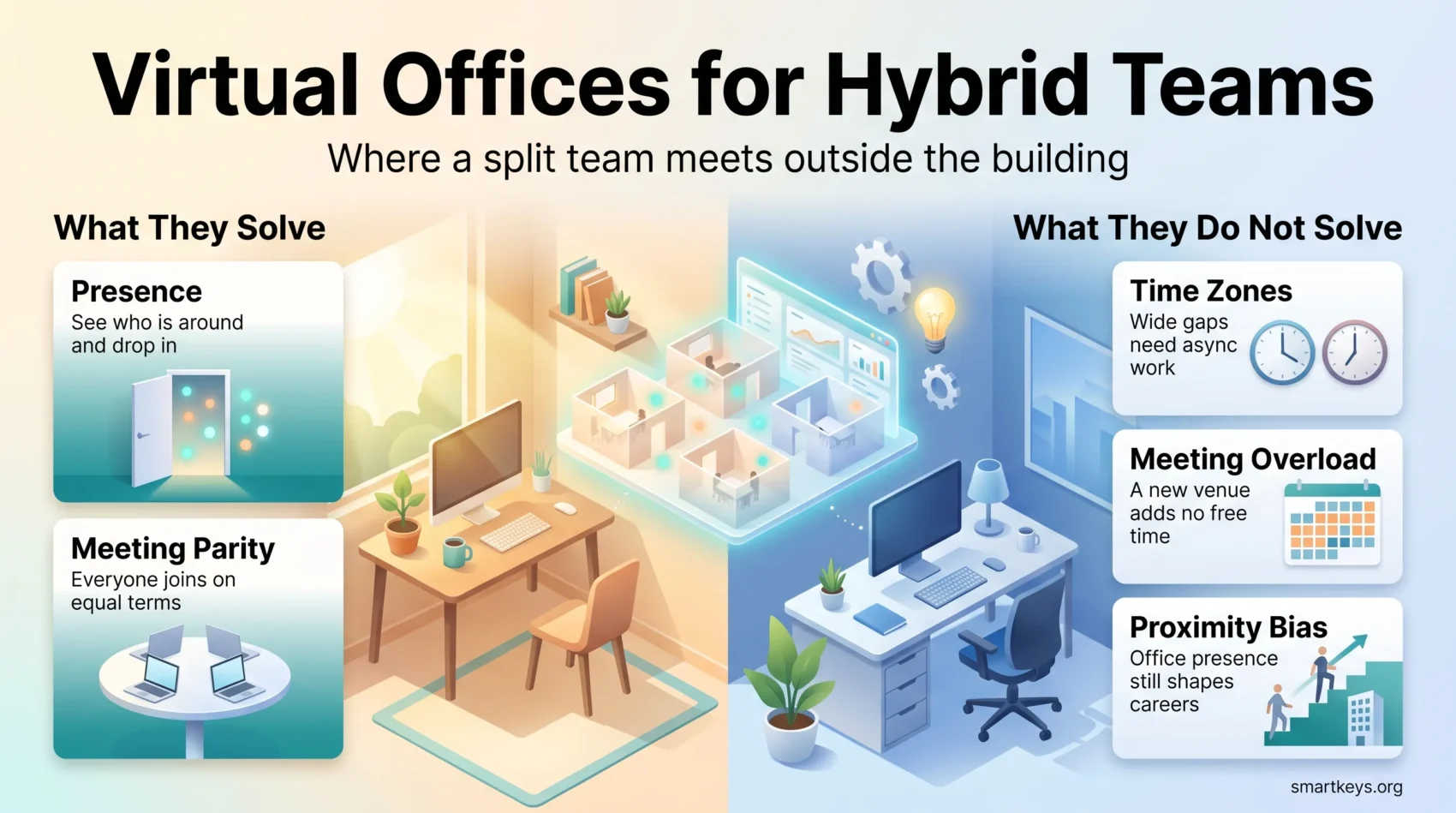
What Virtual Offices Solve
Be specific about the problem before buying the tool. Distributed teams complain about a fairly narrow set of things, and a virtual office addresses some of them well.
Presence and Informal Contact
The most consistent complaint from remote staff is not loneliness in general, it is the loss of low-stakes contact: the two-minute question that never justifies a calendar invite. A persistent space restores that, because being visible in a room is an invitation to interrupt.
This is also where the benefit is easiest to overstate. Presence helps teams that already talk to each other. It does not create relationships that were never there, and it will not fix a team whose real problem is unclear ownership.
Meeting Parity
In a hybrid meeting, the people in the room hold an advantage: side conversations, body language, the whiteboard. Remote attendees get a fraction of it. Running the meeting inside a shared digital space, with everyone on their own device even when some are in the building, removes that asymmetry at the cost of some in-room comfort. The trade is usually worth it, and the ground rules that make hybrid meetings work matter more than the hardware.
Cost and Footprint
The cost argument is real but frequently inflated. Replacing a lease with software does cut fixed property costs, and desk-sharing lowers the square footage a company needs. What the savings are worth depends entirely on your lease terms, your headcount and how often people actually come in, so treat any headline percentage with suspicion and model your own numbers. A structured look at how to compare the cost of remote and office work is a better starting point than a vendor case study.

What Virtual Offices Do Not Solve
Three problems survive the software, and pretending otherwise is how implementations fail.
Time zones stay hard. A persistent room is only useful when someone else is in it, which is why teams spread over more than about six hours end up leaning on written updates instead. Working asynchronously by default is the actual fix, and it is a management change rather than a purchase.
Meeting load stays heavy. Adding a new place to gather rarely reduces the number of gatherings. If calendars are the complaint, the answer is fewer and shorter meetings, not a nicer venue for them.
Career visibility stays uneven. Employees who come in more often still tend to be seen as more committed, an effect documented well enough to have its own name. Our piece on how proximity bias distorts promotion and assignment decisions explains what to watch for in review cycles.
The Technology Behind a Virtual Office
The Core Stack
Most teams already own the pieces. Real-time chat, video, a shared document store and a task board cover the majority of daily work, and the choice matters less than the discipline of picking one of each and deprecating the rest. Our comparison of the tool categories a hybrid team actually needs lays out the shape of a minimal stack, on top of which most vendors now add a layer of summaries, transcripts and drafting.
The failure mode is accumulation. Every added tool creates another place a decision might be recorded, and the cost lands on whoever has to find it later.
Immersive Spaces and Their Limits
Spatial audio, avatars and headset meetings have been promised as the next stage of remote work for years. The technology works; the adoption is narrow. Headsets remain uncomfortable for long sessions, and most teams get the value they need from a browser tab. Where immersive tools have found real traction is training, not routine meetings, as covered in our look at virtual reality applications in remote work.
Treat immersive spaces as a specific tool for specific tasks, not a replacement for the office.
Amenities That Improve the Hybrid Experience
Rooms Built for Remote Parity
A virtual office needs the same variety a physical one has: focus space, small rooms for two people, and larger rooms with proper audio. In the building, the equipment that matters is a good microphone, a camera that frames the whole room and lighting that does not silhouette people against a window. Anything that leaves remote attendees straining to hear will quietly push them out of the conversation.
Space for Informal Contact
Scheduled social events are a weak substitute for spontaneous ones, but they are better than nothing when a team is new or has just grown. Open rooms people can sit in while working, shared channels that are explicitly not about work, and short unstructured check-ins all help. Our guide to creating informal contact points in a distributed team covers the practices that tend to survive contact with a busy week.
What Employers Need to Provide
Training and Equipment
A new workspace tool fails quietly when nobody explains the norms attached to it. Which room is for what, whether an open camera means available, how quickly a message should be answered. Those conventions are the product, more than the software is. Write them down, cover them during remote onboarding, and revisit them when the team changes shape. A clear written hybrid work policy saves a great deal of ad hoc negotiation later.
Equipment matters too. A decent headset, a second screen and a room that does not echo do more for daily experience than any platform feature.
Monitoring Without Losing Trust
Persistent presence tools make monitoring technically trivial, which is exactly why it needs limits. Status indicators, activity logs and screen-time metrics measure availability, not contribution, and staff read them accurately as surveillance when the purpose is not explained.
The workable position is narrow and stated openly: collect what you need for security and billing, say what is collected and who sees it, and evaluate people on delivered work. Our coverage of AI-driven employee monitoring sets out where the line usually falls, and aggregate team-level analytics is generally the safer framing than individual tracking.
The Hard Parts
Privacy and Security
A virtual office concentrates a lot of sensitive material in one system: conversations, documents, presence data and sometimes always-on audio or video. That makes access control, encryption and multi-factor authentication baseline requirements rather than upgrades. Home networks and personal devices widen the surface further, which is the subject of our guide to securing a remote workforce.
The legal side has tightened as well. Employee data now sits under a growing set of obligations covering what may be collected and how long it may be kept, as covered in the current rules on employee data.
Boundaries and Burnout
An always-open workspace makes it harder to stop. Presence indicators can turn into an expectation of constant availability, and remote workers who feel watched often respond by working longer rather than better. Some of that is documented in the phenomenon of managers and employees disagreeing about whether remote work is productive.
The countermeasures are unglamorous: explicit response-time expectations, no default assumption that a green dot means interruptible, and a stated position on out-of-hours contact. Several jurisdictions have gone further and legislated a right to disconnect from work communications outside contracted hours. The wider effects on wellbeing are covered in our review of remote work and mental health.
Building a Connected Culture
Culture in a distributed team is mostly the sum of small, repeated habits, not an annual offsite.
Gallup finds that employees who strongly agree they have a best friend at work are around seven times as likely to be engaged in their job.
That correlation does not mean managers can assign friendships, but it does argue for leaving room where they can form. In practice that means unstructured time that is genuinely optional, credit given in public, and decisions explained rather than announced. What sustains it over time shows up clearly in the engagement data on remote and hybrid staff.
One structural point deserves emphasis. Gallup found that 91% of employees whose team decides its own hybrid schedule regard the policy as fair, against 73% where the employer sets it unilaterally. Who chooses the schedule appears to matter as much as what the schedule is, which is a cheap lever most organisations leave unused.
Managing Hybrid Space Well
Activity-based working, where people choose a setting to match the task rather than owning a desk, fits a workplace with uneven attendance. It only works if the settings genuinely differ, which means real quiet rooms, not a row of identical desks relabelled.
Two rules carry most of the weight. First, anchor days beat individual choice for anything collaborative: if a team needs to overlap, name the days rather than hoping. Second, decisions belong in writing wherever they were made, because anything that lives only in a room excludes everyone who was not in it. Teams that get both right rarely need to argue about attendance at all.
Where This Is Heading
Three developments look reasonably safe to expect.
AI features are moving into the workspace layer itself: transcripts, summaries and search across conversations, which mostly help distributed teams because they lower the cost of not having been present. The same tools raise fresh questions about what is recorded and who can read it later.
Location-independent employment keeps expanding, with the practical constraints sitting in tax and employment law rather than technology, as our coverage of the realities of working across borders describes.
And the software is consolidating. The chat tool, the document store and the virtual office are converging, which is welcome for teams currently paying for three overlapping subscriptions. Broader context on where remote work is going sits in our look at how remote work reshaped the workplace.
Conclusion
Hybrid work is no longer an experiment, and virtual offices have found their real job inside it: keeping presence and informal contact alive when the team is not in the same building. They do that well. They do not fix meeting overload, time zone spread or the quiet advantage held by people who show up in person.
The organisations that get value from them treat the software as the smaller half of the work. The larger half is written norms, honest limits on monitoring, schedules the team has a say in, and a habit of recording decisions where everyone can find them. Get those right and the choice of platform stops being a difficult one.
Found this useful?
Make SmartKeys a preferred source on Google, and our articles will surface more often in your Top Stories, AI Overviews, and AI Mode.
Add as Preferred Source




