Tools
Tools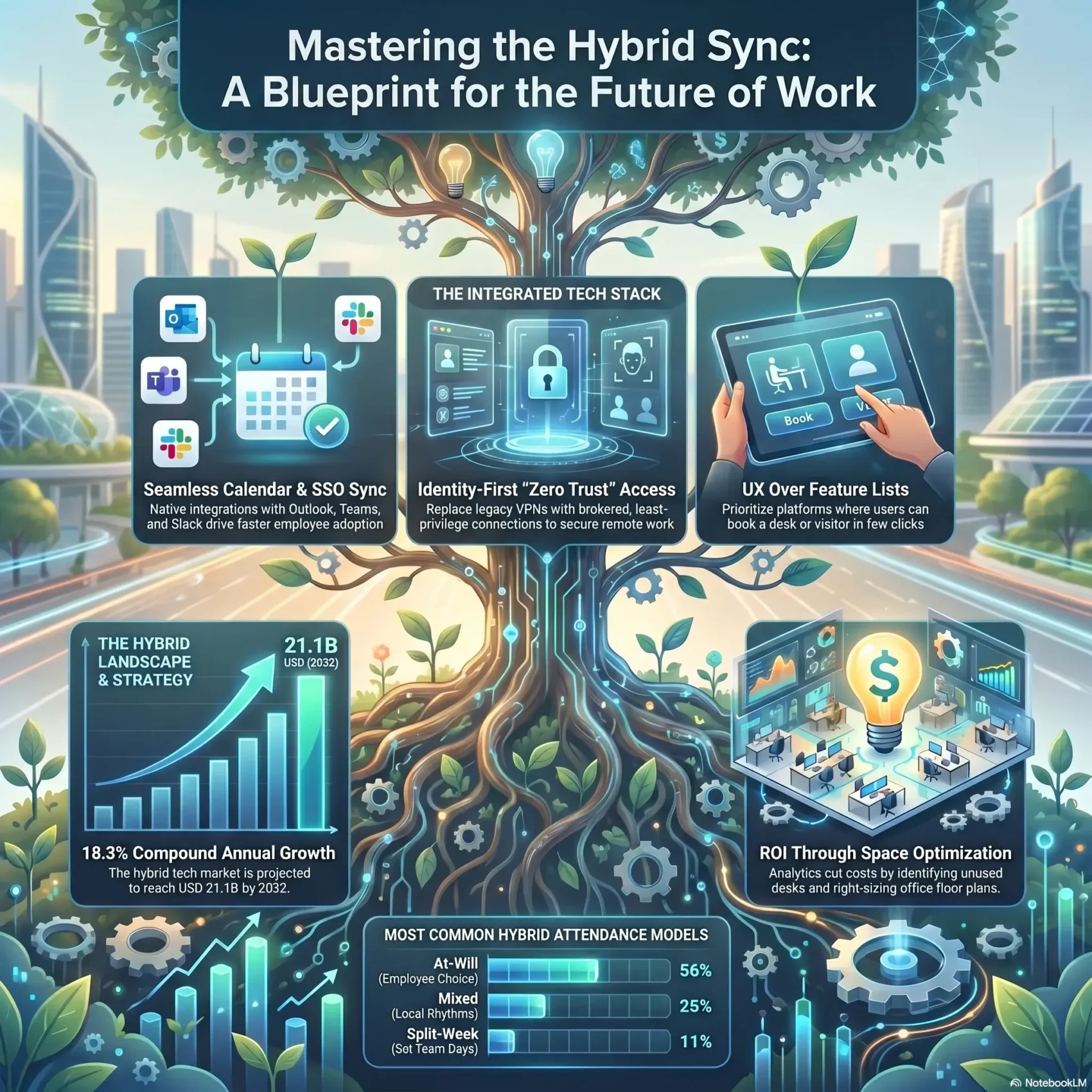
Last Updated on June 12, 2026
Your schedule, space, and people shouldn’t be a guessing game. As demand for hybrid workplace technology grows — from an estimated USD 4.9B in 2023 toward USD 21.1B by 2032 — you need practical ways to align office days, remote schedules, and team access.
This section gives you a friendly walkthrough of how scheduling, space booking, visitor management, and analytics combine to make flexible work practical. You’ll see how software connects people, places, and data so your teams avoid double-bookings and wasted time.
We’ll point out which platforms fit which needs and how integrations like calendars and SSO keep access in the flow of your work. If you want a quick primer on collaborative solutions, check this guide to collaborative options for work: collaborative tools for work.
Key Takeaways
- Market growth means faster adoption—plan timing and budgets accordingly.
- The right software reduces friction for office and remote teams.
- Match platforms to needs: scheduling, booking, visitors, analytics, signage.
- Integrations (calendars, SSO, Slack/Teams) keep access seamless.
- Focus on security and governance while keeping a smooth user experience.
Buyer intent and who this product roundup is for
Whether you’re vetting vendors or assembling a stack, this guide helps you pick what actually saves time.
This roundup is for you if your company needs clearer schedules, better space visibility, or smoother visitor flow. You’ll find help choosing between simple point apps (desk booking) and full management ecosystems that combine booking, scheduling, visitor management, analytics, and signage.
Are you evaluating platforms or building a hybrid tech stack?
If you compare options or build from scratch, look for calendar sync, mobile ease, and how many clicks it takes to book a desk or invite a guest. Pricing models vary—per user, per desk, or enterprise—so check ROI from reduced unused space and lower admin time.
What you’ll take away today
- Which options match teams focused on coordination versus space visibility.
- When a single-purpose app is enough and when an all-in-one management platform pays off.
- A checklist to evaluate schedules, adoption, and the user experience required by your organization.
What hybrid workforce tools are and how they keep people, spaces, and data aligned
Aligning people, space, and usage data cuts friction and keeps your office days predictable. Modern software links who’s on-site with desks, rooms, and shared resources so employees can plan with confidence.
People-first workflows for scheduling and coordination
Make schedules that actually work for your teams. Booking flows let employees find seats near teammates, set check-ins, and request access without extra steps.
Space visibility: desks, rooms, resources
Live maps and inventory show availability at a glance. That visibility prevents double bookings and reduces overcrowding on peak days.
Data-driven decisions for layouts, policies, and real estate
Every booking and check-in creates reliable data managers use to optimize floor plans and policy. Analytics cut costs and clarify which resources stay or go.
- Less friction: calendar and SSO links make access seamless.
- Clear adoption: mobile apps and integrations get users up to speed fast.
- Practical wins: fewer no-shows, smarter layouts, and calmer schedules.
For a closer look at how these digital processes map to everyday work, see our guide to digital workflows.
Hybrid work in the present: market size, momentum, and why it matters
Growth in this space gives you a clear runway for investment. The market was valued at USD 4.9B in 2023 and is projected to reach USD 21.1B by 2032, a compound annual growth rate near 18.3%. That pace shows adoption is not slowing.
Market outlook: from USD 4.9B in 2023 to USD 21.1B by 2032 (CAGR 18.3%)
These numbers help you justify timing and align budgets with a fast-growing category. Early adoption can capture savings and keep your business competitive.
Why hybrid endures: flexibility, talent, and cost optimization
Flexibility lets employees balance life and work. Companies gain access to broader talent pools and meaningful real estate savings.
Benefits scale into improved retention, happier staff, and stronger business outcomes. Challenges remain: culture shifts and legacy VPN or firewall limits can slow progress.
Common schedule models: at-will, split-week, manager-scheduled, and mixed
- At-will (56%) — employees choose office days.
- Split-week (11%) — set office days for teams.
- Manager-scheduled (8%) — leadership assigns presence.
- Mixed (25%) — a blend to fit local rhythms.
Practical takeaway: Match policies and autonomy so management keeps clarity without eroding culture. Modern technology and better management patterns remove bottlenecks while keeping security and governance tight.
Core features you should expect from hybrid work and workplace management software
A good management platform ties bookings, visitors, schedules, analytics, and signage into a single flow so your teams spend less time coordinating and more time doing meaningful work.
Space and resource booking to prevent clashes and no-shows
Smart booking blocks double reservations and uses reminders plus auto check-ins to cut no-shows. Live availability and seat rules boost utilization and save wasted time.
Hybrid scheduling and shared calendars for team presence
Shared calendars make it simple for employees to align in-office days. Native sync with Outlook, Google, and Teams removes back-and-forth planning and speeds adoption.
Visitor management, security, and compliance-ready records
Expect pre-registration, QR check-in, host notifications, badge printing, and audit logs. Enterprise-grade visitor flows keep compliance records ready for audits.
Analytics and digital signage for real-time clarity
Usage data helps you right-size rooms and refine policies. Digital signage and room panels show live status so people find space fast and wayfinding is clearer.
Mobile access and integrations to drive adoption
Mobile booking and check-ins put control in employees’ hands. Integrations with Azure AD, Okta, and M365 keep security tight and collaboration in the flow of your daily work.
“Build for people first; data will guide the rest.”
How to choose the right platform: a practical, ROI-first framework
Choose a platform by matching clear business outcomes to measurable savings and simple daily workflows. Start with the problems that cost time and money today. That focus keeps selection practical and fast.
Prioritize outcomes, not features
Decide whether scheduling, visitor flow, or utilization data will move the needle for your company. Buy for impact, not feature lists.
UX and adoption
Keep key tasks short. A user should book a desk, see who’s in, or register a guest in a few taps. Easy flows drive real adoption and ongoing value.
Integrations and access
Verify sync with Microsoft 365, Google, Teams/Slack, and SSO providers. APIs matter if you need custom workflows or a single sign-on experience for your teams.
Scalability, support, and certifications
Check multi-site scaling, localization, and onboarding SLAs. Confirm security posture and certifications like GDPR, SOC 2, HIPAA, or ISO 27001 so policies are enforceable.
Pricing and proving ROI
Compare per-user, per-desk, and enterprise models against your usage patterns. Use ROI calculators tied to your data to quantify space savings and admin efficiencies.
- Start small: focus on the outcomes that matter now.
- Demand simplicity: reduce clicks for common tasks.
- Verify integrations: keep collaboration and access smooth.
- Confirm security: make audits painless with certifications.
- Measure value: tie pricing to proven time and space savings.
“Buy for impact, measure continuously, and iterate based on real data.”
Top hybrid workplace platforms for coordinating people and spaces
Match what your people do every day to a platform’s scope — this keeps adoption fast and admin light. Start by listing the tasks that slow teams most: visitor checks, desk booking, or cross‑site planning. That list steers you to a solution that reduces friction without piling on features.
All-in-one ecosystems vs. point solutions: when to pick each
All-in-one platforms like YAROOMS and Robin unify booking, scheduling, visitors, signage, and analytics. They cut vendor sprawl and make management easier for multi-site and enterprise setups.
Point solutions such as Officely (Slack/Teams add-ins) solve narrow problems fast. Choose a focused option when you need a quick win for a single pain point.
Best-fit by use case: visitor-heavy, EU compliance, Slack-native, AI-driven
Visitor-heavy offices often pick Envoy for its guest flow and security features. EU-focused companies prefer Deskbird for GDPR-first policies and regional compliance.
Kadence suits teams that need coordination and workplace events. OfficeSpace and Robin add AI planning and enterprise depth when you scale across many locations.
- Quick compare: start focused, expand to an ecosystem as needs grow.
- Access & resource controls: enforce fair booking and predictable office days for users.
- Growth model: pilot with a point solution, then standardize on a management platform for broader value.
“Pick for daily impact — the right platform makes work smoother for your teams without extra admin.”
Product spotlight: YAROOMS for end‑to‑end hybrid workplace management
YAROOMS brings desk, room, and parking booking together with digital signage and analytics so your office runs with less friction. This platform is a single-entry solution for scheduling, visitor flow, and real‑time occupancy that your teams will actually use.
Strengths
Booking and scheduling: unified desk/room/parking reservations and auto check‑ins reduce no‑shows.
Visitor management and signage: pre‑registration, QR check‑in, and panels keep lobbies smooth and secure.
Analytics and M365 stack: deep integrations with Microsoft 365, Outlook, Teams, Google Workspace, Azure AD, and Okta speed adoption and centralize data.
Who it’s for
YAROOMS serves regulated industries and multi‑site enterprises—finance, education, healthcare, government, and larger tech companies that need controls, scale, and audit trails.
Pricing and ROI considerations
- Starter: $99/month
- Business: $399/month (adds AI workplace assistant)
- Enterprise: $899/month; visitor module $99/location/month
Use the built‑in ROI model to estimate savings from lower unused space, fewer no‑shows, and less admin time. That helps you justify investment and measure impact.
“A unified management model makes it easier for users and admins to keep the office working for everyone.”
Other notable workplace platforms to evaluate
Explore a shortlist of reliable platforms that solve common reception, booking, and team coordination gaps. This set helps you match needs to clear strengths so your organization can choose faster and with less risk.
Envoy — visitor and delivery leadership
Envoy shines for visitor and delivery management. It uses QR check-ins, badge printing, and host notifications to speed lobbies and secure deliveries.
Kadence — neighborhoods, events, and team coordination
Kadence targets team culture. It includes neighborhoods, workplace events, and an AI assistant to simplify coordination and improve collaboration.
Deskbird, Tactic, OfficeSpace, Officely
Deskbird is EU-first and GDPR-focused for privacy-conscious companies. Tactic adds HR-friendly scheduling and policy controls. OfficeSpace and Robin offer enterprise depth and AI planning. Officely runs inside Slack and Teams for very fast adoption.
TableAir, Cloudbooking, Joan, Robin
TableAir and Cloudbooking cover desks, rooms, parking, and signage for secure sectors. Joan is known for sleek e‑paper room panels that improve wayfinding and the on-site experience.
elia, FLYDESK, Archie, UnSpot
elia pairs software with sensors and hardware. FLYDESK is a budget-friendly option for small offices. Archie and UnSpot focus on simple, structured scheduling for teams and users who want low-friction management.
“Scan a curated vendor list with clear strengths to match options to your specific needs.”
Essential IT hybrid workforce tools that secure access and keep work moving
Fast connections and strict identity controls stop small hiccups from becoming big outages. You need systems that protect data, verify users, and keep devices performing across sites.
Remote access: Splashtop
Splashtop delivers high‑definition, low‑latency remote access with 2FA, encryption, and device authentication. It supports Windows, macOS, iOS, Android, and Linux so your teams can get secure access without complex VPNs.
Identity and access management
Okta, Azure AD, and Ping Identity centralize identity, provide SSO, and enforce least privilege. That management reduces login friction and limits who can reach sensitive systems.
Endpoint security and device protection
CrowdStrike, Symantec Endpoint Protection, and Carbon Black defend every device from malware and unauthorized access. Strong endpoint security shrinks attack surface and improves overall performance.
IT asset management and monitoring
ManageEngine, SolarWinds, and ServiceNow keep inventories accurate and networks predictable. Good management helps IT resolve issues faster and use resources smarter.
Cloud backup and data management
AWS Backup, Veeam, and Rubrik provide resilience and fast recovery. Reliable backups are non‑negotiable for security and business continuity.
“Combine fast remote access, solid identity controls, and layered endpoint defense to reduce challenges and save time.”
Securing your hybrid workforce with zero trust
Zero trust gives you a clear path to replace legacy VPNs with identity-first access that fits how people actually work. Moving to brokered, least-privilege connections tightens security and improves user experience.
From legacy VPNs to brokered, least-privilege access
Stop wide-open tunnels. Brokered access grants each user the specific apps they need. That reduces risk and removes extra steps for your teams.
Reducing attack surface with one-to-one user-to-app connections
Create microsegmented links so a compromised device can’t roam across the network. One-to-one connections block lateral movement and protect sensitive data.
Experience monitoring to proactively fix network, app, and device issues
Continuous monitoring spots slowdowns in the platform, app, or device layer. IT can act before users notice, keeping productivity steady and performance high.
- Practical steps: identity-first policies, posture checks, and microsegmentation.
- Why it matters: tighter management without slowing day-to-day work.
- Outcome: fewer security gaps and clearer data on access and performance.
“Shift to least-privilege access to secure users and keep work flowing.”
Integrations that matter: calendars, collaboration, SSO, and building systems
Integrations turn separate systems into a single, predictable day for your teams. The right platform connects calendar sync, chat apps, and building tech so people spend less time switching context.
Microsoft 365, Google Workspace, Teams, Slack
Sync calendars with Microsoft 365 or Google Workspace to keep bookings accurate across Outlook and Gmail. Link Teams or Slack for invite updates and presence signals so collaboration stays in one place.
Access control, signage, sensors, and floor maps
Integrate access control and sensors to show live availability on room panels and floor maps. That integration makes the office feel intuitive and improves wayfinding for users.
- Data-driven resource planning: combined events and sensor data reveal real use of desks and rooms.
- Security & performance: evaluate SSO (Azure AD/Okta) and network impact before rollout.
- Implementation sequencing: start with calendar and SSO, then add signage, sensors, and analytics.
“Start small, measure use, then expand so integrations add value without added risk.”
Scalability for multi-site, multi-region organizations
Enterprise growth demands a management model that balances central control with local flexibility. You want consistent data, clear roles, and regional policies so each office follows the right rules without slowing teams.
Role-based access and regional compliance
Define roles up front. Give facilities, IT, HR, and local managers precise permissions so users see only what they need.
Align policies with GDPR, SOC 2, HIPAA, or ISO 27001 to keep compliance consistent across regions.
APIs and modular add-ons to futureproof your stack
Choose a platform with clean APIs and modular add-ons. That lets you add parking, signage, or analytics when you want.
APIs help you integrate identity, sensors, and building systems without redoing core management.
Deployment models and sequencing for minimal disruption
Roll out by site groups. Pilot one region, measure adoption, then expand. This preserves service levels for teams and cuts risk.
“Design role controls and modular APIs so your organization scales with security and speed.”
- What you’ll learn: structure access, match regional policies, and extend capabilities on your timeline.
- Outcome: consistent data, local flexibility, and smoother enterprise operations.
Pricing, packaging, and proving ROI
Link each pricing option to measurable savings so you can build a clear investment case for your company. Start by matching costs to how teams actually use space and asked-for features.
Per user vs. per desk vs. enterprise licenses
Per-user plans suit companies that need broad access and simple adoption. Per-desk pricing often fits offices with fixed seating or mixed attendance.
Enterprise licensing makes sense when you manage many sites, need role-based management, or require single invoices and SLAs.
Savings levers: space optimization, fewer no-shows, reduced admin time
Use your existing data—occupancy, no-shows, and admin hours—to quantify savings. Many vendors include ROI calculators to run scenarios for your organization.
- Space optimization: right-size real estate and cut unused desks.
- Fewer no-shows: auto check-ins and reminders improve utilization.
- Reduced admin time: automation lowers scheduling and visitor friction.
“Compare models by expected savings per month and negotiate add-on bundles, like visitor modules priced per location.”
Hybrid workforce tools: what to shortlist today
Start by shortlisting a compact set of platforms that solve the day-to-day frictions your teams face. Focus on options that show clear wins for scheduling, visitor flow, coordination, and analytics. This makes vendor calls and pilots faster and cheaper for your company.
Workplace platforms to consider
YAROOMS is an all-in-one solution with deep Microsoft 365 integrations for bookings and analytics.
Envoy leads on visitor management and lobby security.
Kadence helps teams coordinate events and neighborhood planning.
Robin adds AI-driven scheduling and planning for larger deployments.
IT stack essentials
Pair your chosen platform with a solid IT core: Splashtop for remote access, modern IAM (Okta/Azure AD/Ping), endpoint defense (CrowdStrike/Symantec/Carbon Black), ITAM (ManageEngine/SolarWinds/ServiceNow), and cloud backup (AWS Backup/Veeam/Rubrik).
- Fast shortlist: YAROOMS, Envoy, Kadence, Robin cover most office coordination needs.
- Pairing: combine platform features with access and security basics before trials.
- Next step: match teams and schedules to the platform strengths, then run targeted proofs of concept.
“Run small pilots to validate adoption, integrations, and real data before scaling.”
Conclusion
End with a simple plan: start small, measure adoption, and expand what works across locations. Choose a platform that helps your teams coordinate and keeps the office running with fewer interruptions.
Focus on people-first management and a secure IT base so users get a consistent experience. Pair straightforward booking and identity controls with clear analytics to prove ROI.
Keep flexibility central: pilot quick wins, watch network and device performance, then scale. When you link practical management, solid technology, and zero trust, your teams gain time and your business gains advantage.