A big project is any project you cannot hold in your head at once. A website relaunch. An office move. Replacing the software your whole team uses. A dissertation. The size itself is rarely the problem. The problem is that the next concrete step is invisible, so the work never starts.
Even full-time professionals struggle with this. Bent Flyvbjerg, a professor at the University of Oxford, built a database of more than 16,000 large projects. In it, 47.9% came in on budget or better. Only 8.5% hit budget and schedule together. Just 0.5% delivered on budget, on schedule and with the benefits that were promised (Flyvbjerg and Gardner, How Big Things Get Done, 2023).
Those are programmes with dedicated planners and professional oversight. If they slip that badly, a large project squeezed between your normal week needs a method rather than more willpower.
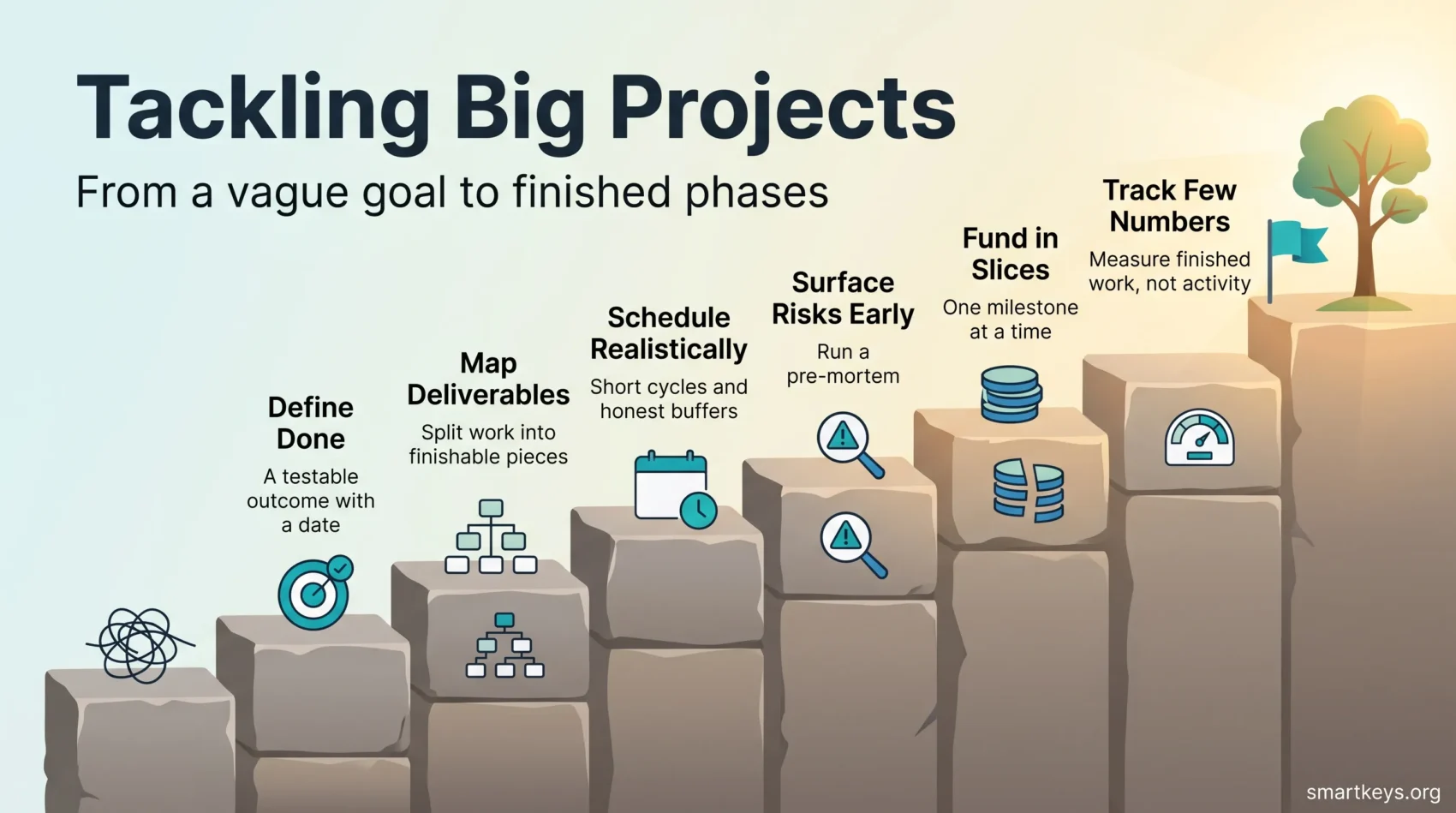
This guide gives you a large project planning method in seven steps, from a vague outcome to phases you can schedule. Each step is small enough to do in an afternoon, and none of it requires special software.
Key Takeaways
- Define what “finished” means before you plan anything else.
- Break the work into deliverables you can point at, not vague activities.
- Use short cycles for momentum and milestones for alignment with other people.
- Size your buffers from what past projects actually took, not from your best case.
- Track a handful of numbers you will genuinely act on, and ignore the rest.
Why big projects feel overwhelming
Three things create the feeling, and each has a practical fix.
The next step is invisible. “Replace the CRM” is not a task. You cannot start it, so you postpone it and feel guilty instead. Unfinished work keeps returning to mind until there is a concrete plan attached to it, which is why the first fix is simply to get every open item out of your head and into one trusted list.
Dependencies are hidden. You cannot brief the agency until legal approves the contract, and legal cannot approve until procurement picks a vendor. Nobody wrote that chain down, so it surfaces as a surprise three weeks in.
Nobody agreed what done means. Without a shared finish line, scope grows quietly. Every stakeholder adds one more “small” request, and the end moves further away each week.
None of these is a motivation problem. They are all planning problems, and planning problems have procedures.
Step 1: Decide what “done” means before you plan
Start at the end. Write one or two sentences describing what will be true in the world when the project ships. Not the activity, the change.
Weak: “Migrate to the new CRM.” Better: “Every salesperson works in the new CRM by 31 March, with three years of history imported and no manual spreadsheet tracking left.”
The second version is testable. You can hold it up against reality and get a yes or no.
Turn the outcome into measurable objectives
Many teams write this as OKRs, which stands for objectives and key results: one sentence saying what you want to achieve, plus two or three numbers that prove you achieved it. If that is new to you, the personal OKR framework shows the pattern on a small scale before you apply it to a team.
The same discipline applies to simpler projects. Ordinary goal setting works fine, as long as each goal names who benefits and how you will check it.
- Name the outcome, not the activity: “invoices go out in two days” beats “improve invoicing”.
- Anchor each measure to something a user notices: waiting time, error rate, hours saved.
- Pick a date. An outcome without a date is a wish.
Fix your non-negotiables early
Non-negotiables are the limits you refuse to break: a hard deadline, a budget ceiling, a legal or safety requirement, a minimum quality bar. Write them down before the work starts.
This is unglamorous, and it saves the most pain. When something has to give at week eleven, you already know which of scope, time and budget is allowed to move. That turns a crisis into a decision. Note the trade-offs in a shared document so the reasoning survives after the meeting ends.
Step 2: Break the work into deliverables you can see
Now split the outcome into pieces. The standard tool is a work breakdown structure, usually shortened to WBS: a simple tree that splits the project into deliverables, then splits those into smaller ones, until each piece is small enough to estimate.
The key rule is to organise by things, not by activity. “Data migration script, tested against a copy of production” is a deliverable. “Work on migration” is not. Deliverables can be finished, shown and ticked off. Activities expand forever.
If the shape of the project is still fuzzy, sketch it visually first. Many people find it easier to see the branches on paper before turning them into a list, and the same logic drives the broader habit of breaking big goals into small, doable steps.
Give every deliverable a definition of done
For each piece, write the acceptance criteria: what has to be true for it to count as complete, who signs it off, and what documentation goes with it. Two or three bullet points are enough.
This is where a short checklist earns its place. Repeatable steps that people otherwise forget belong on a list, not in someone’s memory. For work that recurs across the project, save the pattern as a reusable template so the second round takes half the time.
- Keep discovery separate from execution so you stop switching between the two.
- Size pieces to fit one or two weeks of real work, including review time.
- Flag long-lead items early: hiring, procurement and legal approval rarely compress.
Step 3: Build a schedule that survives contact with reality
Two rhythms work together here. Short cycles create momentum. Milestones keep everyone else aligned.
A sprint is simply a fixed period, often one or two weeks, in which you finish a defined set of pieces and then review them. It is not an Agile ritual you need to buy into. It is a promise you make to yourself that something testable exists by Friday.
Milestones sit above that. They are the points where you show progress to people outside the project: a sponsor, a client, a regulator. Space them a few weeks to a quarter apart, and attach a decision to each one.
Protect the time in your own week
A schedule only works if the hours exist. Reserve them explicitly with time blocking, or cap open-ended work with timeboxing so research does not swallow a whole week. Then decide what gets those hours using clear prioritization. If several people are choosing at once, agree on a shared method from the common task prioritization frameworks, or start with the simplest of them, the Eisenhower Matrix.
Size buffers from history, not optimism
People systematically underestimate how long their own work takes. The reliable correction is to look at how long comparable work actually took last time, then plan from that number instead of from your best case. Project researchers call this reference class forecasting, and it is the single cheapest improvement most plans can get.
Put the buffer where the risk is: integration, external approvals, anything that depends on a third party. Spreading a flat 10% across every task hides the risk instead of covering it.
Also identify your critical path, the chain of tasks where any delay pushes the end date. Everything else has slack. Knowing which is which tells you where to spend your attention when the week goes sideways.
Step 4: Make risk visible before it makes itself visible
Most project damage comes from things people half-knew about and never wrote down.
Run a pre-mortem
Before the work starts, gather the team and say: it is six months from now and the project failed badly. What happened? Then write down every answer. This exercise, popularised by psychologist Gary Klein, gives people permission to voice doubts they would otherwise keep quiet.
Take the top three or four answers and add a mitigation to your plan. That is usually enough to change the outcome.
Keep one dependency list
One page. Each row: what the dependency is, who owns it, the date it is needed, and what happens if it slips. Review it at every milestone.
For bigger or regulated work, formalise this in a proper risk management framework with owners and review dates. If the project changes how people work day to day, treat adoption as its own risk and plan for it, which is exactly what change management exists to handle.
Step 5: Fund and resource the work in slices
Do not commit the whole budget, or your whole year, on day one. Fund a first slice that produces something visible, then decide whether to fund the next.
For a company project, that means tying each tranche of budget to a milestone that delivers a working piece. For a solo project, it means committing four weeks of evenings, then reassessing rather than promising yourself a year.
Slicing does three useful things. It creates natural checkpoints where stopping is allowed. It gives sponsors evidence instead of promises. And it retires the biggest unknowns early, while changing course is still cheap.
- Tie each slice to a deliverable, never to a period of activity.
- Keep contingency separate, and agree in advance what releases it.
- Sequence the work so the riskiest assumption is tested first, not last.
Step 6: Communicate by audience, not by broadcast
The same update sent to everyone serves nobody. Split it by what each group has to decide.
- Sponsors and executives: outcomes, risks, and the decisions they owe you. Monthly or at milestones.
- The delivery team: what is next, what is blocked, who owns it. Weekly or per cycle.
- Everyone affected: what changes for them and when. At each milestone, in plain language.
Keep one source of truth for scope, timeline and risks. When two versions of the plan exist, people follow the wrong one.
Cut the meetings that only transmit information. A written update read by twelve people beats a status call that interrupts twelve calendars, and moving routine reporting into asynchronous updates frees the live meetings for real decisions. When you do meet, make it count: the habits in running effective meetings apply directly to project reviews.
Finally, hand work over properly. Vague delegation creates rework, so be explicit about the outcome, the constraints and the deadline. The practical rules for delegating well matter more on a long project than on a short one, because the cost of a misunderstanding compounds.
Step 7: Track a few numbers you will actually act on
Reporting expands to fill the space you give it. Keep it small.
Pick metrics that trigger a decision
Four are usually enough:
- Deliverables completed against deliverables planned for this cycle.
- Cycle time: how long a piece takes from start to accepted.
- Blockers open and how long they have been open.
- Budget or hours consumed against work actually finished, not against the calendar.
That last one matters most. Spending 60% of the budget is fine at 60% of the deliverables and alarming at 20%.
A single shared view beats five scattered reports. If you are running the project yourself, a simple productivity dashboard is enough, and a kanban board makes work in progress visible at a glance.
Set a rhythm and clean handoffs
Match the review rhythm to the risk. A short weekly planning session sets the week, and an honest weekly review catches drift while it is still small. Monthly steering suits sponsors. Add a readiness check before any major handoff.
At every phase boundary, state the entry and exit criteria in writing. Quality is lost at handoffs more often than during the work itself.
Tools that help, and tools that just add noise
Tools do not rescue an unclear plan. They make a clear plan easier to run.
For most teams a shared task tool is enough. Boards suit visual work in progress, while timelines suit dependency-heavy work. If you are choosing between the common options, the comparison of Asana and Trello covers the practical trade-offs.
Two categories genuinely help on complex work. A live dashboard removes the weekly scramble to collect status. And on construction or engineering programmes, building information modelling, known as BIM, gives every discipline one coordinated model of the same building, so clashes appear on screen rather than on site.
Everything else deserves scrutiny. A tool that nobody updates is worse than a spreadsheet everybody trusts. Agree on naming, versioning and permissions once, then leave the setup alone.
What large infrastructure programmes actually teach
Megaprojects are not a template for your work. They are a stress test of the same principles, played out over years and in public.
Open something usable early. New York’s Second Avenue Subway opened its first phase on 1 January 2017 while later phases were still in planning. Passengers got value before the full line existed.
Stage the integration. London’s Elizabeth line opened its central section on 24 May 2022 and added through-running services later, rather than switching on the whole railway in one night. Each stage was tested before the next one started.
Assemble in modules. The International Space Station was built piece by piece over dozens of flights, with each module tested before launch. Nobody attempted a single assembly.
The pattern repeats at every scale. Stage the work, prove each stage, and only then commit to the next one. Your CRM migration deserves the same courtesy as a railway.
Your first afternoon
If the project is still a knot in your head, do this in one sitting:
- Write the outcome in two sentences, with a date.
- List every deliverable you can think of. Ten to twenty is normal.
- Mark the three that carry the most uncertainty.
- Give the first deliverable a definition of done and a named owner.
- Book the hours for it in your calendar this week.
That is enough to start. The plan will be wrong in places, and that is fine. A wrong plan you can correct beats a perfect plan you never wrote.
Conclusion
Big projects do not fail because people lack ambition. They fail because the work stays abstract for too long.
The fix is mechanical. Define done. Split the work into deliverables. Schedule with buffers drawn from experience. Surface risk early. Fund in slices. Tell each audience what it needs. Track a few honest numbers.
Pick one milestone that proves value and reduces risk. Give it an owner and a date. Then ship it, and let the project become a string of finished pieces instead of one intimidating block.
Found this useful?
Make SmartKeys a preferred source on Google, and our articles will surface more often in your Top Stories, AI Overviews, and AI Mode.
Add as Preferred Source