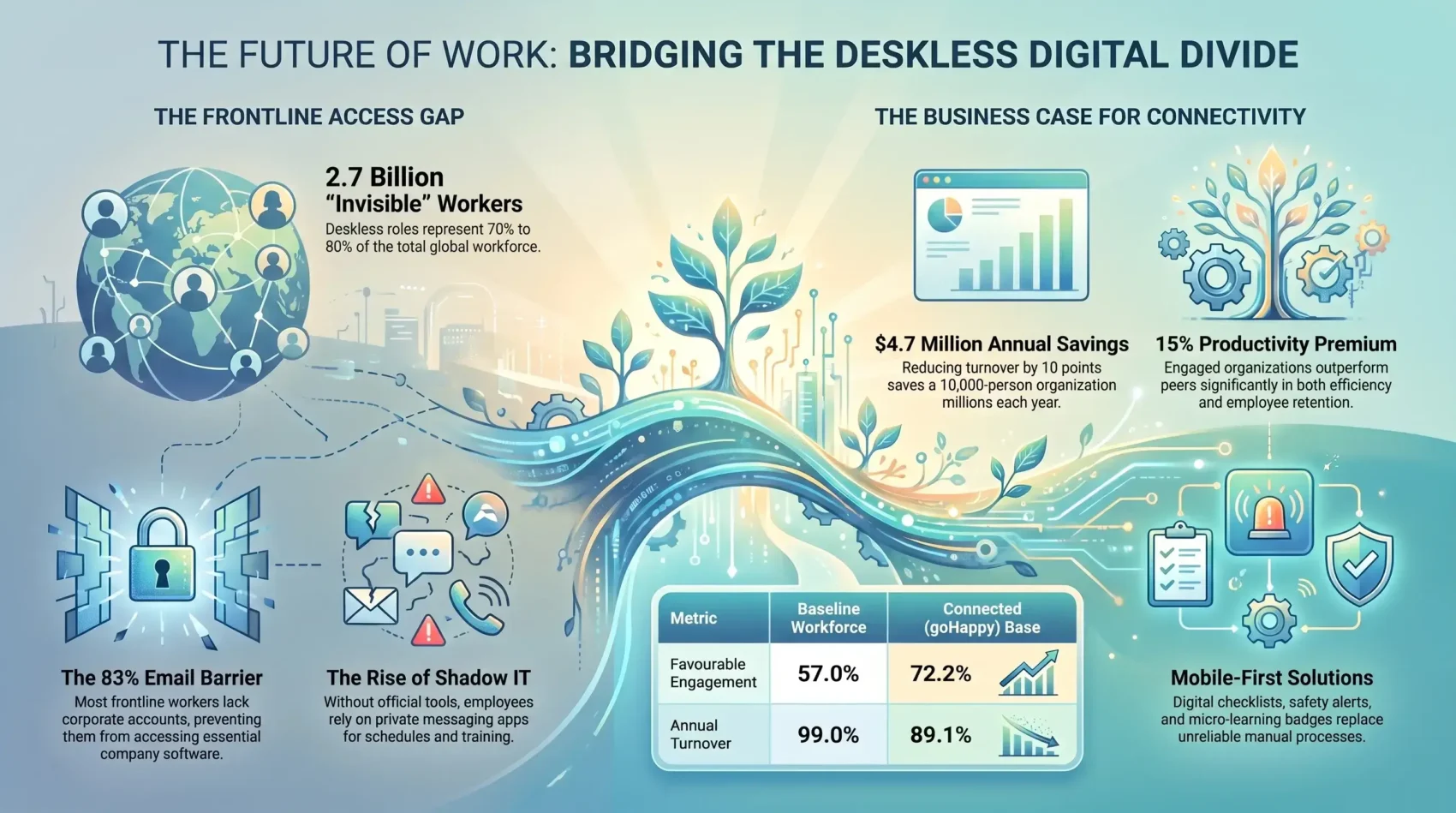
When your people work beyond a traditional office, staying connected can be a daily challenge. Deskless workforce technology gives you a practical way to reach the roughly 2.7 billion people who work away from a desk, a group BCG puts at 70% to 80% of the workforce.
This population keeps essential industries moving. Healthcare, agriculture, construction, manufacturing, retail, telecommunications, and transportation rely on employees who serve customers, handle equipment, and respond in the field. Their access to good tools shapes productivity, satisfaction, and value.
Yet access remains uneven. In 2026 research by Flip and Workplace Intelligence, covering more than 1,500 frontline employees and managers in the US, UK, and Germany, 83% of frontline workers still had no corporate email account. Without that basic identity, most company software never reaches them.
This guide shows how mobile-first tools improve communication for employees on the move, what current engagement and turnover data say about the payoff, and how to choose software your teams will actually open.
Key Takeaways
- Roughly 2.7 billion people work outside a traditional office.
- Frontline roles carry critical industries across the world.
- Most frontline workers still lack a corporate account or device.
- Mobile tools strengthen communication, safety, and retention.
- Engagement gains track directly against lower turnover costs.
Understanding the Modern Deskless Workforce
Around 2.7 billion people earn a living away from a desk. These deskless workers keep vital services running, yet many still lack the digital support office teams take for granted. Understanding this population is the first step toward closing the access gap.
Who frontline workers are and where they work
Frontline roles include service technicians, grocery clerks, nurses, construction crews, warehouse pickers, and equipment operators. Their work happens in stores, fields, job sites, vehicles, wards, and distribution centres.
Agriculture, retail, and manufacturing account for the largest share of this workforce, followed by construction, transport, healthcare, and hospitality. What these jobs share is a condition rather than an industry: the work moves, and the worker moves with it.
Why access remains limited
Many deskless employees depend on personal phones because employers never issue a company account for schedules, pay, benefits, or training. That pushes work into private messaging apps. It is one reason shadow IT, the unapproved tools teams adopt on their own, spreads so quickly outside the office.
Software investment has historically followed the desk, so the people who keep stores, sites, and wards running were served last. Flip puts the imbalance at roughly 1% of enterprise software venture funding reaching operational workers. Practical deskless workforce technology closes that gap and gives every worker a stronger voice.
How Deskless Workforce Technology Improves Communication
Clear messages help your teams act quickly, even when jobs span stores, plants, vehicles, and field sites. Deskless workforce technology gives employees one reliable channel for schedules, safety alerts, and daily priorities.

Connecting employees across locations and shifts
A phone in a pocket is the only shared device most frontline teams have, so set-up matters more than hardware. When access is tied to credentials workers already hold, rather than an email address they were never given, adoption climbs sharply. Flip reports weekly active usage, the share of staff who open the app in a given week, rising from 5% to 10% up to between 60% and 100% once sign-in stops being the barrier. Employee ID, date of birth, or phone number all work as a login where a company address does not.
Delivering timely updates on mobile devices
Push messages carry shift changes, safety notices, and urgent tasks to the right site in seconds. That works best when the roster behind them is solid, which is why intelligent shift scheduling and frontline comms tend to be bought together. Plain language, translation, and offline access decide whether the message lands. Real-time translation tools are worth pairing with any multilingual rollout, and clear notification boundaries stop urgent alerts from disappearing into noise.
Creating a stronger link between headquarters and the frontline
Head office still tends to broadcast and hope. A two-way channel works better: let supervisors confirm receipt, let workers flag problems, and route the answer back the same day. An employee experience platform can hold surveys, recognition, and comms in one place, while a transparency culture decides whether people use it honestly.
The Business Impact of Supporting Deskless Employees
Strong frontline support shapes daily results, loyalty, and long-term business value. When workers receive timely information, they complete tasks with fewer errors and less delay.
Boosting productivity and operational efficiency
Deskless workforce technology moves instructions and records to the right person faster. BCG’s 2024 analysis of the deskless labour shortage found that organisations with low engagement report 33% higher turnover and 15% lower productivity than their peers, and that replacing an employee can cost up to 10% of annual salary.
That reframes the spend. Connected checklists, digital handovers, and shared task lists are how you stop rework, missed steps, and unsafe shortcuts in retail, healthcare, logistics, and manufacturing.
Improving job satisfaction, engagement, and retention
The retention case is now measurable. In the 2026 State of the Frontline Worker report, goHappy recorded engagement of 72.2% across a customer base of more than 52,000 frontline workers, against a market benchmark of 57.0% from an independent Lighthouse Research and Advisory study of 2,000 US frontline workers. Turnover in that base fell from 99.0% to 89.1% in a year.
goHappy estimates a ten-point drop in turnover at a 10,000-person organisation is worth about $4.7 million a year, based on an average replacement cost of $4,700 per employee.
BCG’s figures point the same way. It found that 53% of deskless workers feel burned out and 43% are actively looking for another job. Those two numbers are the reason burnout prevention and employee engagement now sit on the same budget line as the software itself.
Choosing Technology That Meets Frontline Needs
The right digital setup starts with the job, not the device. Deskless workforce technology should give employees quick access to useful information while keeping each task simple and safe.

Mobile-first tools, wearables, and connected devices
Choose devices that survive the work. A rugged phone or shared tablet covers most needs; scanners, sensors, and drones earn their place only where they remove a manual step. Wearables sit at the edge of this. Exoskeletons, the wearable frames that take load off a worker’s back and shoulders, and smart badges both raise real questions about physical strain and about who sees the data. Write the wearable tech policy before you run the pilot, not after.
Accessible software for diverse industries and work environments
Effective deskless technology works across phones, tablets, and shared devices. It should support multiple languages, offline access, clear icons, and voice input, because much of this work happens in noisy, outdoor, gloved, or low-signal conditions. Industry cloud solutions increasingly ship with these patterns built in.
- Test tools with employees before launch.
- Match features to daily tasks, not to a feature list.
- Measure adoption and task completion, not licences bought.
Where AI actually reaches the frontline
AI has arrived unevenly. Gallup surveyed 23,717 employed US adults from February 4 to 19, 2026. It found that half now use AI at work at least a few times a year, but only 10% of production and trade workers called its productivity impact extremely positive, against 15% of managers. Flip found 10 or more AI tools running side by side in 28% of large enterprises, with 76% reporting a negative outcome from that fragmentation. Narrow, job-specific uses travel best: shift swaps, equipment lookups, safety questions answered in the worker’s own language.
Strategies for Building a More Informed and Engaged Team
Your frontline team guides better decisions when you invite it into the process. Buying decisions still sit largely with executives, and tools chosen that way tend to miss what a shift actually looks like.
Include frontline voices in key decisions
Ask deskless workers to join pilots, feedback sessions, and usability tests. Their input shows whether new software fits busy sites, thin connections, and gloved hands. Participatory management turns that from a one-off consultation into a habit, and AI-driven organisational design is only as good as the frontline data feeding it.
Make learning part of career growth
Career paths out of frontline roles are still thin, and that costs you good people. Give deskless employees short mobile lessons, verifiable skill badges, and written promotion criteria. A microlearning approach fits the reality of a shift better than a day-long course. Micro-credentials, short qualifications an employer can verify, are becoming a practical route for workers without a degree, and AI performance coaching or soft skills simulations can prepare shift leads for their first management job. Pair it with resilience training when the operating model is changing underneath them.
Conclusion
Deskless workers make up the large majority of the global workforce, and they deserve technology built around daily realities rather than office routines.
Your employees need fast communication that reaches every shift, location, and industry. Mobile access puts schedules, safety updates, and key information within reach, and the data ties that access to engagement, turnover, and cost.
Choose accessible, employee-centred technology that works in real conditions, and invite deskless team members to shape the decisions that affect their work. When organisations listen and act, the workforce becomes more connected, capable, and ready for what comes next.
Found this useful?
Make SmartKeys a preferred source on Google, and our articles will surface more often in your Top Stories, AI Overviews, and AI Mode.
Add as Preferred Source